The Telegram To MT4 Copier for MT4 is a sophisticated EA designed to automatically copy trading signals from Telegram channels or groups directly to your MT4 platform. This tool is incredibly versatile, capable of working with nearly any signal format, including text and image-based signals.
It even supports translation from other languages into English, making it accessible to a global audience.
The Download Package Includes: + Expert: Telegram To MT4 Copier (.ex4) V6.117
Official versionsInstant downloadFree lifetime updatesExtra 20% off with cryptoReal people on support28,000+ tradersTrading since 2019Rated Excellent on Trustpilot
Product description
About Telegram To MT4 Copier Utility
Telegram To MT4 Copier for MT4 by Trinh Dat: Revolutionize Your Trading Workflow
Introduction
In the fast-paced world of Forex and CFD trading, the ability to quickly and accurately execute trades based on expert signals can be the difference between success and missed opportunities. The Telegram To MT4 Copier for MT4 by Trinh Dat is a groundbreaking tool designed to seamlessly bridge the gap between Telegram signal providers and your MT4 trading platform.
This powerful EA (Expert Advisor) allows traders to automate their trading by copying signals directly from Telegram into MT4, ensuring that you never miss a trade again. Available on CheaperForex.com, this tool is perfect for traders who want to leverage the expertise of signal providers while maintaining full control over their trades.
Telegram to MT4 Copier Screenshots
Description of the Telegram To MT4 Copier for MT4
The Telegram To MT4 Copier for MT4 is a sophisticated EA designed to automatically copy trading signals from Telegram channels or groups directly to your MT4 platform. This tool is incredibly versatile, capable of working with nearly any signal format, including text and image-based signals. It even supports translation from other languages into English, making it accessible to a global audience.
One of the key features of this EA is its ability to work with all types of Telegram channels or groups, even those that have “Restrict Saving Content” enabled. It supports multi-channel and multi-MT4 setups, allowing you to manage multiple accounts and signals simultaneously. The EA also functions as a remote copier, where it can copy trades using a ticket number, ensuring that trades are executed precisely as intended.
Additionally, the EA supports backtesting, allowing you to analyze past signals and optimize your strategy before committing to live trading. This feature is invaluable for traders looking to refine their approach and increase their chances of success.
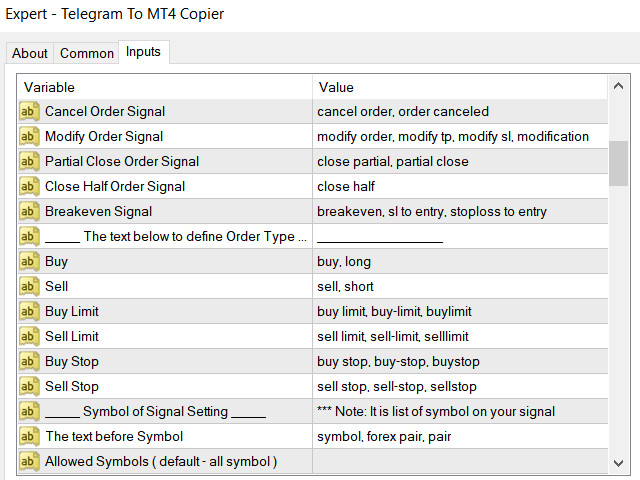
Telegram to MT4 Copier Screenshots Inputs
Trading Specifications: Recommended Pair, Timeframe, and Minimum Balance
The Telegram To MT4 Copier is highly flexible and can be used with any currency pair or trading instrument available on the MT4 platform. However, it is particularly effective when used with major Forex pairs, where signals are often most reliable.
The recommended timeframe is M15 (15-minute chart) or higher, as this allows the EA to process signals and execute trades efficiently without being overly sensitive to market noise. However, the EA is adaptable and can be configured to work on any timeframe based on the nature of the signals you receive.
As for the minimum balance, it is recommended to start with at least $500. This ensures that the EA has sufficient margin to manage trades effectively, particularly when using features like lot size management and trailing stops.
Our Thoughts About It
After thoroughly evaluating the Telegram To MT4 Copier for MT4, we are impressed by its comprehensive feature set and ease of use. This EA is not just a simple copier—it’s a complete trading management system that allows traders to automate their trading while maintaining control over every aspect of the process.
The ability to filter signals based on specific text strings and manage orders with advanced features like trailing stops, breakeven points, and lot size multipliers makes this EA incredibly powerful. The option to customize how signals are interpreted and executed ensures that it can be tailored to fit any trading style or strategy.
Moreover, the support for multi-channel and multi-MT4 setups is a game-changer for traders managing multiple accounts or following signals from various providers. This flexibility, combined with the EA’s robust backtesting capabilities, makes it an invaluable tool for serious traders.
Reviews
The Telegram To MT4 Copier for MT4 has received excellent reviews from traders who have integrated it into their trading workflows. Here are some of their experiences:
Hajime Hoshi (2024.04.22) expresses his satisfaction: “Thank you very much for releasing a wonderful EA. I appreciate it.”
whchg1028 (2024.03.04) highlights the EA’s capabilities: “For any CFD or FX trader seeking a helping hand, Trinh Dat’s Telegram To MT4 Copier is a revelation. This complete tool empowers us to leverage the knowledge of seasoned traders by seamlessly copying their signals directly into the MT4 platform. By following the strategies of proven winners, we can automate our trading and potentially unlock a new level of success. It’s like having a team of experts whispering winning trades in our ears, 24/5 to 24/7. However, don’t be soothed into a false sense of security by the tool’s effectiveness. While it shines in execution most of the time, a comprehensive guide detailing the various settings the Expert Advisor (EA) offers would be a welcome addition. But fear not, because here’s where Trinh Dat truly impresses. This developer prioritizes customer satisfaction above all else. Regardless of our subscription tier, we can expect prompt and helpful responses to our inquiries. It’s evident that Trinh Dat genuinely cares about the users’ success, and that’s a quality worth its weight in gold in the often-uncertain trading world.”
flavio1kk (2024.01.18) appreciates the psychological benefits: “This EA is amazing to remove the psychological side and manage trades emotionlessly. It takes partials based on risk-reward ratios if you set it up that way. When the provider says to enter a trade, you can randomize the opening time as well as the closing, avoiding prop firms’ detection. You can also add pips to your entries and stop loss to cover spreads. It’s a complete low-cost EA, and compared to its competitors, this is the best deal! The most important aspect is the support, which is amazing! The seller answered every single question and helped me solve them. 100% recommend it!”
Conclusion
The Telegram To MT4 Copier for MT4 by Trinh Dat is an exceptional tool that brings automation and precision to your trading strategy. Whether you’re a beginner looking to automate your trades or an experienced trader seeking to streamline your workflow, this EA has the features and flexibility to meet your needs.
With its ability to work with any Telegram channel, customizable signal filters, and advanced trade management options, this EA offers everything you need to capitalize on the insights of professional signal providers while maintaining full control over your trades. The positive reviews and outstanding customer support further cement its status as a must-have tool for Forex and CFD traders.
Available now on CheaperForex.com, the Telegram To MT4 Copier is ready to help you take your trading to the next level. Don’t miss out on the opportunity to automate your trading and unlock new potential in your trading strategy.
Every order
What’s included with Telegram To MT4 Copier Utility
Instant downloadReady after checkout and kept in your account
Free lifetime updatesAdded as soon as we receive them, every version kept in your account
Unlimited activationsUnlimited live and demo accounts
Setup helpReal people on Telegram or email
7-day money-back guarantee*If the EA fails to attach to your chart because of errors we can replicate, you get a full refund.
*Refunds don’t cover changing your mind or not liking the EA. All brokers are different, and results are never promised because markets are constantly changing.

 MT4
MT4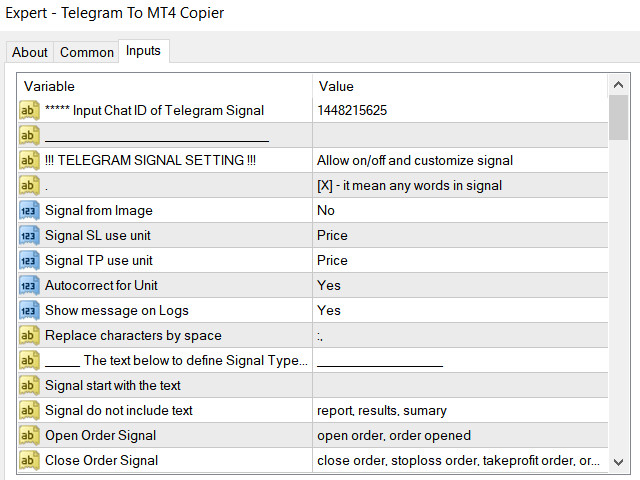
 Save 85%
 Save 92%
 Save 54%
 MT5Save 40%