
Excellent product quality.


The latest updated versions of EAs are sent as soon as they are available.

I can highly recommend this site

Have gotten a lot from them in the past and never been disappointed.

After reaching out, I was refunded right away. 5/5 stars in my book.

I received immediate attention to a credit card payment error and they organised a refund within minutes ( late on a Sunday evening ) plus a great saving on a quality Forex EA.


But you need to do your homework on any product before buying.


They give a lot of commitment from themselves. I highly recommend it to everyone!

I recommend it 100%

The products work as advertised and the customer support is topnotch.

Great support. Recommended, 5 STARS.

You can trust them completely.

All issues have been resolved. , If the problem cannot be resolved, a refund will be given.

Prima che intervenissi, si erano accorti dell'anomalia. Per me, piena fiducia all'operatore.


Best in the industry. Thank you for what you do

They also have an outstanding customer care services .

It makes a change from most of the scam forex websites!
Quick Summary:
Golden Suite EA for MT4 is a comprehensive gold trading toolkit developed by Dmitriq Evgenoeviz Ko — the same developer behind Golden Shield, Golden Symphony, Golden Raider, Genesis VIP, Voyageur, Golden Dome, and Gold Medalist.
This is the Swiss army knife of the developer’s gold EA lineup: 20 technical indicators that can each be toggled on or off as entry filters, comprehensive news filtering with on-chart display, three configurable trading sessions, and strict risk management with no martingale.
The philosophy is customization: instead of a black-box system, Golden Suite lets you build your own indicator combination. Want EMA + RSI + MACD? Enable those three. Prefer Ichimoku + Bollinger Bands + ATR? Toggle accordingly. The EA only enters when all your enabled indicators align.
Backtest shows $300 growing to $13.9M with 98% win rate and only 2.76% maximum drawdown — impressive numbers driven by the multi-indicator confluence approach.
Official MQL5 Listing:
Golden Suite EA MT4
Developer Profile:
pants-dmi (Dmitriq E. Ko)
From the Same Developer
Dmitriq Ko also developed Golden Shield EA, Golden Symphony EA, Golden Raider EA, Genesis VIP EA, Voyageur EA, Golden Dome EA, and Gold Medalist EA.
What Golden Suite Is Designed To Do
Golden Suite is a customizable indicator-based trading system for XAUUSD:
- 20 Indicator Filters — Toggle each indicator on/off to build your preferred combination
- Confluence Trading — Enters only when all enabled indicators align
- News Protection — Comprehensive news filter with on-chart event display
- Session Control — Three configurable trading sessions
- Strict Risk Management — One trade at a time, no martingale, fixed risk %
The core idea: you control which indicators filter your entries, creating a personalized trading strategy rather than accepting a fixed black-box approach.
The 20 Toggleable Indicators
Each indicator can be independently enabled or disabled as an entry filter:
Trend Indicators
- UseEMA — Exponential Moving Average
- UseMACD — Moving Average Convergence Divergence
- UseADX — Average Directional Index
- UseIchimoku — Ichimoku Cloud
- UseSAR — Parabolic SAR
Momentum Indicators
- UseRSI — Relative Strength Index
- UseStoch — Stochastic Oscillator
- UseCCI — Commodity Channel Index
- UseMomentum — Momentum Indicator
- UseWPR — Williams Percent Range
- UseAO — Awesome Oscillator
Volatility Indicators
- UseBands — Bollinger Bands
- UseATR — Average True Range
- UseEnvelope — Envelopes
Volume Indicators
- UseMFI — Money Flow Index
- UseOBV — On Balance Volume
- UseForce — Force Index
Pattern/Other Indicators
- UseDeMarker — DeMarker Indicator
- UseFractals — Fractals
How It Works: Enable the indicators you trust. The EA only opens trades when ALL enabled indicators confirm the signal. More indicators = stricter filtering = fewer but higher-quality trades.
Key Features
Comprehensive News Filter
One of the most detailed news filtering systems available:
- Pauses trading before and after high-impact news
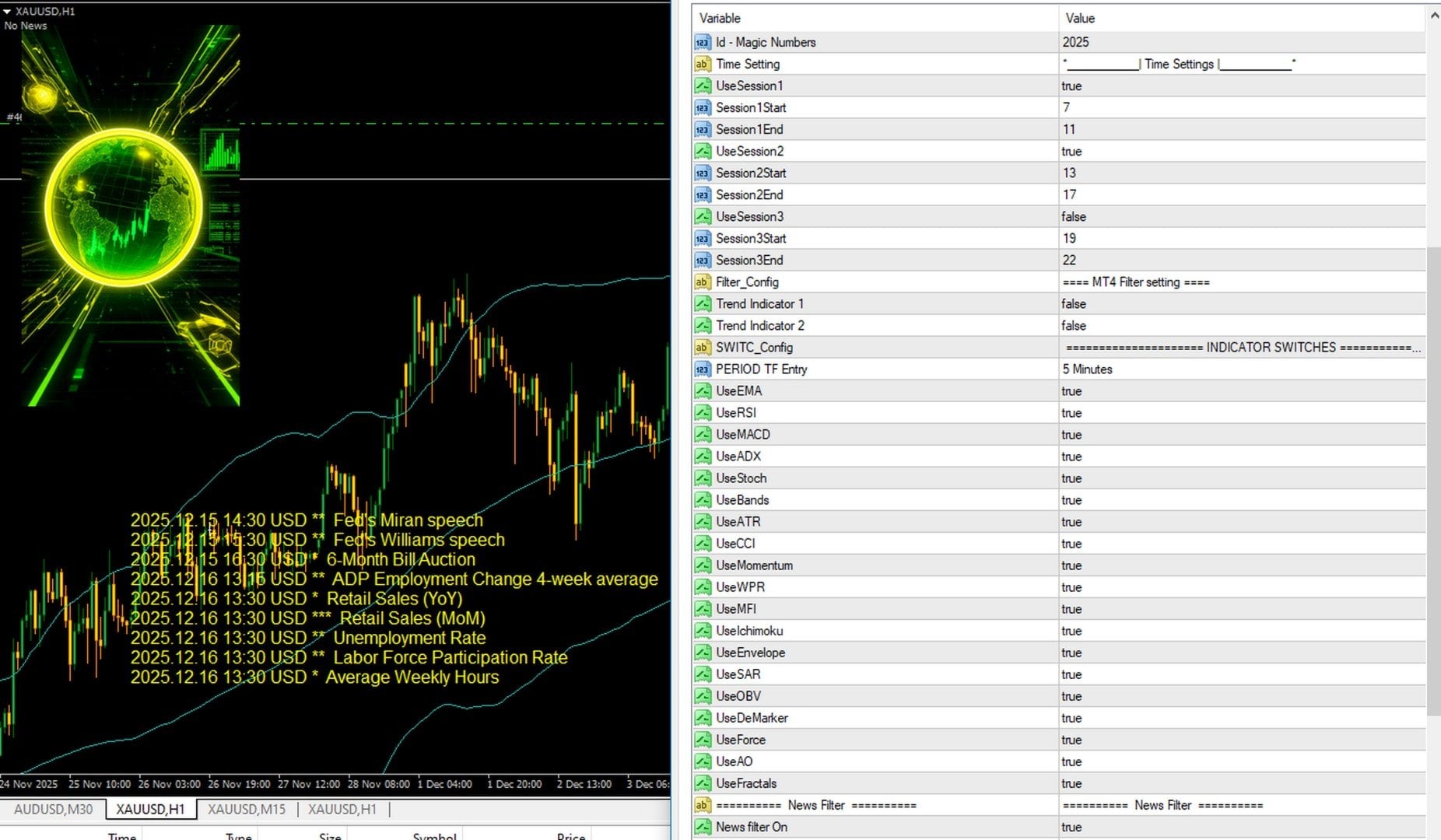
- On-chart display of upcoming economic events
- Shows date, time, currency, importance level, and event name
- Visual lines marking news periods
- Configurable buffer times
The screenshot shows upcoming events like Fed speeches, retail sales, unemployment rate, and employment data — all displayed directly on your chart.
Multi-Session Time Control
Three independently configurable trading sessions:
- Session 1: Start 7 – End 11 (enabled by default)
- Session 2: Start 13 – End 17 (enabled by default)
- Session 3: Start 19 – End 22 (disabled by default)
Trade only during your preferred market hours. Enable or disable each session independently.
Strict Risk Management
- One trade at a time — No position stacking
- No martingale — Fixed position sizing
- Fixed risk % — Risk percentage of deposit
- Max drawdown control — Pauses at threshold
- Daily loss control — Limits daily losses
- Trailing stop — Lock in profits
- Spread filter — Prevents entries during high spreads
Multi-Timeframe Support
- Configurable entry timeframe (default: M5)
- Recommended: M5 or H1
- Works on any timeframe
Backtest Performance
XAUUSD M5 backtest (2025):
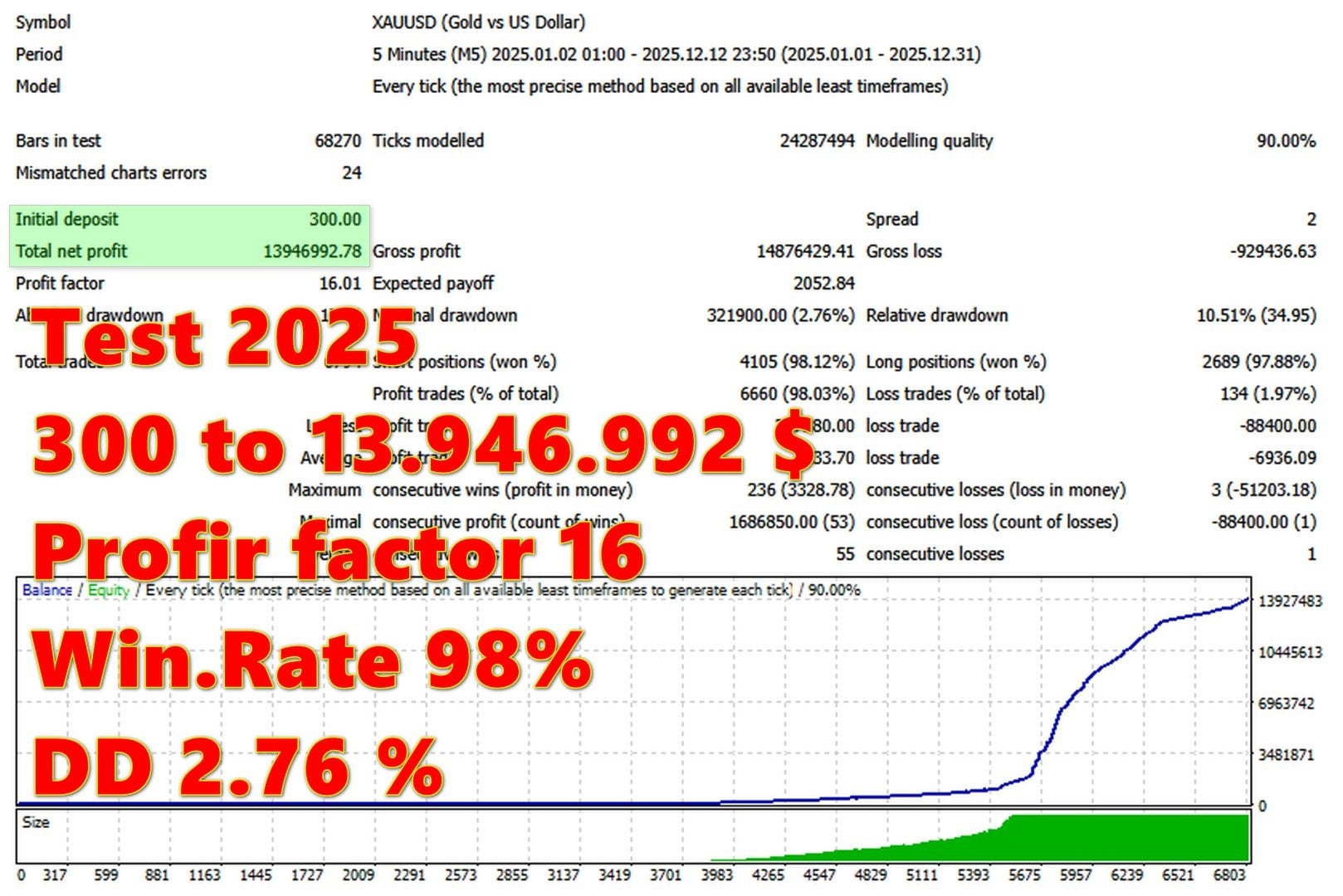
- Period: January 2025 – December 2025
- Initial deposit: $300
- Total net profit: $13,946,992
- Profit factor: 16.01
- Win rate: 98.03%
- Total trades: 6,794
- Shorts won: 98.12% (4,105 trades)
- Longs won: 97.88% (2,689 trades)
- Max drawdown: 2.76%
- Max consecutive wins: 236
- Average consecutive wins: 55
- Modelling quality: 90%
The equity curve shows steady growth with minimal drawdown until the exponential phase. The 16.01 profit factor and 98% win rate reflect the strict multi-indicator confluence filtering.
Important Backtest Disclaimer:
These results represent optimized backtesting conditions. The 98% win rate comes from enabling multiple indicator filters — actual live performance will vary based on your indicator selection and market conditions.
Technical Requirements
- Platform: MetaTrader 4
- Symbol: XAUUSD (Gold)
- Timeframe: M5 or H1 recommended (any works)
- Minimum deposit: $300
- Account type: Low spread recommended (Tickmill, IC Markets)
- Leverage: Any
- VPS: Recommended for continuous operation
Quick Setup Guide
- Install the EA file into your MT4
Expertsfolder. - Restart MT4 and enable AutoTrading.
- Attach Golden Suite to an XAUUSD M5 or H1 chart.
- Configure your indicator selection — toggle on/off based on your preference.
- Set your risk percentage appropriate for your account.
- Configure trading sessions for your preferred hours.
- Enable news filter for protection during high-impact events.
- Set max drawdown and daily loss limits.
- Run on a VPS for 24/5 uninterrupted operation.
- Test different indicator combinations on demo before live trading.
User Reviews
★★★★★ “The customization is incredible.”
20 indicators I can toggle on and off? This is what I’ve always wanted. Started with just EMA + RSI + MACD — solid results. Now experimenting with adding ADX and Bollinger Bands. Each combination trades differently. It’s like having multiple EAs in one.
— Marcus T., Berlin
★★★★★ “Same quality as Dmitriq’s other EAs.”
Already running Golden Dome and Gold Medalist. Golden Suite adds a completely different approach — full indicator customization. The news filter is identical to his other EAs (excellent), and the session control is useful. Seven EAs from one developer, all quality.
— Sarah K., London
★★★★★ “One trade at a time — that’s discipline.”
No martingale, no grid, no position stacking. Just clean single trades based on indicator confluence. Combined with the max drawdown control and daily loss limits, this is proper risk management. The 2.76% backtest DD shows what’s possible.
— Chen W., Singapore
★★★★☆ “Takes time to find your indicator combo.”
The flip side of customization: you need to test different combinations. Started with all 20 indicators enabled — almost no trades. Reduced to 5 indicators — much more active. Finding the right balance takes experimentation. Worth the effort though.
— James H., Toronto
★★★★★ “The news display is useful beyond just filtering.”
Even if you’re not using the EA to trade, having upcoming Fed speeches, employment data, and retail sales displayed on your chart is valuable. I check the Golden Suite chart before manual trading too. Professional feature.
— Paolo R., Milan
Our Assessment
Transparent evaluation based on backtest analysis and feature review:
What We Found:
- Unique Approach: 20 toggleable indicators as entry filters — genuine customization
- Confluence Logic: Trades only when all enabled indicators align — quality over quantity
- News Filter: Comprehensive with on-chart display of upcoming events
- Session Control: Three independently configurable trading sessions
- Risk Management: One trade at a time, no martingale, max DD control, daily loss limits
- Backtest Results: 98% win rate with 2.76% DD — impressive but requires indicator tuning
- Developer: Same as Golden Shield, Golden Symphony, Golden Dome, Gold Medalist — proven track record
- Learning Curve: Finding optimal indicator combination requires experimentation
- Best Suited For: Traders who want control over their entry criteria
- Watch Out For: Too many indicators = too few trades; too few = lower quality
- Overall: The most customizable EA in the developer’s lineup — ideal for traders who know what indicators they trust
Conclusion
Golden Suite EA for MT4 is the Swiss army knife of Dmitriq Ko’s gold EA lineup: 20 technical indicators you can toggle on or off to build your own entry criteria.
This isn’t a black-box system. You decide which indicators matter: EMA for trend? Toggle it on. RSI for momentum? Enable it. Ichimoku for comprehensive analysis? Add it. The EA only enters when ALL your enabled indicators confirm — creating confluence-based entries tailored to your trading philosophy.
The supporting features match the developer’s other EAs: comprehensive news filtering with on-chart event display, three configurable trading sessions, trailing stops, spread filtering, and strict risk management with one trade at a time and no martingale.
The backtest shows what’s possible with the right indicator combination: 98% win rate with 2.76% maximum drawdown. Finding that combination requires experimentation — that’s the trade-off for customization. But for traders who know which indicators they trust and want full control over their entry criteria, Golden Suite delivers unprecedented flexibility.
From the same developer who built seven other successful gold EAs, Golden Suite adds a completely different approach to the collection: your indicators, your rules, your strategy.
What Do You Receive?
– Golden Suite EA for MT4 – Latest Version
– Free lifetime updates
– Fully unlocked for unlimited brokers and accounts
– Delivered by email and allocated to your user account dashboard
FAQs
What are the 20 indicators?
EMA, RSI, MACD, ADX, Stochastic, Bollinger Bands, ATR, CCI, Momentum, WPR, MFI, Ichimoku, Envelope, SAR, OBV, DeMarker, Force Index, AO (Awesome Oscillator), and Fractals. Each can be independently toggled on or off.
How does indicator toggling work?
Each indicator has a TRUE/FALSE setting. When TRUE, that indicator must confirm before entry. The EA only opens trades when all enabled indicators align — creating confluence-based entries.
How many indicators should I enable?
Start with 3-5 complementary indicators (e.g., one trend, one momentum, one volatility). Too many indicators = very few trades. Too few = lower quality filtering. Experiment on demo to find your balance.
Does it use martingale or grid?
No. One trade at a time with fixed risk percentage. No position stacking, no lot multiplication.
What’s the news filter?
The EA displays upcoming economic events directly on your chart (Fed speeches, employment data, retail sales, etc.) with date, time, currency, and importance level. Trading pauses during high-impact news with configurable buffer times.
What are the three trading sessions?
Three independently configurable time windows: Session 1 (default 7-11), Session 2 (default 13-17), Session 3 (default 19-22, disabled). Enable/disable each session and set your preferred hours.
What timeframe should I use?
M5 or H1 recommended. The entry timeframe can be configured separately from the chart timeframe.
What’s the minimum deposit?
$300 minimum recommended by the developer.
What risk management features are included?
Fixed risk %, max drawdown control (pauses trading at threshold), daily loss control, trailing stop, spread filter, and one trade at a time.
Is the 98% win rate realistic?
It represents optimized backtesting with a specific indicator combination. Your results will depend on which indicators you enable and market conditions. Test different combinations on demo.
What other EAs does this developer make?
Dmitriq Ko also developed Golden Shield EA, Golden Symphony EA, Golden Raider EA, Genesis VIP EA, Voyageur EA, Golden Dome EA, and Gold Medalist EA.
Is a VPS required?
Recommended for continuous 24/5 operation, especially if using multiple trading sessions.

-

Bitcoin Magnet X Turbo EA MT4 – 118% Growth
Original price was: $999.00.$179.95Current price is: $179.95. -

JorgeAi Oceania PreciseStrategy EA MT4 – 500% Growth
Original price was: $2,000.00.$249.95Current price is: $249.95. -