
How to Download AOT EA MT5: The AI-Powered Multi-Currency EA With a 94% Win Rate
Last updated: February 2026
- Bottom Line Summary
- What Is AOT EA?
- The Developer
- The AI Integration — How It Actually Works
- Live Performance (Verified Signal)
- The Strategy Explained
- Drawdown Reality Check
- What Real Buyers Are Saying
- How to Get AOT EA MT5
- Step-by-Step Setup Guide
- Pros and Cons
- Who Should Buy This EA?
- Frequently Asked Questions
- Our Assessment — Download AOT EA MT5
Bottom Line Summary
At $189 on MQL5 (or $79.95 through CheaperForex), it’s one of the more affordable AI-integrated EAs on the marketplace. The catch? It trades infrequently — averaging just 3 trades per week — and requires patience. If you’re looking for daily action, this isn’t it.
If you’re looking for a genuinely intelligent system that waits for high-probability setups, AOT is worth serious consideration.
What Is AOT EA?
AOT EA MT5 is a fully automated Expert Advisor developed by Thi Ngoc Tram Le (known as Lucia014 on MQL5). Published in May 2025, it’s quickly become one of the most talked-about EAs on the marketplace, racking up 62 reviews with a 4.71-star rating and over 565 purchases per month.
What makes AOT different from the thousands of other EAs claiming to be “AI-powered” is that it actually uses AI. Specifically, it integrates with Anthropic’s Claude API for real-time market sentiment analysis. Most EAs that slap “AI” on their marketing page are just running standard technical indicators with a trendy label. AOT connects to a genuine large language model to analyze market conditions before executing trades.
The EA monitors 16 currency pairs simultaneously from a single chart attachment (AUDCAD M15), including EURUSD, GBPUSD, AUDUSD, USDJPY, USDCAD, USDCHF, NZDUSD, EURJPY, EURGBP, and seven additional major crosses. It uses no grid, no martingale, and no dangerous recovery strategies — just AI-filtered, selective trade entries with built-in risk management.
More Information: https://www.mql5.com/en/market/product/139655

The Developer
Thi Ngoc Tram Le is a Vietnamese algorithmic trader who has built a small but growing portfolio on MQL5. Beyond AOT, she also developed ABS GoldGrid (a gold-focused grid EA with 30 reviews) and the free Titan Trade Panel utility. Her developer profile shows over 14,000 reputation points on MQL5, and she’s known for responsive support — nearly every review on the AOT listing has a developer reply within hours.
AOT is clearly her flagship product and the one receiving the most active development. Version 2.3 (November 2025) introduced support for Claude Sonnet 4.5 and customizable panel font sizes. Previous updates added entry signal pause controls, recovery distance management, news calendar filtering, break-even functionality, and maximum drawdown protection. The pace of updates suggests an actively maintained product, not an abandoned cash grab.
The AI Integration — How It Actually Works
This is the headline feature and the one that deserves the most scrutiny. AOT EA connects to Anthropic’s Claude API to perform real-time sentiment analysis before executing trades. In practical terms, this means the EA processes news events, currency correlations, and fundamental factors that traditional technical indicators miss entirely.
Here’s what’s important to understand: the AI sentiment analysis is optional. You can run AOT without it, and the EA will function using its other trading logic. However, if you want the full AI filtering capability, you’ll need your own Claude API key from Anthropic, which means paying for API usage separately. This is an ongoing cost that buyers should factor in beyond the EA purchase price.
The developer’s proprietary Smart Loss Reduction (SLR) system works alongside the AI layer, continuously monitoring positions and automatically adjusting stop losses during market reversals. Version 2.2 introduced enhanced entry signal pause control (0-10 candles) and improved recovery distance management, giving traders more granular control over the system’s behavior.
Is this revolutionary? In the context of retail forex EAs, yes — it genuinely is. We’ve reviewed hundreds of EAs that claim AI capabilities. AOT is one of the very few where the AI integration is real, functional, and verifiable through API connection. That said, AI doesn’t guarantee profits. It’s a tool for better decision-making, not a crystal ball.
Live Performance (Verified Signal)
The developer maintains a verified live signal on MQL5 running on a $100,000 Darwinex account with 1:200 leverage. Here are the current numbers:
| Metric | Value |
|---|---|
| Growth | 73.07% |
| Signal Age | 25 weeks |
| Initial Deposit | $100,000 |
| Profit | $73,064 |
| Win Rate | 94.38% (84 wins / 5 losses) |
| Profit Factor | 10.53 |
| Recovery Factor | 12.97 |
| Max Drawdown (Equity) | 11.23% |
| Max Drawdown (Balance) | 3.97% |
| Total Trades | 89 |
| Trades per Week | 3 |
| Avg Holding Time | 2 days |
| Monthly Growth | 3.48% |
| Max Consecutive Wins | 35 |
| Broker | Darwinex |
| Leverage | 1:200 |
| Algo Trading | 98% |
Live Signal: https://www.mql5.com/en/signals/2319048
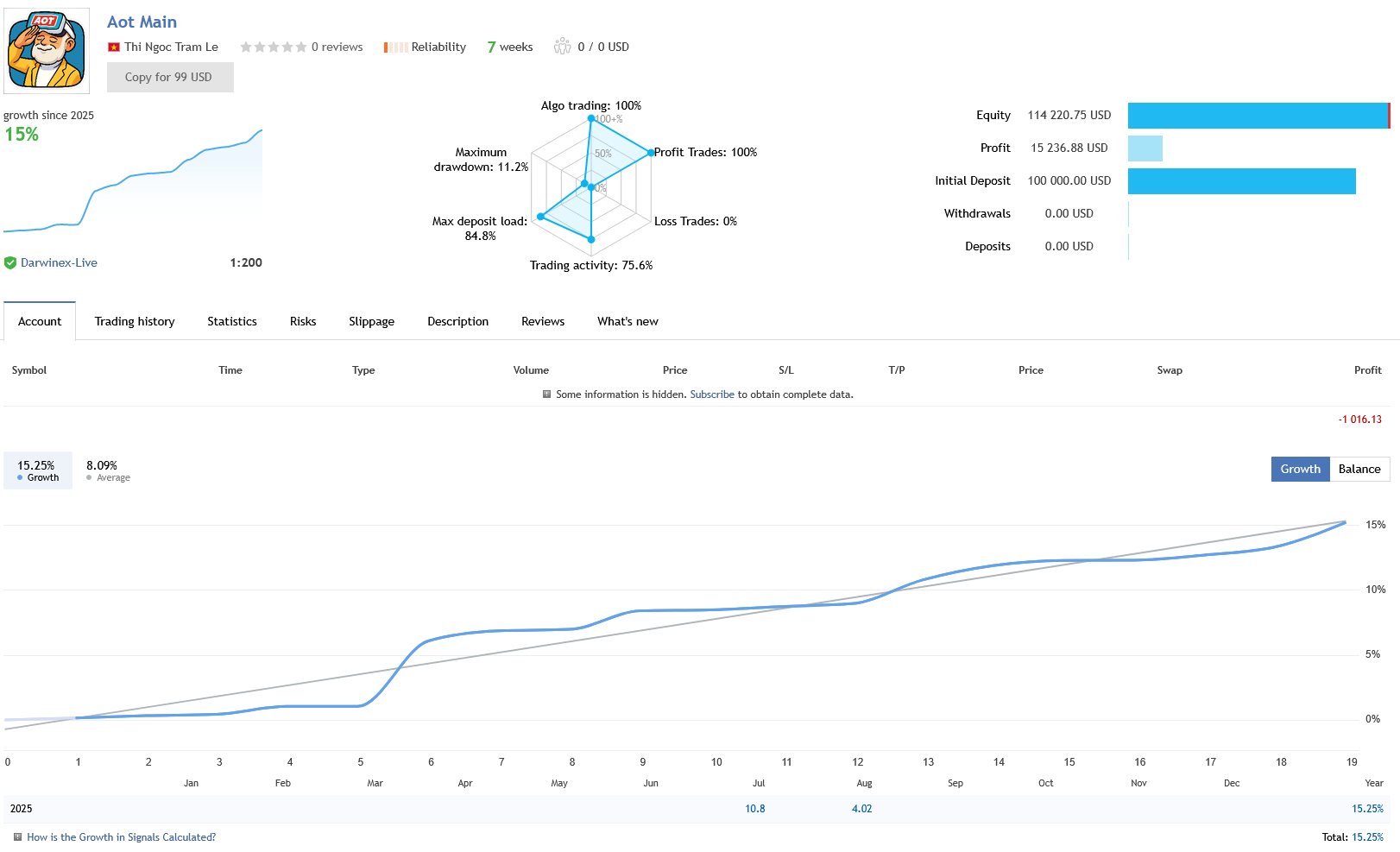
A few things stand out. First, the signal is running on a $100,000 real account at Darwinex — not a $100 cent account. Multiple reviewers have specifically called this out as a trust signal, noting that most EA developers only demonstrate their products on tiny accounts. Running six figures through an EA shows genuine confidence in the system.
Second, 35 consecutive winning trades is exceptional. The EA achieved this by being extremely selective about entries — it only trades when all its conditions align. This patience-first approach explains the low trade frequency (3 per week) but high accuracy.
Third, the 11.23% equity drawdown is well-controlled for a 73% growth figure. For comparison, many EAs achieve similar growth numbers with 40-60% drawdowns. The profit factor of 10.53 is outstanding — anything above 2.0 is generally considered strong.
The caveat: 25 weeks of signal history is still relatively short. The EA has been available since May 2025 but the main signal started in July 2025. We’d like to see this track record extend through different market conditions — particularly through a significant risk-off event or a period of extremely low volatility — before calling it proven. The numbers so far are impressive, but the sample size is still building.
The Strategy Explained
AOT operates from a single AUDCAD M15 chart but manages positions across all 16 currency pairs independently. The system combines several layers:
AI Sentiment Layer (Optional): When enabled via Claude API, the EA analyzes market sentiment, news events, and fundamental factors before deciding whether to trade. This acts as a filter — if sentiment doesn’t align with the technical setup, the EA stays out.
Smart Loss Reduction (SLR): This proprietary system continuously monitors open positions and automatically adjusts stop losses during market reversals. Rather than using static stops, the SLR adapts to changing conditions.
Entry Signal Pause: Configurable from 0-10 candles after the last entry signal, preventing over-trading during choppy conditions.
Recovery Distance Control: Can be set to automatic or manual, defining the minimum distance for opening recovery trades.
The EA is explicitly designed to avoid dangerous strategies. No martingale lot sizing, no grid stacking, no averaging down into losing positions. Each symbol operates independently, meaning a loss on EURUSD doesn’t trigger wider system behavior on other pairs.
One unique aspect: the EA is FIFO-compliant, making it suitable for prop firm challenges. The controlled drawdown profile (3.97% balance drawdown on the live signal) aligns well with the typical 5-10% daily drawdown limits imposed by prop firms.
Drawdown Reality Check
The distinction between balance drawdown and equity drawdown matters here. The live signal shows:
Balance drawdown: 3.97% — this measures the actual realized loss from peak to trough on the account balance. Under 4% is excellent.
Equity drawdown: 11.23% — this includes unrealized floating losses. Since AOT holds trades for an average of 2 days, positions can go through temporary drawdown before reaching their targets. The worst single trade was -$5,558 (5.5% of initial deposit), which was the only consecutive loss recorded.
For perspective, the max deposit load reached 84.8%, which is high and worth noting. This indicates the EA can have significant exposure during certain market conditions. Traders running this on smaller accounts or with higher risk settings should be aware that equity swings can be meaningful, even if the final results are positive.
The recovery factor of 12.97 indicates strong ability to recover from drawdowns relative to the maximum drawdown experienced. This is a healthy ratio that suggests the system isn’t just getting lucky — it has a genuine edge that compounds over time.
What Real Buyers Are Saying
With 62 reviews and a 4.71 rating, AOT has substantial user feedback. Here are some representative quotes from verified MQL5 buyers:
The pattern is clear: buyers who understand that AOT trades infrequently and requires patience tend to be very satisfied. Those expecting immediate daily action or who don’t complete the setup process tend to be frustrated. This is a patience EA — if that doesn’t match your trading style, it’s not the right tool for you.
How to Get AOT EA MT5
You have two options for purchasing AOT EA MT5:
| Feature | MQL5 Marketplace | CheaperForex |
|---|---|---|
| Price | $189 | $79.95 (save 58%) |
| Official Product | ✅ Yes | ✅ Yes (same activation) |
| Future Updates | ✅ Included | ✅ Included |
| Refund Policy | Store credit only | ✅ Full refund before activation |
| Crypto Discount | ❌ Not available | ✅ Extra 20% off |
| Installation Help | Self-install | ✅ We install for you (free) |
| Payment Options | Cards only | ✅ Cards, Apple Pay, Crypto |
| Hardware Activations | 5 activations (20 total) | 1 activation (up to 10 MT5s) |
| Rental Option | $99/month | ❌ Lifetime only |
⚠️ A note on pirate sites: Several websites are selling “AOT EA downloads” for $55 or less. These are not legitimate — AOT is an MQL5 marketplace product that can only be activated through the official marketplace system. There are no downloadable .ex5 files. If a site offers you a file to download, it’s either fake, a scam, or malware. Only buy from MQL5 directly or from an authorized reseller like CheaperForex.
👉 Get AOT EA MT5 at CheaperForex — Save 58%
Step-by-Step Setup Guide
AOT EA has a specific setup process that’s slightly different from typical EAs because it runs all 16 pairs from a single chart. Here’s how to get it running:
Step 1: Prepare Your Broker Account
You’ll need an MT5 account with an ECN or Raw spread broker. Minimum leverage of 1:30 is required, but 1:100 to 1:200 is recommended for optimal performance. Minimum deposit is $100, though the developer recommends $300+ for proper operation. Darwinex, ICMarkets, Pepperstone, and RoboForex are all used by signal subscribers.
Step 2: Add All 16 Currency Pairs to Market Watch
This step is critical. Open Market Watch in MT5 (Ctrl+M), right-click, and select “Show All.” This ensures MT5 downloads candle data for all the pairs AOT needs to monitor. The 16 pairs include: EURUSD, GBPUSD, USDCAD, AUDUSD, NZDUSD, USDCHF, USDJPY, EURJPY, EURGBP, EURAUD, EURCAD, GBPAUD, GBPCAD, GBPNZD, AUDCAD, and additional crosses.
Step 3: Activate the EA on Your MT5
If purchased through CheaperForex, we’ll handle the activation for you — it takes about 2 minutes via remote access. If purchased on MQL5 directly, the EA will appear in your Navigator panel after purchase.
Step 4: Attach to AUDCAD M15 Chart
Open an AUDCAD chart, set the timeframe to M15, and drag AOT EA onto the chart from your Navigator panel. In the settings window, check “Allow Algo Trading” on the Common tab. Configure your risk settings on the Input tab — the developer provides recommended set files via private message after purchase.
Step 5: Configure AI Sentiment (Optional)
If you want to use the Claude AI sentiment filtering, you’ll need to enter your Claude API key in the EA settings. You can obtain an API key from Anthropic’s developer console. API costs are separate from the EA purchase price and vary based on usage.
Step 6: Enable Auto Trading and Use a VPS
Click the “Algo Trading” button on the MT5 toolbar (it should turn green). A VPS is strongly recommended for 24/5 operation — especially important if you’re using the AI sentiment feature, which requires continuous API access. Windows VPS hosting starts from around $13/month.
Pros and Cons
✅ Pros
- Genuine AI integration — Real Claude API connection, not marketing fluff. One of the only EAs on MQL5 with verifiable AI capabilities.
- Exceptional win rate — 94.38% across 89 trades on a verified $100K live account. 35 consecutive wins on the main signal.
- Low balance drawdown — Just 3.97% realized drawdown against 73% growth. Outstanding risk-adjusted returns.
- Multi-currency diversification — 16 pairs from one chart reduces correlation risk and broadens opportunity set.
- No dangerous strategies — No martingale, no grid, no averaging. Each pair trades independently with its own risk management.
- Prop firm compatible — FIFO-compliant with controlled drawdowns suitable for challenge accounts.
- Active development — Version 2.3 with regular updates adding meaningful features, not just version number bumps.
- Responsive developer — Nearly every MQL5 review gets a detailed reply. Setup support provided after purchase.
- Affordable entry — $189 on MQL5 or $79.95 at CheaperForex. Far cheaper than most AI-labeled EAs ($500-$1,500+).
- 62 reviews with 4.71 stars — Substantial user base providing real-world validation.
❌ Cons
- Low trade frequency — Only 3 trades per week average. Some weeks may see zero trades. Requires patience.
- Relatively short track record — Signal is only 25 weeks old. Needs more time through varied market conditions to prove long-term consistency.
- High equity drawdown — 11.23% equity DD is manageable but significantly higher than the 3.97% balance DD. Floating losses can be stressful.
- Max deposit load of 84.8% — The EA can use substantial margin during peak exposure, leaving little buffer.
- AI feature costs extra — Claude API key and usage fees are separate from the EA purchase. Ongoing cost for the full experience.
- VPS essentially required — The AI integration and 16-pair monitoring means running this on a home PC isn’t practical for serious use.
- Single chart complexity — Trading 16 pairs from one AUDCAD chart is clever but means you can’t easily monitor individual pair performance.
- Limited activations through CheaperForex — 1 hardware activation (10 MT5s) vs 5 activations on MQL5 direct.
Who Should Buy This EA?
AOT EA is ideal for: Patient traders who understand that fewer, higher-quality trades outperform frequent mediocre ones. Prop firm challengers who need FIFO-compliant systems with controlled drawdowns. Tech-forward traders interested in genuine AI capabilities in their trading. Multi-pair diversifiers who want broad forex exposure without managing 16 separate charts.
AOT EA is NOT for: Traders who want daily action and instant gratification. Anyone who can’t tolerate days without a trade. Traders unwilling to invest in a VPS. Those looking for a “set and forget” gold-only EA — this is a multi-currency forex system. Anyone who expects 100% win rates forever — the live signal already shows 5 losses out of 89 trades.
Frequently Asked Questions
Can I download AOT EA MT5 for free?
No. AOT EA is a paid product on the MQL5 marketplace priced at $189 (or $99/month rental). A free demo is available for backtesting, but the live trading version requires purchase. Any website offering a “free download” of AOT is selling a fake or pirated copy — the real EA can only be activated through MQL5’s official system. CheaperForex offers the genuine product at a 58% discount for $79.95.
Is CheaperForex a legitimate seller?
Yes. CheaperForex has been operating since 2019 with over 28,000 customers and a 4.5-star rating on Trustpilot from 116+ verified reviews. All products are genuine MQL5 marketplace activations — not cracked files. The company offers a 7-day refund policy before activation and free installation support.
Do I need a Claude API key to use AOT EA?
No — the AI sentiment analysis feature is optional. AOT EA functions without it using its other trading logic, including the Smart Loss Reduction system and technical analysis filters. However, the Claude AI integration is the EA’s standout feature, and many users recommend enabling it for the best results. API costs vary based on usage but are generally modest for EA trade filtering.
Why does AOT EA trade so infrequently?
By design. AOT uses AI-powered sentiment analysis to filter trades, only executing when all conditions align favorably across its 16 monitored pairs. Some users report only 3-5 trades per week, and there may be quiet periods with no trades. This selectivity is what drives the 94% win rate — quality over quantity. As one reviewer noted, patience is essential with this EA.
Is AOT EA suitable for prop firm challenges?
Yes. The EA is FIFO-compliant with controlled drawdown management. The live signal shows only 3.97% balance drawdown, which fits well within most prop firms’ 5-10% daily drawdown limits. Multiple reviewers have reported using AOT successfully for prop firm challenges, though results will vary by firm and account settings.
What broker should I use with AOT EA?
The developer recommends ECN or Raw spread brokers with minimum 1:30 leverage (1:100 to 1:200 preferred). The live signal runs on Darwinex with 1:200 leverage. Signal subscribers show good results on ICMarkets, Pepperstone, RoboForex, and VantageFX. Low spreads and fast execution are important since the EA trades multiple currency pairs.
What’s the difference between AOT EA and gold trading EAs?
AOT EA trades 16 forex currency pairs — it does not trade gold (XAUUSD) or any commodities. If you’re looking for a gold EA, this isn’t it. AOT’s strength is diversified forex exposure across major and cross pairs, using AI sentiment analysis for trade filtering. Gold EAs like Quantum Queen or ABS GoldGrid serve a completely different purpose.
Our Assessment — Download AOT EA MT5
AOT EA MT5 is one of the most technically interesting EAs we’ve reviewed. The Claude AI integration is real, the developer is responsive and actively improving the product, and the live signal numbers are strong. A 94% win rate with under 12% equity drawdown on a $100K account is compelling.
The main reservation is time. At 25 weeks, the track record is promising but not yet proven through extended market conditions. We want to see how AOT handles a sharp risk-off event, a flash crash, or a prolonged low-volatility environment before giving an unconditional recommendation.
At $79.95 through CheaperForex (with a 7-day refund before activation), the financial risk is low. If you’re a patient trader comfortable with infrequent trading and interested in genuine AI capabilities, AOT is well worth testing on demo first and then considering for live deployment.
Get AOT EA MT5 — Save 58% at CheaperForex →
Disclaimer: Trading forex involves substantial risk of loss and is not suitable for all investors. Past performance, whether live or backtested, does not guarantee future results. The information on this page is for educational purposes only and should not be considered financial advice. Always test any EA on a demo account before risking real capital, and never trade with money you cannot afford to lose. CheaperForex is an authorized reseller of MQL5 marketplace products.