


AudCad Grid Pro for MT4 by Takanori Toshioka is built specifically for AUDCAD on the M30 chart. It combines averaging-down entries with a hedge-lock mechanism and changes its entry approach according to detected range or trend conditions. Its chart panel also lets you intervene manually.
Automatic trading with chart-level controls
The developer lists one external input, Lot. Further controls sit on the chart: BUY and SELL buttons, a manual lot field adjustable in 0.01 steps, an Auto-Lot switch, and Auto / Trend Fixed / Counter Fixed modes. This gives you a simple input window without removing every operational choice.
Manual orders can be recognised by the EA and receive the same averaging follow-up and take-profit management as its own basket. The Manual-Close switch toggles that automatic follow-up/closure behaviour. It is a management toggle, not a button described as immediately closing every trade.
Lot sizing and hedge management
A balance-step lot table scales trade size automatically and is enabled by default. The developer says it accounts for both JPY and non-JPY account currencies. The on-chart panel displays balance, floating profit/loss, drawdown and profits over several reporting periods.
Hedge locking opens an opposing position against a losing exposure. It does not erase the loss or make the grid risk-free. Extended directional moves can leave substantial floating losses, and the combined positions still need margin and an eventual exit.
Setup essentials
- Platform
- MetaTrader 4.
- Pair and chart
- AUDCAD, M30, as specified by the developer.
- Broker environment
- An ECN/Raw-type account with tight spreads is recommended. Confirm hedging support, margin treatment, commissions and swaps with your broker.
- Starting balance
- The written listing does not give a minimum deposit. Select exposure for your account rather than treating a backtest deposit as a universal requirement.
See the trading panel
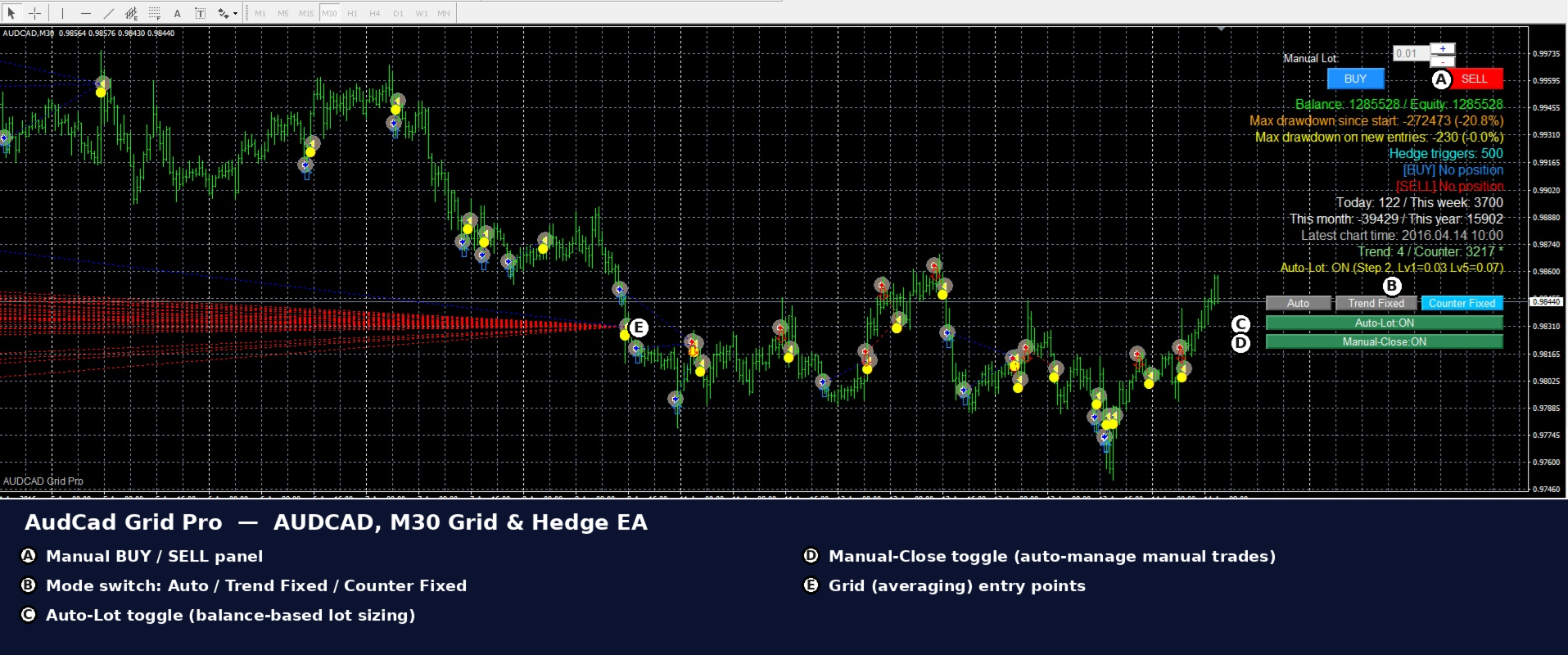
The detailed review compares the original test reports and explains the grid and hedge-lock risks. The screenshots are historical tests; they do not establish a long-term live track record.
AudCad Grid Pro developer specification
Standalone file — latest version. Delivery instructions are included with your order.
FAQs
Which pair and timeframe does it use?
The developer specifies AUDCAD on the M30 chart in MetaTrader 4.
Does it use grid trading?
Yes. The strategy uses averaging-down grid entries and opposing hedge-lock positions. Drawdowns can become large during sharp or prolonged moves.
What does Manual-Close do?
It toggles the automatic follow-up and take-profit management of manual positions. Turning that behaviour off leaves you responsible for those exits; it is not described as a close-all command.
Is Auto-Lot enabled by default?
The developer says balance-step lot sizing is enabled by default and can be toggled on the chart. Its table is described as accounting for JPY and non-JPY account currencies.
Which version is supplied?
The latest version is supplied as a standalone MT4 file. Delivery instructions accompany your order.
Is there a verified live signal?
No public monitoring link was found in the listing or seller page at the 14 September 2026 source check. The supplied images and video show historical testing and operation.
You must be logged in to post a review.

Reviews
There are no reviews yet.