


Excellent product quality.


The latest updated versions of EAs are sent as soon as they are available.

I can highly recommend this site

Have gotten a lot from them in the past and never been disappointed.

After reaching out, I was refunded right away. 5/5 stars in my book.

I received immediate attention to a credit card payment error and they organised a refund within minutes ( late on a Sunday evening ) plus a great saving on a quality Forex EA.


But you need to do your homework on any product before buying.


They give a lot of commitment from themselves. I highly recommend it to everyone!

I recommend it 100%

The products work as advertised and the customer support is topnotch.

Great support. Recommended, 5 STARS.

You can trust them completely.

All issues have been resolved. , If the problem cannot be resolved, a refund will be given.

Prima che intervenissi, si erano accorti dell'anomalia. Per me, piena fiducia all'operatore.


Best in the industry. Thank you for what you do

They also have an outstanding customer care services .

It makes a change from most of the scam forex websites!
The lowest genuine reseller price. Includes free future updates.


Quick Summary:
Blox EA for MT4 is a TMA-based pending order system developed by Cence Jk.
The developer has transformed one of the most powerful discretionary strategies of 2025 into a fully automated Expert Advisor based on Triangular Moving Average (TMA) with CG logic. The system uses pending orders (Buy Stop / Sell Stop) with smart trailing — keeping optimal entry distance at all times.
Verified Myfxbook results show 12,654% gain from a $500 deposit with $26,000 already withdrawn and only 14.5% maximum drawdown. Users report consistent trades across different ECN brokers — suggesting the EA isn’t heavily broker-dependent like many others.
Designed for precision entries, smart order management, and strict risk control on forex pairs and gold.
Official MQL5 Listing:
Blox EA MT4
Developer Profile:
Cence Jk (eb.robot)
What Blox EA Is Designed To Do
Blox EA uses a pending order strategy based on TMA channel logic:
- TMA Analysis — Triangular Moving Average with CG logic identifies trade zones
- Pending Orders — Places Buy Stop and Sell Stop orders at calculated distances
- Smart Trailing — Pending orders follow price to maintain optimal entry distance
- Precision Entries — Waits for price to come to the order, not chasing market
- Multi-Pair — Works on all forex pairs plus XAUUSD
The system works best on ECN accounts with spreads below 10 points for accurate pending order execution.
Verified Myfxbook Performance
Real account results on VT Markets:
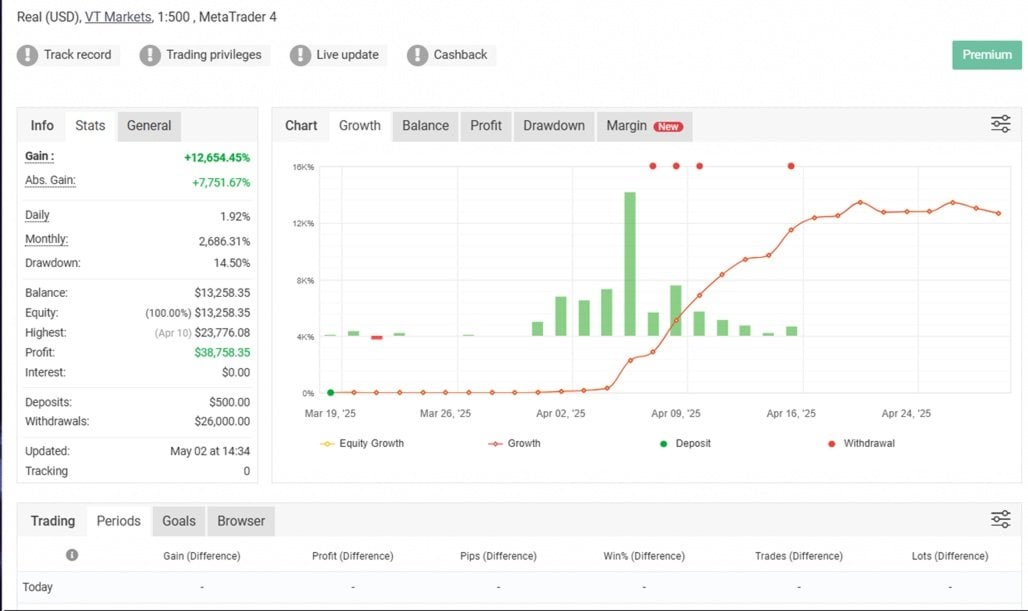
- Gain: +12,654.45%
- Absolute gain: +7,751.67%
- Daily average: 1.92%
- Monthly average: 2,686.31%
- Maximum drawdown: 14.50%
- Initial deposit: $500
- Peak balance: $23,776.08
- Total profit: $38,758.35
- Withdrawals: $26,000
- Current balance: $13,258.35
- Broker: VT Markets
- Leverage: 1:500
- Verified: Track record, trading privileges, live update
Key Takeaway: $500 turned into over $38,000 in profit, with $26,000 already withdrawn — demonstrating real profit-taking, not just paper gains.
Key Features
TMA-Based Entry Logic
The core strategy uses Triangular Moving Average with configurable settings:
- HalfLength — Core TMA smoothing period
- BandsDeviations — Width of TMA bands (volatility sensitivity)
- Price — Price type used for calculation
- Interpolate — Smooths indicator values for consistency
Smart Pending Order Management
- PendingDistance — Distance from price to place pending orders
- TrailPending — Orders follow price to maintain optimal entry distance
- Buy Stop / Sell Stop — Waits for momentum confirmation before entry
On-Chart Display

Simple, clean display showing:
- Current balance
- Current equity
- Total P/L
Risk Management
- MaxConsecutiveTrades — Limits consecutive trades in same direction
- UseAutoLot — Automatic lot sizing based on balance
- StopLoss / TakeProfit — Fixed levels in pips
- TrailingStart / TrailingDist — Advanced trailing stop for active positions
Filtering Options
- UseTimeFilter — Trade only during specific hours
- UseMAFilter — Moving Average trend filter
- ReverseSystem — Optional reverse trading mode
Backtest Performance

The backtest shows steady equity growth with controlled position sizing over time.
Technical Requirements
- Platform: MetaTrader 4
- Instruments: All forex pairs + XAUUSD
- Timeframe: M5 (5 minutes)
- Account type: ECN recommended
- Spread requirement: Below 10 points
- Leverage: 1:500 recommended
- VPS: Recommended for best performance
Quick Setup Guide
- Install the EA file into your MT4
Expertsfolder. - Open an ECN account with spreads below 10 points.
- Restart MT4 and enable AutoTrading.
- Attach Blox EA to your chosen M5 chart (forex pair or XAUUSD).
- Configure risk settings — AutoLot or fixed lots.
- Set time filter if you want to trade specific sessions.
- Adjust TMA parameters or use defaults.
- Run on a VPS for uninterrupted pending order management.
- Test on demo before live trading.
User Reviews

★★★★★ “Not broker dependent like many others!”
Great support! Just started on a Vantage ECN account and had the first profitable trades on the evening before Christmas, which is really good. I will update my review frequently. Would be great to have set files from other currency pairs! Merry Christmas!
Update: I started on a Fusion Markets ECN and on a Vantage ECN account. I have exactly the same trades on both sides, which makes me really happy since the EA seems not to be that much Broker dependent like many others!
— DominikDorner (MQL5 verified, December 2025)
★★★★★ “Seems very promising — profits during Asian session.”
Bought yesterday. Seems very promising. Market conditions these days are not the best. As Dominik I put the EA to work on a Vantage ECN RAW account and it makes profit during asian session (5 trades. 3 wins and 2 loses). This morning I put the EA to work on a Roboforex ECN account, but in this case it makes 5 trades (3 wins and 2 loses) but account it’s 3% down, so not the same results. I’m going to put the EA to work on a IC Markets RAW account. At the moment 5 stars.
— zaustorron (MQL5 verified, December 2025)
Our Assessment
Transparent evaluation based on Myfxbook data and user feedback:
What We Found:
- Strategy: TMA-based pending order system with smart trailing
- Verified Performance: 12,654% Myfxbook gain with $26,000 withdrawn — real profit-taking
- Drawdown: 14.5% max DD — reasonable for the returns achieved
- Broker Independence: Users report consistent trades across different ECN brokers
- Order Type: Pending orders (Buy Stop/Sell Stop) — waits for price confirmation
- Versatility: Works on all forex pairs plus XAUUSD
- ECN Requirement: Best performance with spreads below 10 points
- User Feedback: Both reviews highlight profitable trades and good support
- Best Suited For: Traders who want pending order precision on ECN accounts
- Watch Out For: Requires ECN account with low spreads for optimal execution
- Overall: Strong verified results with a unique pending order approach
Understanding the TMA Strategy
Triangular Moving Average (TMA) creates a channel around price:
- Upper and lower bands define volatility zones
- The EA places pending orders at calculated distances
- When price reaches the order level with momentum, the position activates
- Smart trailing keeps pending orders at optimal distance as price moves
This pending order approach differs from market orders:
- Market Orders: Enter immediately at current price
- Pending Orders: Wait for price to reach a specific level with momentum
The result is more precise entries with built-in momentum confirmation.
Conclusion
Blox EA for MT4 brings TMA-based precision to automated trading through its smart pending order system.
The verified Myfxbook results speak for themselves: $500 to over $38,000 in profit with $26,000 already withdrawn. The 14.5% maximum drawdown shows controlled risk despite the impressive returns. Users confirm the EA produces consistent trades across different ECN brokers — suggesting it’s not dependent on specific execution conditions.
The pending order approach is the key differentiator. Instead of market orders that chase price, Blox EA places Buy Stop and Sell Stop orders at calculated distances, with smart trailing to maintain optimal positioning. When price reaches the order with momentum, entry is confirmed.
For traders who want precision entries with momentum confirmation on ECN accounts, Blox EA delivers a well-structured TMA-based solution with verified real-money results.
What Do You Receive?
– Blox EA for MT4 – Latest Version
– Free lifetime updates
– Fully unlocked for unlimited brokers and accounts
– Delivered by email and allocated to your user account dashboard
FAQs
What is TMA (Triangular Moving Average)?
TMA is a smoothed moving average that creates a channel with upper and lower bands. The EA uses this channel with CG logic to identify optimal entry zones for pending orders.
Why pending orders instead of market orders?
Pending orders (Buy Stop/Sell Stop) wait for price to reach a specific level with momentum before activating. This provides more precise entries compared to market orders that execute immediately.
What does “TrailPending” do?
When enabled, pending orders follow price movement to maintain optimal entry distance. This keeps orders positioned correctly as market conditions evolve.
Is it broker dependent?
Users report consistent trades across different ECN brokers (Vantage, Fusion Markets). The EA appears less broker-dependent than many alternatives, though ECN accounts with low spreads are recommended.
What spread is required?
Below 10 points for accurate pending order execution and minimal slippage. ECN/RAW accounts are recommended.
What pairs does it work on?
All forex pairs plus XAUUSD (gold) on the M5 timeframe.
What’s the minimum deposit?
The Myfxbook account started with $500. Use appropriate lot sizing for your account.
What’s the MaxConsecutiveTrades setting?
Limits the maximum number of consecutive trades in the same direction. Helps reduce drawdown during strong trends against the system.
What is ReverseSystem?
When TRUE, buy and sell signals are reversed. Useful for testing or adapting to different market behaviors.
Is a VPS required?
Recommended for best performance. Pending order strategies need consistent execution for proper order placement and trailing.
What time filter should I use?
Configure StartTime and EndTime based on your preferred sessions. Users report good results during Asian session. Avoid low-liquidity or high-news periods.
How does the auto lot work?
AutoLotBalance sets the balance step, AutoLotStep sets the lot increment per step. The EA automatically calculates position size based on your current balance.

