/* Only complements native navigation; native search and Woo actions stay unchanged. */ (()=>{ const key='cfHeaderDraft40435'; window[key]?.dispose?.(); const abort=new AbortController(),media=matchMedia('(max-width:1024px)'); const header=()=>document.querySelector('.elementor-40435.elementor-location-header'); const toggle=()=>header()?.querySelector('.cf-header-nav .elementor-menu-toggle'); const expanded=t=>t&&(t.getAttribute('aria-expanded')==='true'||t.classList.contains('elementor-active')); const close=focus=>{const t=toggle();if(expanded(t)){t.click();if(focus)t.focus();}}; document.addEventListener('keydown',event=>{ if(event.key==='Escape'&&expanded(toggle())){close(true);event.preventDefault();} },{signal:abort.signal}); document.addEventListener('pointerdown',event=>{ const nav=header()?.querySelector('.cf-header-nav'); if(media.matches&&expanded(toggle())&&nav&&!nav.contains(event.target))close(false); },{signal:abort.signal}); const change=()=>close(false);media.addEventListener('change',change); const disposeCart=cfEnhanceDraftCart(header()); window[key]={dispose(){abort.abort();media.removeEventListener('change',change);disposeCart();}}; /* Proposal only. Call inside the draft header's existing behaviour IIFE: * const disposeCart = cfEnhanceDraftCart(header()); * Include disposeCart() in that IIFE's existing dispose method. * Native cart toggling, fragments and checkout links remain untouched. */ function cfEnhanceDraftCart(header) { if (!header || header.getAttribute('data-elementor-id') === '353') return () => {}; const abort = new AbortController(), owned = new Map(); let wasOpen = false, closing = false, frame = 0; const refs = () => { const widget = header.querySelector('.cf-header-cart'); return {widget, pane:widget?.querySelector('.elementor-menu-cart__main'), trigger:widget?.querySelector('.elementor-menu-cart__toggle_button'), close:widget?.querySelector('.elementor-menu-cart__close-button, .elementor-menu-cart__close-button-custom')}; }; const open = r => !!r.widget?.classList.contains('elementor-menu-cart--shown'); const attribute = (el, name, value) => { if (!el || el.getAttribute(name) === value) return; if (!owned.has(el)) owned.set(el, new Map()); const values = owned.get(el), old = values.has(name) ? values.get(name).old : el.getAttribute(name); values.set(name, {old, value}); el.setAttribute(name, value); }; const prepare = r => { if (!r.pane) return; if (!r.pane.id) attribute(r.pane, 'id', 'cf-cart-dialog-' + header.getAttribute('data-elementor-id')); attribute(r.pane, 'role', 'dialog'); attribute(r.pane, 'aria-modal', 'true'); if (!r.pane.hasAttribute('aria-label') && !r.pane.hasAttribute('aria-labelledby')) attribute(r.pane, 'aria-label', 'Shopping cart'); attribute(r.pane, 'tabindex', '-1'); attribute(r.trigger, 'aria-haspopup', 'dialog'); attribute(r.trigger, 'aria-controls', r.pane.id); if (r.close) { if (!r.close.matches('button, input[type="button"]')) attribute(r.close, 'role', 'button'); attribute(r.close, 'tabindex', '0'); if (!r.close.hasAttribute('aria-label') && !r.close.hasAttribute('aria-labelledby')) attribute(r.close, 'aria-label', 'Close shopping cart'); } }; const focusable = pane => [...pane.querySelectorAll('a[href],button,input,select,textarea,summary,[tabindex],[contenteditable="true"]')] .filter(el => el.tabIndex >= 0 && !el.matches(':disabled') && !el.closest('[hidden],[inert],[aria-hidden="true"]') && el.getClientRects().length && getComputedStyle(el).visibility === 'visible'); const focusInside = () => { const r = refs(); if (!open(r) || closing || !r.pane) return; (focusable(r.pane)[0] || r.pane).focus({preventScroll:true}); }; const returnFocus = () => { const t = refs().trigger; if (t?.isConnected) t.focus(); }; const sync = () => { const r = refs(); prepare(r); const now = open(r); if (now && !wasOpen) { closing = false; cancelAnimationFrame(frame); frame = requestAnimationFrame(focusInside); } else if (!now && wasOpen) { closing = true; cancelAnimationFrame(frame); returnFocus(); closing = false; } else if (now && r.pane && !r.pane.contains(document.activeElement) && !closing) { cancelAnimationFrame(frame); frame = requestAnimationFrame(focusInside); } wasOpen = now; }; const closeNative = () => { const r = refs(); if (!open(r)) return; closing = true; returnFocus(); // Invoke the existing handler; never change its internal isCartOpen state. (r.close || r.trigger)?.click(); if (open(refs())) { closing = false; focusInside(); } }; document.addEventListener('keydown', event => { const r = refs(); if (!open(r) || !r.pane) return; if (event.key === 'Escape') { event.preventDefault(); event.stopPropagation(); closeNative(); return; } if ((event.key === 'Enter' || event.key === ' ') && r.close?.contains(event.target) && !r.close.matches('button, input[type="button"]')) { event.preventDefault(); closeNative(); return; } if (event.key !== 'Tab') return; const list = focusable(r.pane), first = list[0], last = list[list.length - 1], current = document.activeElement; if (!first) { event.preventDefault(); r.pane.focus({preventScroll:true}); } else if (!r.pane.contains(current) || (event.shiftKey && (current === first || current === r.pane))) { event.preventDefault(); (event.shiftKey ? last : first).focus({preventScroll:true}); } else if (!event.shiftKey && current === last) { event.preventDefault(); first.focus({preventScroll:true}); } }, {capture:true, signal:abort.signal}); // Move focus before native click handlers apply aria-hidden to the pane. document.addEventListener('click', event => { const r = refs(); if (!open(r) || !r.pane) return; if (r.close?.contains(event.target) || !r.pane.contains(event.target)) { closing = true; returnFocus(); queueMicrotask(() => { if (open(refs())) { closing = false; focusInside(); } }); } }, {capture:true, signal:abort.signal}); document.addEventListener('focusin', event => { const r = refs(); if (!closing && open(r) && r.pane && !r.pane.contains(event.target)) focusInside(); }, {capture:true, signal:abort.signal}); const observer = new MutationObserver(sync); observer.observe(header, {subtree:true, childList:true, attributes:true, attributeFilter:['class','aria-hidden']}); sync(); return () => { observer.disconnect(); abort.abort(); cancelAnimationFrame(frame); for (const [el, attrs] of owned) for (const [name, {old, value}] of attrs) { if (el.getAttribute(name) !== value) continue; if (old === null) el.removeAttribute(name); else el.setAttribute(name, old); } }; } })();

Official MT4 version · Prop firm EA

FTMO Protector EA MT4

The FTMO Protector EA employs a meticulous risk management strategy, specifically designed to monitor and control your daily trading performance across multiple robots and instruments. It automatically calculates your account balance at midnight (01:00 system time) and tracks real-time daily profit and loss.

Once it reaches your predefined profit or loss targets, it takes immediate action to close all active trades and stop all trading activities, thereby preventing further losses and securing your profits.

This Package Contains an Instant Download of:
+ Expert: FTMO Protector EA MT4 (.ex4) V3.0 – Works on ALL MT4 Builds including 1420+
+
ReadMe.txt
+ How to Install.pdf

More Information:
+ https://www.robot4trade.com/protector

Video Information:
+ https://youtu.be/immq8DdDTrA

Live Performance Signal:
+
N/A

FTMO Protector EA LogoMT4Save 86%

Regular priceRegular price was $250.00

$27.96Crypto priceUSDT, USDC, BTC or ETH. Extra 20% off at checkout.Save 89%You save $222.04 with crypto

$34.95 with card

Visa, Mastercard, Apple Pay and Google Pay accepted.

Card payments add bank fees, sales taxes and other charges.

  • Instant downloadYour file is provided immediately after payment. In very rare cases we manually review an order first, then send your download straight after. If you don’t receive your file, you can request a full refund.
  • Free future updatesAll updates are free. They’re provided on a best-availability basis: we get new versions as fast as we can, led by customer demand, but we don’t guarantee them immediately. If you need every update the moment it’s released, our service may not be the best fit for you.
  • 7-day money-backRefunds only cover an EA that fails to attach to your chart because of errors we can replicate. We don’t cover changing your mind or not liking the EA. All brokers are different, and results are never promised because markets are constantly changing.
  • Unlimited activationsUse it on as many MT4 accounts and computers as you want, live or demo. There are no restrictions on how you use it.

Source code (.mq4) available at checkout.

Orders over $300 include 3 months of PrismAlgo freeThe highly recommended cloud-connected EA for 28 FX pairs, Gold and Bitcoin. Added to your cart automatically. View PrismAlgo

Official versionsInstant downloadFuture updates includedExtra 20% off with cryptoReal people on support28,000+ tradersTrading since 2019Rated Excellent on Trustpilot

Product description

About FTMO Protector EA MT4
FTMO Protector EA for MT4: Your Ultimate Safeguard in Prop Trading

Introduction:

Welcome to the FTMO Protector EA, the quintessential Expert Advisor designed to safeguard your prop trading accounts from unexpected drawdowns. Available exclusively on CheaperForex.com, this robust tool is indispensable for any trader participating in prop trading challenges or managing multiple trading robots and currency pairs.

With its easy-to-use parameters and settings, the FTMO Protector EA ensures your trading capital is protected, helping you stay within the limits set by prop trading firms like FTMO.

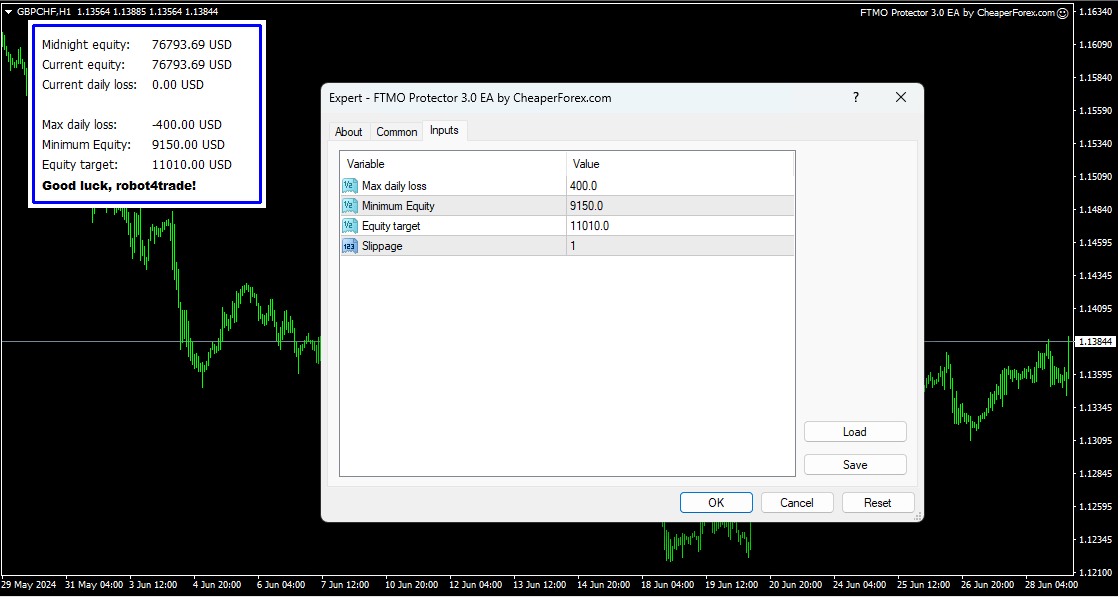
FTMO Protector EA on the Chart with Inputs

Strategy Overview:

The FTMO Protector EA employs a meticulous risk management strategy, specifically designed to monitor and control your daily trading performance across multiple robots and instruments. It automatically calculates your account balance at midnight (01:00 system time) and tracks real-time daily profit and loss. Once it reaches your predefined profit or loss targets, it takes immediate action to close all active trades and stop all trading activities, thereby preventing further losses and securing your profits.

Key strategy highlights include:

  • Real-Time Monitoring: Constantly tracks your account balance and trading performance.
  • Profit and Loss Control: Automatically closes all trades once target profit or loss is reached.
  • Comprehensive Management: Manages multiple robots and instruments simultaneously.
  • Simple Input Parameters: Easy-to-configure settings ensure quick setup and operation.

Trading Specifications:

Recommended Pair: The FTMO Protector EA is versatile and can be used with any currency pair or instrument, making it suitable for a wide range of trading strategies.

Timeframe: The EA operates independently of specific timeframes, focusing instead on overall account performance and risk management.

Minimum Balance: There is no strict minimum balance requirement, but it is recommended to align with the balance limits set by your prop trading firm or personal trading goals.

Our Thoughts About It:

The FTMO Protector EA stands out for its simplicity and effectiveness in managing trading risks. It is a must-have tool for traders looking to secure their investments and adhere to the strict risk management rules of prop trading firms. The EA’s ability to monitor multiple robots and instruments simultaneously adds significant value, ensuring that all trading activities are coordinated and controlled.

One of the most notable features of the FTMO Protector EA is its ease of use. The input parameters are straightforward, making it accessible even for traders who may not be highly tech-savvy. The ability to set maximum daily loss, minimum equity, and equity target ensures that your trading account is always protected from excessive drawdowns and unplanned losses.

Final Verdict:

The FTMO Protector EA for MT4 is an essential tool for any trader involved in prop trading or managing multiple trading systems. Its advanced risk management features provide a reliable safeguard against unexpected drawdowns, ensuring that your trading capital is protected. The simplicity of its input parameters, combined with its robust performance monitoring, makes it a valuable addition to any trading arsenal.

Available now on CheaperForex.com, the FTMO Protector EA offers unparalleled protection for your prop trading accounts. Invest in this powerful tool today and take control of your trading risk management with confidence. With the FTMO Protector EA, you can focus on your trading strategies while knowing that your account is securely protected.


Disclaimer: The FTMO Protector EA is a trading tool, and all trading involves risk. Please conduct thorough analysis and consider your risk tolerance before making any trading decisions.


Additional Information:

Protect Your FTMO Account the Simplest Way:

The FTMO Protector EA is designed to provide seamless protection for your FTMO account or any other prop trading account. Its advanced monitoring and control features ensure that your daily trading activities stay within the predefined risk parameters, helping you maintain compliance with prop trading firm requirements.

Must-Have Account Protector for Any Prop-Trading Account and Challenge:

Whether you’re participating in a prop trading challenge or managing a funded account, the FTMO Protector EA is an invaluable tool. It provides peace of mind by ensuring that all trades are managed according to your risk management rules, preventing unexpected drawdowns and securing your profits.

Simple Input Parameters:

  • Max Daily Loss: Set the maximum loss you are willing to tolerate in a single day (e.g., $3,000).
  • Minimum Equity: Define the minimum equity level your account should maintain (e.g., $91,500).
  • Equity Target: Set your desired profit target (e.g., $100,050).
  • Time to Close and Open: Specify the times to close all open trades and start monitoring anew.

By leveraging the powerful capabilities of the FTMO Protector EA, you can enhance your trading strategy and achieve consistent success in the forex market. Invest in the FTMO Protector EA today and take your trading journey to the next level.

Every order

What’s included with FTMO Protector

  • Instant downloadReady after checkout and kept in your account
  • Free future updatesIncluded when we receive them, every version kept in your account
  • Unlimited activationsUnlimited live and demo accounts
  • Setup helpReal people on Telegram or email
  • 7-day money-back guaranteeIf the EA fails to attach to your chart because of errors we can replicate, you get a full refund.

Customer reviews

Reviews of FTMO Protector EA MT4

There are no reviews yet.

Be the first to review “FTMO Protector EA MT4”

Ready when you are

FTMO Protector EA MT4 for $27.96 with crypto

Regular price was $250.00 · $34.95 with card · instant download · future updates included

FTMO Protector EA MT4$27.96with crypto$34.95 with card