
FXCOW Smart EA MT5
Genuine files only. No cracks, fakes or AI copies. See why
Why our prices aren’t rock-bottom
- The official file. The developer’s own, unmodified EA. Never a crack, a decompiled copy or an AI recreation.
- It trades like the original, because it is the original. AI recreations only copy how an EA looks from the outside, so they can trade very differently.
- Safe to run. Cracked files can hide malware that reaches your computer and your trading account.
- Updates and help. Free updates, a setup guide, and real people on Telegram if you get stuck.
We keep prices as low as we can. We just won’t sell fakes to be the cheapest.
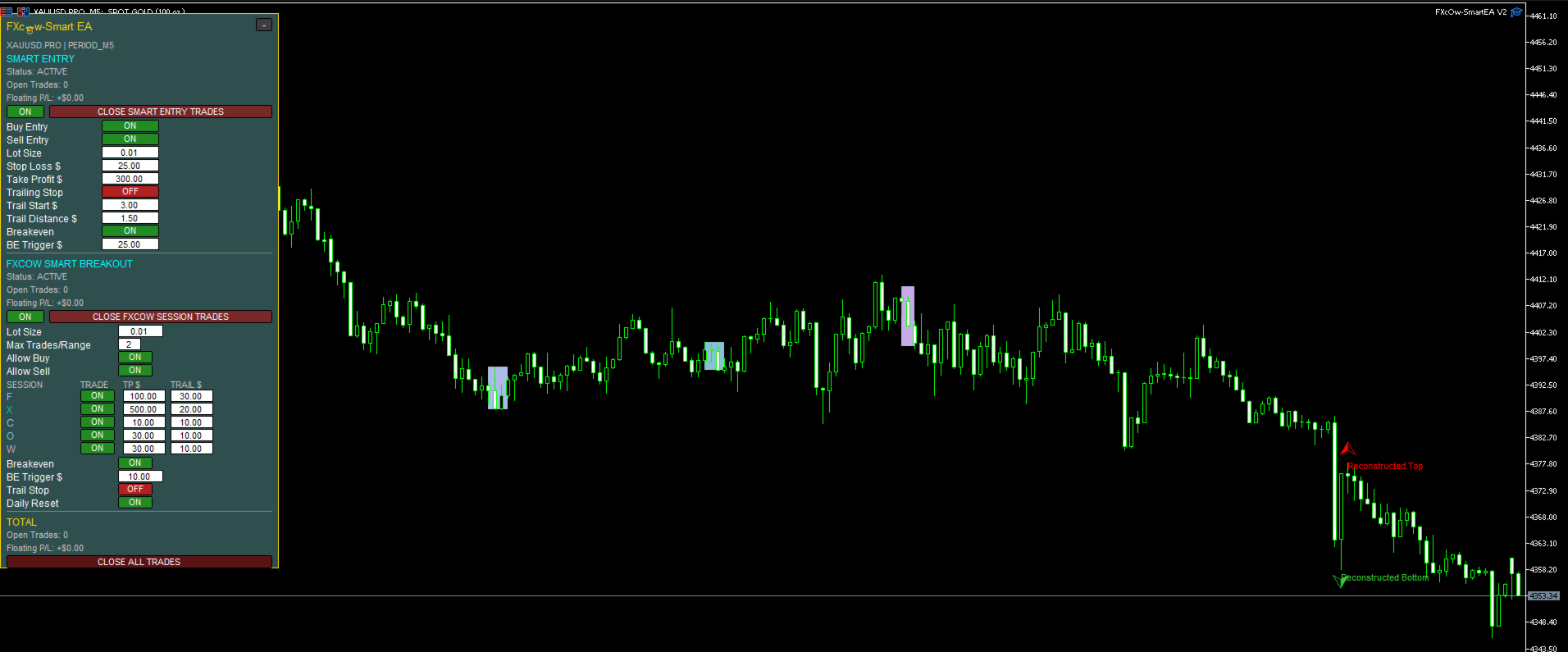
FXCOW Smart EA MT5 automates market-structure breakout entries and trade management. Its illustrated dashboard combines Smart Entry controls with a separate Smart Breakout section, including direction switches, session controls, position limits, stop loss, take profit and trailing settings.
- Smart Entry plus a separate session-breakout panel.
- Direction controls, stops, targets and trailing settings.
- Trades-per-range control and individual session toggles.
FXCOW Smart EA MT5 controls and evidence review
Comparison: MQL5 one-year rental, not an outright purchase price.
 MT5Save 50%
What you receive
- FXCOW Smart.ex5Genuine, unmodified developer file for MetaTrader 5Version 9.10
- Setup guide.pdfA general guide to installing expert advisors.Official step-by-step install guide
Delivered instantly to your account after payment
Regular priceRegular price was $1,199.00
$599.95 with card
Visa, Mastercard, Apple Pay and Google Pay accepted.
Card payments add bank fees, sales taxes and other charges.




 Apple Pay and Google Pay ready at checkout
- Official developer build · Version 9.10
- Instant downloadYour file is provided immediately after payment. In very rare cases we manually review an order first, then send your download straight after. If you don’t receive your file, you can request a full refund.
- Free lifetime updatesAll updates are free. They’re provided on a best-availability basis: we get new versions as fast as we can, led by customer demand, but we don’t guarantee them immediately. If you need every update the moment it’s released, our service may not be the best fit for you.
- 7-day money-backRefunds only cover an EA that fails to attach to your chart because of errors we can replicate. We don’t cover changing your mind or not liking the EA. All brokers are different, and results are never promised because markets are constantly changing.
- Unlimited activationsUse it on as many MT5 accounts and computers as you want, live or demo. There are no restrictions on how you use it.
What you receive
- FXCOW Smart.ex5Genuine, unmodified developer file for MetaTrader 5Version 9.10
- Setup guide.pdfA general guide to installing expert advisors.Official step-by-step install guide
Delivered instantly to your account after payment


28,000+ tradersServed since 2019
Don’t miss thisSee the EA we recommend
The Gold EA we trade ourselves
DowGold for XAU and US30


We have tested thousands of EAs. DowGold is the one we use and recommend, and we rarely say that. We’re also an official reseller.
Real USD MyFXBook accounts. A live cloud, constantly evolving strategy.
See DowGoldOfficial versionsInstant downloadFree lifetime updatesExtra 20% off with cryptoReal people on support28,000+ tradersTrading since 2019Rated Excellent on Trustpilot
Product description
About FXCOW Smart EA MT5
- Developer source link: FXCOW Smart EA MT5 on MQL5
- Live signal link: No public live signal was linked from the checked listing or seller page on 16 September 2026.
FXCOW Smart EA MT5 automates market-structure breakout entries and trade management. Its illustrated dashboard combines Smart Entry controls with a separate Smart Breakout section, including direction switches, session controls, position limits, stop loss, take profit and trailing settings.
Two control sections on one trading dashboard
The developer describes analysis of price structure followed by automatic breakout execution and management from entry to exit. The original XAUUSD.PRO M5 screenshot shows separate Smart Entry and FXCOW Smart Breakout sections, each with its own status and trade-management controls.
- Smart Entry: Buy/Sell toggles, lot size, stop-loss and take-profit fields.
- Smart Breakout: maximum trades per range, direction permissions and individually controlled session rows.
- Money management: breakeven and trailing controls, with separate example settings for each section.
- Position oversight: open-trade counts, floating P/L and close-trade buttons.
Session controls and setup
The breakout panel labels five session rows F, X, C, O and W, each with a trade toggle and TP/trailing amounts. A daily-reset switch is also shown. The public listing does not define those letters or their broker-time schedule, so verify the mapping rather than assuming they refer to familiar market sessions.
The gallery demonstrates gold on M5, but the listing does not state an exclusive symbol/timeframe requirement or a minimum deposit. No public parameter manual or presets are linked. Confirm the intended broker symbol, position sizing, session times and exits on demo before running live.
Evidence and comparison
No public live signal or customer reviews were available at our source check. The gallery is an interface illustration, not a performance report. Read our FXCOW Smart EA review for a closer look at the two panels and the limits of the published specification.
Also from Lemuel Pangandoyon
FXCOW Smart Entry MT5 is the related MT5 product from the same developer. Read its separate feature and evidence review to compare the documented controls. These are separate offers; purchase of one does not imply that the other is included.
Price comparison: the MQL5 comparison shown is its one-year rental, not an outright purchase price. Our offer is a standalone file.
Standalone file. Follow the delivery instructions supplied with your order.
Every order
What’s included with FXCOW Smart
- Instant downloadReady after checkout and kept in your account
- Free lifetime updatesAdded as soon as we receive them, every version kept in your account
- Unlimited activationsUnlimited live and demo accounts
- Free remote installationOptional: a one-time install over AnyDesk, with settings advice and custom presets
- 7-day money-back guaranteeIf the EA fails to attach to your chart because of errors we can replicate, you get a full refund.
Product FAQs
FXCOW Smart EA MT5 FAQs
Real people on support, by Telegram or our contact form.
How does Smart EA differ from Smart Entry?
Its original gallery shows Smart Entry controls plus a separate Smart Breakout section with session rows and a trades-per-range setting. They are separate products; the public material does not establish identical internal logic.
Is it a gold M5 EA?
The original screenshot illustrates XAUUSD.PRO M5. The listing does not state an exclusive market or timeframe requirement; confirm the intended setup with the developer.
What do the session letters mean?
The panel labels them F, X, C, O and W, but the public listing does not define their timing or mapping. Do not assume standard session names or GMT offsets.
Does it have verified live results?
No public live signal or complete statistical report was linked at our 16 September 2026 check.
What is the comparison price?
The comparison is the MQL5 one-year rental, not an outright purchase price. Our offer is a standalone file.
What is supplied?
The standalone file offer, with delivery instructions available after purchase.
- Excellent on Trustpilot 4.6 out of 5 from 120 reviews (opens in a new tab)
- 28,000+ traders since 2019
- 1,570+ official EAs
- Card or crypto payments
Related EAs
Traders also explore
Premium expert advisors at vault-low prices, with your crypto price on every card.
 MT5Save 50%
 MT5Save 40%
 MT5
MT5 MT5Save 62%
Ready when you are
FXCOW Smart EA MT5 for $479.96 with crypto
Regular price was $1,199.00 · $599.95 with card · instant download · free lifetime updates

FXCOW Smart EA MT5$479.96with crypto$599.95 with card