
Official version · Indicator
Gann Zone Pro Indicator MT4 V1.1
Version 1.1
The Gann Zone Pro Indicator for MT4 is a versatile tool for identifying key price reversal zones.
With manual and automatic modes, it highlights areas of strength where price is likely to react. Equipped with an intuitive control panel, it works seamlessly on any chart, timeframe, or instrument, making it an essential addition to any trader’s strategy.
The Download Package Includes:
+ Indicator: Gann Zone Pro (.ex4 file) V1.1
+ How to Install files.pdf
+ Pairs and Timeframes.txt
More Information:
+ https://www.mql5.com/en/market/product/113964
Live Signal Performance:
+ N/A
 Save 70%
Regular priceRegular price was $470.00
$139.95 with card
Visa, Mastercard, Apple Pay and Google Pay accepted.
Card payments add bank fees, sales taxes and other charges.
- Version 1.1
- Instant downloadYour file is provided immediately after payment. In very rare cases we manually review an order first, then send your download straight after. If you don’t receive your file, you can request a full refund.
- Free future updatesAll updates are free. They’re provided on a best-availability basis: we get new versions as fast as we can, led by customer demand, but we don’t guarantee them immediately. If you need every update the moment it’s released, our service may not be the best fit for you.
- 7-day money-backRefunds only cover an EA that fails to attach to your chart because of errors we can replicate. We don’t cover changing your mind or not liking the EA. All brokers are different, and results are never promised because markets are constantly changing.
- Unlimited activationsUse it on as many MetaTrader accounts and computers as you want, live or demo. There are no restrictions on how you use it.
Source code (.mq4) available at checkout.


28,000+ tradersServed since 2019
Orders over $300 include 3 months of PrismAlgo freeThe highly recommended cloud-connected EA for 28 FX pairs, Gold and Bitcoin. Added to your cart automatically. View PrismAlgo
Official versionsInstant downloadFuture updates includedExtra 20% off with cryptoReal people on support28,000+ tradersTrading since 2019Rated Excellent on Trustpilot
Product description
About Gann Zone Pro Indicator MT4 V1.1
Gann Zone Pro Indicator for MT4 by Kirill Borovskii
Introduction to Gann Zone Pro Indicator
The Gann Zone Pro Indicator is a versatile and intuitive tool for identifying high-probability price reversal zones across any chart, instrument, or timeframe. Developed by Kirill Borovskii, this indicator provides traders with a unique edge by marking areas of strength where prices are likely to react or reverse. Featuring both manual and automatic modes, the Gann Zone Pro Indicator caters to traders of all levels, providing precision and flexibility for various trading strategies.
Equipped with an easy-to-use control panel, the indicator ensures seamless operation, whether you’re marking levels manually or letting the automatic mode handle everything. This makes it a valuable addition to any trading toolbox, whether used as a standalone solution or as a supplement to existing strategies.
Key Features
- Dual Modes for Flexibility:
- Manual Mode: Allows traders to draw levels based on their own analysis, providing full customization.
- Automatic Mode: Automatically generates levels based on selected timeframes, offering effortless integration.
- User-Friendly Control Panel:
- Provides a set of buttons for quick and intuitive operation directly from the chart.
- Can be displayed or hidden and moved to a convenient location on the chart.
- Customizable Level Management:
- Create, adjust, and delete levels with a single click.
- Trim levels to focus on specific price areas or extend them for broader coverage.
- Versatility Across Markets:
- Works seamlessly on any trading instrument (Forex, commodities, stocks, indices, etc.) and any timeframe.
- Standalone or Complementary:
- Can be used as a primary tool for trading from zones or as an enhancement to other trading strategies.
How It Works
- Manual Mode:
- Click the NEW button to create a segment.
- Stretch the segment across the movement.
- Click LVL to display the level, marking a critical price zone.
- Automatic Mode:
- Select the desired timeframe(s) for level generation.
- Press the AVTO button to generate levels automatically on the chart.
- Observe levels extending into the future, providing a clear visual of potential price reaction areas.
Button Functions
- NEW: Creates a new segment for manually determining levels.
- LVL: Converts the segment into a level.
- MOD: Deletes the selected level (click on the level to remove it).
- CUT: Trims a level to the desired size.
- DEL: Deletes all levels from the chart.
- RL: Displays levels only from the last bar or the automatic calculation point.
- +/-: Adds levels above and below the selected zone for expanded analysis.
- Show Levels Panel: Double-click to toggle the button panel visibility; move the panel to a preferred chart location.
Observations from the Chart
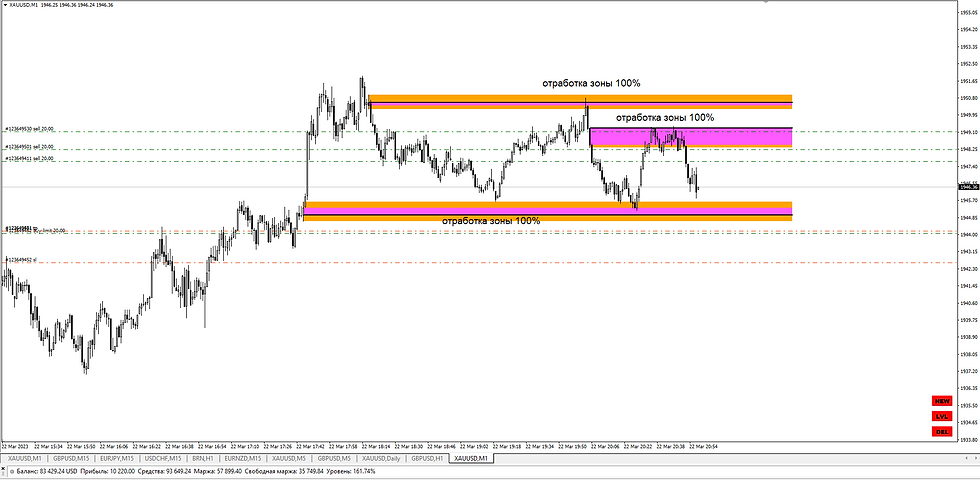
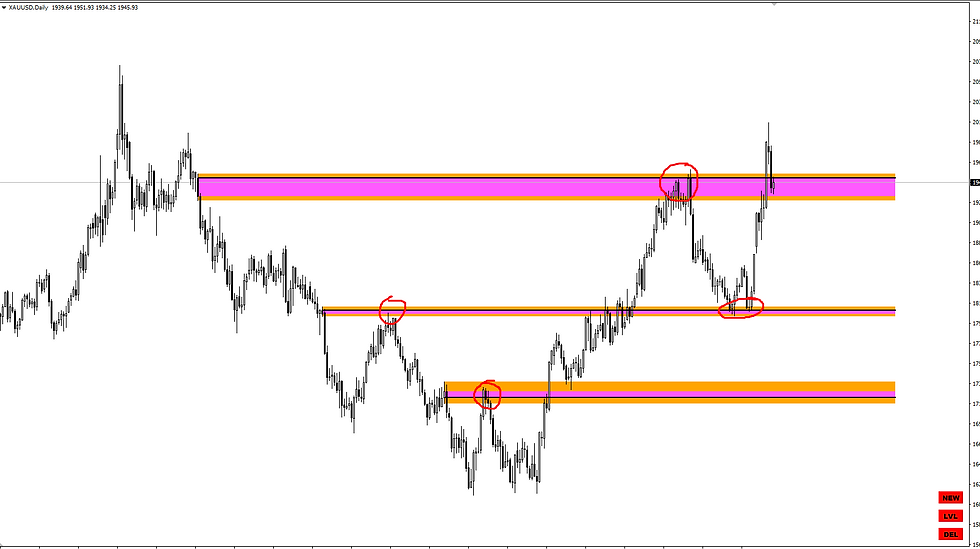
The provided images illustrate the Gann Zone Pro Indicator’s ability to mark key zones with precision.
- The orange and pink zones highlight areas of strength where price has historically reversed or reacted significantly. These zones can be used to identify potential support or resistance levels.
- The manual mode is evident in how segments are stretched to define custom levels, ensuring flexibility for traders who prefer hands-on control.
- The automatic mode showcases its ability to generate zones efficiently, extending levels into the future to forecast high-probability reaction areas.
- Dynamic and visual clarity: The indicator provides a clean representation of zones, making it easy to plan trades directly from the chart.
Reviews
⭐️⭐️⭐️⭐️⭐️
John D.
“This is hands down one of the most intuitive indicators I’ve used. The ability to switch between manual and automatic modes is a game-changer for me. It works perfectly with my strategy.”
⭐️⭐️⭐️⭐️⭐️
Sarah K.
“The zones marked by this indicator are incredibly accurate. I’ve seen price react to these levels time and time again. Highly recommended!”
⭐️⭐️⭐️⭐️⭐️
Martin P.
“The control panel makes this tool so easy to use. I’ve been able to customize and fine-tune my levels with just a few clicks. A must-have for serious traders.”
Conclusion
The Gann Zone Pro Indicator is a powerful, versatile tool for any trader seeking precision in identifying reversal zones. Its dual modes, manual and automatic, provide the perfect balance of control and convenience. Whether you’re trading Forex, commodities, or indices, this indicator’s clean design and intuitive functionality will give you a clear edge in the market.
Start leveraging the strength of price zones today with the Gann Zone Pro Indicator—your ultimate tool for actionable insights and smarter trading decisions.
Every order
What’s included with Gann Zone Pro Indicator
- Instant downloadReady after checkout and kept in your account
- Free future updatesIncluded when we receive them, every version kept in your account
- Unlimited activationsUnlimited live and demo accounts
- Setup helpReal people on Telegram or email
- 7-day money-back guaranteeIf the EA fails to attach to your chart because of errors we can replicate, you get a full refund.
Customer reviews
Reviews of Gann Zone Pro Indicator MT4 V1.1
You must be logged in to post a review.
- Excellent on Trustpilot 4.6 out of 5 from 120 reviews (opens in a new tab)
- 28,000+ traders since 2019
- 1,180+ official EAs
- Card or crypto payments
Related EAs
Traders also explore
Premium expert advisors at vault-low prices, with your crypto price on every card.
 Save 50%
 Save 85%
 MT4Save 80%
 MT5Save 51%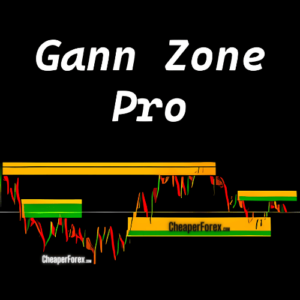
Ready when you are
Gann Zone Pro Indicator MT4 V1.1 for $111.96 with crypto
Regular price was $470.00 · $139.95 with card · instant download · future updates included
Gann Zone Pro Indicator MT4 V1.1$111.96with crypto$139.95 with card
There are no reviews yet.