


Excellent product quality.


The latest updated versions of EAs are sent as soon as they are available.

I can highly recommend this site

Have gotten a lot from them in the past and never been disappointed.

After reaching out, I was refunded right away. 5/5 stars in my book.

I received immediate attention to a credit card payment error and they organised a refund within minutes ( late on a Sunday evening ) plus a great saving on a quality Forex EA.


But you need to do your homework on any product before buying.


They give a lot of commitment from themselves. I highly recommend it to everyone!

I recommend it 100%

The products work as advertised and the customer support is topnotch.

Great support. Recommended, 5 STARS.

You can trust them completely.

All issues have been resolved. , If the problem cannot be resolved, a refund will be given.

Prima che intervenissi, si erano accorti dell'anomalia. Per me, piena fiducia all'operatore.


Best in the industry. Thank you for what you do

They also have an outstanding customer care services .

It makes a change from most of the scam forex websites!
Quick Summary:
Opening Range Breakout Master EA for MT4 is an ICT/Smart Money Concepts trading system developed by Thushara Dissanayake.
Built for traders who follow institutional trading methodologies, this EA automates the detection and execution of opening range breakouts (ORB) across key global Forex sessions — London, New York, Tokyo, and Midnight killzones.
The strategy is rooted in institutional concepts: market makers induce liquidity by sweeping key levels before reversing or continuing momentum. By automating session high/low identification and breakout confirmation, the EA captures early breakout moves, false breakout sweeps, and session liquidity grabs while maintaining disciplined risk management.
Non-repainting logic ensures trades execute only after confirmed breakouts — no late entries or signal changes.
Official MQL5 Listing:
Opening Range Breakout Master EA MT4
Developer Profile:
Thushara Dissanayake
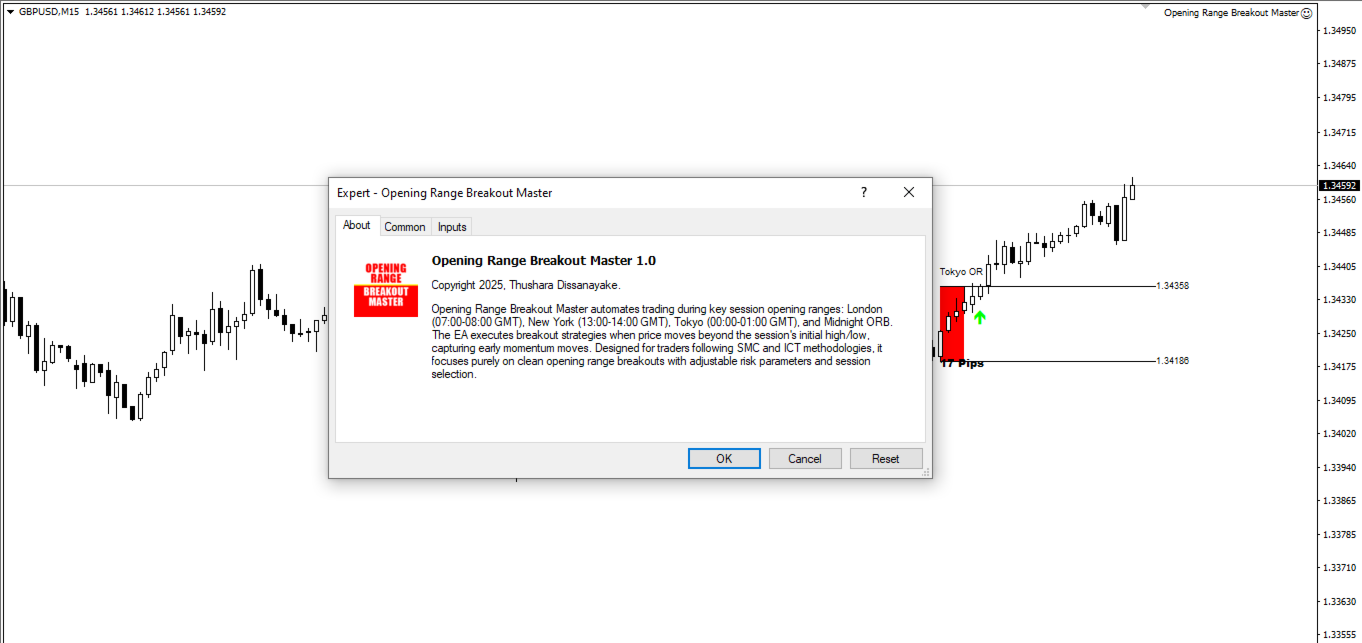
What Opening Range Breakout Master Is Designed To Do
The EA automates institutional-style breakout trading based on ICT and SMC concepts:
- Session Range Detection — Marks the high and low of the first hour (TimeBox) after each session opens
- Breakout Monitoring — Watches for price to break above high (bullish) or below low (bearish)
- Confirmation Entry — Opens trades when price closes beyond range with displacement
- Trade Management — Uses SL beyond opposite range level with TP at liquidity zones
- Multi-Session — Covers London, New York, Tokyo, and Midnight killzones
The philosophy: align with market maker movements, liquidity hunts, and session-driven volatility.
How the Strategy Works
The EA follows a structured approach to opening range breakout trading:
Step 1: Identify the Session Range
The EA marks the high and low of the first hour (TimeBox) after a session opens:
- London: 07:00-08:00 GMT
- New York: 13:00-14:00 GMT
- Tokyo: 00:00-01:00 GMT
- Midnight: Configurable overnight range
Step 2: Monitor for Breakouts
The EA waits for price to break above the high (bullish breakout) or below the low (bearish breakout) with optional confirmation filters applied.
Step 3: Enter on Confirmation
When price closes beyond the range with displacement — indicating a potential liquidity grab or continuation move — the EA opens a position.
Step 4: Manage the Trade
- Stop loss placed beyond the opposite range level (or swing points)
- Take profit at key liquidity zones, session extremes, or FVG fills
- Trailing stops lock in gains during strong trend continuation
Visual Session Markers
The EA displays clear session boxes on your chart for each killzone:
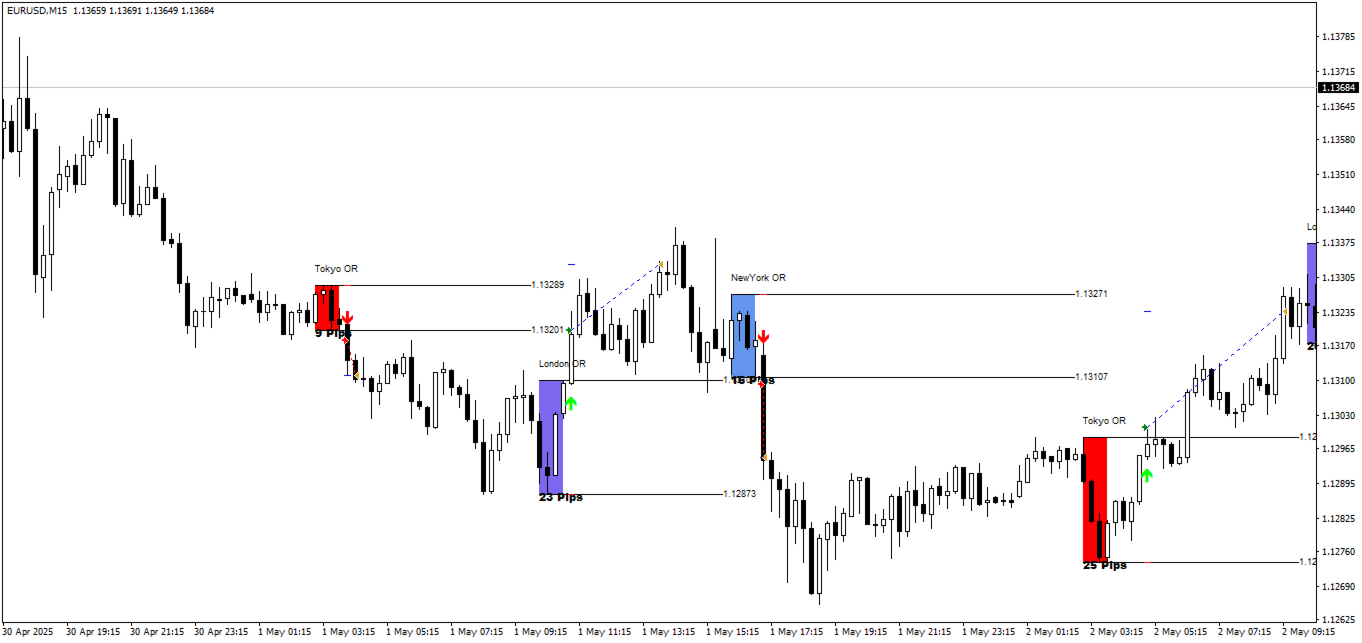
Each session is color-coded:
- Tokyo OR — Red boxes marking Asian session range
- London OR — Blue boxes marking European session range
- NewYork OR — Blue boxes marking US session range
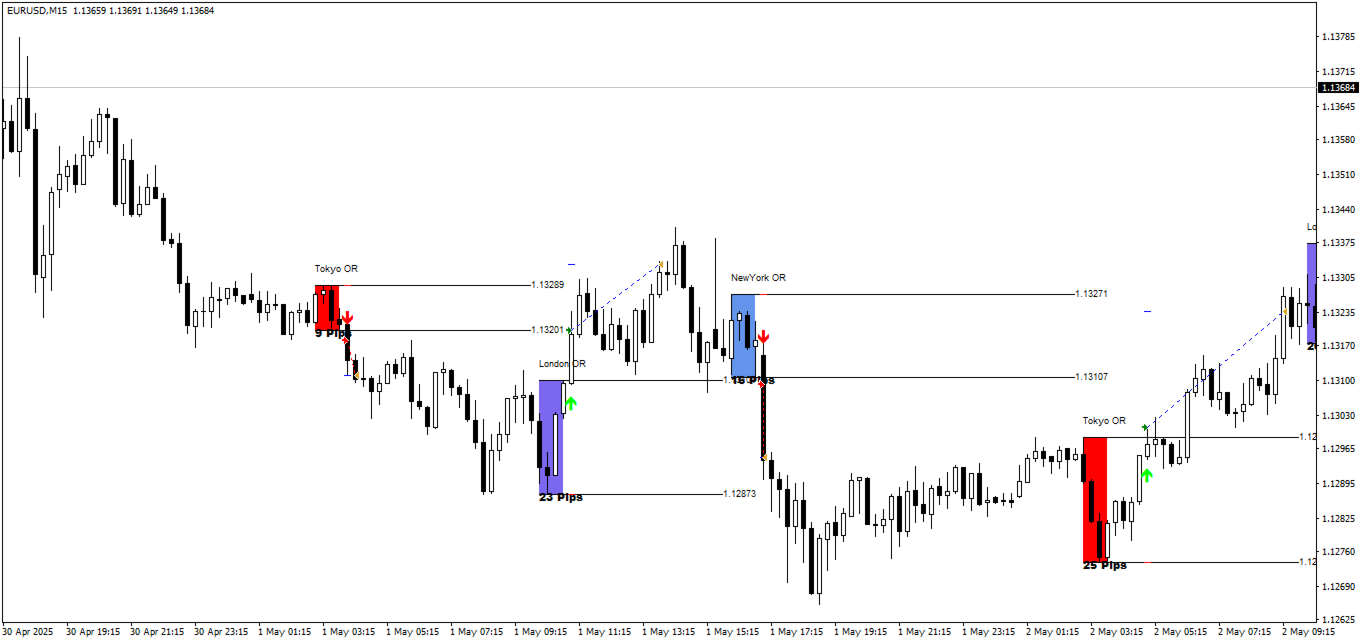
The EA displays pip measurements showing the range size and breakout distance, allowing you to verify setups visually.
Key Features
Session-Based Breakout Detection
Automatically tracks opening ranges for all major trading sessions:
- London Killzone — 07:00-08:00 GMT (high momentum)
- New York Killzone — 13:00-14:00 GMT (overlap volatility)
- Tokyo Killzone — 00:00-01:00 GMT (Asian liquidity)
- Midnight ORB — Overnight range for early session setups
Smart Money Confirmation Filters
Reduces false signals through:
- Previous close analysis
- Breakout margin validation
- Timeframe confirmation
- Displacement requirements
Non-Repainting Logic
Trades execute only after confirmed breakouts. No signal changes, no late entries, no repainting. What you see is what you get.
Customizable Risk Parameters
- Lot sizing — Fixed or percentage-based risk
- Stop loss methods — Opposite range level, fixed pips, or swing-based
- Take profit strategies — 1:1, 1:2 RR, or session-based exits
- Trailing stops — Lock in gains during strong trends
- Profit protection — Secure gains at predefined levels
Multi-Session Flexibility
Trade single or multiple sessions based on your preference:
- Focus on London & New York for high momentum pairs
- Add Tokyo for USDJPY and AUDUSD setups
- Use Midnight ORB for early positioning
Best Pairs for This Strategy
The EA performs optimally on pairs with high liquidity and session-driven volatility:
London & New York Sessions
- EURUSD — High liquidity, clean breakouts
- GBPUSD — Volatile, strong session reactions
- XAUUSD — Strong breakout tendencies during NY
- USDCAD — Reacts well to NY session news
Tokyo Session
- USDJPY — Primary Asian session pair
- AUDUSD — Reacts to Tokyo liquidity
Who Should Use This EA?
This tool is ideal for:
- ICT & SMC traders — Who follow institutional order flow and liquidity concepts
- Breakout & intraday traders — Focusing on London/New York killzones
- Algorithmic traders — Seeking automation of time-based range strategies
- Price action traders — Who combine ORB with market structure shifts
- Forex scalpers & swing traders — Looking for high-probability session setups
Technical Requirements
- Platform: MetaTrader 4
- Instruments: EURUSD, GBPUSD, USDJPY, AUDUSD, USDCAD, XAUUSD (recommended)
- Timeframe: M15 recommended for session detection
- Account type: Any (ECN preferred for tight spreads)
- Server time: Adapts to broker server time for accurate session tracking
- VPS: Recommended for continuous session monitoring
Quick Setup Guide
- Install the EA file into your MT4
Expertsfolder. - Restart MT4 and enable AutoTrading.
- Attach the EA to your chosen chart (EURUSD, GBPUSD, etc.).
- Select which sessions to trade (London, NY, Tokyo, Midnight).
- Configure your risk parameters — lot sizing, SL method, TP strategy.
- Set confirmation filters based on your preference.
- Enable visual markers if you want on-chart session boxes.
- Run on a VPS for uninterrupted session monitoring.
- Test on demo before live trading.
User Reviews
★★★★★ “Finally, proper ICT automation.”
I’ve been trading ICT concepts manually for two years. This EA captures the ORB methodology perfectly — session ranges, liquidity sweeps, confirmed breakouts. The visual markers help me verify the setups match what I’d take manually. Saves hours of screen time.
— Marcus T., London
★★★★★ “Non-repainting is a game changer.”
So many breakout EAs repaint their signals. This one doesn’t — when it marks a breakout, that’s the actual confirmed entry. The multi-session coverage means I don’t miss London killzone while sleeping in Australia.
— James H., Sydney
★★★★☆ “Great concept, needs proper pair selection.”
Works beautifully on EURUSD and GBPUSD during London. Tried it on exotic pairs — not as clean. Stick to the recommended majors during their active sessions and results are solid. The confirmation filters really help avoid false breakouts.
— Anna K., Frankfurt
★★★★★ “Smart money concepts without the emotion.”
The hardest part of SMC trading is waiting for confirmation and not FOMO entering. This EA handles that perfectly — waits for displacement, doesn’t chase. Combined with my higher timeframe bias analysis, it’s been very profitable.
— Chen W., Singapore
Our Assessment
Transparent evaluation based on feature review:
What We Found:
- Strategy: ICT/SMC-based opening range breakout with session focus
- Methodology: Aligns with institutional concepts — liquidity sweeps, killzones, displacement
- Session Coverage: London, New York, Tokyo, Midnight — comprehensive killzone automation
- Signal Quality: Non-repainting with confirmation filters — reduces false entries
- Visual Tools: Clear session boxes with pip measurements for manual verification
- Customization: Flexible risk management, session selection, and filter options
- Best Suited For: ICT/SMC traders wanting ORB automation on major pairs
- Pair Selection: Stick to recommended majors during active sessions for best results
- Watch Out For: Combine with higher timeframe bias for optimal performance
- Overall: Professional-grade ORB system for traders who understand institutional concepts
Understanding ICT & SMC Concepts
For traders new to these methodologies:
What is ICT (Inner Circle Trader)?
A trading methodology focused on how institutional traders and market makers move price. Key concepts include liquidity pools, order blocks, fair value gaps, and session-based killzones.
What is SMC (Smart Money Concepts)?
An approach that tracks “smart money” (banks, institutions) through order flow, liquidity hunts, and market structure shifts. The goal is to trade alongside institutional positioning, not against it.
What are Killzones?
Specific time windows when institutional traders are most active:
- London Killzone: Highest forex volume of the day
- New York Killzone: London/NY overlap creates maximum volatility
- Tokyo Killzone: Asian session liquidity for JPY and AUD pairs
What is Opening Range Breakout (ORB)?
A strategy that marks the high and low of the first trading period (typically first hour) and enters when price breaks beyond these levels. The concept: early session range establishes liquidity levels that institutions target.
Conclusion
Opening Range Breakout Master EA for MT4 brings institutional trading methodology to automated execution.
For traders who follow ICT, Smart Money Concepts, and time-based price action, this EA eliminates the emotional decision-making that often undermines manual breakout trading. It systematically identifies session ranges, waits for confirmed breakouts with displacement, and enters aligned with market maker movements and liquidity dynamics.
The non-repainting logic is crucial — entries happen only after confirmation, not before. The multi-session coverage (London, New York, Tokyo, Midnight) means you capture killzone setups across all major trading windows. And the confirmation filters reduce false breakout entries that plague simpler ORB systems.
This isn’t a set-and-forget system — it works best when combined with higher timeframe bias analysis and proper pair selection for each session. But for traders who understand institutional concepts and want to automate their ORB executions, Opening Range Breakout Master delivers a professional-grade solution.
What Do You Receive?
– Opening Range Breakout Master EA for MT4 – Latest Version
– Free lifetime updates
– Fully unlocked for unlimited brokers and accounts
– Delivered by email and allocated to your user account dashboard
FAQs
What is Opening Range Breakout (ORB)?
A strategy that marks the high and low of the first trading hour (the “opening range”) and enters when price breaks above the high (bullish) or below the low (bearish). The EA automates this across multiple sessions.
What are ICT and SMC concepts?
ICT (Inner Circle Trader) and SMC (Smart Money Concepts) are methodologies focused on trading alongside institutional order flow. They emphasize liquidity pools, killzones, market structure, and time-based setups.
What are killzones?
Specific time windows when institutional traders are most active. The EA covers London (07:00-08:00 GMT), New York (13:00-14:00 GMT), Tokyo (00:00-01:00 GMT), and Midnight ORB.
Does it repaint signals?
No. Trades execute only after confirmed breakouts. No signal changes, no late entries, no repainting.
What pairs work best?
EURUSD, GBPUSD (London/NY), USDJPY, AUDUSD (Tokyo), USDCAD, XAUUSD (NY). Use pairs with high liquidity during their active sessions.
Can I trade only specific sessions?
Yes. You can enable or disable London, New York, Tokyo, and Midnight sessions based on your preference and the pairs you trade.
What confirmation filters are available?
Previous close analysis, breakout margin validation, timeframe confirmation, and displacement requirements. These reduce false breakout entries.
What stop loss methods are available?
Opposite range level, fixed pips, or swing-based placement. Choose based on your risk management style.
What take profit strategies are available?
Fixed risk-reward (1:1, 1:2), session-based exits at liquidity zones, or trailing stops for trend continuation.
Should I use higher timeframe analysis?
Yes. The EA works best when combined with manual analysis of market structure, higher timeframe bias, and volume profiles.
Does it adapt to broker server time?
Yes. The EA adapts to your broker’s server time for accurate session tracking regardless of your broker’s time zone.
Is a VPS required?
Recommended for continuous session monitoring. Missing a killzone due to disconnection means missing potential setups.

-

-

-

-

Leopard Adaptive EA MT4 – Amazing Results
Original price was: $1,867.00.$199.95Current price is: $199.95.
