
Last updated: April 2026
Most “professional” trading systems sold on MQL5 promise the world and deliver a martingale grid wrapped in marketing. Wall Street Robot is the opposite: a deliberately narrow system that trades only S&P 500 and Dow Jones, opens exactly one position at a time, and uses predefined exits on every trade. No grid stacking. No martingale escalation. No hedging exposure. The kind of architecture prop firms actually want to see — and that retail traders should want too.
That makes Wall Street Robot interesting on paper, but it also raises the question every disciplined-architecture EA has to answer: does the trading logic actually make money, or does the conservative risk profile just produce a slow flat line? Without grid recovery to mask losing scalps, the underlying entry logic has to genuinely work — there’s no safety net to hide behind.
This review covers both the MT4 and MT5 versions (which are mechanically identical apart from platform), the live performance screenshot the developer published, the two management modes (Fixed vs Dynamic), and the genuine prop firm compatibility — plus the legitimate concerns we have about a brand-new product with no MQL5 reviews and no verified live signal yet.

⚠️ Searching for Wall Street Robot EA free download? Wall Street Robot is an MQL5 marketplace product with built-in licensing that cannot be cracked. Sites offering “free downloads” deliver malware, fake non-functional .ex4/.ex5 files, or funnel you into Telegram VIP signal scams. CheaperForex offers Wall Street Robot at a significant discount on MQL5’s $699 launch price with a 7-day money-back guarantee — MT5 version here | MT4 version here.
The Single-Position Discipline (And Why It Matters)
The single most important architectural decision in any automated trading system is what happens when a trade goes wrong. There are essentially three approaches:
Grid systems: when a position moves adverse, the EA opens additional positions to “average down” the entry price. When price reverts, all positions close together at break-even or small profit. The risk: if price never reverts within the account’s margin capacity, the grid grows until it consumes the entire balance. Most retail accounts blow up on the first sustained adverse trend.
Martingale systems: when a position closes at a loss, the next position is opened at a multiplied lot size (typically 2x or 3x). The logic is that mathematically, one eventual win recovers all preceding losses plus a small profit. The risk: a long enough losing streak — five to seven consecutive losses for 2x martingale — produces position sizes so large they exceed available margin and force-close the account.
Single-position systems: only one trade is open at any time, with a predefined Stop Loss that exits the trade if it goes adverse. No averaging down, no doubling up. The risk: every losing trade is a real, realised loss. The only “recovery” is the next winning trade closing at its Take Profit.
Wall Street Robot is firmly in the third category. This means the underlying entry logic has nowhere to hide — when it picks badly, you see the loss. Many EA developers avoid this architecture specifically because it exposes weak entry logic. The fact that MQL TOOLS SL chose this approach for Wall Street Robot is itself a signal — they’re confident enough in the entry logic to skip the grid safety net that masks underperforming systems.
For prop firm traders, this architecture isn’t just preferred — it’s mandatory. Most prop firms explicitly ban grid trading and martingale strategies. Wall Street Robot’s design mechanically meets these rules without you having to disable any features.
Why S&P 500 and Dow Jones Specifically
The instrument selection in Wall Street Robot reveals the developer’s thinking. Most multi-symbol EAs claim to work across “30+ pairs” and predictably perform mediocrely on all of them. Wall Street Robot trades two instruments — and they’re chosen with deliberate logic.
Liquidity. S&P 500 and Dow Jones futures and CFDs are among the most heavily traded instruments globally. Spread costs on these markets at any reputable broker are tight enough to support intraday strategies — unlike exotic Forex pairs where spread costs can consume an EA’s entire edge.
Structured behavior. US indices respond predictably to economic calendar events, central bank announcements, and broad market sentiment. They don’t behave like cryptocurrencies (random spikes during low-volume periods) or exotic Forex pairs (sudden gaps from political events). This predictability is what makes algorithmic trading work — patterns repeat because the underlying market structure is stable.
Intraday rhythm. US indices have well-defined session patterns: pre-market, opening drive, mid-session consolidation, closing volatility. An M15 system can exploit these consistent rhythms because they show up in similar form day after day.
Correlation between the two instruments. S&P 500 and Dow Jones move together about 90% of the time, but the 10% of the time they diverge is where Wall Street Robot’s two-instrument focus matters. The system can take a trade on whichever index shows clearer signal alignment, rather than being forced into a single instrument when conditions don’t suit it.
An EA that trades 30 random Forex pairs is making 30 separate (and usually bad) bets. An EA that trades two highly liquid, structurally similar US indices is making one well-informed bet about US equity market direction with two execution options.
The Live Performance Screenshot — What It Shows and What It Doesn’t
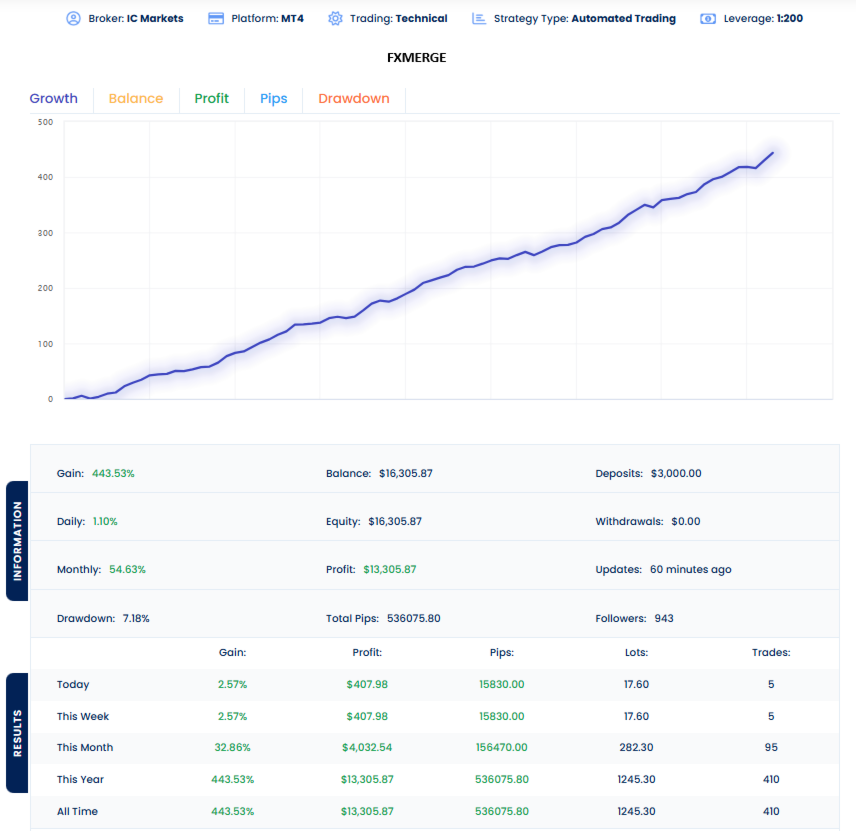
The developer has published a live performance screenshot showing the following metrics on an IC Markets MT4 account at 1:200 leverage:
+443.53% total gain on a $3,000 deposit, growing to $16,305.87. $13,305.87 in profit, no withdrawals taken. 7.18% maximum drawdown over the entire tracked period — exceptionally controlled given the gain figure. 410 trades total, with current month showing 95 trades and 32.86% gain. 1,245.30 lots traded across the full account history. 1.10% daily gain on the most recent active day.
The growth curve in the screenshot shows steady, near-linear progression — none of the spike-and-collapse patterns typical of grid systems waiting to fail. 54.63% monthly average gain and 536,075 total pips across 410 trades suggests the system is making approximately 1,300 pips per trade on average — which is consistent with M15 index trading rather than scalping.
What the screenshot tells us: the system has been actively trading, the architecture is producing the controlled drawdown profile its design predicts, and the current owner has not withdrawn any profits — they’re letting the account compound.
What the screenshot doesn’t tell us — and this matters: the screenshot is from an external tracking service rather than an MQL5 verified signal. MQL5 verified signals provide third-party guarantees about which broker, account number, and EA combination produced specific results. External tracking services rely on the account owner accurately reporting their setup and not switching between systems on the same account. The performance data may be entirely accurate, but the verification chain is weaker than what we’d typically expect from a system at this $699 price point.
Our recommendation: treat the live screenshot as encouraging evidence rather than definitive proof. The numbers are consistent with the architecture, the drawdown profile is sensible, and the trading frequency aligns with M15 strategy expectations. But until MQL TOOLS SL publishes an MQL5-verified signal — which they do for several of their other products including XG Gold Robot and AI Forex Robot — we’d encourage cautious deposit sizing on first deployment.
The On-Chart Panel
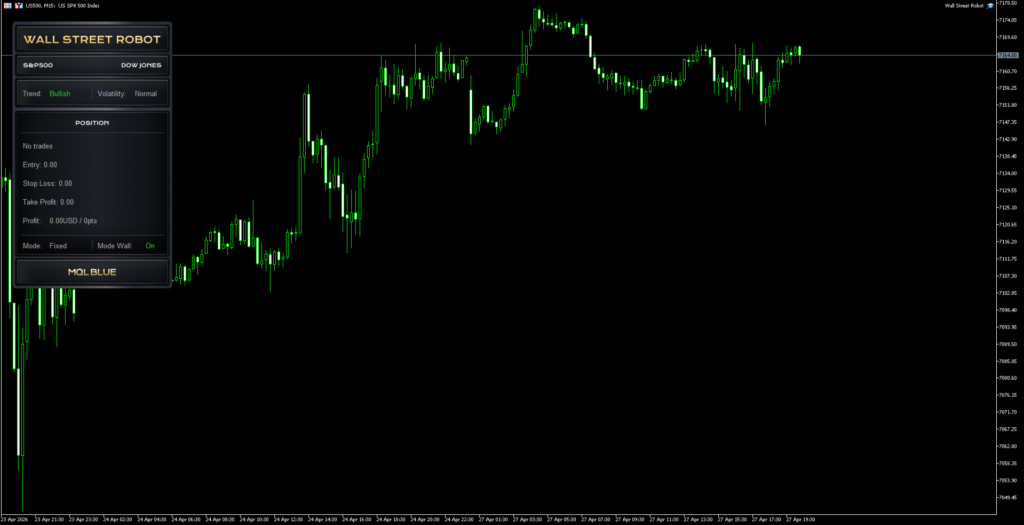
Wall Street Robot’s on-chart panel is functional rather than flashy. It surfaces exactly the information you actually need to verify the system is operating correctly without cluttering the chart workspace.
Top section — Market identification: Confirms which instrument the EA is attached to (S&P 500 or Dow Jones) so you know it’s correctly mapped to your broker’s symbol naming.
Trend and volatility section: Real-time display of the EA’s current read on market direction (Bullish/Bearish) and volatility regime (Normal/High). This isn’t just decoration — it tells you why the EA is or isn’t taking trades right now. If you see trend = Bullish but no long position fires, you know the volatility filter or other entry conditions haven’t aligned yet.
Position section: Shows entry price, Stop Loss level, Take Profit level, current floating profit in dollars and points, and operating mode. When no trade is active, the section reads “No trades” and all values are zero.
Mode display: Confirms whether the EA is running in Fixed or Dynamic mode at a glance, plus the “Mode Wall: On” status indicating the index-specific filtering is active.
What’s notably absent from the panel: any mention of grid levels, martingale step counts, or recovery sequences — because the architecture doesn’t have those concepts. The simplicity of the panel reflects the simplicity of the strategy.
Fixed vs Dynamic Mode — Which to Choose
The two management modes serve genuinely different use cases, and choosing correctly matters more than most users initially realise.
Fixed Mode lets you set explicit Take Profit, Stop Loss, and Break Even distances in points. This is the recommended starting mode for most users for three reasons:
- You can set conservative TP/SL distances that match your specific risk tolerance from day one rather than letting the EA’s volatility logic decide for you
- You get predictable, repeatable trade behavior that’s easier to evaluate against your performance expectations
- For prop firm traders, you can mathematically align stop distances with your firm’s drawdown rules — much harder to do with dynamic stops
Dynamic Mode uses volatility-based calculations to automatically adjust TP/SL/BE distances based on current market conditions. Stops widen during volatile sessions to avoid premature exits, and tighten during quiet markets to maximise capture of smaller moves.
Dynamic Mode’s appeal is hands-off operation — the EA adapts without you needing to manually tune parameters. Its downside is unpredictability of trade behavior: in extreme volatility, stops can widen significantly beyond what you’d configure manually, which translates to larger realised losses on the trades that do hit Stop Loss.
Our suggestion: start with Fixed Mode, run it for 4-6 weeks on a demo or small live account, learn the system’s natural rhythm, then optionally experiment with Dynamic Mode once you’ve established a baseline. This sequence prevents the common mistake of attributing system performance to the mode setting when it’s actually just a function of which market regime you happened to deploy during.
MT4 vs MT5 — Which Should You Buy?
Wall Street Robot is available on both MetaTrader 4 and MetaTrader 5. The trading logic is identical — same entry signals, same exit logic, same management modes. Choose based on your platform preference and broker situation:
Choose MT4 if:
- Your broker provides better US indices spreads on MT4 than MT5 (some brokers favour one platform over the other for index CFDs)
- You’re already running other systems on MT4 and want consistency
- You’re trading a prop firm challenge where MT4 is the only allowed platform
- Your broker only supports MT4 (rare in 2026 but still some legacy setups)
Choose MT5 if:
- Your broker has more competitive US500 and US30 spreads on MT5
- You want access to MQL TOOLS SL’s private support group with full manual and direct support team access (MT5 buyers receive this)
- You’re using MT5 for other strategies and want platform consistency
- You’re starting fresh and want the more modern platform infrastructure
The MT5 version is the version the developer prioritises for support — the private support group and manual access is included with MT5 purchases. From a pure trading perspective, the two are functionally identical.
Where to Download Wall Street Robot Legitimately
Two sources only:
MQL5 Marketplace — the official developer page at $699 for MT4 or $699 for MT5. Direct purchase from MQL TOOLS SL with instant activation through MQL5’s licensing system.
CheaperForex — authorised reseller pricing significantly below MQL5’s price, with the same official activation, the same EA file, free lifetime updates, plus a 7-day money-back guarantee before activation and an extra 20% discount for crypto payments. View MT5 version at CheaperForex | View MT4 version at CheaperForex.
Anywhere else claiming to offer Wall Street Robot — for free, at suspiciously discounted prices, via Telegram channels, via cracked .ex4/.ex5 files — is a scam. The MQL5 marketplace licensing cannot be cracked. Files from those sources either won’t execute, will execute as fake EAs that don’t actually trade US indices, or contain malware that compromises your trading account credentials.
Why “Free Download” Sites Are a Trap
Wall Street Robot was published 27 April 2026. Within hours, fake download pages were already being indexed by search engines. Here’s what they’re actually selling: nothing functional.
The free-download playbook is consistent across every MQL5 marketplace EA. You search “Wall Street Robot free download.” A site appears in the top results promising the file. You scroll through generic AI-written content — vague descriptions, recycled stock images, no real performance data — looking for a download button. You click. A countdown timer appears. The timer ends and you’re redirected to a Telegram group.
The Telegram group is the actual product. They’ll either pitch you “VIP signals” at $99/month, push a sketchy broker affiliate link where they earn commission on your deposits, or distribute a file containing a credential stealer targeting your MT4 or MT5 login details. The “free EA” never existed.
The reason these sites still rank in Google despite providing no actual product: the algorithm sees matching keywords (“free download”), reasonable dwell time (because users scan-read looking for the link), and a click-through to a secondary page (engagement signal). From Google’s perspective it looks like a satisfied search journey. From your perspective it’s wasted time and a potentially compromised trading account.
Wall Street Robot Installation Guide
Once purchased from MQL5 or CheaperForex, installation is straightforward on either platform:
Step 1: Activation. If you bought from MQL5, the EA appears automatically in your MetaTrader Navigator under Market. If you bought from CheaperForex, we activate it remotely on your terminal in around 2 minutes via UltraViewer or AnyDesk — the EA then appears in your Navigator under Expert Advisors → Market just like a direct MQL5 purchase.
Step 2: Open a US500 or US30 chart. Find your broker’s S&P 500 symbol (US500, SPX500, or similar) or Dow Jones symbol (US30, DJI30, or similar). Set the timeframe to M15 — this is the only timeframe Wall Street Robot is designed to operate on.
Step 3: Enable AutoTrading / Algo Trading. Click the AutoTrading button (MT4) or Algo Trading button (MT5) in the platform toolbar so it turns green.
Step 4: Drag Wall Street Robot onto the chart. Find the EA in the Navigator under Expert Advisors → Market, drag it onto your open M15 chart. The settings dialog appears.
Step 5: Choose your operating mode. On the Inputs tab, select Fixed Mode (recommended for first-time users) and configure your TP, SL, and Break Even distances in points — or select Dynamic Mode if you want volatility-based automatic management.
Step 6: Verify the EA is running. A smiley face appears in the top-right of the chart when running correctly (MT4/MT5 standard behavior). The Wall Street Robot panel appears on the chart showing trend, volatility, and position state. The system will only enter a trade when its specific conditions align — it’s normal to see “No trades” and Active: 0/4 strategies for extended periods, especially during low-volatility sessions.
Broker Setup for US Indices
The most important factor for Wall Street Robot’s performance is your broker’s spread on US500 and US30. Tight spreads (1-2 points typical for ECN brokers) mean the EA’s M15 trades have room to be profitable; wide spreads (5+ points common on standard accounts) erode the edge significantly.
Recommended brokers based on US indices spread quality: IC Markets, IC Trading, FP Markets, Pepperstone, FxTrading. Each offers competitive index spreads and supports both MT4 and MT5.
Account types: Standard accounts with no commission and slightly wider spreads can work, but ECN/Raw Spread accounts (with low spreads + small commission) are usually more cost-effective for an M15 system over time.
Leverage: 1:30 (EU-regulated brokers) works fine since Wall Street Robot uses single-position execution with predefined Stop Losses. There’s no need for higher leverage — it just gives you more flexibility on lot sizing relative to your account balance.
Prop firm accounts: Wall Street Robot is fully compatible with major prop firms (FTMO, MyForexFunds, FundedNext, The Funded Trader, etc.) since the architecture doesn’t violate the standard rule sets. Always verify your specific firm’s rules around news trading, weekend holding, and minimum trading days before deploying.
Position Sizing and VPS
A VPS is recommended for 24/5 operation. While Wall Street Robot’s single-position architecture is more forgiving of brief connection drops than grid systems, you still want continuous market presence — otherwise the EA could miss valid entries during your offline hours, and any open position would lose its trailing/Break Even management if your terminal disconnects. A standard forex VPS at $13–25/month resolves this.
Minimum deposit is $200 for very conservative position sizing. $500–$1,000 is the comfortable range — sufficient capital to absorb the inevitable losing streaks without over-sizing relative to your stops, and enough headroom for prop firm trailing drawdown rules. Larger accounts are fine, just don’t compound aggressively until you’ve validated 4-6 weeks of performance on your specific broker.
Who Wall Street Robot Works For (and Who It Doesn’t)
Wall Street Robot works for you if: you specifically want to trade US stock indices via automation; you’re running or planning to run a prop firm challenge that requires no grid/no martingale; you prefer single-position execution with clear exit logic over portfolio-style multi-position systems; you accept that the brand-new product status (published April 2026) means you’re an early adopter; you have $200+ minimum, ideally $500+ for comfortable position sizing; you already use a broker offering competitive US indices spreads.
Wall Street Robot doesn’t work for you if: you want a Forex pair-specific EA — Wall Street Robot only trades US indices; you need years of MQL5-verified live track record before deploying any system (the live performance data is from external tracking, not MQL5 verified signals); you prefer aggressive grid or martingale recovery — this is a defined-risk single-position approach; you trade exclusively on instruments other than US500 or US30.
Frequently Asked Questions
Where can I download Wall Street Robot legitimately?
Two sources: MQL5 marketplace at $699 for either MT4 or MT5, or CheaperForex at a significant discount for both versions, with a 7-day money-back guarantee before activation. Both deliver the same official .ex4 or .ex5 file with proper MQL5 licensing.
Can I download Wall Street Robot for free?
No. Wall Street Robot is an MQL5 marketplace product with built-in DRM that cannot be cracked or pirated. Sites offering “free downloads” distribute malware, fake EAs, or funnel users into Telegram VIP signal scams. The only legitimate sources are MQL5 and CheaperForex.
Is the live performance screenshot reliable?
It’s encouraging but not definitively verified. The screenshot shows +443% gain on an IC Markets MT4 account at 1:200 leverage with 7.18% maximum drawdown — numbers consistent with the architecture’s design. However, the data is from an external tracking service rather than an MQL5 verified signal, which provides weaker third-party verification than MQL5’s native signal system. Treat as supportive evidence, not definitive proof.
Is Wall Street Robot prop firm compatible?
Yes. The architecture (single position, no grid, no martingale, no hedging, defined Stop Loss every trade) directly meets the rules of most prop firms including FTMO, MyForexFunds, FundedNext, and The Funded Trader. Fixed Mode lets you align Stop Loss distances with your specific firm’s drawdown rules. Always verify individual firm policies on news trading and weekend holding.
What’s the difference between Fixed and Dynamic mode?
Fixed Mode lets you manually configure Take Profit, Stop Loss, and Break Even distances in points — recommended for first-time users and for prop firm trading where you need predictable risk parameters. Dynamic Mode uses current market volatility to automatically adjust those distances — wider during volatile sessions, tighter during quiet markets. Start with Fixed, experiment with Dynamic once you understand the system.
Should I buy MT4 or MT5?
Same trading logic in both. Choose based on your broker’s index spread quality on each platform, your existing platform setup, and whether you want access to MQL TOOLS SL’s private support group (MT5 buyers receive this). For most users in 2026, MT5 is the better default choice — newer platform infrastructure and direct developer support team access.
Are there any reviews of Wall Street Robot yet?
Not yet. The product was published 27 April 2026, so there hasn’t been time for buyer reviews to accumulate on the MQL5 listing. For indirect confidence, MQL TOOLS SL’s broader portfolio includes XG Gold Robot (140+ combined verified MQL5 reviews across MT4 and MT5), Big Forex Players EA, AI Forex Robot, AI Prop Firms, and Bitcoin Robot — all with established review track records on MQL5.
What broker should I use?
Any reputable broker offering competitive spreads on US500 (S&P 500) and US30 (Dow Jones). IC Markets, IC Trading, FP Markets, Pepperstone, and FxTrading are all good fits. Avoid brokers with very wide index spreads or commission structures that would erode the EA’s M15 edge. Prop firm accounts work fine since the architecture is rules-compliant.
How much capital do I need?
$200 absolute minimum for very conservative sizing. $500–$1,000 is the comfortable range — enough to absorb losing streaks without over-sizing positions relative to stops. Larger accounts are fine, just scale lots proportionally and don’t compound aggressively before validating 4-6 weeks of performance on your broker.
Do I need a VPS for Wall Street Robot?
Recommended. While the single-position architecture is more forgiving of brief connection drops than grid systems, continuous market presence ensures you don’t miss valid entries or lose Break Even management on open positions. A forex VPS costs $13–25/month and is worth the cost for any seriously deployed EA.
The Verdict on a Brand-New Product
Wall Street Robot delivers an architecture genuinely uncommon in the EA category: deliberate single-position execution, no grid stacking, no martingale recovery, predefined exits on every trade, and explicit prop firm compatibility built into the design. The instrument focus on S&P 500 and Dow Jones reflects sound thinking about where automated systems can actually find edge — liquid, structured markets with predictable session rhythms.
The live performance screenshot is encouraging — 443% gain with 7.18% maximum drawdown over 410 trades on an IC Markets MT4 account is the kind of profile that’s consistent with the architecture’s design rather than the curve-fit pattern of overhyped products. The two management modes (Fixed and Dynamic) provide genuine flexibility for both novice and experienced users.
The honest considerations: this is a brand-new product (published 27 April 2026) with no MQL5 user reviews accumulated yet. The live performance data is from external tracking rather than an MQL5-verified signal — which is unusual for MQL TOOLS SL given they publish verified signals for several other products in their portfolio. We’d be more confident in the system if a verified MQL5 signal were available; until that’s published, the live data should be treated as supportive evidence rather than definitive proof.
We rate Wall Street Robot 4 out of 5. The architecture is genuinely well-designed, the developer is established with multiple successful EAs, and the live screenshot supports the design’s claims. The full point held back reflects the brand-new product status, the lack of MQL5-verified signal verification, and the corresponding caution warranted for early adoption. If MQL TOOLS SL publishes a verified MQL5 signal and the first reviews confirm consistent live behavior over the next 3-6 months, this rating moves up. For prop firm traders, US indices specialists, and anyone who specifically wants disciplined non-grid automation, Wall Street Robot is one of the most architecturally sound 2026 launches we’ve seen.