
Wall Street Robot MT5 EA
Version: Latest
Guaranteed genuine. No cracks, fakes or AI recreations. See why
Why we only sell the original
- Fakes are everywhere right now. AI recreations and cracked copies sell for $10 to $20 on other websites and channels. They are not the real EA.
- A fake doesn’t trade like the original. AI recreations only copy how an EA looks from the outside, so they can trade very differently.
- Cracks can hide malware that reaches your computer and your trading account.
- The real thing, with real support. The developer’s own, unmodified file, free updates, a setup guide, and real people on Telegram if you get stuck.
A $10 fake is your call. But with real money on the line, is it worth the risk? We only sell originals, at the lowest genuine price.
Wall Street Robot for MT5 by MQL TOOLS SL is a professional trading system built exclusively for US stock indices — S&P 500 and Dow Jones. The system trades on the M15 timeframe with disciplined single-position execution, no grid mechanics, no martingale, and no hedging. Each trade is managed with predefined Take Profit, Stop Loss, and Break Even logic for full control over risk exposure.
The robot includes two management modes — Fixed mode for manual TP/SL/BE configuration, and Dynamic mode that adjusts position management automatically using volatility-based calculations. The on-chart panel displays real-time trend direction, current volatility, active position details, and operating mode. Prop trading firm compatible — designed to operate within strict drawdown rules and evaluation models. Backtested across S&P 500 and Dow Jones data with strong stability metrics.
- ✅ S&P 500 + Dow Jones, M15 — single-position execution with predefined TP/SL/BE
- ✅ No grid, no martingale, no hedging — defined risk per trade, no exposure stacking
- ✅ Prop firm compatible — meets strict drawdown limits with two management modes
S&P 500 + Dow Jones. M15. One position at a time. Prop firm ready.
 MT5Save 55%
What you receive
- Wall Street Robot.ex5Genuine, unmodified developer file for MetaTrader 5Latest version
- Setup guide.pdfA general guide to installing expert advisors.Official step-by-step install guide
Delivered instantly to your account after payment
100% original. Never a crack, fake or AI recreation.
Regular priceRegular price was $1,099.00
$499.95 with card
Visa, Mastercard, Apple Pay and Google Pay accepted.
Card payments add bank fees, sales taxes and other charges.




 Apple Pay and Google Pay ready at checkout
- Official developer build · Latest version
- Instant downloadYour file is provided immediately after payment. In very rare cases we manually review an order first, then send your download straight after. If you don’t receive your file, you can request a full refund.
- Free lifetime updatesAll updates are free. They’re provided on a best-availability basis: we get new versions as fast as we can, led by customer demand, but we don’t guarantee them immediately. If you need every update the moment it’s released, our service may not be the best fit for you.
- 7-day money-backRefunds only cover an EA that fails to attach to your chart because of errors we can replicate. We don’t cover changing your mind or not liking the EA. All brokers are different, and results are never promised because markets are constantly changing.
- Unlimited activationsUse it on as many MT5 accounts and computers as you want, live or demo. There are no restrictions on how you use it.
What you receive
- Wall Street Robot.ex5Genuine, unmodified developer file for MetaTrader 5Latest version
- Setup guide.pdfA general guide to installing expert advisors.Official step-by-step install guide
Delivered instantly to your account after payment
100% original. Never a crack, fake or AI recreation.


28,000+ tradersServed since 2019
Don’t miss thisSee the EA we recommend
The Gold EA we trade ourselves
DowGold for XAU and US30


We have tested thousands of EAs. DowGold is the one we use and recommend, and we rarely say that. We’re also an official reseller.
Real USD MyFXBook accounts. A live cloud, constantly evolving strategy.
See DowGoldOfficial versionsInstant downloadFree lifetime updatesExtra 20% off with cryptoReal people on support28,000+ tradersTrading since 2019Rated Excellent on Trustpilot
Product description
About Wall Street Robot MT5 EA
Quick Summary:
Wall Street Robot for MT5 is a professional automated trading system by MQL TOOLS SL that focuses exclusively on the S&P 500 and Dow Jones US stock indices. By concentrating only on these two markets, the system adapts precisely to their behavior, volatility patterns, and intraday dynamics rather than trying to operate on multiple unrelated instruments.
The robot operates on the M15 timeframe with a disciplined architecture: no grid, no martingale, no hedging. Only one position is open at any given time, managed with predefined Take Profit, Stop Loss, and Break Even logic. This eliminates the possibility of uncontrolled exposure and makes the system fully prop trading firm compatible.
Official MQL5 Listing:
Wall Street Robot MT5 — MQL5 Marketplace
👀 Looking for MetaTrader 4? Wall Street Robot is also available for MT4 with identical trading logic. View Wall Street Robot MT4 →
Why Wall Street Robot
Wall Street Robot is built for traders who want disciplined US index trading without the failure modes that destroy most automated systems:
- Single instrument focus — S&P 500 and Dow Jones only. The system adapts closely to the behavior of these specific indices instead of trying to work across unrelated markets.
- One position at a time — never stacks exposure. When a trade is open, no second position is added until the first closes. Eliminates the possibility of compounding losses through grid layering.
- Predefined TP, SL, and Break Even — every trade has explicit exit logic from entry. No floating drawdown growing into account-killing positions.
- Two management modes — Fixed mode for manual TP/SL/BE configuration in points (full control), or Dynamic mode that adjusts based on current market volatility (automated adaptation).
- M15 timeframe — provides the optimal balance between signal quality and trading frequency. Avoids the noise of lower timeframes while still capturing intraday opportunities.
- Prop trading firm compatible — the no-grid, no-martingale, single-position architecture is exactly what prop firm rules require. Designed to operate within strict drawdown thresholds.
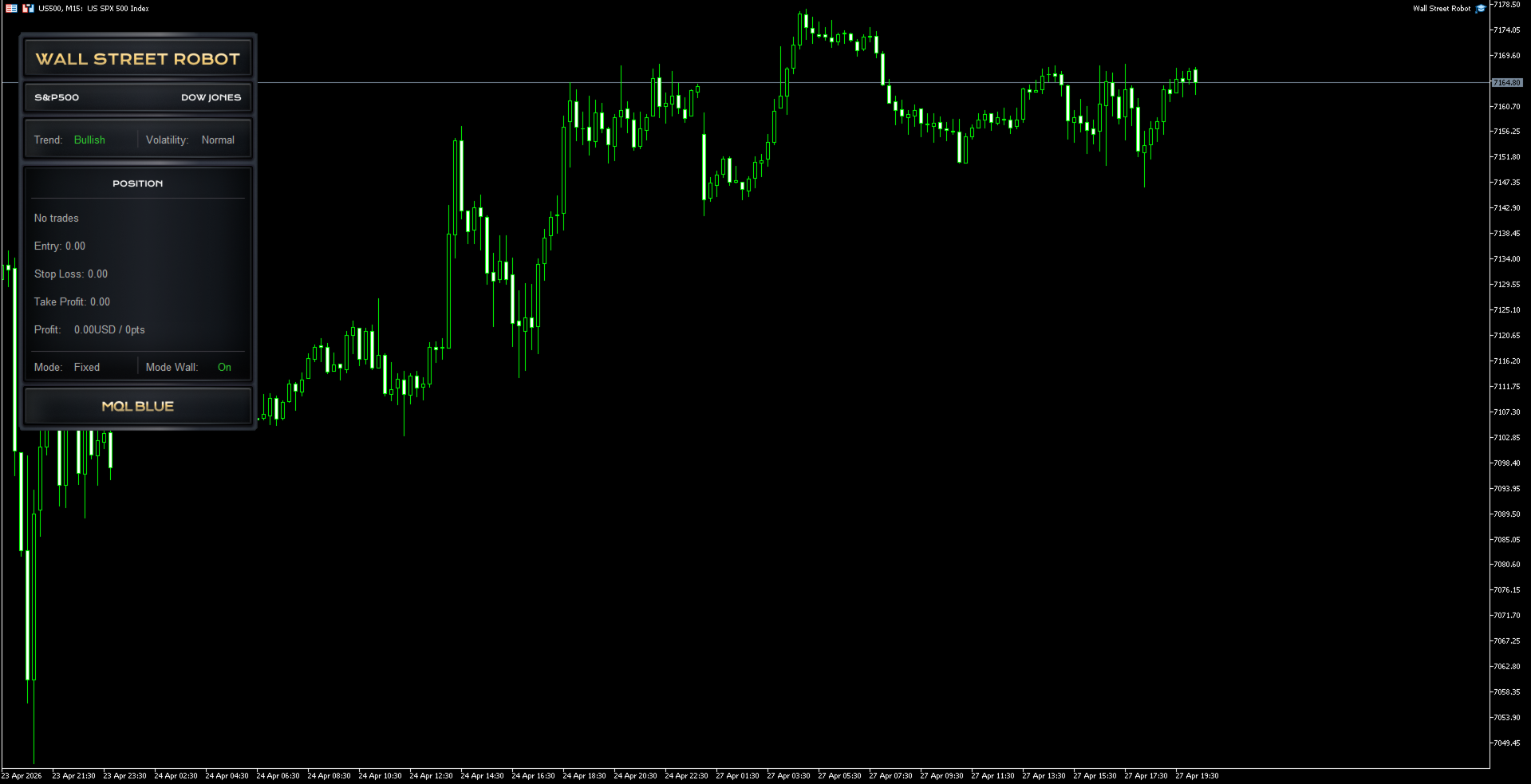
- Visual on-chart panel — displays trend direction (Bullish/Bearish), market volatility (Normal/High), active position details (entry, SL, TP, current profit), and operating mode at a glance.
- Established multi-product developer — MQL TOOLS SL has shipped multiple successful EAs including XG Gold Robot, AI Forex Robot, AI Prop Firms, Big Forex Players, XIRO Robot, and Bitcoin Robot, with thousands of combined verified reviews on MQL5.
EA Setup at a Glance
- Platform: MetaTrader 5
- Instruments: S&P 500 (US500/SPX500) and Dow Jones (US30/DJI30) only
- Timeframe: M15
- Strategy: Trend and volatility analysis with predefined position management
- Position management: Fixed (manual TP/SL/BE in points) or Dynamic (volatility-based)
- Trades open: Maximum 1 at any time
- Risk mechanics: No grid, no martingale, no hedging — defined risk per trade
- Account type: Standard, ECN, or prop firm accounts
- Leverage: 1:30 minimum (works on EU-regulated accounts), 1:100+ recommended
- Minimum deposit: $200 minimum, $500–$1,000 comfortable
- VPS: Recommended for 24/5 uninterrupted operation
- Recommended brokers: Any reputable broker offering US500 and US30 with reasonable spreads — IC Markets, IC Trading, FP Markets, Pepperstone, FxTrading
Visual On-Chart Panel
From Established Developer MQL TOOLS SL
MQL TOOLS SL is one of the most active multi-product developers on MQL5, with a portfolio that includes XG Gold Robot (140+ combined reviews across MT4/MT5), Big Forex Players EA, AI Forex Robot, AI Prop Firms, Bitcoin Robot, and XIRO Robot. The developer has shipped numerous successful EAs over multiple years and maintains active communication with buyers across their product range.
Wall Street Robot reflects the development philosophy visible across MQL TOOLS SL’s portfolio: instrument-specific systems rather than generic multi-symbol EAs, conservative risk architecture without grid or martingale dependencies, and explicit prop firm compatibility on systems where that’s relevant.
Who Wall Street Robot MT5 Is For
Ideal for traders who:
- Trade or want to trade US stock indices specifically (S&P 500, Dow Jones)
- Need a system compatible with prop firm rules (no grid, no martingale, defined drawdown)
- Want one trade at a time with clear exit logic, not portfolio-style position layering
- Prefer disciplined intraday execution on M15 over scalping or swing approaches
- Have $200+ minimum, $500–$1,000+ recommended for comfortable position sizing
- Already use a broker offering competitive spreads on US500 and US30 indices
Consider alternatives if you:
- Want a Forex EA — Wall Street Robot only trades US indices
- Prefer multiple positions running simultaneously across different instruments
- Need a system with years of public live track record before deploying — this product was published 27 April 2026
What You Receive
- Wall Street Robot for MT5 — available file
Want the Full Breakdown?
📖 Read our complete Wall Street Robot review, setup guide and prop firm analysis →
Includes detailed breakdown of the Fixed vs Dynamic management modes, why single-instrument focus matters for US indices specifically, the live performance screenshot we examined, prop firm setup guidance, broker recommendations with reasoning, and step-by-step installation instructions for both MT4 and MT5.
Every order
What’s included with Wall Street Robot
- Instant downloadReady after checkout and kept in your account
- Free lifetime updatesAdded as soon as we receive them, every version kept in your account
- Unlimited activationsUnlimited live and demo accounts
- Free remote installationOptional: a one-time install over AnyDesk, with settings advice and custom presets
Product FAQs
Wall Street Robot MT5 EA FAQs
Real people on support, by Telegram or our contact form.
What is Wall Street Robot for MT5?
Wall Street Robot for MT5 is a professional automated trading system by MQL TOOLS SL focused exclusively on US stock indices — S&P 500 and Dow Jones. It operates on the M15 timeframe with disciplined single-position execution: no grid, no martingale, no hedging. Each trade has predefined Take Profit, Stop Loss, and Break Even levels for full risk control. Two management modes (Fixed and Dynamic) provide flexibility for both manual configuration and volatility-based automatic adjustment.
Which instruments does Wall Street Robot trade?
S&P 500 (US500, SPX500) and Dow Jones (US30, DJI30) only. The system is specifically designed and optimized for these two US stock indices. By concentrating on this narrow instrument focus, the robot adapts precisely to the behavior, volatility patterns, and intraday dynamics of these markets rather than trying to operate across unrelated instruments. Different brokers may use different symbol names — the EA is calibrated for index CFD pricing typical of major brokers.
Does Wall Street Robot use grid or martingale?
No. The architecture is explicitly grid-free, martingale-free, and hedging-free. Only one position is open at any given time, with predefined Take Profit, Stop Loss, and Break Even logic. This eliminates the most common failure modes that destroy automated systems — there is no possibility of compounding losses through stacking positions or doubling down on losing trades.
What’s the difference between Fixed and Dynamic mode?
Fixed mode lets you manually define Take Profit, Stop Loss, and Break Even levels in points, giving full control over trade parameters. Dynamic mode uses volatility-based calculations to automatically adjust position management according to current market conditions — wider stops during high volatility, tighter stops during quiet markets. Most users start with Fixed mode and switch to Dynamic once familiar with the system’s behavior.
Is Wall Street Robot prop firm compatible?
Yes. The EA’s architecture (single position, no grid, no martingale, predefined SL on every trade) directly meets the rules of most prop trading firms. The Fixed mode in particular allows you to set conservative TP/SL/BE values that align with your prop firm’s specific drawdown limits. As always, verify your specific firm’s rules before deploying — different firms have different restrictions on EA usage, news trading, and timing.
What broker should I use for Wall Street Robot MT5?
Any reputable broker offering US500 (S&P 500) and US30 (Dow Jones) indices with competitive spreads. IC Markets, IC Trading, FP Markets, Pepperstone, FxTrading are all good fits. Avoid brokers with extremely wide index spreads or commission structures that would erode the system’s edge on M15 trades. Prop firm accounts work fine — the EA’s architecture is fully compatible.
What’s the minimum deposit?
$200 minimum for conservative position sizing. $500–$1,000 recommended for comfortable trading with reasonable position sizes relative to your stop loss distances. Larger deposits give you more flexibility on lot sizing and protect you from unfortunate runs of consecutive losses while the system finds its rhythm on your specific broker.
- Excellent on Trustpilot 4.6 out of 5 from 120 reviews (opens in a new tab)
- 28,000+ traders since 2019
- 1,580+ official EAs
- Card or crypto payments
Related EAs
Traders also explore
Premium expert advisors at vault-low prices, with your crypto price on every card.
 MT5Save 50%
 MT5Save 17%
 MT5Save 50%
Ready when you are
Wall Street Robot MT5 EA for $399.96 with crypto
Regular price was $1,099.00 · $499.95 with card · instant download · free lifetime updates

Wall Street Robot MT5 EA$399.96with crypto$499.95 with card