
Official MT4 version
Flip Bot EA MT4 – Aggressive Account Growth
Flip Bot EA operates on a high-risk, high-reward strategy that allows traders to potentially double their investments in a short period. Once the bot achieves a 20-50% gain on the initial deposit, it switches to only risking the profits, safeguarding the original investment.
This approach makes it a powerful tool for traders willing to take calculated risks to achieve significant returns.
The Download Package Includes:
+ Expert: Flip Bot EA (.ex4)
+ 2 Presets
+ Instructions
+ How to Install MT4 Files.pdf
More Information:
+ https://t.me/flip_botEA
Live Performance Signal:
+ None known/public
 MT4Save 99%
Regular priceRegular price was $2,000.00
$24.95 with card
Visa, Mastercard, Apple Pay and Google Pay accepted.
Card payments add bank fees, sales taxes and other charges.
- Instant downloadYour file is provided immediately after payment. In very rare cases we manually review an order first, then send your download straight after. If you don’t receive your file, you can request a full refund.
- Free future updatesAll updates are free. They’re provided on a best-availability basis: we get new versions as fast as we can, led by customer demand, but we don’t guarantee them immediately. If you need every update the moment it’s released, our service may not be the best fit for you.
- 7-day money-backRefunds only cover an EA that fails to attach to your chart because of errors we can replicate. We don’t cover changing your mind or not liking the EA. All brokers are different, and results are never promised because markets are constantly changing.
- Unlimited activationsUse it on as many MT4 accounts and computers as you want, live or demo. There are no restrictions on how you use it.
Source code (.mq4) available at checkout.


28,000+ tradersServed since 2019
Orders over $300 include 3 months of PrismAlgo freeThe highly recommended cloud-connected EA for 28 FX pairs, Gold and Bitcoin. Added to your cart automatically. View PrismAlgo
Official versionsInstant downloadFuture updates includedExtra 20% off with cryptoReal people on support28,000+ tradersTrading since 2019Rated Excellent on Trustpilot
Product description
About Flip Bot EA MT4 – Aggressive Account Growth
Flip Bot EA for MT4
Introduction
Flip Bot EA for MT4 is an aggressive trading robot designed to flip accounts rapidly by leveraging high-risk strategies. It’s ideal for traders looking to grow their accounts swiftly, especially in high-volatility periods such as news releases.
Available on CheaperForex.com, Flip Bot EA aims to maximize profits while managing risks smartly by only risking the profits after reaching a certain gain on the initial deposit.
Description of Flip Bot EA
Flip Bot EA operates on a high-risk, high-reward strategy that allows traders to potentially double their investments in a short period. Once the bot achieves a 20-50% gain on the initial deposit, it switches to only risking the profits, safeguarding the original investment. This approach makes it a powerful tool for traders willing to take calculated risks to achieve significant returns.
Key Features:
- Smart Risk Management: Risks only the profits after securing the initial capital.
- High-Risk Mode: Capable of flipping accounts quickly, suitable for traders looking to take advantage of market volatility.
- Scalping Strategy: Designed for short-term trading, best used on the M1 timeframe to capture rapid price movements.
- Cent Account Compatibility: Ideal for small balances, as traders can open cent accounts and enjoy increased trade volume with a lower initial capital requirement.
Trading Specifications
- Recommended Currency Pair: XAUUSD (Gold).
- Timeframe: M1 for optimal scalping performance.
- Minimum Balance: As low as $500-$1000; suitable for cent accounts for enhanced trading flexibility.
Our Thoughts About Flip Bot EA
Flip Bot EA stands out for its ability to manage high-risk strategies effectively, making it an excellent choice for traders who are not risk-averse and wish to grow their accounts aggressively. It’s particularly well-suited for those who prefer a more hands-off approach but still want to participate in the excitement of high-risk trading. The bot’s performance in news time, where it made $1480, showcases its potential when trading under volatile conditions.
Reviews
Alex P. (July 2024): “Flip Bot EA is a beast! I started with $1000, and within days, I saw significant gains. The bot’s strategy of only risking profits after reaching a certain level is genius—it gives me confidence to keep using it even during volatile markets.”
Maria S. (June 2024): “I was skeptical at first, but Flip Bot EA proved its worth. The bot handled my $500 account exceptionally well, flipping it within a week. Just be cautious with the risks, but if managed well, the rewards are worth it.”
John T. (May 2024): “I’ve tried many EAs, but Flip Bot EA is my go-to for aggressive trading. It’s perfect for when I want to take advantage of market moves quickly. The cent account option is a great feature for starting small and scaling up.”
EA Inputs and Features
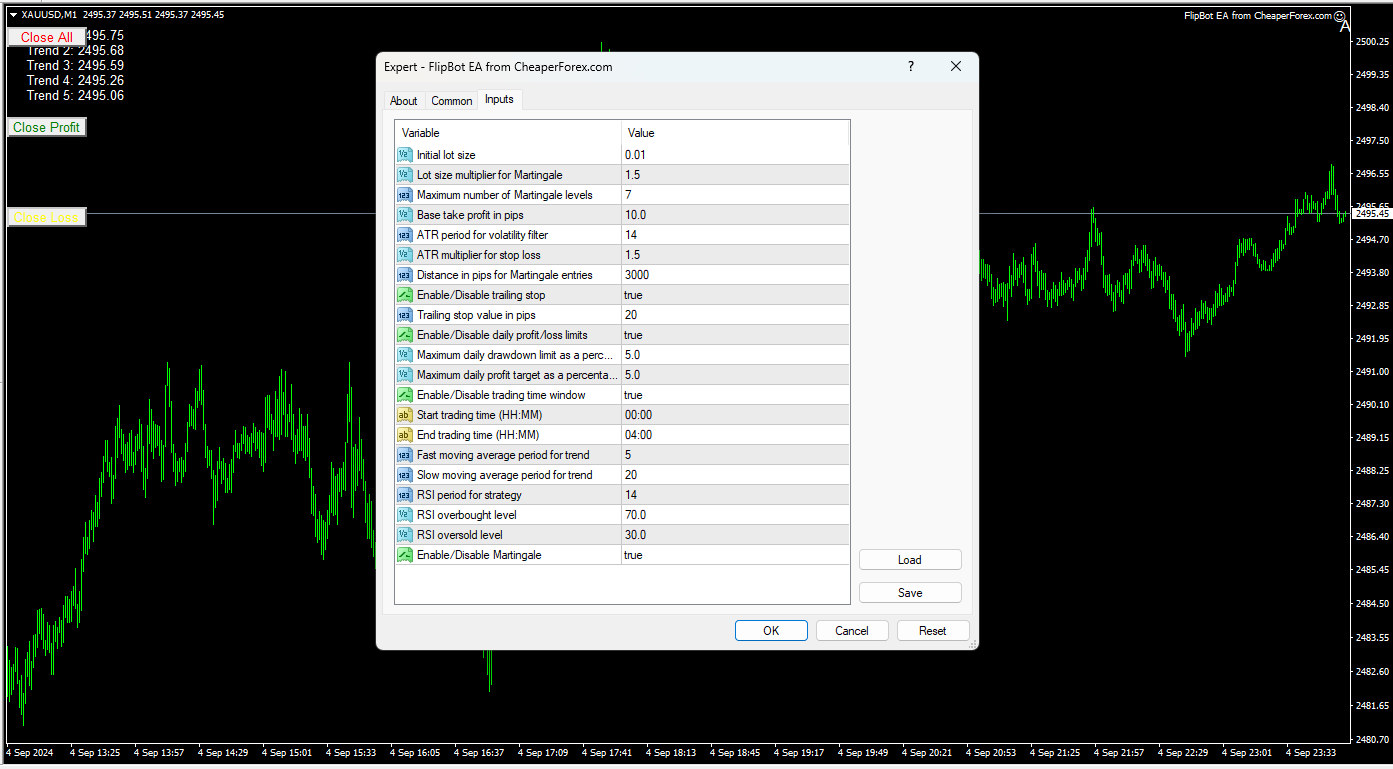
Flip Bot EA offers a range of customizable inputs to fine-tune the trading experience:
- Initial Lot Size: Set to 0.01, providing a conservative entry point.
- Martingale Multiplier: Adjusts lot sizes progressively, with a multiplier set to 1.5, allowing for controlled scaling during drawdowns.
- Maximum Drawdown Control: Users can set daily drawdown limits as a percentage, adding another layer of risk management.
- Trailing Stop: A built-in trailing stop function helps lock in profits as the market moves favorably.
- Daily Profit Targets: Allows setting daily profit goals, enabling traders to manage and lock in gains systematically.
These settings provide flexibility, allowing both novice and experienced traders to customize the EA to fit their risk appetite and trading style.
Conclusion
Flip Bot EA for MT4 is a dynamic and aggressive trading tool tailored for traders who want to flip their accounts quickly. Its innovative risk management strategy, coupled with a high-risk, high-reward approach, makes it an excellent choice for those looking to maximize their trading potential in a short timeframe. Available on CheaperForex.com, Flip Bot EA is ideal for traders who want to capitalize on market volatility without compromising their initial capital. Whether you’re starting with a small balance or ready to scale up, Flip Bot EA offers the flexibility and power to achieve impressive results in the forex market.
Every order
What’s included with Flip Bot
- Instant downloadReady after checkout and kept in your account
- Free future updatesIncluded when we receive them, every version kept in your account
- Unlimited activationsUnlimited live and demo accounts
- Setup helpReal people on Telegram or email
- 7-day money-back guaranteeIf the EA fails to attach to your chart because of errors we can replicate, you get a full refund.
- Excellent on Trustpilot 4.6 out of 5 from 120 reviews (opens in a new tab)
- 28,000+ traders since 2019
- 1,180+ official EAs
- Card or crypto payments
Related EAs
Traders also explore
Premium expert advisors at vault-low prices, with your crypto price on every card.
 MT4Save 98%
 MT4Save 83%
 MT4Save 95%
 MT5Save 40%
Ready when you are
Flip Bot EA MT4 – Aggressive Account Growth for $19.96 with crypto
Regular price was $2,000.00 · $24.95 with card · instant download · future updates included

Flip Bot EA MT4 – Aggressive Account Growth$19.96with crypto$24.95 with card