
Official MT4 version · Gold EA
Leopard Scalper EA V1.4 & V3.1 – 10X Your Account Quickly
Latest version
Leopard Scalper EA for MT4 is a precision-engineered trading advisor optimized for GOLD (XAUUSD) on the M5 timeframe, combining advanced Bollinger Bands strategies, dynamic risk management, and intelligent trade control.
With a remarkable 96.88% win rate, it balances aggressive growth with structured safeguards, making it a powerful tool for traders seeking consistent profitability and smart risk mitigation.
The Download Package Includes:
+ Expert: Leopard Scalper EA (.ex4 file) V1.4 and V3.1
+ Custom Profitable Setfiles
+ How to Install files.pdf
+ Pairs and Timeframes.txt
More Information:
+ https://www.mql5.com/en/market/product/123623
Live Signal Performance:
+ None known
 MT4Save 96%
Regular priceRegular price was $4,700.00
$199.95 with card
Visa, Mastercard, Apple Pay and Google Pay accepted.
Card payments add bank fees, sales taxes and other charges.
- Latest version
- Instant downloadYour file is provided immediately after payment. In very rare cases we manually review an order first, then send your download straight after. If you don’t receive your file, you can request a full refund.
- Free future updatesAll updates are free. They’re provided on a best-availability basis: we get new versions as fast as we can, led by customer demand, but we don’t guarantee them immediately. If you need every update the moment it’s released, our service may not be the best fit for you.
- 7-day money-backRefunds only cover an EA that fails to attach to your chart because of errors we can replicate. We don’t cover changing your mind or not liking the EA. All brokers are different, and results are never promised because markets are constantly changing.
- Unlimited activationsUse it on as many MT4 accounts and computers as you want, live or demo. There are no restrictions on how you use it.
Source code (.mq4) available at checkout.
28,000+ tradersServed since 2019
Orders over $300 include 3 months of PrismAlgo freeThe highly recommended cloud-connected EA for 28 FX pairs, Gold and Bitcoin. Added to your cart automatically. View PrismAlgo
Official versionsInstant downloadFuture updates includedExtra 20% off with cryptoReal people on support28,000+ tradersTrading since 2019Rated Excellent on Trustpilot
Product description
About Leopard Scalper EA V1.4 & V3.1 – 10X Your Account Quickly
Introduction to Leopard Scalper EA for MT4
Leopard Scalper EA is a precision-engineered expert advisor optimized exclusively for GOLD (XAUUSD) on the M5 timeframe. Designed over months of meticulous development, this EA boasts a 96.88% win rate and integrates advanced strategies like Bollinger Bands, Stochastic, RSI, and dynamic Supply and Demand zones.
With robust trade management tools and intelligent risk controls, it offers traders a seamless automated trading experience with maximum profitability and controlled risk.
Key Features of Leopard Scalper EA
1. Intelligent Trading Algorithms
- Bollinger Bands Core Strategy: Key price entry points are identified using Bollinger Bands.
- Supporting Indicators: Stochastic, RSI, ADX, and Supply/Demand zones provide confirmation.
- Dynamic Adjustments: Lot sizes adapt to account equity automatically for smarter risk management.
2. Advanced Trade Management
- Stop-Loss & Trailing Stop: Automated stop-loss with trailing features for locking in profits.
- Breakeven Mechanism: Ensures minimal risk after reaching certain profit levels.
- Hedging Functionality: Automatically counteract losses in adverse scenarios.
3. Real-Time Trading Panel
- Live stats for Daily, Weekly, Monthly, and Yearly profits.
- Manual Buy/Sell buttons with options to close specific positions.
- Market insights, including volatility levels, spread details, and trading sessions.
4. Flexible Trading Conditions
- Configurable trading sessions with up to 5 custom time intervals.
- Built-in protections for high spreads and low volatility scenarios.
5. News Trading Feature
- Dynamically adjusts trading strategies 10 seconds before major news events.
- Automatically executes trades in both directions to capitalize on market volatility.
Performance Details
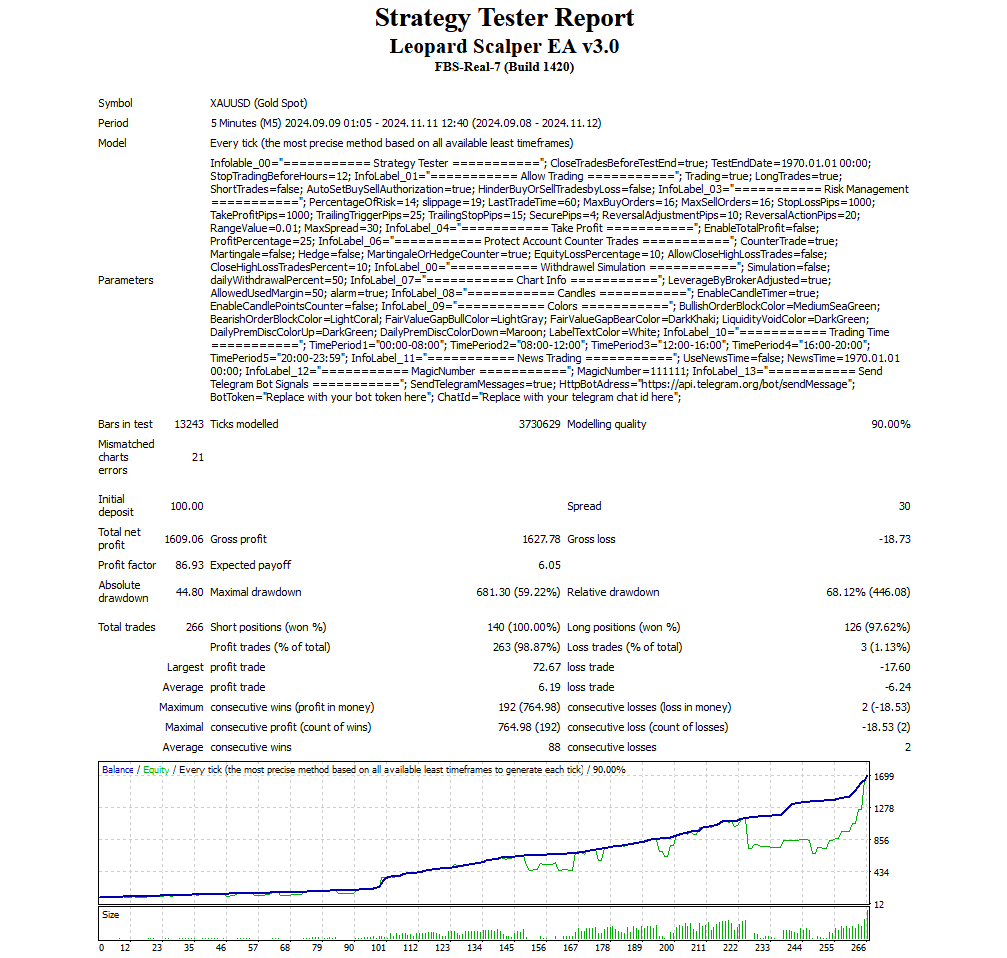
The Leopard Scalper EA’s backtest results demonstrate exceptional consistency and profitability:
- Net Profit: $1,609.06
- Profit Factor: 86.93
- Win Rate: 96.88%
- Drawdown: 68.12%
These results highlight the EA’s capability to grow accounts aggressively while maintaining structured risk management strategies.
Inputs and Settings
Leopard Scalper EA includes an extensive range of customizable settings:
- Risk Management: Configure lot sizes, stop-loss, and trailing stop.
- Trading Hours: Set preferred trading intervals across 5 time periods.
- Indicators: Adjustable settings for Bollinger Bands, RSI, and ADX.
- News Filters: Activate or deactivate news-based trading strategies.
- Manual Overrides: Toggle automated Buy/Sell controls for trend flexibility.
Recommended Setup
- Currency Pair: XAUUSD (GOLD)
- Timeframe: M5
- Minimum Deposit: $100 (recommended $500+)
- Broker Type: ECN, Raw Spread, Zero Account
- Leverage: 1:100 or higher
- VPS Hosting: Strongly recommended for uninterrupted trading
Who is Leopard Scalper EA For?
- Gold Traders: Optimized specifically for XAUUSD.
- Prop Firm Traders: Effective risk management for funding challenges.
- Manual & Automated Traders: Flexibility for hybrid trading approaches.
- Risk-Aware Investors: Built-in features to minimize unnecessary risk.
Testing & Risk Management Advice
- Start with a demo account to understand the EA’s behavior.
- Withdraw profits regularly after doubling equity.
- Avoid manual interference with automated strategies for best results.
Conclusion
Leopard Scalper EA offers a powerful blend of intelligent automation, advanced risk management, and user-friendly controls. Designed with the GOLD (XAUUSD) market in mind, it provides both manual and fully automated trading options, making it suitable for beginners and experienced traders alike. With a structured approach to risk and profitability, this EA can rapidly grow accounts when managed responsibly.
The main takeaway: If you master profit withdrawals after significant gains, Leopard Scalper EA has the potential to transform your trading results.
Every order
What’s included with Leopard Scalper
Download it, install it and keep it current: everything comes with your license.
Instant download
Ready the moment checkout completes, and kept in your customer portal.
Installation guide
Step-by-step PDF with screenshots.
Optimized presets
Ready-to-use configuration files.
Future updates
Included free when we receive them. You never pay twice, and every version stays in your account.
Unlimited activations
Use it on as many terminals as you like: unlimited live and demo accounts, no activation keys.
Setup help
Questions about installing or settings? Message us on Telegram or email and a real person answers.
7-day money-back guarantee
If the EA fails to attach to your chart because of errors we can replicate, you get a full refund.
*Refunds don’t cover changing your mind or not liking the EA. All brokers are different, and results are never promised because markets are constantly changing.
Customer reviews
Reviews of Leopard Scalper EA V1.4 & V3.1 – 10X Your Account Quickly
You must be logged in to post a review.
The CheaperForex difference
Why 28,000+ traders choose CheaperForex


“Bought 2 EAs from them. Requested update for new version and was sent within 24hrs. Great support. Recommended, 5 STARS.”
 Aceman · Trustpilot review (opens in a new tab)
“Fantastic service as always. Have gotten a lot from them in the past and never been disappointed.”
Paul Michael Lawrence · Trustpilot review (opens in a new tab)“They were friendly and helpful in setting up my expert advisor.”
 Sarah Francis · Trustpilot review (opens in a new tab)
- Instant accessNo group buys or waiting
- 7-day refund policyRefunds only cover an EA that fails to attach to your chart because of errors we can replicate. We don’t cover changing your mind or not liking the EA. All brokers are different, and results are never promised because markets are constantly changing.For product errors
- Setup helpBy Telegram or email
- Flexible paymentsCards, Apple Pay, Crypto
Related EAs
Traders also explore
Premium expert advisors at vault-low prices, with your crypto price on every card.
 Save 55%
 MT4Save 60%
 MT4Save 60%
 MT4Save 69%
Ready when you are
Leopard Scalper EA V1.4 & V3.1 – 10X Your Account Quickly for $159.96 with crypto
Regular price was $4,700.00 · $199.95 with card · instant download · future updates included

Leopard Scalper EA V1.4 & V3.1 – 10X Your Account Quickly$159.96with crypto$199.95 with card
There are no reviews yet.