
Official MT4 version · Gold EA
Loss Recovery Trader EA MT4
Latest version
We’re rated Excellent on Trustpilot · 4.6/5 (opens in a new tab)Loss Recovery Trader EA for MT4 by Michalis Phylactou is an advanced zone recovery bot that turns losing trades into breakeven or profit using a structured grid-based strategy with dynamic lot control.
Ideal for traders who want to recover from drawdown intelligently.
The Download Package Includes:
+ Expert: Loss Recovery Trader (.ex4) – Version 12.4
+ Pairs/Timeframes.txt
+ How to Install MT4 files.pdf
More Information:
+ https://www.mql5.com/en/market/product/7562
Live Performance Signal:
+ Unknown
 MT4Save 67%
What you receive
- Loss Recovery Trader.ex4Genuine, unmodified developer file for MetaTrader 4Latest version
- Setup guide.pdfA general guide to installing expert advisors.Official step-by-step install guide
Delivered instantly to your account after payment
Regular priceRegular price was $749.00
$249.95 with card
Visa, Mastercard, Apple Pay and Google Pay accepted.
Card payments add bank fees, sales taxes and other charges.
- Official developer build · Latest version
- Instant downloadYour file is provided immediately after payment. In very rare cases we manually review an order first, then send your download straight after. If you don’t receive your file, you can request a full refund.
- Free lifetime updatesAll updates are free. They’re provided on a best-availability basis: we get new versions as fast as we can, led by customer demand, but we don’t guarantee them immediately. If you need every update the moment it’s released, our service may not be the best fit for you.
- 7-day money-backRefunds only cover an EA that fails to attach to your chart because of errors we can replicate. We don’t cover changing your mind or not liking the EA. All brokers are different, and results are never promised because markets are constantly changing.
- Unlimited activationsUse it on as many MT4 accounts and computers as you want, live or demo. There are no restrictions on how you use it.
What you receive
- Loss Recovery Trader.ex4Genuine, unmodified developer file for MetaTrader 4Latest version
- Setup guide.pdfA general guide to installing expert advisors.Official step-by-step install guide
Delivered instantly to your account after payment


28,000+ tradersServed since 2019
Orders over $300 include 3 months of PrismAlgo freeThe highly recommended cloud-connected EA, on all 28 Forex pairs for one MT5 account. Added to your cart automatically. View PrismAlgo
Official versionsInstant downloadFree lifetime updatesExtra 20% off with cryptoReal people on support28,000+ tradersTrading since 2019Rated Excellent on Trustpilot
Product description
About Loss Recovery Trader EA MT4
🟨 Introduction to Loss Recovery Trader EA
Loss Recovery Trader EA is a specialized expert advisor designed to help traders recover losing trades through a structured and intelligent zone recovery algorithm. Developed by Michalis Phylactou, this EA initiates a smart sequence of alternating buy/sell trades when the market moves against you, closing all trades at breakeven or a small profit once the price hits one of two predefined exit points.
Whether you’re manually entering trades or integrating this EA with another bot, the system is flexible, powerful, and fully automated once configured.
🔑 Key Features
✅ Zone Recovery Strategy
Initiates trades in opposite directions with calibrated lots to recover loss and exit at breakeven/profit.
✅ Manual or Automated Entry
Use panel buttons, MA crossover, or external EA integration to trigger the initial trade.
✅ Smart Recovery Logic
Handles recovery with flexible pip gaps, profit targets, and lot progression methods.
✅ Advanced Risk Controls
Limit max trades, max spread, max loss/profit at the account level.
✅ External EA Support
Syncs with other bots via magic numbers, making it a perfect plug-in recovery module.
✅ Visual Panel & Config Options
Includes trailing stop, breakeven triggers, and moving average setups for the first trade.
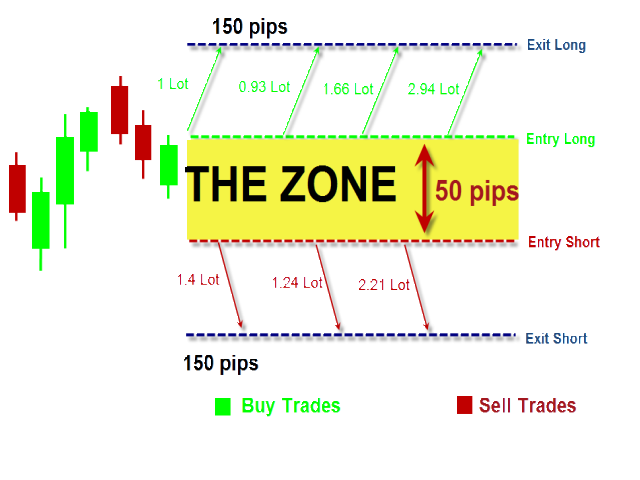
💡 How It Works
Once the initial trade is placed, if the market moves the wrong way, the EA:
-
Starts placing alternating orders (buy/sell) above and below the recovery zone.
-
Adjusts lot sizes based on selected logic (multiplier, fixed target amount, or custom).
-
Monitors the zone until one of the exit lines is hit.
-
Closes all trades in combined profit or breakeven — ending the recovery cycle.
📊 Illustrated clearly below:
⭐ Real User Reviews
💬 Eleni Anna Branou
“Excellent product. It can really help your trading and avoid losses. Super fast and prompt support from Michalis, always the best!”
💬 Brian Hudson
“Just started using this EA, but it’s showing positive results. Lots of smart settings. I love that I can use it with another EA or standalone.”
💬 zancuts
“This EA helped me recover trades that would’ve otherwise blown my account. Highly recommend, but use smart lot sizes!”
💬 Matthew Winfield
“Very comprehensive. If you read the manual and understand it, this thing will do wonders. Support is A+.”
💬 HLong P
“If you take the time to set it up right, it works beautifully. I’ve used it with custom EAs to handle losses automatically.”
💬 Maarten Merkens
“Professional-level product. Very useful when combined with grid or recovery setups. Michalis gives top-notch support!”
🛠️ Settings Overview
-
FirstTrade Mode: Manual, EA panel, external EA, or MA strategy
-
Recovery Zone: Set gap pips, TP pips, and lot calculation method
-
Lot Calculation: Profit Target, Multiplier, or Custom
-
Safety: Max trades, spread filter, loss/profit cutoffs
-
Optional MA Trigger: Use dual MA crossover to trigger the recovery cycle
-
Trailing Stop & Break Even: Optional smart exit tools for the first trade
📈 Why Choose Loss Recovery Trader EA?
🔄 Perfect for recovery-focused strategies
⚙️ Highly customizable and modular
🧩 Works standalone or integrates with other EAs
📉 Helps avoid stop loss-based exits
🧠 Great for traders who understand risk control
❓FAQs
1. Can I use this EA alongside another EA?
Yes, just match the magic number and select “External_EA_Trade” as the first trade method.
2. Does it use martingale?
It uses controlled lot progression, not true martingale. You can set custom formulas or fixed targets.
3. Is this suitable for beginners?
Partially. While setup is flexible, understanding lot sizing and risk exposure is critical.
4. Does it work with any broker?
Yes, but a low-spread ECN broker is recommended. Set a Max Spread filter to avoid bad entries.
5. Can I limit the number of trades or loss?
Yes — configure Max Active Trades, Max Profit, and Max Loss in the settings.
6. Is a VPS necessary?
Highly recommended for uninterrupted performance, especially with pending orders or trailing logic.
🟢 Conclusion
If you’re tired of giving up on losing trades, Loss Recovery Trader EA gives you a second chance — intelligently. Its structured logic, flexible risk settings, and seamless integration with external systems make it a powerful tool for both manual and algorithmic traders.
Whether you’re recovering from grid-based bots or manually misfired entries, this EA helps close your positions with dignity — and often, profit.
Every order
What’s included with Loss Recovery Trader
- Instant downloadReady after checkout and kept in your account
- Free lifetime updatesAdded as soon as we receive them, every version kept in your account
- Unlimited activationsUnlimited live and demo accounts
- Setup helpReal people on Telegram or email
- 7-day money-back guaranteeIf the EA fails to attach to your chart because of errors we can replicate, you get a full refund.
- Excellent on Trustpilot 4.6 out of 5 from 120 reviews (opens in a new tab)
- 28,000+ traders since 2019
- 1,550+ official EAs
- Card or crypto payments
Related EAs
Traders also explore
Premium expert advisors at vault-low prices, with your crypto price on every card.
 MT4Save 28%
 MT4Save 93%
 MT4Save 95%
 MT4Save 75%
Ready when you are
Loss Recovery Trader EA MT4 for $199.96 with crypto
Regular price was $749.00 · $249.95 with card · instant download · free lifetime updates

Loss Recovery Trader EA MT4$199.96with crypto$249.95 with card