
Mad Turtle EA MT5 Settings & Download Guide: Configuration Tips + Save Up to $1,196
📚 What You’ll Learn: This step-by-step configuration guide shows you exactly how to set up and optimize Mad Turtle EA for maximum performance. You’ll discover which AI model to choose based on your account size, the optimal risk settings for your trading style, and how to avoid the common mistakes that kill profitability. Perfect for traders who already own Mad Turtle EA or are ready to purchase it.
🚀 Ready to Buy Mad Turtle EA? Save up to $1,196
From $503.96 with crypto (or $629.95 by card). MQL5 price: $1,700.
✅ Same official EA with lifetime updates
✅ Full installation support included
✅ 4.55★ rating from 78 reviews on MQL5
Quick Start: Mad Turtle EA Configuration Guide
Last Updated: February 2026 | Version 6.5
Mad Turtle EA is an AI-powered gold trading system that requires proper configuration to achieve optimal results. Unlike simple plug-and-play EAs, Mad Turtle offers multiple AI models, customizable risk settings, and advanced features that have delivered 202% growth across 1,443 verified live trades. This guide shows you exactly how to configure it based on real testing data and verified live results.
Understanding Mad Turtle’s AI Models
The most important configuration decision is choosing the right AI model. Mad Turtle includes multiple pre-trained models optimized for different trading approaches:
Primary Models (Recommended)
XAUUSD H1 Mad Turtle (Performance Mode)
- Best for: Conservative traders, accounts from $500+, prop firm challenges
- Trade frequency: 2-5 trades per week
- Recommended risk: 0.5-1% per trade
- VPS required: Optional (recommended for best results)
XAUUSD M15 Mad Turtle
- Best for: Moderate traders wanting more action ($500+)
- Trade frequency: 5-12 trades per week
- Recommended risk: 1-2% per trade
- VPS required: Highly recommended
XAUUSD M5 Mad Turtle
- Best for: Active traders with larger accounts ($1,000+)
- Trade frequency: 10-20+ trades per week
- Recommended risk: 0.5-1.5% per trade
- VPS required: Mandatory
Step-by-Step Setup Process
Step 1: Choose Your Model & Timeframe
- Open MT5 and create an XAUUSD chart
- Set timeframe to match your chosen model (H1, M15, or M5)
- Note: Chart timeframe should match EA model for proper dashboard display
Step 2: Configure EA Settings
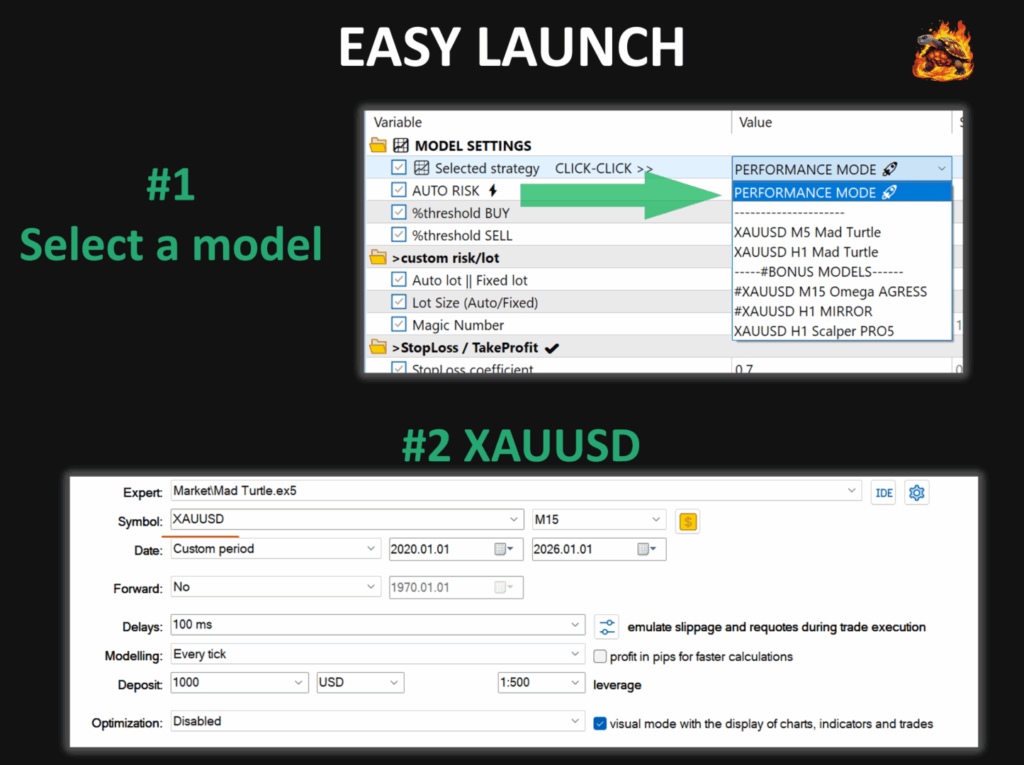
- Drag Mad Turtle EA from Navigator onto your XAUUSD chart
- In the settings panel:
- Select your model from “Selected strategy” dropdown
- Enable “AUTO RISK” checkbox (recommended for 95% of traders)
- Set risk percentage: Start conservative at 0.5-1% per trade
- Set unique Magic Number if running multiple instances
- Leave other settings at default initially
- Click “OK” to apply settings
Step 3: Enable Auto-Trading
- Click “Auto Trading” button in MT5 toolbar (turns green when active)
- Verify EA shows smiley face icon in chart corner
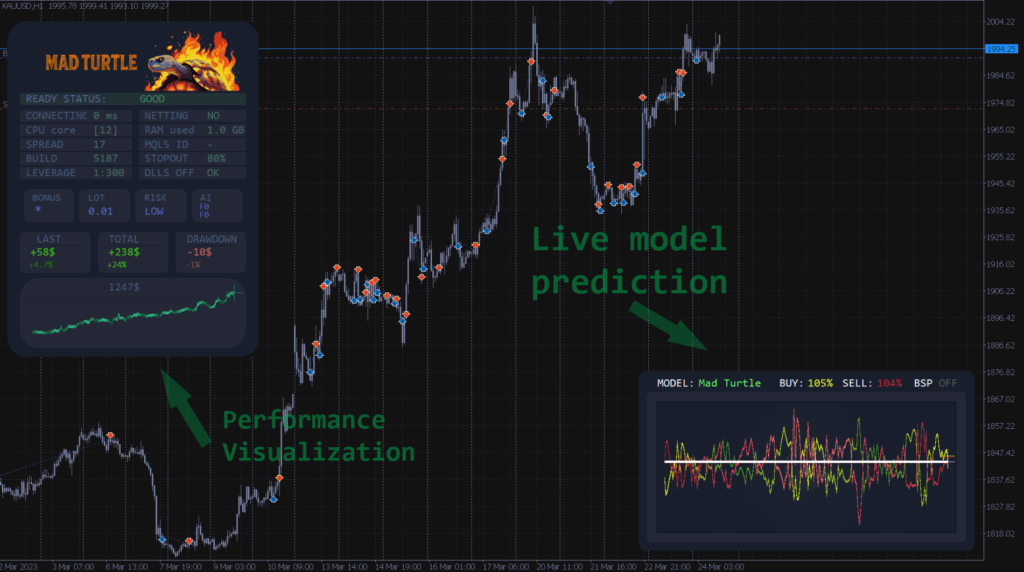
- Check that dashboard panel appears showing EA status
Step 4: Verify Setup
Dashboard should display:
- READY STATUS: GOOD (green indicator)
- Model name matching your selection
- Account information showing correctly
- BUY/SELL prediction percentages updating in real-time
Optimized Risk Management Settings
Risk Per Trade (Auto Risk Enabled)
Conservative Profile ($500-$1,000):
- Start: 0.5% per trade
- Maximum: 1.5% per trade
- Why: Protects smaller accounts from single losing trades
Moderate Profile ($1,000-$2,000):
- Start: 1% per trade
- Maximum: 2% per trade
- Why: Balanced growth without excessive risk
Aggressive Profile ($2,000+):
- Start: 1.5% per trade
- Maximum: 3% per trade
- Why: Faster compounding for experienced traders
Critical rule: Never exceed 5% risk per trade. This is the #1 cause of account blow-ups.
Advanced Settings
Spread Filter: Set to 30-40 points (prevents trading during unusual spread spikes)
News Filter: Enable for H1/M15 models (provides extra protection during major news events like NFP, FOMC)
Time Filters: Leave at default unless your broker has unusual spread patterns during specific hours
Common Configuration Mistakes to Avoid
Mistake #1: Judging Performance Too Quickly
The AI deliberately pauses trading when market conditions are unclear. No trades for 2-3 days is protective behavior, not a malfunction. Evaluate performance over minimum 2-4 weeks, not days.
Mistake #2: Constantly Changing Settings
The developer spent months optimizing through machine learning. Set your configuration once and leave it alone for at least one month. Traders who constantly tweak settings perform worse than those who trust the optimization.
Mistake #3: Wrong Broker Choice
Using a broker with spreads over 30 points on XAUUSD kills profitability. Choose brokers with consistent spreads under 20-25 points. This is non-negotiable for optimal results.
Mistake #4: Running Fast Models Without VPS
M15 and M5 models require stable 24/7 connection. Running on home PC with intermittent internet causes missed trades and poor performance. VPS is mandatory for these models.
🎯 Ready to Get Started?
Mad Turtle EA is available at CheaperForex from $503.96 with crypto or $629.95 by card — saving you up to $1,196 off the MQL5 price of $1,700. Same official EA, same lifetime updates, plus full installation support.
What Results to Expect
Based on the verified live WT signal running since July 2025 (as of February 2026):
- Total growth: 202% across 26 weeks of live trading
- Monthly average: ~28% account growth with moderate risk settings
- Win rate: 67.77% across 1,443 verified trades
- Profit factor: 2.17
- Recovery factor: 10.84
- Maximum drawdown (equity): 9.47%
- Maximum drawdown (balance): 7.51%
- Max deposit load: 3.83%
- Avg holding time: 8 hours
- Max consecutive wins: 70 trades ($645.93)
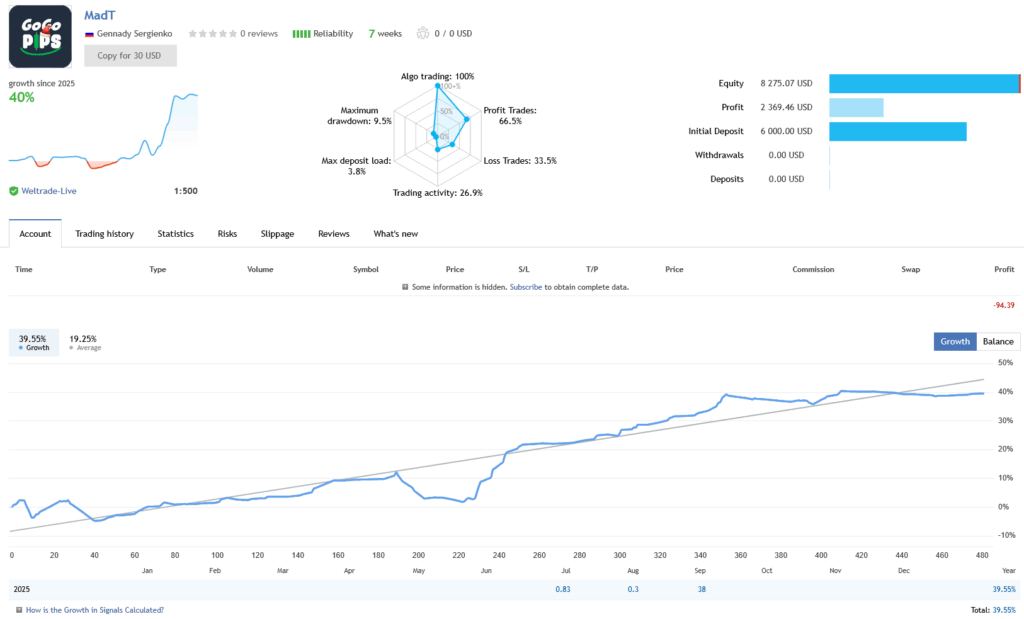
Important: Your results will vary based on broker spread/execution quality, VPS usage, risk settings, and market conditions during your trading period. The developer also runs a second signal on ICMarkets for additional verification.
Broker Requirements
Essential Requirements
- XAUUSD symbol available
- Minimum deposit: $500 (recommended by developer)
- Average spread: Under 20-25 points
- Any account currency (USD, EUR, GBP all work)
- Standard or ECN account types both supported
- Any GMT offset — the EA adjusts automatically
Prop Firm Compatibility
Mad Turtle is fully compatible with prop firm challenges because:
- Uses strict stop loss on every trade
- No grid, martingale, or dangerous strategies
- Single-order logic (no averaging in standard models)
- Transparent operation with controllable risk
- Max deposit load of just 3.83% on verified signal
Works with: FTMO, The5ers, FundedNext, and similar prop firms that allow EAs on XAUUSD.
VPS Setup
H1 Model: Optional (can work on home PC with stable 24/7 internet)
M15 Model: Highly recommended (missing entries impacts performance)
M5 Model: Mandatory (requires continuous low-latency connection)
Minimum VPS specs: 1GB RAM, single core CPU, 20GB storage, Windows Server 2016+
Recommended providers: ForexVPS.net ($10-20/month), Vultr ($5-10/month), or your broker’s free VPS
Frequently Asked Questions
Which model should I start with?
XAUUSD H1 Mad Turtle (Performance Mode) for 90% of traders. It is stable, works from $500, and has the best verified results. The developer’s own live signal runs this model and has achieved 202% growth in 26 weeks.
Why has the EA not traded in 3 days?
The AI pauses when market structure is unclear. This is protective behavior that prioritizes account safety over constant activity. The verified signal shows 49% trading days — meaning the EA deliberately sits out roughly half the time. This patience is part of the edge.
The EA took a stop loss — is something wrong?
No. Stop losses are normal and expected. Even with a 68% win rate, roughly one-third of trades will hit their stop. The verified signal has taken 465 losing trades out of 1,443 total — and is still up 202%. This is proper risk management in action.
Can I run multiple models at the same time?
Yes, but use different magic numbers for each instance. This is not recommended until you understand individual model behavior over at least 2-4 weeks. Start with one model, learn its rhythm, then consider adding a second.
What is a realistic monthly return?
The verified live signal averages approximately 28% monthly growth with moderate risk settings. Individual months will vary — some higher, some with drawdowns. Anyone promising 50-100%+ monthly returns from any EA is being unrealistic.
Does Mad Turtle EA trade both buy and sell?
The EA is heavily biased toward buy positions — 98.4% of trades on the verified signal are long. The developer explains that due to gold’s strong long-term uptrend, the buy models have performed significantly better during training. Some sell models exist but are set to close-only mode rather than opening new short positions.
Is CheaperForex a legitimate seller?
CheaperForex has been operating since 2019, has served over 28,000 customers, and holds a 4.5-star rating on Trustpilot with linked, verifiable reviews. You receive the same official EA file from MQL5 with all future updates included, plus dedicated installation support. Prices start from $503.96 with crypto or $629.95 by card — compared to $1,700 on MQL5.
Ready to Get Started?
Mad Turtle EA is available at CheaperForex from $503.96 with crypto or $629.95 by card — saving you up to $1,196 off the MQL5 price of $1,700. You get the same official EA with lifetime updates and full installation support.
→ Buy Mad Turtle EA — Save Up to $1,196
What’s Included:
- Official Mad Turtle EA v6.5 (latest version)
- Lifetime updates included free
- Full installation support from CheaperForex
- Access to developer support and community
- Complete setup documentation
Support Resources:
- Developer: Gennady Sergienko (8+ years MQL5 experience)
- MQL5 Rating: 4.55/5.00 stars (78 reviews)
- Live verified signal: View Performance (202% growth)
- Official MQL5 page: Product Details
Disclaimer: Trading forex and CFDs involves significant risk of loss. Past performance does not guarantee future results. Configuration strategies are based on verified testing but individual results vary based on broker, execution quality, risk settings, and market conditions. Always trade with risk capital you can afford to lose.
Last updated: February 15, 2026 | Version: 6.5 | Configuration Guide by CheaperForex