
Tycoon Breakout EA MT5
 MT5Save 55%
- Guaranteed genuine
- Free lifetime updates
- Free setup help
Regular price $649.00
$234.39
Version 2.10Official product
$292.99 by card, Apple Pay or Google Pay
What you receive
- Tycoon Breakout.ex5Version 2.10Fully unrestricted with unlimited activations
- Setfiles (.set)Ready to load in MetaTrader
- Free lifetime updatesWhen a new version arrives, download from your account
CheaperForex is rated Excellent on Trustpilot


28,000+ traders served since 2019
- Instant downloadYou’ll find your standard purchase in your account after payment. If your order needs manual review, it will appear once the review is complete. Contact support if you can’t find it.
- Free lifetime updatesAll updates are free. They’re provided on a best-availability basis: we get new versions as fast as we can, led by customer demand, but we don’t guarantee them immediately. If you need every update the moment it’s released, our service may not be the best fit for you.
- 7-day refund policyIf the product won’t attach to your chart, contact us within 7 days of purchase. If we can reproduce the error and can’t fix it, we’ll refund the affected product’s price. Trading performance is excluded. Source code is non-refundable under this policy. Your statutory rights still apply.
- Unlimited activationsUse it on as many MT5 accounts and computers as you want, live or demo. There are no restrictions on how you use it.
Tycoon Breakout EA MT5 combines four XAUUSD breakout and momentum strategies with separate sizing, direction and exit controls.
- PARK, PLAZA, TOWER and ESTATE strategy combinations.
- STANDARD or CUSTOM stop-loss, take-profit and trailing settings.
- Broker-first hybrid protection and optional account-risk controls.
Official versionsInstant downloadFree lifetime updatesExtra 20% off with cryptoReal people on support28,000+ tradersTrading since 2019Rated Excellent on Trustpilot
Product description
About Tycoon Breakout EA MT5
Tycoon Breakout EA MT5 trades XAUUSD / Gold breakouts and momentum through four configurable strategies: PARK, PLAZA, TOWER and ESTATE. Each has its own direction, position sizing and exit settings. Choose a strategy combination, retain the standard optimized exits or customize the stop-loss, take-profit and trailing behavior.
Read our Tycoon Breakout EA MT5 review: strategies, execution and broker signals
Four strategies with separate controls
Each strategy can trade both directions, BUY only or SELL only. LOW uses ESTATE; MEDIUM adds PARK; HIGH adds PLAZA; ARMAGEDDON enables all four, including TOWER. CUSTOM allows manual selection. One open position is permitted per strategy, while pending orders can be managed before an entry. Several strategies can therefore overlap in gold exposure.
Fixed Lot, Risk Percent and Risk per Balance are available independently for each strategy. The overview’s default is ARMAGEDDON with Fixed Lot 0.01 per strategy; that is a starting configuration to assess, not a universal safe size or minimum-deposit recommendation.
Control exits and monitor execution
STANDARD keeps the original optimized stop-loss, take-profit and trailing settings. CUSTOM exposes stop-loss, take-profit, trailing start, distance and step without changing the underlying breakout entry logic. Slippage monitoring has SOFT, MEDIUM and HARD levels, with MEDIUM as the stated default.
The Broker-First Hybrid system attempts broker-side stop protection first. An internal virtual level can provide a fallback when modification is temporarily unavailable. Keep the terminal or VPS running and connected for that management; virtual protection and stop orders do not guarantee a fill price during gaps or fast markets.
News, time and optional account protection
The 30 October 2026 version 2.10 release enables the high-impact USD news filter by default. It also adds FOMC-week, election and Federal Reserve holiday controls, plus separate strategy time filters. Check the loaded inputs after an upgrade. Backup news-feed setup is documented through the WebRequest allowlist at https://nfs.faireconomy.media.
The separate prop-firm protection module is OFF by default. Its configurable daily and overall drawdown, per-trade and total-risk limits, optional daily target and Block Only / Close Position actions need to match the firm’s actual rules. It does not guarantee a challenge pass.
Prepare the gold-trading environment
- Platform and market
- MetaTrader 5; XAUUSD / Gold.
- Chart
- H1 is recommended by the developer.
- Position sizing
- Fixed Lot, Risk Percent or Risk per Balance per strategy.
- Execution
- Check contract size, digits, spread, margin, Stop Levels and Freeze Levels.
- Continuity
- A running, connected MT5 terminal or VPS is needed for active and virtual management.
- Weekend handling
- Friday 22:00 broker time blocks/removes pending orders; Monday 00:00 resumes. Open positions remain managed.
Look beyond the simulated drawdown
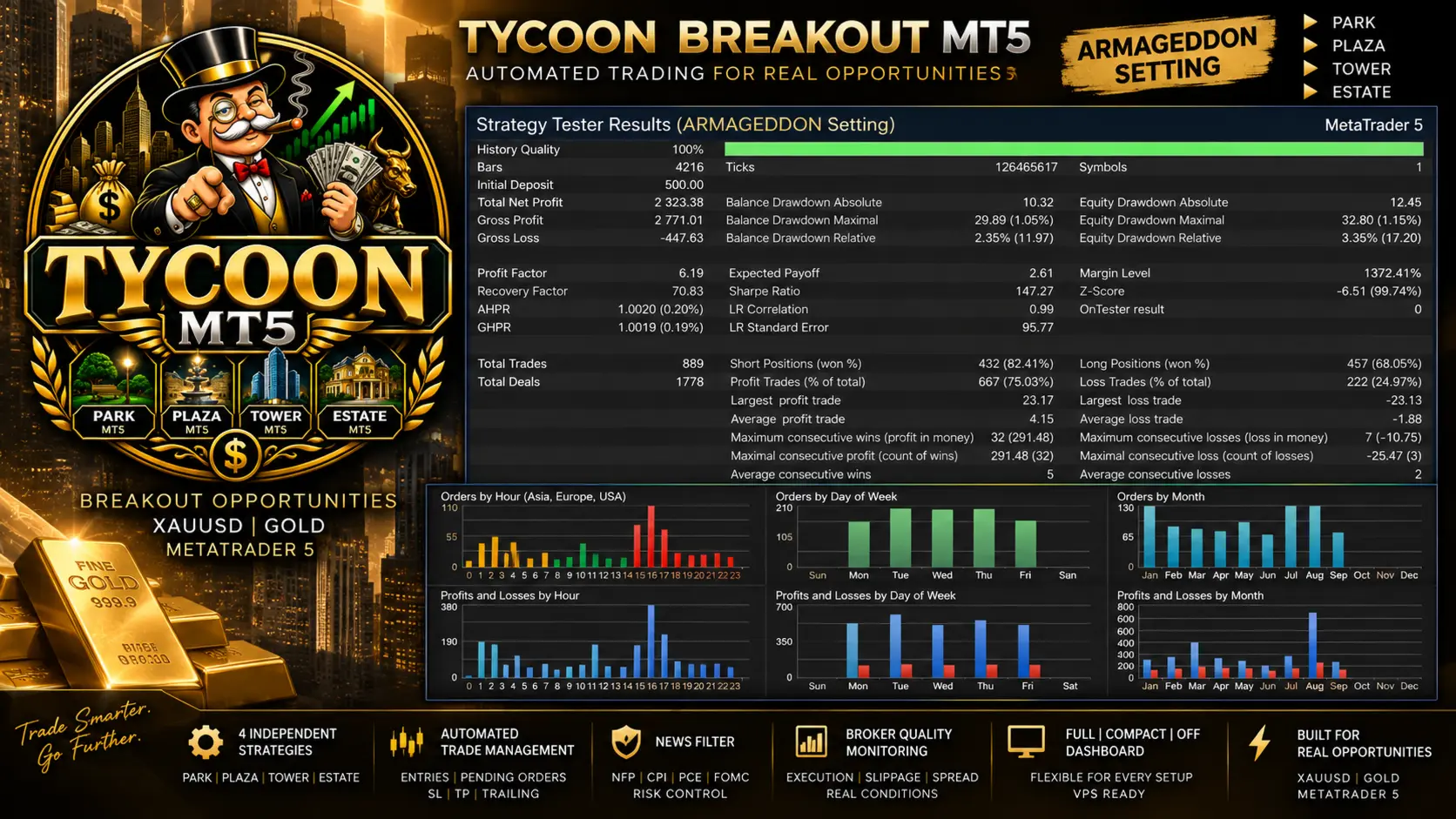
The original developer illustration below includes historical tester-style results. The three linked ARMAGEDDON broker records have only four to ten weeks of history, and the VT account shows 51.23% maximal balance drawdown. The detailed review keeps those risks, leverage and cash flows alongside the reported growth.
Also from Thomas Christoph Lipka: Colosseum MT5 EA and Hedgehog EA MT5.
Compare London to New York MT5 EA, another Alpha Tools EA focused on the London and New York gold sessions.
Verify it yourself
Delivery note
Your order includes a delivery-instructions document for this standalone EA offer. Free lifetime updates are included.
What’s new in version 2.10
In version 2.10 (30 October 2026), the developer added several new filters for trading pauses. There are optional pauses around FOMC week and US congressional election periods, plus an automatic block on official Federal Reserve bank holidays. A year-end holiday pause is available as an option, and each of the four strategies (PARK, PLAZA, TOWER and ESTATE) now has its own on/off trading time control. A high-impact USD news filter is switched on by default. In our view, the separate time controls and event filters give traders more say over when the EA is active around known high-risk periods.
Don’t miss thisSee the EA we recommend
The Forex EA we trade ourselves
PrismAlgo for Forex


We have tested thousands of EAs. PrismAlgo is the one we use and recommend for Forex, and we rarely say that. We’re also an official reseller.
Real USD MyFXBook account. A live cloud, constantly evolving strategy.
See PrismAlgoEvery order
What’s included with Tycoon Breakout
- Instant downloadReady after checkout and kept in your account
- Free lifetime updatesAdded as soon as we receive them, every version kept in your account
- Unlimited activationsUnlimited live and demo accounts
- Free remote installationOptional: a one-time install over AnyDesk, with settings advice and custom presets
Product FAQs
Tycoon Breakout EA MT5 FAQs
Real people on support, by Telegram or our contact form.
Which symbol and timeframe are recommended?
The developer specifies XAUUSD / Gold on MT5 and recommends H1. That recommendation is not a claim that the calculation timeframe is fixed for every setup.
How do the strategy profiles differ?
LOW uses ESTATE; MEDIUM uses PARK and ESTATE; HIGH adds PLAZA; ARMAGEDDON enables all four, including TOWER. CUSTOM allows manual selection. ARMAGEDDON with Fixed Lot 0.01 per strategy is the overview’s default, not a universal sizing recommendation.
Is there only one open position for the whole EA?
No. The stated limit is one open position per strategy. Multiple strategies can overlap, and pending orders can exist before an entry.
Do CUSTOM exits change the entry strategy?
No. CUSTOM changes stop-loss, take-profit and trailing start, distance and step. The underlying breakout entry logic remains unchanged.
Is the USD news filter enabled by default?
The version 2.10 release dated 30 October 2026 says the high-impact USD news filter is enabled by default. This supersedes the older 2.0 overview’s OFF label. Verify the actual inputs and allow the documented backup feed https://nfs.faireconomy.media in MT5’s Expert Advisors WebRequest settings.
Can virtual stop protection work while MT5 is disconnected?
Virtual protection depends on the EA running in a connected terminal or VPS. The broker-first system attempts broker-side protection first and can restore virtual levels after a restart, but it does not guarantee continuous management through an outage or a particular execution price.
Does weekend protection close every position?
No. From Friday 22:00 broker time, new pending orders are blocked and existing Tycoon pending orders are removed. Entries resume Monday 00:00. Open positions remain managed.
Is prop-firm protection automatically active?
No. It is OFF by default in the current overview. Configure the applicable drawdown and risk limits and the Block Only / Close Position action for the firm’s rules. No challenge outcome or fixed return is guaranteed.
- Excellent on Trustpilot 4.6 out of 5 · Read customer reviews (opens in a new tab)
- 28,000+ traders since 2019
- 1,630+ official EAs
- Card or crypto payments
Related EAs
Traders also explore
Premium expert advisors at vault-low prices, with your crypto price on every card.
 MT5Save 42%
 MT5Save 50%
 MT5Save 50%
 MT5Save 50%

Ready when you are
Tycoon Breakout EA MT5 for $234.39
Regular price was $649.00 · $292.99 by card, Apple Pay or Google Pay · instant download · free lifetime updates

Tycoon Breakout EA MT5$234.39$292.99 by card