
The ORB Master EA MT5
Version: 3.5
Guaranteed genuine. No cracks, fakes or AI recreations. See why
Why we only sell the original
- Fakes are everywhere right now. AI recreations and cracked copies sell for $10 to $20 on other websites and channels. They are not the real EA.
- A fake doesn’t trade like the original. AI recreations only copy how an EA looks from the outside, so they can trade very differently.
- Cracks can hide malware that reaches your computer and your trading account.
- The real thing, with real support. The developer’s own, unmodified file, free updates, a setup guide, and real people on Telegram if you get stuck.
A $10 fake is your call. But with real money on the line, is it worth the risk? We only sell originals, at the lowest genuine price.
Free lifetime updates. You never pay twice.
The ORB Master EA for MT5 trades Opening Range Breakouts on US500, US30, NAS100, DAX from a single EURUSD M15 chart.
12 uncorrelated strategies, no grid/martingale, dynamic trailing SL/TP, prop-firm tools, and out-of-sample stress testing.
Delivered as the genuine .ex5 file, with free lifetime updates.
More Information:
+ https://www.mql5.com/en/market/product/150079
Live Performance Signals:
+ https://www.mql5.com/en/users/strueli/seller
 MT5Save 50%
What you receive
- The ORB Master.ex5Genuine, unmodified developer file for MetaTrader 5Version 3.5
- Setup guide.pdfA general guide to installing expert advisors.Official step-by-step install guide
Delivered instantly to your account after payment
Free lifetime updates included
100% original. Never a crack, fake or AI recreation.
Regular priceRegular price was $599.00
$299.95 with card
Visa, Mastercard, Apple Pay and Google Pay accepted.
Card payments add bank fees, sales taxes and other charges.




 Apple Pay and Google Pay ready at checkout
- Official developer build · Version 3.5
- Instant downloadYour file is provided immediately after payment. In very rare cases we manually review an order first, then send your download straight after. If you don’t receive your file, you can request a full refund.
- Free lifetime updatesAll updates are free. They’re provided on a best-availability basis: we get new versions as fast as we can, led by customer demand, but we don’t guarantee them immediately. If you need every update the moment it’s released, our service may not be the best fit for you.
- 7-day money-backRefunds only cover an EA that fails to attach to your chart because of errors we can replicate. We don’t cover changing your mind or not liking the EA. All brokers are different, and results are never promised because markets are constantly changing.
- Unlimited activationsUse it on as many MT5 accounts and computers as you want, live or demo. There are no restrictions on how you use it.
What you receive
- The ORB Master.ex5Genuine, unmodified developer file for MetaTrader 5Version 3.5
- Setup guide.pdfA general guide to installing expert advisors.Official step-by-step install guide
Delivered instantly to your account after payment
Free lifetime updates included
100% original. Never a crack, fake or AI recreation.


28,000+ tradersServed since 2019
Don’t miss thisSee the EA we recommend
The Gold EA we trade ourselves
DowGold for XAU and US30


We have tested thousands of EAs. DowGold is the one we use and recommend, and we rarely say that. We’re also an official reseller.
Real USD MyFXBook accounts. A live cloud, constantly evolving strategy.
See DowGoldOfficial versionsInstant downloadFree lifetime updatesExtra 20% off with cryptoReal people on support28,000+ tradersTrading since 2019Rated Excellent on Trustpilot
Product description
About The ORB Master EA MT5
Quick Summary: The ORB Master EA for MT5 trades the Opening Range Breakout on US500, US30, NAS100, DAX. Runs from a single EURUSD M15 chart, launching 12 uncorrelated strategies across indices with dynamic trailing SL/TP, prop-firm controls, and out-of-sample stress testing.
Introduction to The ORB Master
The ORB Master is a high-discipline implementation of the classic Opening Range Breakout. It targets the early momentum window after the US and European market opens on four leading indices: US500 (S&P 500), US30 (Dow), NAS100 (NASDAQ), DAX. Each index runs three distinct modules, creating a diversified 12-strategy portfolio with robust trade management and strict risk limits.
Key Features at a Glance
| Feature | Details |
|---|---|
| Risk Management | No grid, no martingale, no reckless averaging; disciplined entries with trailing SL/TP. |
| Optimized Assets | US30, US500, NASDAQ (NAS100), DAX. |
| Recommended Timeframe | M15. |
| Chart to Use | EURUSD M15 (EA handles all 4 indices from one chart). |
| Strategy Count | 12 uncorrelated variations in parallel for diversification. |
| Prop Firm Compatible | Controls for unique trades, daily DD cap, time filters, and randomization. |
| Minimum Balance | ~$500 baseline (adjust for broker min lot and risk mode). |
| Broker Recommendation | Low-spread broker with reliable index CFDs and correct trading sessions. |
How It Works: Opening Range Breakout
After session open, the EA measures the initial range and seeks momentum continuation. Breakouts often align with the day’s dominant trend, giving a directional bias. Entries are filtered per index and managed by dynamic trailing to lock gains and reduce give-back.
Portfolio Design & Risk Controls
- 12 modules: 3 per index to spread logic across uncorrelated variants.
- Trailing engine: Adaptive SL/TP to capture extension while cutting losers.
- Prop-safe options: Unique-trade settings, randomization, and Max Daily Drawdown stop.
- Robustness: Developed with out-of-sample stress tests on unseen data to avoid curve-fit traps.
Setup: Live/Demo
- Add to MT5 allowed URLs:
https://www.worldtimeserver.com/. - Enable AutoTrading in MT5.
- Open EURUSD M15 and attach the EA.
- Load a supplied set file.
- Set broker symbols for US500, US30, NAS100, DAX.
- Click OK. The EA will manage all four indices from this single chart.
Backtesting Guidelines
- Run tester on EURUSD M15 with the EA attached.
- Load one of the included set files.
- Ensure symbol names match your broker for US500/US30/NAS100/DAX.
- Set correct GMT offset (AutoGMT, or GMT+2 winter / GMT+3 summer) or adjust trading hours.
- Use at least 2–3 years for meaningful statistics.
Main Parameters
- Info Panel: show panel; scale for 4K; disable update in tester for speed.
- Order Handling: set SL/TP after entry if broker limits; virtual expiration if needed.
- Per-Index Controls: enable US500/US30/NAS100/DAX, set symbol names, start/stop times, Strat1/2/3, max spread, randomization.
- Prop-Firm Unique Trades: customize entries/exits per index to differ from other users.
- Lot Sizing: Fixed or Max Risk per Strategy driven by historical DD; supports equity-based calc, Max Daily DD, OnlyUp.
- Time & News Filters: AutoGMT/manual offsets; NFP, CPI, and IR filters with pre/post minutes; trading-hours filter; delete/close outside windows.
- Magic/Comments: base magic number and comment formatting controls.
📈 Proof of Results
Backtests and third-party screenshots provided by the developer. Independent verification is advised.
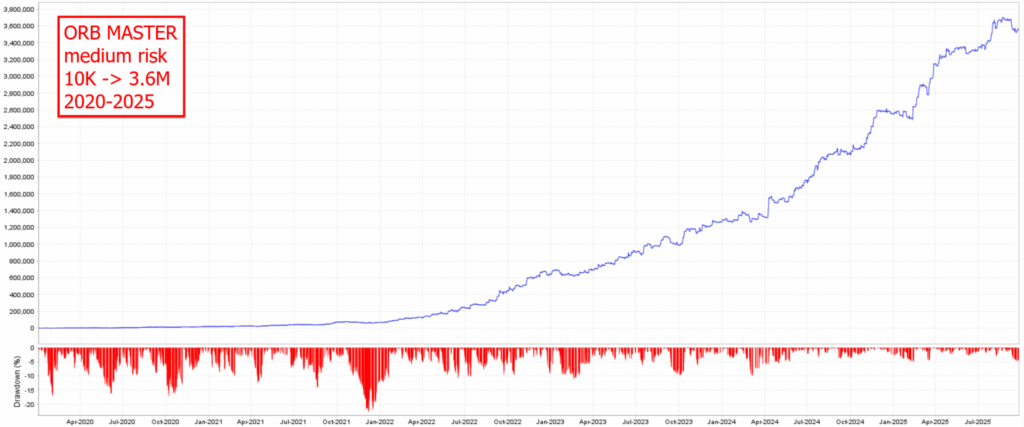
- Medium-risk backtest (2020–2025): growth from 10k to ≈3.6M with controlled drawdown
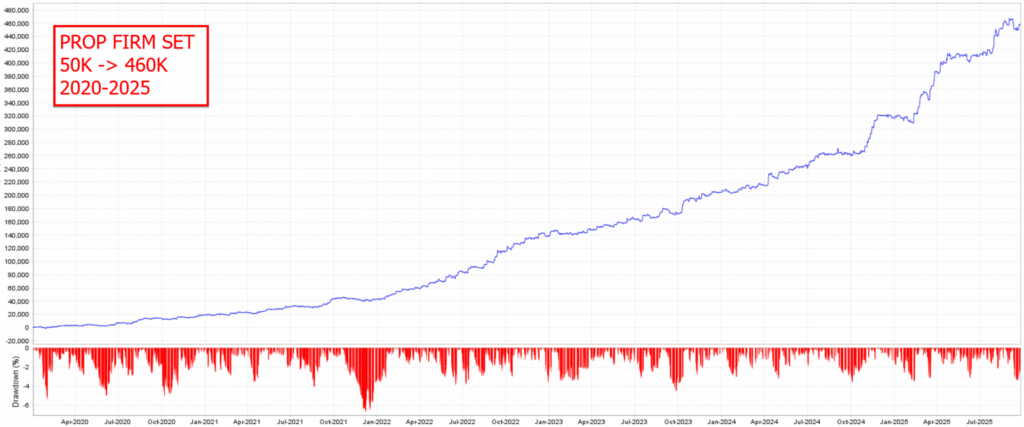
- Prop-firm preset (2020–2025): growth from 50k to ≈460k under tighter constraints
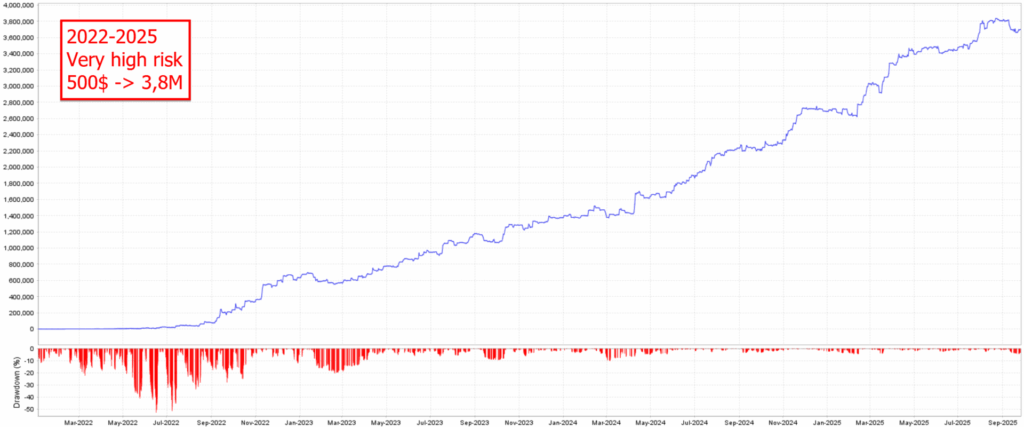
- Very high-risk profile (2022–2025): 500 → ≈3.8M with deeper drawdowns
⚙️ Deployment Guidelines
- Environment: MT5 on Windows VPS for 24/5 uptime.
- Symbols: Confirm correct index tickers and sessions with your broker.
- Risk Mode: Start conservative; let forward data accumulate before scaling.
- Daily DD Guard: Use the built-in Max Daily Drawdown for prop-style protection.
- News Windows: Configure NFP/CPI/IR filters per your rules and risk tolerance.
- Audit Logs: Monitor the Experts/Journal tabs for symbol or session mismatches.
📦 What You Get
- MT5 EA: The ORB Master.
- Preset set files: Medium risk, prop-firm, and high-beta profiles.
- User guide: Setup, hours, symbol mapping, and prop controls.
- Ongoing updates: Free lifetime updates.
- Support: Standard install and troubleshooting help.
FAQs
Does it use grid or martingale?
No. The system relies on defined ORB entries and trailing management.
Which chart and timeframe do I run?
Attach to EURUSD M15. The EA handles all four indices internally.
What minimum balance is sensible?
About $500 for baseline use. Adjust for broker min lot and risk mode.
Is it prop-firm friendly?
Yes. Unique-trade settings, randomization, and Max Daily DD help align with rules.
How do I set sessions correctly?
Use AutoGMT or apply winter GMT+2 / summer GMT+3. Confirm broker trading hours.
Can I disable trading around major news?
Yes. NFP, CPI, and Interest-Rate filters can close or prevent trades for a defined window.
Reviews
- kwikky69 (EN): Reports steady results, clear docs, and appreciates news filter plus virtual expiration. Notes disciplined behavior during volatility.
- Dany Steyaert (EN): Confident in build quality; consistent with other professional releases by the dev.
- Sharif Hamwi (EN): Says the EA performs as described; highlights responsiveness and thorough guidance from the seller.
About the Developer
Profalgo Limited states a pragmatic approach: no AI hype or “perfect straight lines.” Over 15 years of system building, with emphasis on robust development and live alignment over curve-fit theatrics.
Conclusion
The ORB Master EA for MT5 packages a disciplined ORB methodology into a diversified index portfolio with strong trade management and prop-aware controls. Set sessions correctly, begin conservatively, and scale only after forward validation.
Standalone MT5 file. Follow the delivery instructions supplied with your order. Free lifetime updates are included, added as soon as we receive them. You never pay twice.
Every order
What’s included with The ORB Master
- Instant downloadReady after checkout and kept in your account
- Free lifetime updatesAdded as soon as we receive them, every version kept in your account
- Unlimited activationsUnlimited live and demo accounts
- Setup helpReal people on Telegram or email
- Excellent on Trustpilot 4.6 out of 5 from 120 reviews (opens in a new tab)
- 28,000+ traders since 2019
- 1,580+ official EAs
- Card or crypto payments
Related EAs
Traders also explore
Premium expert advisors at vault-low prices, with your crypto price on every card.
 MT5Save 40%
 MT5Save 60%
 MT5Save 40%
 MT5Save 30%
Ready when you are
The ORB Master EA MT5 for $239.96 with crypto
Regular price was $599.00 · $299.95 with card · instant download · free lifetime updates

The ORB Master EA MT5$239.96with crypto$299.95 with card