


Quick Summary:
Golden Dome EA for MT4 is a multi-indicator trading system developed by Dmitriq Evgenoeviz Ko — the same developer behind Golden Shield, Golden Symphony, Golden Raider, Genesis VIP, and Voyageur.
Unlike experimental or proprietary approaches, Golden Dome uses time-tested standard indicators that professional traders have relied on for decades: RSI, MACD, Bollinger Bands, and Moving Averages — combined with classic price patterns.
While optimized for XAUUSD (Gold), the EA can be applied to any tradable asset: forex pairs, commodities, cryptocurrencies, indices, and stocks. The comprehensive news filter pauses trading during high-impact economic releases, and optional grid functionality provides flexibility for different trading styles.
From a developer with five other successful gold EAs, Golden Dome offers a proven indicator approach to automated trading.
Official MQL5 Listing:
Golden Dome EA MT4
Developer Profile:
pants-dmi (Dmitriq E. Ko)
From the Same Developer
Dmitriq Ko also developed Golden Shield EA, Golden Symphony EA, Golden Raider EA, Genesis VIP EA, and Voyageur EA.
What Golden Dome Is Designed To Do
Golden Dome combines four proven technical indicators with classic price pattern recognition:
- Moving Averages (EMA) — Faster EMA (5) and Slower EMA (12) for trend direction
- Relative Strength Index (RSI) — Period 21 with configurable buy/sell levels
- MACD — Momentum confirmation and divergence detection
- Bollinger Bands — Period 100 with 2 standard deviations for volatility analysis
These aren’t experimental algorithms — they’re the same tools professional traders have used for decades. Golden Dome automates their application with intelligent entry/exit logic.
Key Features
Multi-Indicator Analysis
The EA synthesizes signals from all four indicators before entering trades. No single indicator triggers entries — confluence is required. This reduces false signals and improves trade quality.
Comprehensive News Filter
One of the most detailed news filtering systems available:
- Filter by news importance (Low, Medium, High)
- Set buffer time before and after releases (default: 60 minutes each)
- Option to close positions before news
- Filter specific news types (e.g., employment data)
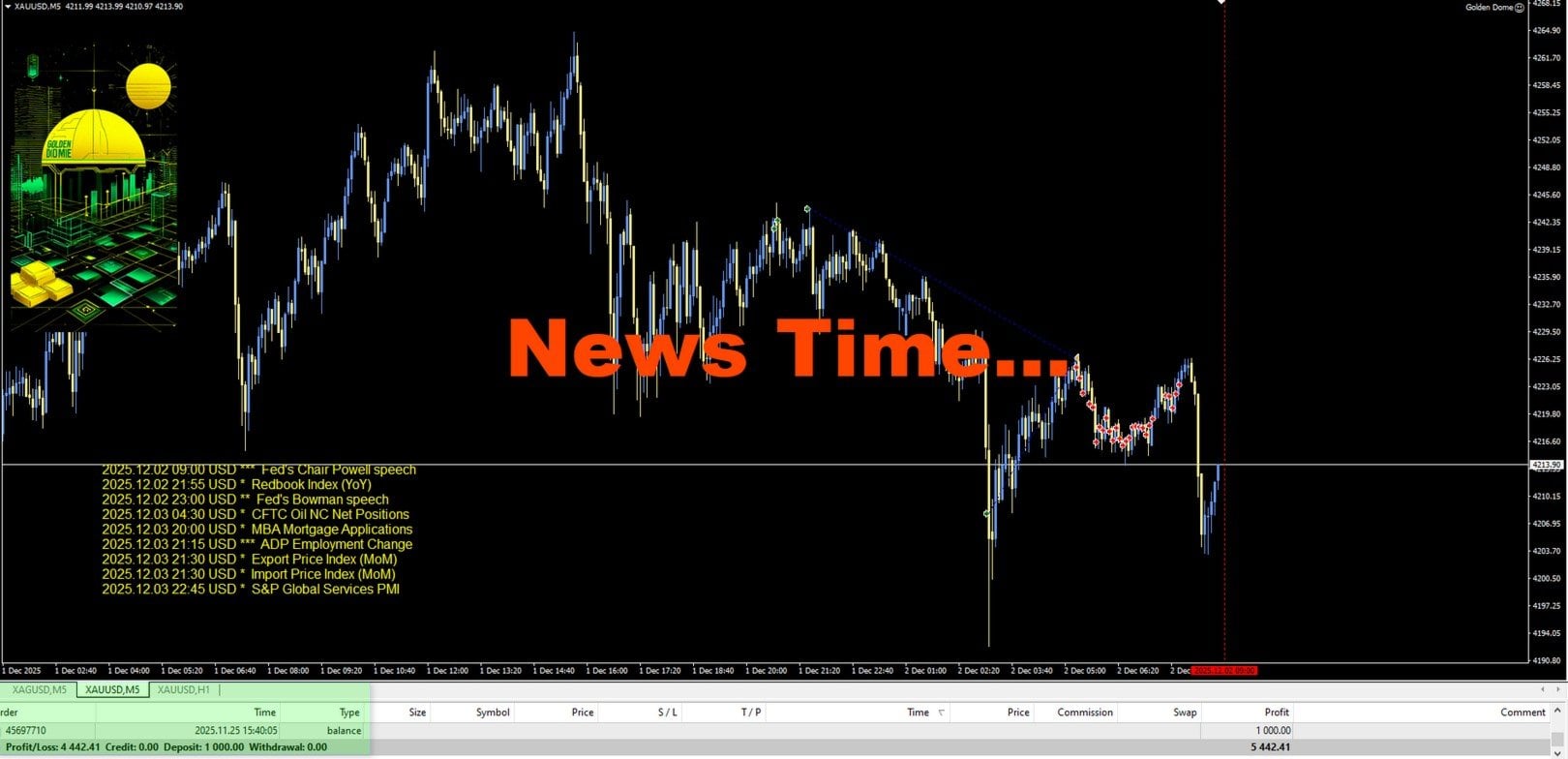
- On-chart display of upcoming events with dates, times, and importance
- Visual lines marking news event periods
- Configurable display position, font, and colors
Trailing Stop Protection
Configurable trailing stop to lock in profits:
- Trail Profit — Trailing distance (default: 15)
- Trail Start — Profit threshold before trailing activates (default: 2)
Optional Grid Mode
Grid functionality can be enabled or disabled:
- UseAddOrder — Enable/disable grid (default: false)
- Grid Orders Limit — Maximum grid positions (default: 15)
- Grid Step — Distance between grid orders (default: 3500)
- Grid Profit % — Profit target for grid closure (default: 5%)
With grid disabled, the EA operates in single-trade mode with defined SL/TP.
Session Time Filter
Control trading hours:
- Time Start — Hour to begin trading (default: 2)
- Time End — Hour to stop trading (default: 23)
Multi-Asset Compatibility
While optimized for XAUUSD, Golden Dome works on:
- Forex pairs (majors, minors, exotics)
- Commodities (gold, silver, oil)
- Cryptocurrencies
- Indices (S&P 500, DAX, NASDAQ)
- Stocks
Adjust indicator parameters and risk settings based on the asset’s characteristics.
Backtest Performance (2025)
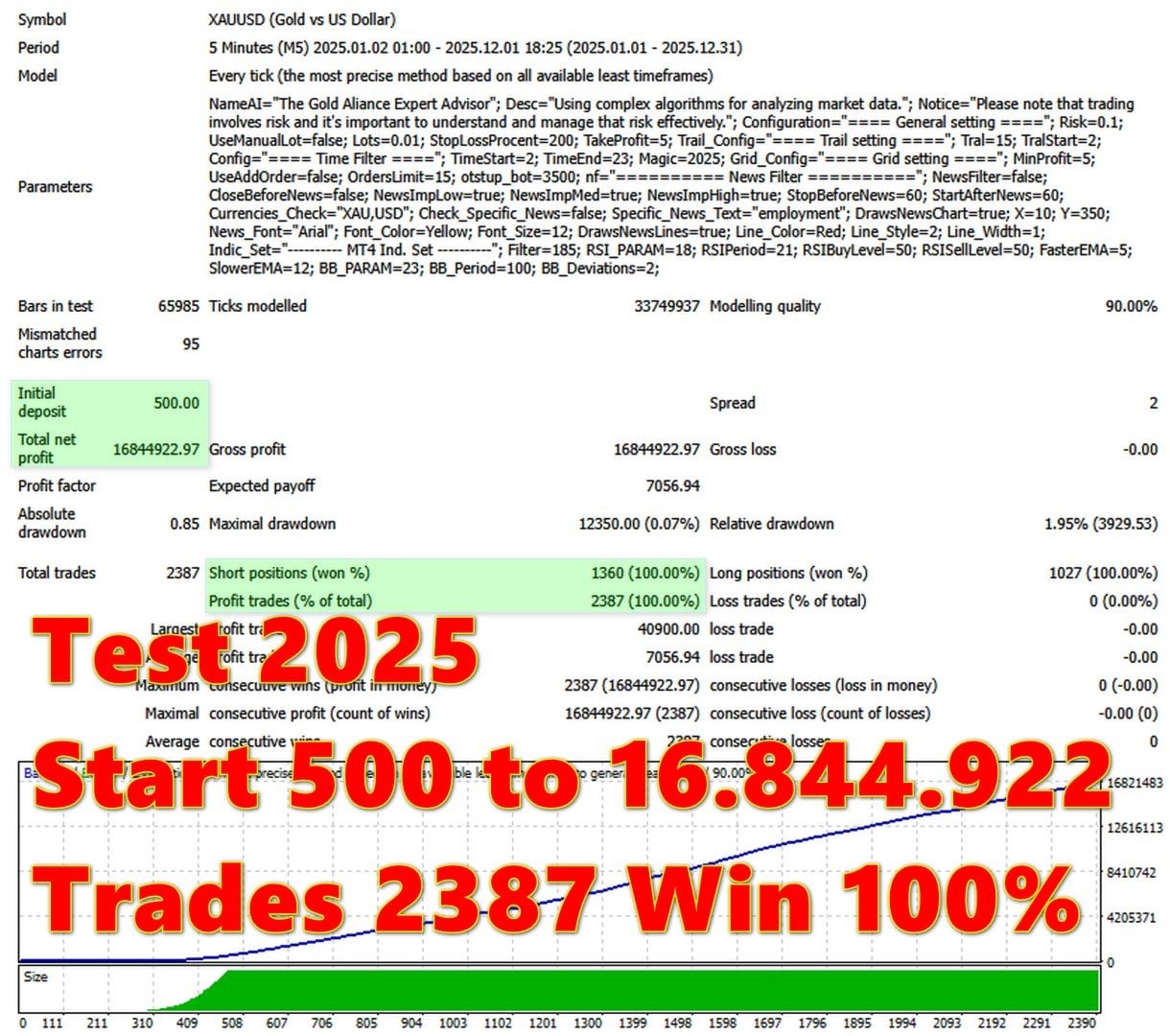
XAUUSD M5 backtest using every-tick modelling:
- Period: Jan 2025 – Dec 2025
- Initial deposit: $500
- Total net profit: $16,844,922
- Win rate: 100%
- Total trades: 2,387
- Max drawdown: 0.07% ($12,350)
- Shorts won: 100% (1,360 trades)
- Longs won: 100% (1,027 trades)
- Average profit trade: $7,056.94
- Modelling quality: 90%
Important Backtest Disclaimer:
The 100% win rate represents optimized backtesting conditions. The developer warns: “Trading on financial markets carries the risk of capital loss. We recommend testing the advisor on a demo account.” Always expect lower performance in live trading.
Settings Analysis
General Settings
- Risk MM — Risk percentage for auto lot calculation (default: 0.1)
- If True = Fix Lot — Toggle between fixed and auto lot sizing
- Fix. Lot — Fixed lot size when enabled (default: 0.01)
- Stop Loss Percent — SL as percentage (default: 10)
- Take Profit Percent — TP as percentage (default: 5)
Trailing Settings
- Trail Profit — Trailing distance (default: 15)
- Trail Start — Activation threshold (default: 2)
Time Filter
- Time Start — Trading start hour (default: 2)
- Time End — Trading end hour (default: 23)
Grid Settings
- Grid. Profit % — Grid profit target (default: 5%)
- UseAddOrder — Enable grid mode (default: false)
- Grid Orders Limit — Maximum grid positions (default: 15)
- Grid Step — Distance between orders (default: 3500)
News Filter Settings
- News filter On — Enable/disable news filtering
- Close all positions before news — Optional pre-news closure
- Low/Medium/High importance news — Filter by impact level
- Stop before news in minutes — Pre-event buffer (default: 60)
- Start after news in minutes — Post-event buffer (default: 60)
- Currencies — News currencies to monitor (default: XAU,USD)
- Check specific news — Filter specific event types
- Shows news on chart — On-chart event display
- Draws lines at news — Visual markers for news times
Indicator Settings (Advanced)
- Filter — Main filter parameter (default: 185)
- RSI_PARAM — RSI calculation parameter (default: 18)
- RSIPeriod — RSI period (default: 21)
- RSIBuyLevel / RSISellLevel — RSI thresholds (default: 50/50)
- FasterEMA — Fast moving average period (default: 5)
- SlowerEMA — Slow moving average period (default: 12)
- BB_PARAM — Bollinger Bands parameter (default: 23)
- BB_Period — Bollinger Bands period (default: 100)
- BB_Deviations — Standard deviations (default: 2)

Technical Requirements
- Platform: MetaTrader 4
- Optimized for: XAUUSD (Gold)
- Compatible with: Any tradable asset
- Timeframe: M5–H1
- Minimum deposit: $500 recommended
- Account type: Any (ECN/Raw spread preferred)
- Leverage: Any
- VPS: Recommended for 24/7 operation
Quick Setup Guide
- Install the EA file into your MT4
Expertsfolder. - Restart MT4 and enable AutoTrading.
- Attach Golden Dome to an XAUUSD M5 or M15 chart.
- Configure Risk MM or set a Fixed Lot size.
- Decide on grid mode: leave UseAddOrder = false for single-trade operation.
- Enable the News Filter and configure importance levels.
- Set your preferred trading hours with the time filter.
- Adjust indicator parameters only if you understand their function.
- Run on a VPS for 24/7 uninterrupted operation.
- Test on demo before live deployment.
User Reviews
★★★★★ “Finally, an EA using real indicators.”
Most gold EAs use some mysterious algorithm nobody can verify. Golden Dome uses RSI, MACD, Bollinger Bands, and MAs — indicators I’ve traded manually for years. I can actually understand what it’s doing. The confluence approach makes sense.
— Richard K., London
★★★★★ “The news filter is comprehensive.”
Fed speeches, employment data, PMI releases — everything displays on chart with exact times and importance levels. I’ve seen the EA pause before Powell speeches and resume after the volatility settles. This level of news protection is rare.
— Maria S., Madrid
★★★★★ “Same quality as the other Dmitriq EAs.”
I run Golden Shield and Voyageur already. Golden Dome takes a different approach — proven indicators rather than proprietary algorithms. Running all three for diversification. Same developer quality, different strategies.
— Thomas H., Frankfurt
★★★★☆ “Good EA, indicator settings take experimentation.”
The default settings work well on XAUUSD. Tried it on EURUSD and needed to adjust the RSI and BB parameters. Once dialed in, results improved significantly. The indicator customization is actually useful if you understand technical analysis.
— Chen W., Singapore
★★★★★ “Grid-off mode is clean.”
Running with UseAddOrder = false. Pure single-trade entries based on indicator confluence. Every position has defined SL/TP, trailing protects profits. No averaging, no position stacking. Clean technical trading.
— Anna L., Stockholm
★★★★★ “Works on crypto too.”
Tested on BTCUSD after adjusting parameters. The multi-indicator approach works on any volatile asset. Obviously needed bigger stop loss for crypto volatility, but the logic translates. Versatile system.
— James D., Austin
Our Assessment
Transparent evaluation based on backtest analysis and feature review:
What We Found:
- Indicator Foundation: RSI, MACD, Bollinger Bands, Moving Averages — proven tools, professionally combined
- Transparency: Uses standard indicators you can verify — not a black box
- News Filter: One of the most comprehensive we’ve reviewed — displays, filters, buffers all configurable
- Flexibility: Grid can be disabled for pure single-trade operation
- Multi-Asset: Works on forex, gold, crypto, indices, stocks — genuinely versatile
- Backtest Reality: 100% win rate is optimized — expect lower in live trading
- Developer: Same as Golden Shield, Golden Symphony, Golden Raider, Genesis VIP, Voyageur — proven track record
- Best Suited For: Traders who want indicator-based automation they can understand
- Watch Out For: Indicator parameters may need adjustment for different assets
- Overall: Solid multi-indicator approach with excellent news protection from a trusted developer
Conclusion
Golden Dome EA for MT4 offers something increasingly rare in the EA market: automation based on indicators you can actually understand and verify.
RSI identifies momentum extremes. MACD confirms direction. Bollinger Bands measure volatility. Moving Averages establish trend. These aren’t mysterious algorithms — they’re the same tools professional traders have used for decades. Golden Dome automates their combination with intelligent entry/exit logic.
The comprehensive news filter protects against unpredictable volatility. The optional grid mode gives you flexibility. The trailing stops lock in profits. And the multi-asset compatibility means you’re not limited to gold.
From the same developer who built Golden Shield, Golden Symphony, Golden Raider, Genesis VIP, and Voyageur — Golden Dome adds a proven-indicator approach to an already strong lineup of trading systems.
What Do You Receive?
– Golden Dome EA for MT4 – Latest Version
– Free lifetime updates
– Fully unlocked for unlimited brokers and accounts
– Delivered by email and allocated to your user account dashboard
FAQs
What indicators does Golden Dome use?
Four proven technical indicators: RSI (Relative Strength Index), MACD, Bollinger Bands, and Moving Averages (EMA). All are standard indicators used by professional traders worldwide.
Can I use it on assets other than gold?
Yes. While optimized for XAUUSD, Golden Dome works on forex pairs, commodities, cryptocurrencies, indices, and stocks. Adjust indicator parameters and risk settings based on the asset’s characteristics.
Does it use martingale or grid?
The EA has optional grid mode which is disabled by default (UseAddOrder = false). With grid off, it operates in single-trade mode with defined SL/TP. No martingale.
What timeframe should I use?
M5 to H1 recommended. The backtest shown uses M5 on XAUUSD.
What’s the minimum deposit?
$500 recommended. Use conservative risk settings (Risk MM = 0.05-0.1) for smaller accounts.
Is the 100% backtest win rate realistic?
No. This represents optimized backtesting conditions. The developer recommends testing on demo first. Expect lower performance in live trading.
How does the news filter work?
The EA can pause trading before low, medium, and high-impact news. You set buffer times before and after releases (default: 60 minutes each). Upcoming events display on chart with visual lines marking news times.
Can I adjust the indicator parameters?
Yes. RSI period, EMA periods, Bollinger Bands period and deviations are all configurable. Only adjust if you understand technical analysis — defaults are optimized for XAUUSD.
What’s the difference between grid on and grid off?
Grid off (default): One trade at a time, defined risk. Grid on: Can add positions at configured intervals. Grid mode requires more capital.
Is a VPS required?
Recommended for 24/7 operation. The EA needs to monitor indicators, manage positions, and track news events continuously.
Is this from the same developer as Golden Symphony?
Yes. Dmitriq Evgenoeviz Ko (pants-dmi) developed Golden Dome, Golden Shield, Golden Symphony, Golden Raider, Genesis VIP, and Voyageur.
What makes this different from the developer’s other EAs?
Golden Dome uses standard technical indicators (RSI, MACD, BB, MA). Golden Shield focuses on risk management. Golden Symphony is high-frequency scalping. Voyageur uses mathematical algorithms. Different approaches for different trading styles.
