


Quick Summary:
Bitcoin Robot EA for MT5 by MQL TOOLS SL is a fully automated BTCUSD trading system for MetaTrader 5. The algorithm trades the M5 timeframe and uses a three-layer signal stack — price action analysis combined with trend-following logic and two proprietary indicators developed specifically for Bitcoin’s volatility profile. The result is a clean, disciplined Bitcoin EA with full risk controls on every trade.
The MT5 build has become the developer’s most successful platform release, accumulating 139 verified MQL5 reviews at 4.55★ — more than double the review count of the MT4 version. This makes it one of the most reviewed dedicated Bitcoin EAs on the MQL5 marketplace, with a substantial sample of real buyer feedback accumulated since the April 2024 launch.
What you receive at CheaperForex: the full unlocked .ex5 file in the latest version. Install on any number of MT5 terminals across multiple broker accounts and VPS setups without activation count restrictions.
Official MQL5 Listing:
Bitcoin Robot MT5 — MQL5 Marketplace
👀 Trading on MetaTrader 4? Bitcoin Robot is also available as an MT4 build — same strategy and risk controls. View Bitcoin Robot EA MT4 →

Why The MT5 Version
The MT5 build is where Bitcoin Robot has accumulated the largest user base. If you have a choice between platforms, MT5 offers material advantages for an M1/M5 Bitcoin algorithm:
- 139 verified MQL5 reviews — over double the MT4 version’s review count. The larger sample size provides more confidence in the EA’s behaviour across diverse buyer setups, broker conditions, and market regimes.
- Faster M5 execution speed — MT5’s modern order execution infrastructure matters on volatile BTCUSD ticks where price can move significantly during the milliseconds between signal generation and order fill.
- Superior tick-quality backtesting — MT5’s strategy tester handles real-tick backtesting at higher accuracy than MT4’s M1 modelling, useful for verifying the EA’s behaviour on your specific broker’s BTCUSD data feed before going live.
- Three-layer signal stack — price action on M5 candles identifies short-term momentum shifts, trend-detection filtering confirms broader directional bias, and two proprietary Bitcoin-specific indicators provide final entry confirmation.
- One position at a time — the EA never stacks trades, never adds to losing positions, and never uses lot multiplication. Every BTCUSD position is fully isolated.
- Hard SL, TP, trailing stop, breakeven on every trade — all four risk-management layers are applied by default to every position. No floating losses held indefinitely, no virtual stops that can be bypassed by adverse moves.
- Built-in news filter — automatically pauses entries 60 minutes before and after high-impact economic events. Critical for Bitcoin, where NFP, CPI, and FOMC announcements can produce $1,000+ moves in minutes.
- MaxDD% safety parameter — configurable maximum drawdown percentage triggers a trading halt if account drawdown reaches the user-defined threshold. Specifically useful for prop firm accounts with strict drawdown rules.
- Configurable trading schedule — run 24/7 by default, or restrict to specific days and hours of the week. Useful for avoiding weekend Bitcoin liquidity gaps or restricting to your preferred session.
- Full unlocked .ex5 file — the CheaperForex version removes activation count restrictions.
How The Algorithm Trades BTCUSD
Bitcoin Robot uses a multi-layer signal approach rather than relying on any single indicator. Each layer must agree before a trade is opened:
Layer 1 — Price Action Analysis: The EA reads M5 candlestick patterns to identify short-term momentum shifts, potential reversals, and continuation setups on BTCUSD. Price action is the primary signal generator — the system reads the actual price behaviour of Bitcoin rather than relying solely on lagging mathematical indicators.
Layer 2 — Trend Detection: A trend-following overlay confirms that the price action signal aligns with the broader directional bias. This filter prevents the EA from taking counter-trend trades during strong Bitcoin moves, which improves entry quality and reduces whipsaw losses during trending phases.
Layer 3 — Two Proprietary Bitcoin Indicators: The developer has built two custom indicators specifically calibrated for Bitcoin’s volatility profile. These are not standard MT5 indicators — they’re unique to the Bitcoin Robot system and provide the final confirmation before a trade is executed. The combination of all three layers means trades only open when price action, trend, and the proprietary signals all align.
Trade Execution and Management: When all three layers agree, the EA opens a single position (buy or sell) on BTCUSD. Predefined stop loss, take profit, trailing stop, and breakeven levels are applied immediately. The trade is then managed by the EA’s internal logic — the trailing stop follows favourable price action, breakeven kicks in once the trade reaches a defined profit threshold, and the hard SL/TP cap the maximum risk/reward on the position.
Opposite Signal Closure (Optional): A configurable feature that automatically closes a buy position when sell conditions appear (and vice versa). When enabled, this prevents holding losing trades through clear reversals and allows the EA to flip direction when the underlying market structure changes. The feature can be disabled if you prefer the trade to run to its predefined SL/TP regardless of new signals.
EA Setup at a Glance
- Platform: MetaTrader 5 (hedging account required)
- Trading Pair: BTCUSD only (Bitcoin)
- Timeframe: M5
- Strategy: Price action + trend + two proprietary indicators
- Position Sizing: Fixed lots or percentage-based lot sizing
- Account Type: Raw, Hedging, Zero, Cent, Micro, Standard, Premium, or ECN
- Broker: Low-spread account recommended (Raw / ECN preferred)
- Leverage: 1:30 to 1:1,000 (any leverage works)
- Minimum Deposit: $500 to $1,000 depending on lot sizing
- Risk Controls: Hard SL, hard TP, trailing stop, breakeven — all set by default
- News Filter: Built-in, blocks trades 60 min before/after high-impact events
- MaxDD% Safety: Configurable maximum drawdown halt
- Schedule: 24/7 default or configurable trading days/hours
- Max Open Positions: 1 at a time (configurable daily limit)
- VPS: Recommended for 24/5 BTCUSD trading
- Published: April 2024 (established product on the MQL5 marketplace)
- Activation: Unlimited when purchased from CheaperForex
Developer Live Performance
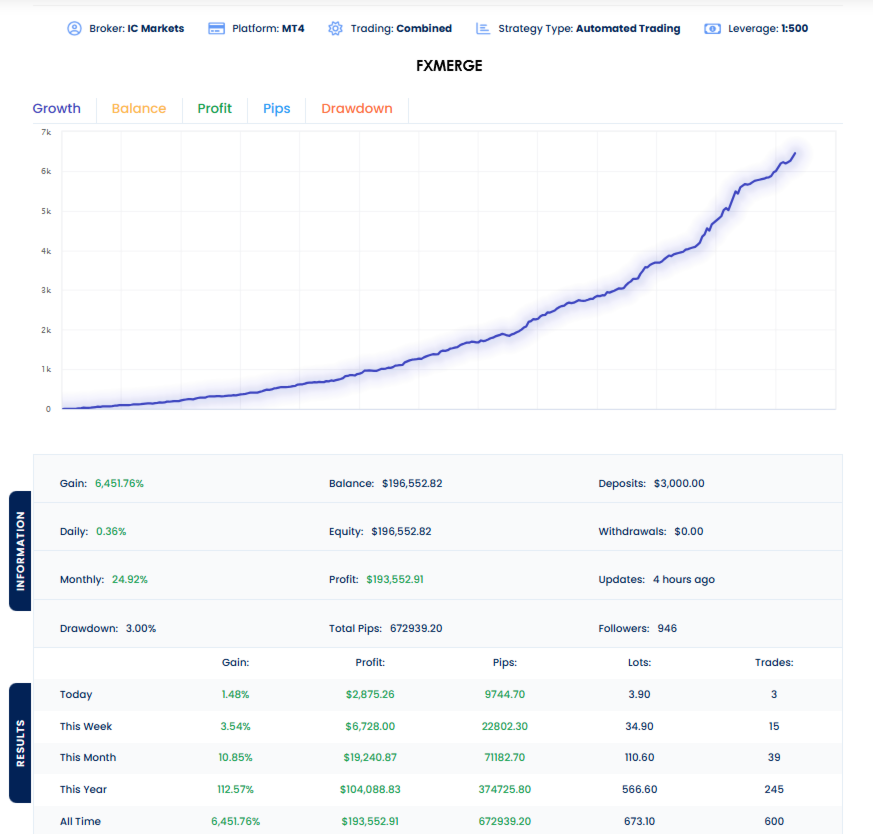
The developer publishes live performance data on the FXMERGE third-party tracking platform. The reference account runs on IC Markets MT4 at 1:500 leverage with the following metrics at time of writing:
- Gain: 6,451.76% (compounding gain since account inception)
- Profit: $193,552.91 on $3,000 in total deposits with $0 withdrawn
- Current Balance/Equity: $196,552.82
- Maximum Drawdown: 3.00%
- Monthly Average: 24.92%
- Daily Average: 0.36%
- Total Trades: 600
- Total Pips: 672,939.20
- Followers: 946
Honest interpretation: FXMERGE is a third-party performance tracker but is not an official MQL5 Signal. The data is broker-verified through the tracking integration but does not carry the same regulatory weight as a MetaQuotes-verified MQL5 Signal. The 6,451.76% gain represents compounding over an extended period — real forward returns at conservative position sizing will be materially lower in absolute percentage terms but should reflect the same risk profile. The 3.00% maximum drawdown is the headline number — exceptionally low for any Bitcoin trading system. This figure reflects the EA’s strict single-position discipline and full SL/TP/trailing/breakeven coverage on every trade, working as designed.
Who Bitcoin Robot MT5 Is For
Ideal for traders who:
- Specifically want exposure to BTCUSD via an automated trading system
- Prefer single-position discipline with hard stops over grid or martingale recovery strategies
- Want a Bitcoin EA with a substantial verified review base (139 reviews) rather than a young untested product
- Run the MetaTrader 5 platform on a low-spread ECN or Raw broker account
- Need a system compatible with prop firm rules (MaxDD% control, no grid, hard SL/TP)
- Want a built-in news filter to manage Bitcoin’s news-driven volatility automatically
- Can deploy a 24/5 VPS for continuous M5 operation
- Are willing to demo test for 2-4 weeks before committing real capital
Consider alternatives if you:
- Trade exclusively on MT4 — the MT4 version is available at CheaperForex with the same strategy
- Require an officially verified MQL5 Signal rather than FXMERGE tracking
- Want a multi-currency EA — Bitcoin Robot trades BTCUSD only
- Prefer grid trading mechanics — the developer offers a separate Bitcoin Robot Grid product on the MQL5 marketplace for that risk profile
- Trade with a broker whose BTCUSD spreads exceed reasonable levels — wide spreads materially impact M5 algorithmic performance
What You Receive
- Bitcoin Robot EA for MT5 — Latest Version
- Full unlocked .ex5 file — install on any number of MT5 terminals without activation restriction
- Installation guide
- Free lifetime updates
Risk Disclaimer
Bitcoin Robot operates on the M5 BTCUSD timeframe — a market characterised by significant intraday volatility, news-driven price spikes, and broker spread variability that can materially impact algorithmic performance. While the single-position discipline and hard SL/TP/trailing/breakeven controls limit per-trade risk, accumulated drawdown can still occur across consecutive losing trades during adverse market conditions. The FXMERGE live performance data shows historically strong results, but past performance does not guarantee future results. Some MQL5 reviewers have reported losses on the EA where their broker, configuration, or risk settings did not match the developer’s reference setup. Test on demo or cent accounts for at least 2-4 weeks on your intended broker before committing real capital, use conservative position sizing, and never deploy funds you cannot afford to lose.
Want the Full Analysis?
📖 Read our complete Bitcoin Robot EA review (MT4 + MT5) →
Includes detailed breakdown of the three-layer signal stack, analysis of the FXMERGE live performance data and where it differs from MQL5 Signals verification, MT4 vs MT5 platform comparison, broker recommendations and BTCUSD spread considerations, prop firm compatibility analysis, breakdown of the developer’s 32+ product portfolio for context on their track record, and our verdict on whether Bitcoin Robot is appropriate for your specific trading profile.
FAQs
What is Bitcoin Robot EA for MT5?
Bitcoin Robot EA for MT5 is a fully automated BTCUSD trading system by MQL TOOLS SL, a Spain-based development company with 32+ products on the MQL5 marketplace. The EA trades the M5 timeframe on BTCUSD using a three-layer signal stack: price action analysis, trend-following logic, and two proprietary indicators developed specifically for Bitcoin’s volatility behaviour. It opens only one position at a time with hard stop loss, take profit, trailing stop, and breakeven applied to every trade.
How does Bitcoin Robot MT5 differ from the MT4 version?
The underlying strategy is identical — same three-layer signal stack, same single-position discipline, same risk-control architecture. The MT5 build has accumulated 139 verified MQL5 reviews at 4.55★, while the MT4 build has 65 reviews at 4.63★. MT5 offers faster order execution and superior tick-quality backtesting infrastructure, both relevant advantages for an M5 BTCUSD algorithm. Choose MT5 if you have a free choice of platform; choose MT4 if your broker only supports MT4 or you prefer the MT4 ecosystem.
Does the EA use grid or martingale?
No. Bitcoin Robot opens a maximum of one position at a time on BTCUSD. No grid (no recovery position ladders), no martingale (no lot doubling after losses), no hedging (no simultaneous buy and sell), no averaging (no adding to losing positions). Every trade has a defined stop loss, take profit, trailing stop, and breakeven level applied by default. When a position closes, the EA evaluates conditions before opening the next trade. This is fundamentally different from the developer’s separate Bitcoin Robot Grid product, which uses a structured grid strategy on BTCUSD.
What is the live performance like?
The developer publishes live performance data on FXMERGE, a third-party performance tracking platform. The reference account runs on IC Markets MT4 at 1:500 leverage and shows 6,451.76% gain across 600 trades from a $3,000 initial deposit, with a maximum drawdown of 3.00% and an average monthly return of 24.92%. Note: FXMERGE is not an officially verified MQL5 Signal — it’s broker-tracked but does not carry the same regulatory verification as MQL5 Signals. The 3% maximum drawdown is the most meaningful number — exceptionally low for a Bitcoin trading system.
Is Bitcoin Robot MT5 prop firm compatible?
Yes, the architecture is designed for prop firm compatibility. The single-position approach, hard SL/TP coverage on every trade, no grid/martingale mechanics, and configurable MaxDD% parameter all align with typical prop firm rules. The MaxDD% feature is specifically designed for funded accounts — it halts trading if your drawdown reaches a percentage you define, preventing accidental challenge failures. The EA can be used with any prop firm that offers BTCUSD trading on MT5.
What broker and account type do I need?
A hedging-enabled MT5 account is required. The EA is compatible with Raw, Hedging, Zero, Cent, Micro, Standard, Premium, and ECN account types. Low-spread accounts (Raw or ECN) are recommended for best M5 performance — Bitcoin spreads can vary significantly between brokers, and wide spreads materially impact algorithmic results on the 5-minute timeframe. Leverage can range from 1:30 to 1:1,000. Minimum deposit is $500 to $1,000 depending on lot sizing.
Will the EA trade 24/7 including weekends?
By default the EA can trade Monday to Sunday (Bitcoin markets trade 24/7, though liquidity and spreads vary). You can configure the trading schedule to restrict it to specific days and hours — for example, excluding weekends when Bitcoin spreads are typically wider and liquidity thinner, or restricting to your preferred trading session. A VPS is recommended for uninterrupted 24/5 operation with low-latency connection to your broker.
Why are some MQL5 reviews negative?
With 139 reviews at 4.55★, the EA has a substantial review base and a few negative reviews are inevitable across that sample size. Common patterns in critical reviews include configuration issues (wrong settings or risk parameters), broker-specific BTCUSD execution problems, and aggressive lot sizing that produced larger-than-expected drawdowns. Some reviewers have referenced “recovery mode” or risk multipliers — features that, when configured aggressively, can produce larger losing trades than the EA’s default single-position discipline implies. Always start with conservative position sizing on demo before scaling up.
