
What's included

  • Installation guideStep-by-step PDF with screenshots
  • Optimised presetsReady-to-use configuration files
  • Future updatesIncluded free when we receive them
  • Email supportHelp with setup and technical issues
7-day money-back guarantee. If the EA fails to attach to your chart because of errors we can replicate, you get a full refund. Trading results are not covered.
Trustpilot service reviews

What our customers say

Selected Trustpilot feedback about CheaperForex support, setup and service.

Since 2019 in business 28,000+ customers served

Harmonizer EA MT5

Harmonizer EA MT5 runs a volatility-adaptive Forex grid across AUDCAD and NZDCAD from one MetaTrader 5 chart, with optional AUDNZD trading.

  • Version 3.2: refreshed dashboard and configurable buy/sell direction.
  • News pauses, basket exits and account-level drawdown controls.
  • Compare the developer’s MT5 signals alongside grid exposure and floating losses.

Read the Harmonizer signals and platform review · View the MT4 edition

Original price was: $870.00.Current price is: $599.95.

 
Card price. Apple Pay and Google Pay accepted.
Pay with crypto and it is  20% off at checkout
  • Instant download from your account the moment checkout completes. The files stay in your customer portal.
  • Official version, with future updates included free when we receive them. You never pay twice for the same product.
  • 7-day money-back guarantee if it fails to install or run. Setup help by email whenever you need it.
Orders over $300 include 3 months of PrismAlgo EA MT5, free Our cloud-connected EA for 28 FX pairs, Gold and Bitcoin. Added to your cart automatically. PrismAlgo.com
View listing
Need Help? Message us on Telegram, or contact us

What's included

  • Installation guideStep-by-step PDF with screenshots
  • Optimised presetsReady-to-use configuration files
  • Future updatesIncluded free when we receive them
  • Email supportHelp with setup and technical issues
7-day money-back guarantee. If the EA fails to attach to your chart because of errors we can replicate, you get a full refund. Trading results are not covered.

Harmonizer EA for MetaTrader 5

Harmonizer EA MT5 by Amir Hossein Moharreri manages a portfolio of Forex grid positions from one chart. Its grid spacing responds to volatility, while basket take-profit and trailing controls manage exits across a trading cycle. It suits traders who want configurable multi-pair automation and are prepared to monitor the exposure that builds when a market moves against a basket.

What distinguishes the MT5 edition?

The current MQL5 release is version 3.2, updated 26 August 2026. The August version 3 series added buy-only, sell-only or two-way trading and a redesigned control panel. Its release notes also describe corrections to position handling after a terminal restart, time filters, daily drawdown tracking and very large order volumes.

MT5’s documented news filter can pause initial and additional grid entries separately, with configurable time windows and medium-impact news handling. This matters because pausing a new basket and blocking recovery entries in an existing basket have different effects. Check both settings rather than assuming one news switch covers every order.

  • Portfolio operation: AUDCAD and NZDCAD are the recommended core symbols; AUDNZD is optional.
  • Position sizing: fixed lots, deposit-load sizing or four risk modes, together with configurable lot multipliers.
  • Basket management: take-profit, trailing behaviour, grid distance and limits on trades or simultaneous symbols.
  • Account controls: global and daily drawdown thresholds, plus a Sleep control for pausing new cycles.
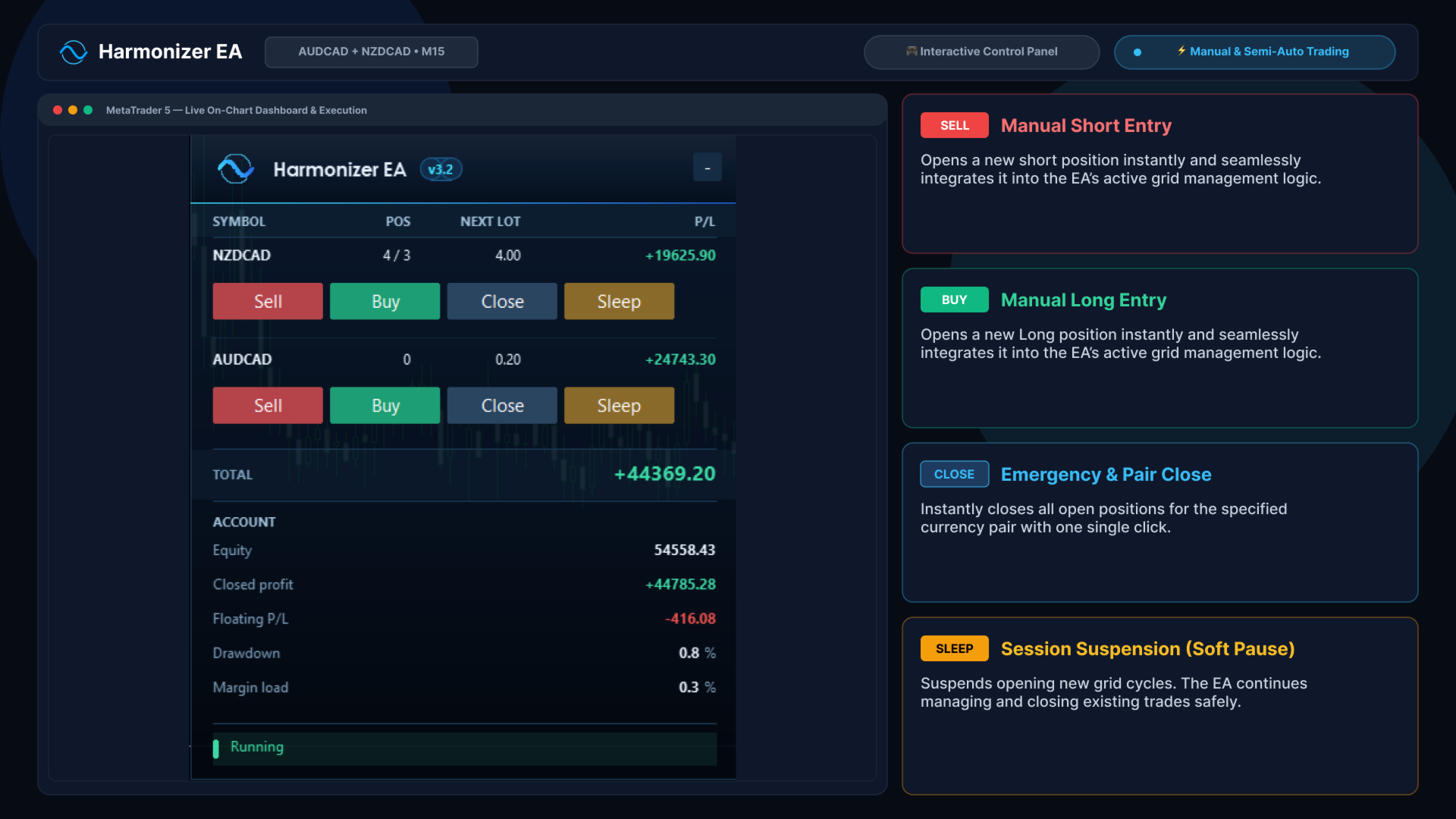
Harmonizer MT5 version 3.2 dashboard
Developer-provided MT5 3.2 dashboard illustration, accessed 13 September 2026. Displayed positions and profits illustrate the interface, not independently verified results.

MT5 setup at a glance

Starting chart
AUDCAD, M15; multi-symbol operation from one chart.
Account
A compatible MT5 account supporting hedging positions. ECN conditions and a stable VPS are suggested by the developer.
Capital and leverage
Developer reference: $500 minimum, with $1,500 suggested as a larger buffer, and leverage of at least 1:200. These are setup references, not safe-loss limits.
Presets
The developer’s 28 August 2026 comment says to use the defaults and avoid old files from the first comments page.
Symbol names
Confirm that broker suffixes resolve to the intended pairs in the trading panel.

The risk behind the grid

Additional trades can use larger lot sizes, so this is a grid with martingale-style position escalation, not a no-martingale system. A prolonged one-way move can leave a basket carrying substantial floating losses. Check that drawdown protection is actually enabled and understand that closing a basket at its limit realises the loss. Execution conditions can affect the final amount.

The developer’s public records are MT5 accounts. Our Harmonizer review separates their growth, equity drawdown and monitoring dates, and examines the much deeper drawdowns visible in some backtests. For an existing MetaTrader 4 setup, Harmonizer EA MT4 has its own release history and lower purchase price; do not assume the two builds have identical features.

Official MT5 specification and release notes · Checked 13 September 2026.

Delivery: standalone MT5 file offer, version 3.2, priced at $599.95. Your order provides the delivery-instructions document; it is not itself the EA executable. This edition requires MetaTrader 5.

FAQs

Which pairs and timeframe does Harmonizer MT5 use?

The developer recommends AUDCAD and NZDCAD, with AUDNZD optional, and AUDCAD M15 as the starting chart for one-chart portfolio operation. Verify symbol names with your broker.

Is Harmonizer MT5 a grid or martingale EA?

It uses a volatility-adaptive grid and configurable lot multipliers for additional orders. Those multipliers create martingale-style exposure escalation; it should not be described as no-martingale.

Does the MT5 version have news protection?

The public MT5 documentation describes a news filter with separate pauses for initial and secondary trades. Configure those settings and the calendar connection before relying on them.

Does this purchase work in MetaTrader 4?

No. This is the MT5 standalone edition. The separate Harmonizer EA MT4 product is for MetaTrader 4.

Reviews

There are no reviews yet.

Be the first to review “Harmonizer EA MT5”

Pre-Purchase FAQs

Are updates always free?

Yes, all updates are completely free—you'll never pay twice.

We receive updates from developers and upload them to your account when they're available. Please be patient, as we're managing hundreds of products at discounted prices. More popular products are updated more frequently.

All versions are stored in your account for easy access.

What's your refund policy?

We offer a 7-day technical guarantee. If the EA fails to attach to your chart due to verified errors we can replicate, we'll issue a full refund.

However, we cannot refund based on trading performance or profit expectations—forex markets are unpredictable, and results vary by broker, spread, and market conditions. We provide tools, not guarantees.

I need assistance installing this?

Yes, we'd be happy to assist you!

We can advise you on the best settings for your account or create custom presets tailored to your needs. Additionally, we offer a one-time free installation service using AnyDesk for remote setup.

Please note, however, that we cannot provide advice on how to make money with any of our products.

Can I use this on multiple accounts?

Absolutely. Once you purchase, the EA is yours to use on unlimited live and demo accounts—no restrictions.

You can run it on multiple brokers, VPS servers, or trading accounts simultaneously.

There are no license limits or activation keys. Buy once, use everywhere.

How do I download after payment?

After successful payment, your product will be available for download instantly:

  • Displayed on the screen immediately after checkout
  • Emailed to the address you provided during purchase
  • Stored in your account if you created one at checkout

In rare cases (about 1% of high-value premium products), orders may be held for manual review to prevent fraud. If you don't see a download link, contact us for assistance.

Is this an original product?

Yes, absolutely.

We do not sell fake products, and our customer reviews, along with our pricing, reflect the quality and authenticity of what we offer.

Why Traders Trust Us

Excellent on Trustpilot
4.5★ from real customers
In Business Since 2019
28,000+ customers served
Instant Access
No group buys or waiting
7-Day Refund Policy
For product errors
Remote Installation
We can install for you
Flexible Payments
Cards, Apple Pay, Crypto

Reviewed by Our Trader

Picture of Peter Jones

Peter Jones

Peter Jones is a full-time trader, forex software developer, and founder of CheaperForex.com. With over 10 years of experience in algorithmic trading, he helps traders gain an edge using reliable EAs and strict risk control.
SKU CHF-HARMONIZER-MT5-EA Categories ,
Product
— Card — Crypto