
New MT5 arrival
KSM EA MT5
Latest version
We’re rated Excellent on Trustpilot · 4.6/5 (opens in a new tab)KSM EA MT5 automates multi-currency Forex trading with time-series analysis, configurable signal timeframes and order-series management.
- Fixed lots or automatic sizing with a limit on orders in a series.
- Separate drawdown-based close-all and stop-trading settings.
- Take profit, stop loss, series trailing and volatility controls.
 MT5Save 57%
What you receive
- KSM.ex5Expert Advisor for MetaTrader 5Latest version
- Setup guide.pdfOfficial step-by-step install guide
Delivered instantly to your account after payment
Regular priceRegular price was $1,279.00
$549.99 with card
Visa, Mastercard, Apple Pay and Google Pay accepted.
Card payments add bank fees, sales taxes and other charges.
- Latest version
- Instant downloadYour file is provided immediately after payment. In very rare cases we manually review an order first, then send your download straight after. If you don’t receive your file, you can request a full refund.
- Free lifetime updatesAll updates are free. They’re provided on a best-availability basis: we get new versions as fast as we can, led by customer demand, but we don’t guarantee them immediately. If you need every update the moment it’s released, our service may not be the best fit for you.
- 7-day money-backRefunds only cover an EA that fails to attach to your chart because of errors we can replicate. We don’t cover changing your mind or not liking the EA. All brokers are different, and results are never promised because markets are constantly changing.
- Unlimited activationsUse it on as many MT5 accounts and computers as you want, live or demo. There are no restrictions on how you use it.
What you receive
- KSM.ex5Expert Advisor for MetaTrader 5Latest version
- Setup guide.pdfOfficial step-by-step install guide
Delivered instantly to your account after payment
Source code (.mq5) available at checkout.


28,000+ tradersServed since 2019
Orders over $300 include 3 months of PrismAlgo freeThe highly recommended cloud-connected EA, on all 28 Forex pairs for one MT5 account. Added to your cart automatically. View PrismAlgo
Official versionsInstant downloadFree lifetime updatesExtra 20% off with cryptoReal people on support28,000+ tradersTrading since 2019Rated Excellent on Trustpilot
Product description
About KSM EA MT5
Multi-currency Forex automation with configurable order series
KSM EA MT5 combines time-series market analysis with configurable trade sizing, signal timing and order-series management. Andriy Sydoruk describes a Forex robot that can work with multiple currency pairs across different timeframes, with controls for both individual exits and broader trading activity.
Its appeal is the ability to tune the relationship between signal selection, exposure and exits. The current overview does not publish a complete supported-pair list, a single required chart timeframe or an exact entry formula. Choose and test the actual instrument and inputs together rather than assume all Forex symbols behave alike.
Signal, volume and series controls
- Signal timeframe:
signalTfdetermines the period used for the trading signals. - Price scaling:
ScalePipsadjusts price scaling, making quote format and input units relevant during setup. - Position size: use a fixed
Lotor enable automatic risk management throughRiskOn. - Series configuration:
LimitSerieslimits order count andTypeSeriesselects the order-series type. - Trade exits: take-profit and stop-loss inputs are complemented by optional series-level trailing.
Closing orders and stopping the strategy are different settings
MaximumDrawdown is described as the threshold for closing all orders, whereas StopWorkingDrawdown stops trading activity when its limit is reached. These controls serve different purposes and should be checked separately. Confirm the build’s units and the behavior of already-open orders during a demo test.
The overview also names a volatility limit and discusses spread-related configuration. These can restrict trading conditions, but they do not remove slippage or guarantee a particular realized drawdown. A broker may fill exits beyond a chosen threshold when prices gap or execution is delayed.
Evaluate total exposure across the selected pairs
KSM’s series-based design means the size of one starting trade is not the only risk measure. Check the permitted order count, simultaneous exposure, margin use and closing behavior for the actual series type. The source does not establish a no-grid or no-martingale guarantee.
When several pairs are active, allow for related currency moves rather than treating every chart as independent. Use realistic spread and commission assumptions in testing, and compare the configured stop and trailing behavior with a forward demo run before live use.
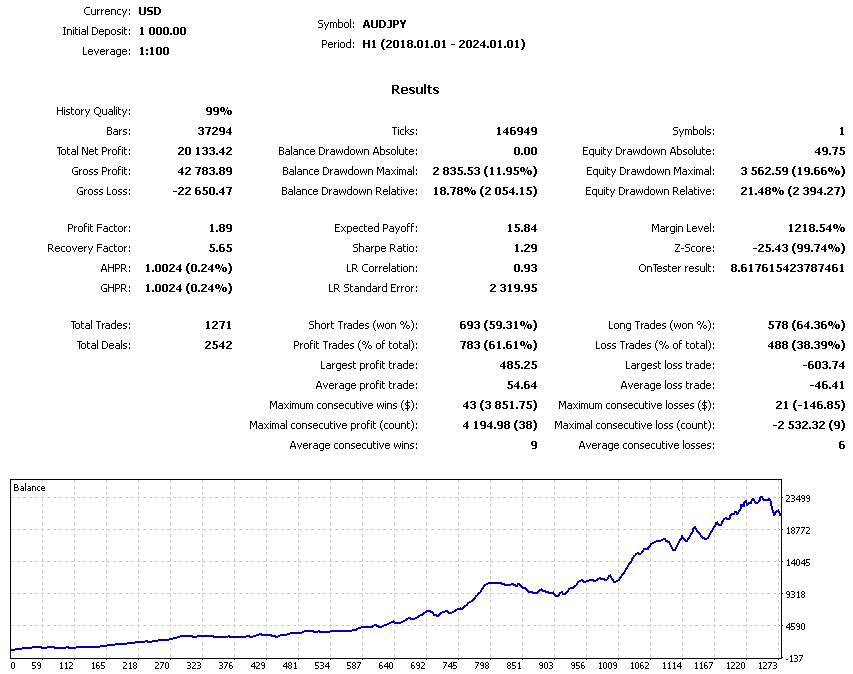
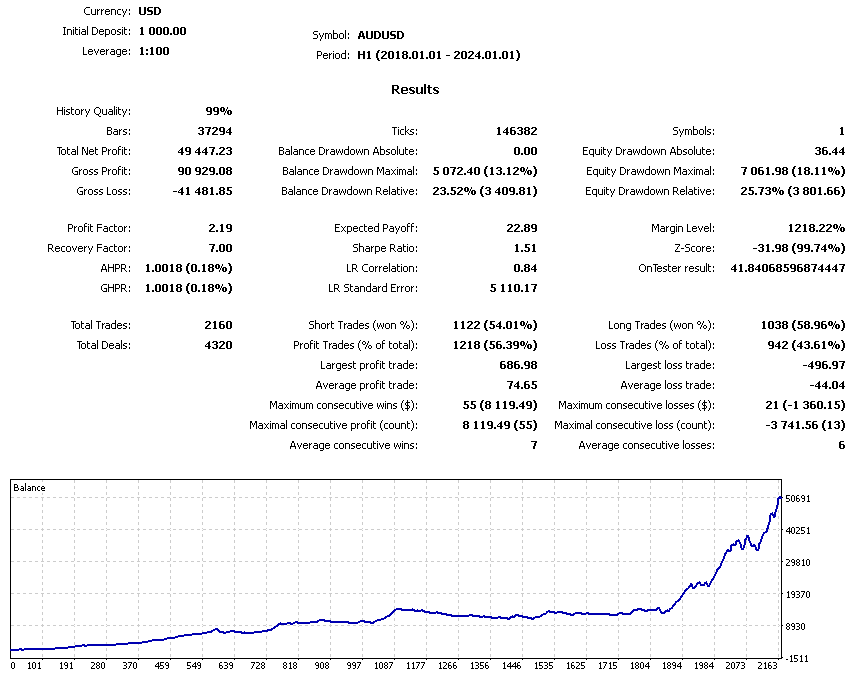
Original developer screenshots
Public customer feedback is limited and mixed
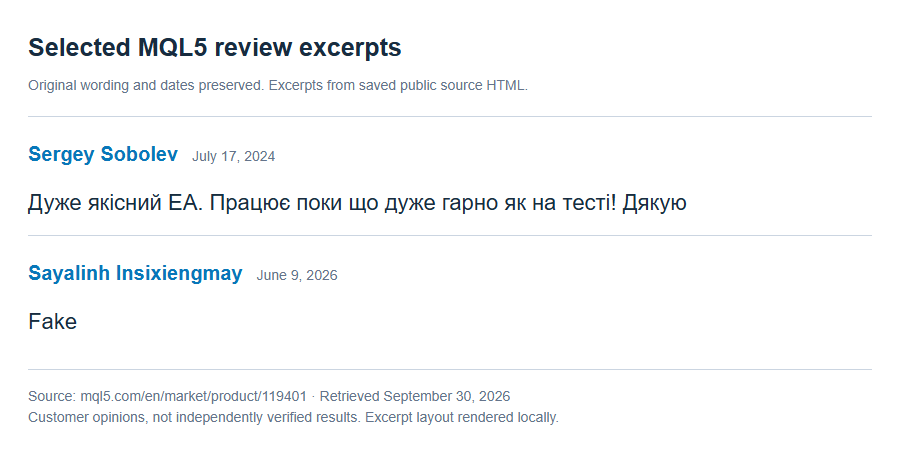
The two visible MQL5 reviews are not a performance record. A July 2024 customer reported a positive early experience; a June 2026 customer posted a brief negative allegation without technical detail, and the developer requested more information. Neither comment verifies returns for the current build. Read the original reviews and replies.
No public live signal is linked in the inspected overview. Assess the documented controls and your own reproducible testing separately from both the developer’s screenshots and customer opinions.
Source checked September 30, 2026: KSM on MQL5. Features are summarized from the developer’s published specification; no independently monitored live result is claimed.
Free lifetime updates
An instant delivery-instructions download is available after checkout and payment. It explains how to obtain the standalone EA files; the instructions document is not the trading executable. Free lifetime updates and optional free AnyDesk installation help are included. See the FAQ for update details.
Every order
What’s included with KSM
- Instant downloadReady after checkout and kept in your account
- Free lifetime updatesAdded as soon as we receive them, every version kept in your account
- Unlimited activationsUnlimited live and demo accounts
- Free remote installationOptional: a one-time install over AnyDesk, with settings advice and custom presets
- 7-day money-back guaranteeIf the EA fails to attach to your chart because of errors we can replicate, you get a full refund.
Product FAQs
KSM EA MT5 FAQs
Real people on support, by Telegram or our contact form.
Which currency pairs and timeframes does KSM use?
The overview describes multiple Forex currency pairs and configurable timeframes but gives no definitive pair list or single required chart. The signalTf input selects the signal timeframe. Verify the chosen instrument and settings together.
Can KSM hold a series of orders?
Yes. LimitSeries limits the order count, TypeSeries selects the series type and TrailingSeriesOn enables series trailing. The published overview does not justify a no-grid or no-martingale claim.
Do the drawdown settings do the same thing?
No. MaximumDrawdown is described as closing all orders, while StopWorkingDrawdown stops trading activity. Check both settings, their units and their effect on open trades in the actual build before live use.
Is there verified live-performance evidence?
The inspected overview does not link a public live signal. Its screenshots and the two visible customer reviews are developer or user material, not an independently verified performance record.
How do I access the download?
After checkout and payment, your order provides an instant delivery-instructions download explaining how to obtain the standalone EA files. The instructions document is not the EA executable.
Are free lifetime updates included?
Yes. Free lifetime updates are included when we receive them. A new developer release may not be available immediately; contact us if you need to confirm a particular build.
Is installation help available?
Yes. This product qualifies for optional free remote installation assistance through AnyDesk. You can also install the standalone files yourself.
- Excellent on Trustpilot 4.6 out of 5 from 120 reviews (opens in a new tab)
- 28,000+ traders since 2019
- 1,530+ official EAs
- Card or crypto payments
Related EAs
Traders also explore
Premium expert advisors at vault-low prices, with your crypto price on every card.
 MT5Save 57%
 MT5Save 78%
 MT5Save 50%
 MT4Save 91%
Ready when you are
KSM EA MT5 for $439.99 with crypto
Regular price was $1,279.00 · $549.99 with card · instant download · free lifetime updates

KSM EA MT5$439.99with crypto$549.99 with card