
New MT5 arrival
Intel Neuron Bot EA MT5
Latest version
We’re rated Excellent on Trustpilot · 4.6/5 (opens in a new tab)Intel Neuron Bot EA MT5 trades from a trained neural-network file with signal sensitivity, equity and order-management controls.
- Developer-preferred H1 timeframe.
- Trained model required; disable Random Orders before model-based trading.
- Equity limits, order caps, grid spacing and series settings.
 MT5Save 45%
Regular priceRegular price was $999.00
$549.99 with card
Visa, Mastercard, Apple Pay and Google Pay accepted.
Card payments add bank fees, sales taxes and other charges.
- Latest version
- Instant downloadYour file is provided immediately after payment. In very rare cases we manually review an order first, then send your download straight after. If you don’t receive your file, you can request a full refund.
- Free lifetime updatesAll updates are free. They’re provided on a best-availability basis: we get new versions as fast as we can, led by customer demand, but we don’t guarantee them immediately. If you need every update the moment it’s released, our service may not be the best fit for you.
- 7-day money-backRefunds only cover an EA that fails to attach to your chart because of errors we can replicate. We don’t cover changing your mind or not liking the EA. All brokers are different, and results are never promised because markets are constantly changing.
- Unlimited activationsUse it on as many MT5 accounts and computers as you want, live or demo. There are no restrictions on how you use it.
Source code (.mq5) available at checkout.


28,000+ tradersServed since 2019
Orders over $300 include 3 months of PrismAlgo freeThe highly recommended cloud-connected EA for 28 FX pairs, Gold and Bitcoin. Added to your cart automatically. View PrismAlgo
Official versionsInstant downloadFree lifetime updatesExtra 20% off with cryptoReal people on support28,000+ tradersTrading since 2019Rated Excellent on Trustpilot
Product description
About Intel Neuron Bot EA MT5
Intel Neuron Bot EA MT5 is a configurable neural-network trading system by Andriy Sydoruk. It reads a trained model file, converts the model’s output into trading signals and combines those signals with order, equity and series controls. The developer identifies H1 as the preferred operating timeframe.
A trained model is required
The default configuration can place random orders. The developer instructs users to load a trained neural-network file and set Random Orders = false for model-based trading. Do this before evaluating the intended strategy. Attaching the EA without its model and configuration does not establish that it is running a trained system.
The listing links to the separate free Teaching T-INN training utility. Its instructions place the script in the Scripts folder and run it on the intended instrument and timeframe after loading its price history. The output model uses a Files location, with the trainer defaulting to the folder shared by MetaTrader terminals. Check the configured filename and location when connecting it to the EA.
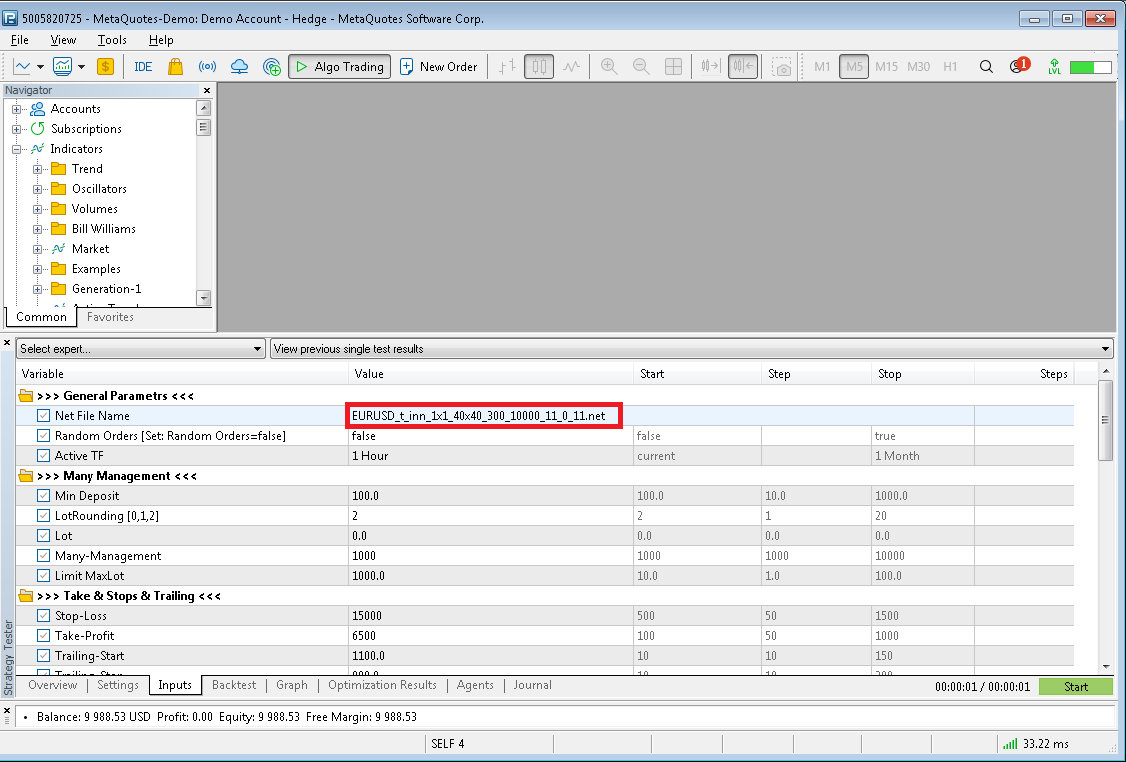
The public discussion supplies an EURUSD H1 example from September 2022. The developer’s setup guide says to rename the supplied file’s extension from .sqlite to .net, place it in Terminal/Common/Files, match Net File Name and enable File Common Data On. That older example explains the workflow; its availability does not establish suitability for today’s market.
Signal sensitivity and trade management
The developer calls the architecture T-INN, combining clustered training data with neural-network processing. The practical trading control is Level Signal, which adjusts the response to the network’s output. The source also lists the following management areas:
- Position and exit settings: money management, stop loss, take profit, trailing start and trailing stop.
- Equity controls:
TotalEquityLossandTotalEquityProfit. - Order limits and spacing:
LimitOrdersandGridStep. - Series modes:
TypeSeria,SeriaTrendOnandSeriaAntyTrendOn. - Monitoring: configurable comments and the ability to write its own log files.
The grid-spacing and series inputs matter when assessing exposure. This is not presented as a no-grid system, and the model’s signal is only one part of the account risk. Review the order limit, sizing and equity settings together before enabling automated trading.
Separate model training from validation
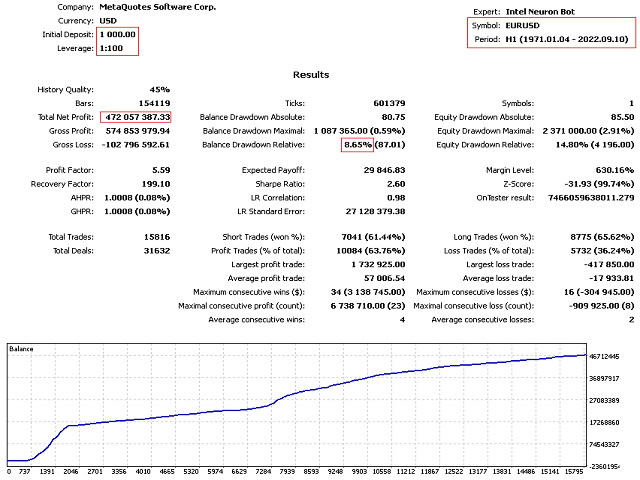
Teaching T-INN uses agTeaching to train, agAudit to inspect the training interval and agForward to check the later forward period. Its guide also explains the cluster-count setting. A network can fit its training period well without performing similarly on later data: keep these intervals separate, inspect the trade sequence and then test the configured model on a demo account.
The November 27, 2022 release notes describe a fix for loaded networks remaining tied to a specified timeframe despite the chart or tester selection. Check the actual timeframe behavior when evaluating an existing model.
This EA is most relevant to traders willing to manage model files and test their assumptions. Public examples are separate from the purchase; no private developer consultation or newly trained model is promised here.
Intel Neuron Bot specifications · Developer’s public discussion.
Included: standalone MT5 delivery, account download instructions after payment, and Free lifetime updates. Follow your order instructions and confirm the required trained model before use.
Every order
What’s included with Intel Neuron Bot
- Instant downloadReady after checkout and kept in your account
- Free lifetime updatesAdded as soon as we receive them, every version kept in your account
- Unlimited activationsUnlimited live and demo accounts
- Free remote installationOptional: a one-time install over AnyDesk, with settings advice and custom presets
- 7-day money-back guaranteeIf the EA fails to attach to your chart because of errors we can replicate, you get a full refund.
Product FAQs
Intel Neuron Bot EA MT5 FAQs
Real people on support, by Telegram or our contact form.
Can Intel Neuron Bot run without a trained model?
The developer states that its default mode can place random orders. For model-based trading, load the required trained neural-network file and set Random Orders to false before testing or use.
How is the neural-network file prepared?
The separate free Teaching T-INN trainer, MQL5 product 86304, runs as a script on the intended instrument and timeframe after price history is loaded. Its output defaults to the shared MetaTrader Files location. Check the model filename and configured folder when connecting it to the EA. No particular pretrained model is promised here.
Which timeframe is recommended?
The developer identifies H1 as optimal. Models can be trained for other instruments and timeframes, but the training data and EA configuration must match the intended test.
Does it use grid or series management?
The documented inputs include GridStep, LimitOrders, TypeSeria and trend/anti-trend series switches. Review these alongside sizing and TotalEquityLoss/TotalEquityProfit; the product is not presented as a no-grid EA.
How do I access the purchase?
An instant delivery-instructions download is available in your account after payment and explains how to obtain the standalone files. The instructions document itself is not the EA executable.
Are free lifetime updates included?
Free lifetime updates are included when we receive them. A new developer release may not be available immediately; check with us if you need a specific build.
- Excellent on Trustpilot 4.6 out of 5 from 120 reviews (opens in a new tab)
- 28,000+ traders since 2019
- 1,400+ official EAs
- Card or crypto payments
Related EAs
Traders also explore
Premium expert advisors at vault-low prices, with your crypto price on every card.
 MT5Save 57%
 MT5Save 78%
 MT5Save 50%
 MT5Save 50%
Ready when you are
Intel Neuron Bot EA MT5 for $439.99 with crypto
Regular price was $999.00 · $549.99 with card · instant download · free lifetime updates
Intel Neuron Bot EA MT5$439.99with crypto$549.99 with card