
Available from CheaperForex
Explore the Bitcoin strategy and current offer.
Tnun Davinci BTC Buy EA MT5 is a BUY-only BTCUSD system with M5 execution and D1, H4, H1 and M15 market context. Its appeal is selective entry, per-layer sizing and coordinated trade management within one Bitcoin strategy. It suits users prepared to configure broker specifications and protection scope carefully. The main consideration is overlapping long exposure and the distinction between blocking new entries and closing positions.
Evidence scope: the developer’s product information, linked BUY settings guide and original Strategy Tester images checked on 9 November 2026. The listing identifies version 1.1, updated 4 November after its 3 November publication. This is a source-based editorial assessment, not a firsthand terminal test or an independently reproduced backtest. CheaperForex sells this EA.

What the multi-layer structure contributes
The developer separates the market reading into five layers. D1 provides broad structure, H4 supplies medium-term direction, H1 addresses continuation and management, M15 offers shorter-term confirmation, and M5 handles execution. The distinction matters: a five-minute chart attachment does not mean decisions use only five-minute information.
The four named pillars are trend, range, Elliott Wave and cycle. They describe how direction, price zones, wave behavior and market phases are considered. The internal formulas are proprietary, so these labels do not establish a complete independently auditable trading rule set.
Entry permission and open-position management
The overview says multiple conditions must align before a new entry. It distinguishes new-trade permission from managing the positions already open. Blocking additional entries can reduce further exposure while the EA continues to handle existing trades.
The developer-linked settings guide is shared across the BUY family and carries an EA XAUUSD BUY footer. It explains the operating controls; the BTCUSD market and M5 application here come from this product’s own listing.
The linked BUY guide specifies per-layer order caps and base volume, an optional maximum lot for each new entry, risk-based size adjustment and lot reduction after a layer reaches a configured position count. A cap below the broker’s minimum valid volume can prevent an entry. Read screenshot Value columns as selected settings; Start columns are optimization inputs.
Layered participation can create correlated exposure to the same underlying Bitcoin move. Stop-loss and profit-management logic does not remove slippage, gaps or the possibility that several positions lose together. The public overview does not justify treating the strategy as risk-free or assuming an exact maximum drawdown.
Protection scope changes what can be closed
Daily balance protection can stop entries and close the chosen scope when equity reaches the start-of-day balance minus the configured loss allowance. A triggered equity floor closes the selected scope and remains halted. Reset it through the chart control only after equity is above the floor and liquidation is complete. Strategy-only, current-symbol and full-account scopes have different consequences: Full account includes other EAs’ and manual positions.
The exposure guard has a different job: it blocks new entries based on potential loss. Its percentage option is labeled %Equity, but the guide states that this edition uses start-of-day balance for that threshold. Monetary labels also do not automatically convert the account currency. Those distinctions matter when matching protection to a prop firm’s loss rules.
Price limits need the same care. The upper limit can act as a managed-BUY exit and block entries at or above it. The lower entry limit blocks purchases below the selected price; it is not a stop loss.
Entry schedules and protection resets are separate
The entry schedule supports weekdays, optional start/end dates and up to three session windows, with several clock options. StartDate and EndDate are trading-window settings. The daily-protection clock separately supports broker time, Prague with seasonal clock changes, or a custom UTC offset.
Ending a session or disabling Allow long entries stops new entries rather than closing existing positions. Keep MT5, the EA and Algo Trading running if the EA is to continue managing the open book. Changing a Strategy ID while positions remain open can also affect identification and should be avoided.
Broker specifications are part of the configuration
- Market and chart
- BTCUSD / Bitcoin on M5.
- Account structure
- A hedging account is recommended.
- Execution costs
- Spread and commission need to be assessed for the actual broker contract.
- Volume and margin
- Check contract size, minimum volume, leverage and available margin before choosing exposure.
- Price handling
- Verify digits, stop level and symbol naming.
- Continuity
- The developer recommends a stable VPS connection.
Two brokers can use the same BTCUSD label with different contract sizes, costs and execution conditions. A fixed lot amount can therefore represent a different cash exposure. The source’s recommendation for sufficient leverage and a margin buffer is not a universal minimum deposit or sizing recommendation.
How to read the performance language
The listing includes layer-level win-rate claims without a complete account history, trade sample or measurement period alongside them. A win rate alone also says nothing about the size of losing trades relative to winning trades. It should not be treated as an expected return or a verified forward result.
The named market framework is useful for understanding the intended behavior. Establishing how a selected configuration behaves still requires checking trade history, execution conditions and the relation between position size and losses. Historical testing cannot guarantee future Bitcoin performance.
What the original tester images show
The developer’s statistics image records 143 BUY trades, 62.24% winners and a profit factor of 4.79. Relative balance drawdown is 16.19%, while relative equity drawdown reaches 23.23%. The higher equity figure matters because open-position losses can be deeper than the closed-balance history suggests.
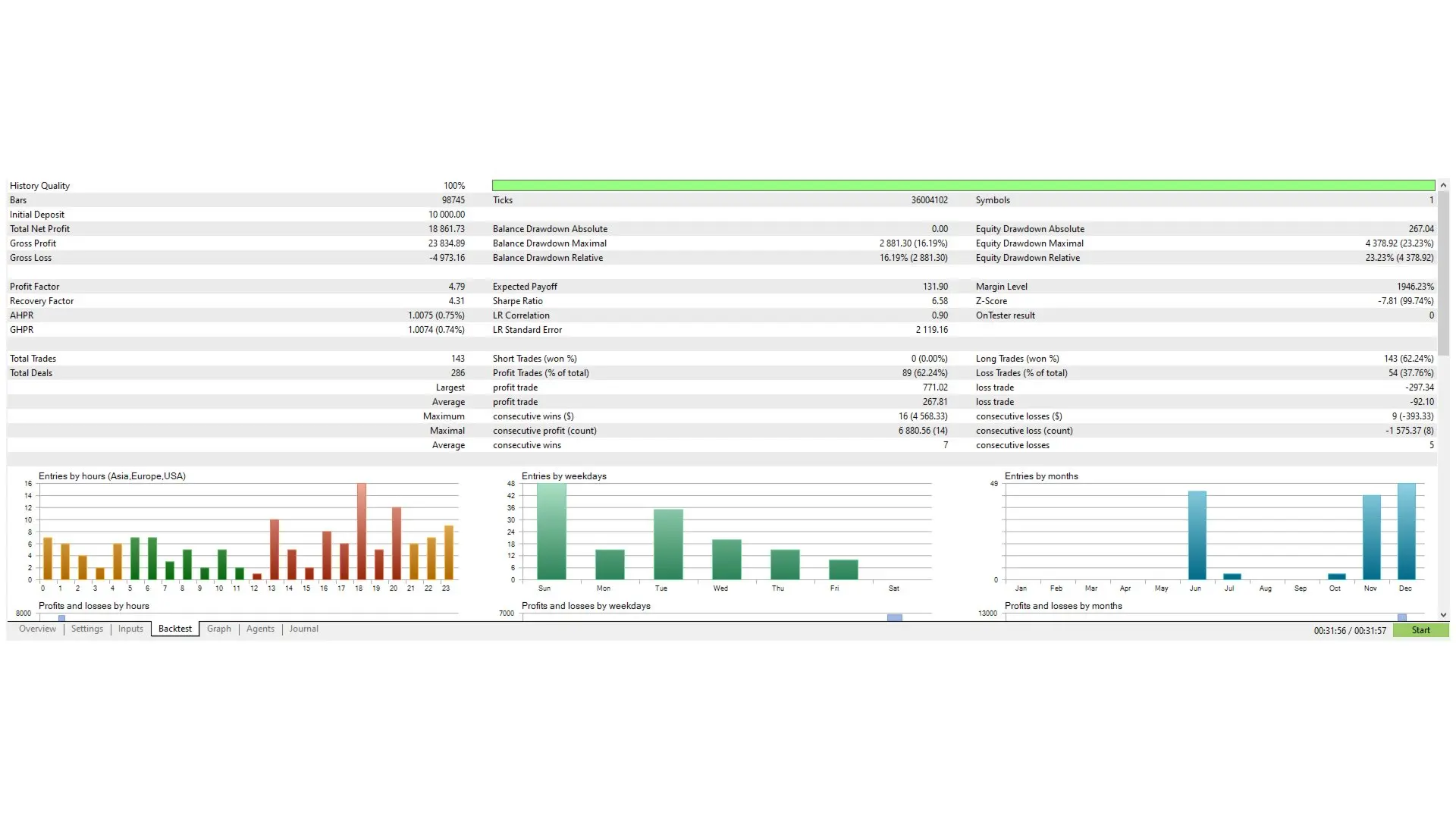
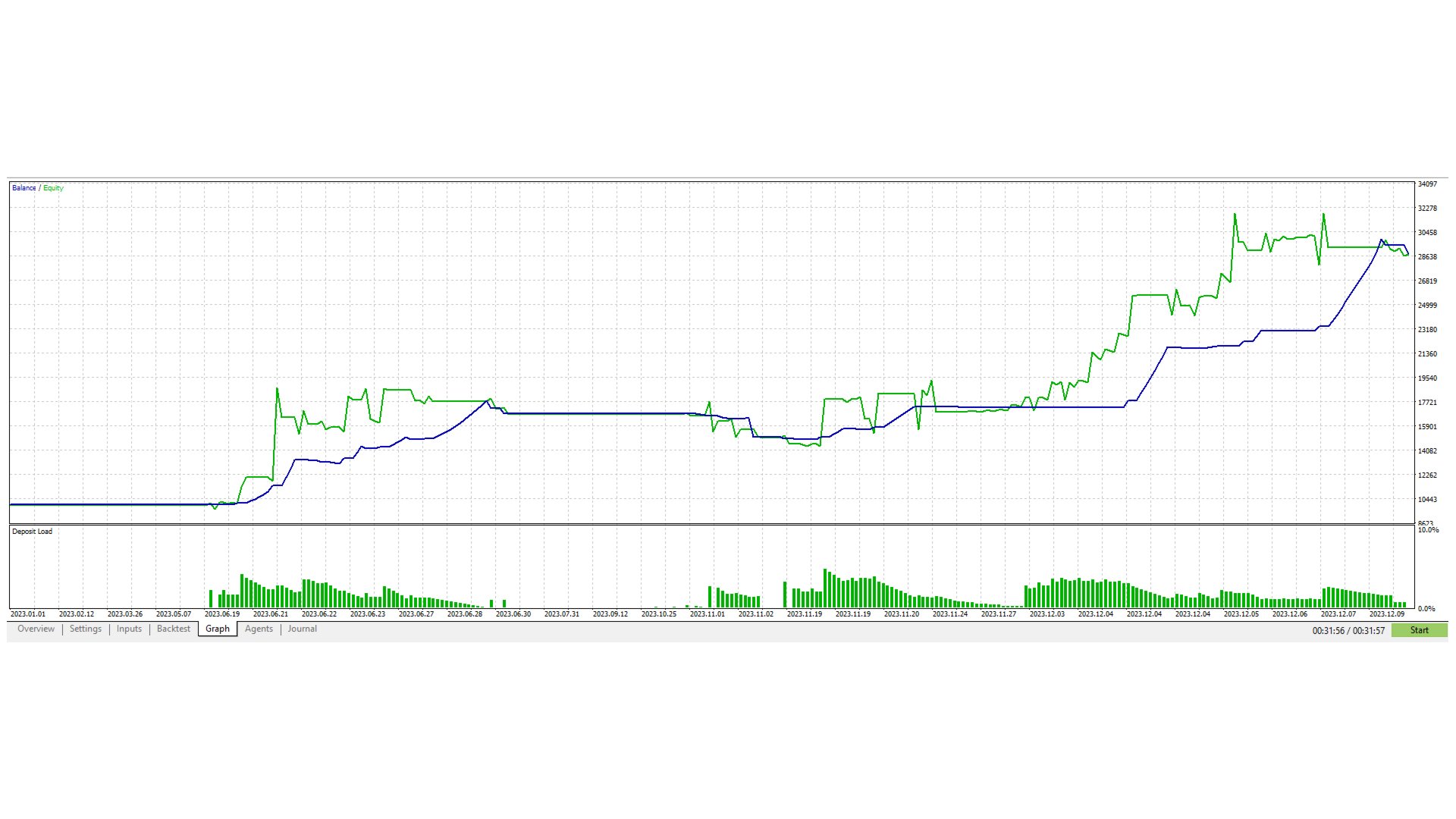
The curve has visible 2023 date labels and shows balance, equity and deposit load. The images do not establish the tested symbol, build, full date range or settings, and they do not verify the current 1.1 release. The complete-report win rate and the advertised layer-level claims describe different measurements; one cannot validate the other.
No live signal was linked from the product description, and no product reviews or visible comments were available when checked. These original gallery images are historical simulations, with the drawdown retained alongside the results.
Prop-firm use requires a separate rules check
The developer emphasizes disciplined exposure and position management for personal or prop-firm-style accounts. That describes an intended use, not approval by any particular firm. BTCUSD availability, news restrictions, holding windows, daily loss calculations and maximum drawdown definitions can differ.
Check the firm’s exact rules against the EA’s configured behavior, including existing positions when new entries are blocked. A structured strategy does not guarantee a challenge pass, and the source explicitly rejects a promise of fixed profits.
Who it may suit
The strongest case is a trader looking for focused Bitcoin automation with broader market context and position-management controls. Its selective approach allows quiet periods instead of promising continuous activity.
The main consideration is matching the strategy, broker contract and exposure settings. The public overview explains the framework but does not provide enough information to certify every entry rule or predict a fixed loss ceiling.
Sources and current product details
- TnunDavinciBTCBuy official MQL5 listing
- Developer-linked BUY settings guide
- Nguyen Van Thien’s developer catalog
Available from CheaperForex
Explore the Bitcoin strategy and current offer.