

What's included

  • Installation guideStep-by-step PDF with screenshots
  • Optimised presetsReady-to-use configuration files
  • Future updatesIncluded free when we receive them
  • Email supportHelp with setup and technical issues
7-day money-back guarantee. If the EA fails to attach to your chart because of errors we can replicate, you get a full refund. Trading results are not covered.
Trustpilot service reviews

What our customers say

Selected Trustpilot feedback about CheaperForex support, setup and service.

Since 2019 in business 28,000+ customers served

Benefit EA for MT4 V4.1 & V5.1

Benefit EA is a non-indicative flexible grid advisor that excels in identifying unique entry points based on rigorous statistical analysis.

Unlike many traditional EAs, Benefit EA does not use stop loss; instead, all trades are closed using take profit or trailing stop mechanisms. This approach minimizes losses and maximizes profits by strategically planning lot increments.

This Package Contains an Instant Download of:
+ Experts: Benefit EA (.ex4) V4.1 and V5.1 – Works on ALL MT4 Builds
+ Pairs/Timeframes
+ How to Install.pdf

More Information:
+ https://www.mql5.com/en/market/product/14018

Video Information:
+
https://youtu.be/c6uJ8KZN6iA

Live Performance Signal:
+
None known

Original price was: $10,000.00.Current price is: $39.95.

 
Card price. Apple Pay and Google Pay accepted.
Pay with crypto and it is  20% off at checkout
  • Instant download from your account the moment checkout completes. The files stay in your customer portal.
  • Official version, with future updates included free when we receive them. You never pay twice for the same product.
  • 7-day money-back guarantee if it fails to install or run. Setup help by email whenever you need it.
Orders over $300 include 3 months of PrismAlgo EA MT5, free Our cloud-connected EA for 28 FX pairs, Gold and Bitcoin. Added to your cart automatically. PrismAlgo.com
View listing
Need Help? Message us on Telegram, or contact us

What's included

  • Installation guideStep-by-step PDF with screenshots
  • Optimised presetsReady-to-use configuration files
  • Future updatesIncluded free when we receive them
  • Email supportHelp with setup and technical issues
7-day money-back guarantee. If the EA fails to attach to your chart because of errors we can replicate, you get a full refund. Trading results are not covered.

Benefit EA for MT4: Unleashing the Power of Market Patterns

Introduction

Welcome to the world of advanced automated trading with the Benefit EA for MT4. This exceptional Expert Advisor (EA) combines flexibility with sophisticated entry points to offer a statistical advantage revealed through mathematical modeling of market patterns. Designed to cater to both novice and professional traders, Benefit EA provides a comprehensive solution for those looking to optimize their trading strategies with minimal manual intervention. Available exclusively at CheaperForex.com, this EA stands out for its adaptability and powerful trading capabilities.
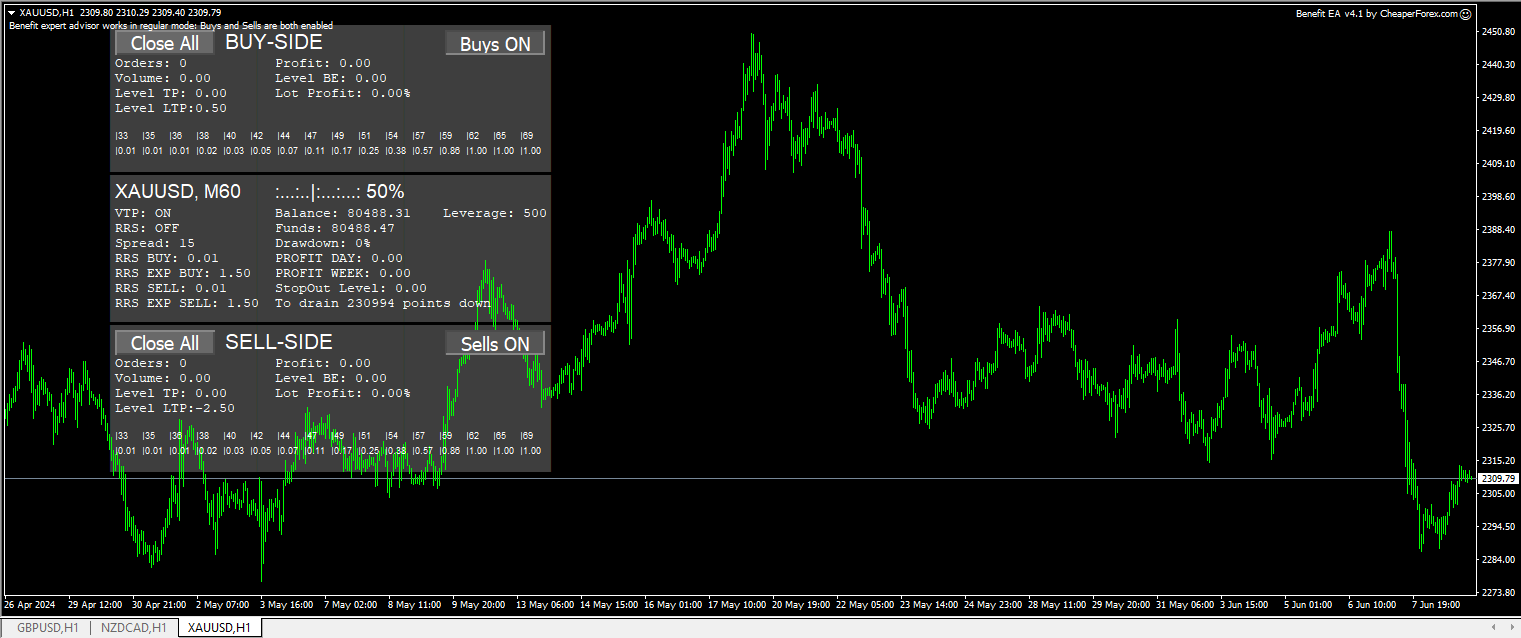
Benefit EA MT4 on Chart

Strategy Overview

Benefit EA is a non-indicative flexible grid advisor that excels in identifying unique entry points based on rigorous statistical analysis. Unlike many traditional EAs, Benefit EA does not use stop loss; instead, all trades are closed using take profit or trailing stop mechanisms. This approach minimizes losses and maximizes profits by strategically planning lot increments.

One of the standout features of Benefit EA is its “Time Filter” function, which operates based on the internal time of the trading terminal. This allows for complete automation of the trading process, ensuring that the EA performs optimally without the need for manual oversight. The status of the “Time Filter” is displayed clearly in the upper left corner of the trading window, providing real-time updates on its operation.

Benefit EA is designed to handle various trading styles, including selling short, scalping, and trading flat markets. The EA also includes semi-automatic trading buttons that allow traders to block the operation of one or both trade directions, with text notifications indicating the trade blocking status.
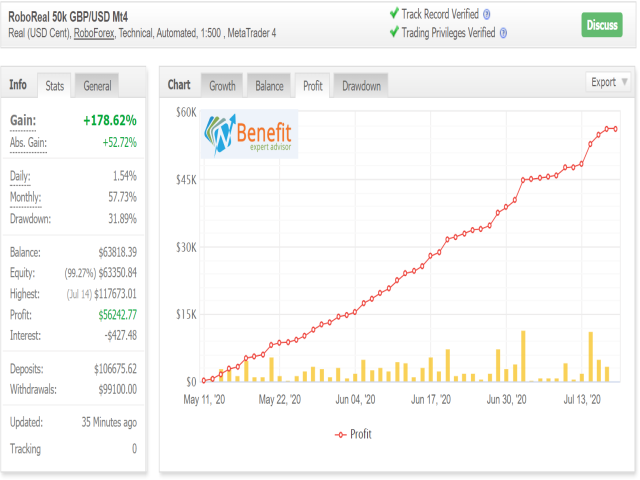
Benefit EA MT4 Live Performance

Trading Specifications

  • Recommended Pairs: GBPUSD, USDJPY, EURUSD, EURJPY, USDCAD, USDCHF, AUDUSD
  • Timeframe: M1, M5, M15, H1
  • Minimum Balance: $5,000 – $10,000 (depending on the instrument)
  • Leverage: 1:20 – 1:1000
  • Default Settings: Optimized for GBPUSD on M15 timeframe

Key Features

  • No Stop Loss: Utilizes take profit and trailing stop mechanisms for trade closure.
  • Time Filter: Automates trading based on the terminal’s internal time, ensuring seamless operation without manual intervention.
  • Multiple Trading Styles: Supports selling short, scalping, and trading flat markets.
  • Semi-Automatic Trading: Includes buttons to block trade directions with notifications.
  • Flexible Settings: Extensive options for professional traders, allowing customization for various trading styles.
  • Robust Risk Management: Features a Risk Reduction System (RRS) to manage drawdown and protect capital.

Detailed Parameters

  1. Base Settings
    • New_Cycle: Enable/disable opening order series in cycles.
    • MAGIC: Unique identifier for trades, essential for running multiple EAs on the same account.
    • Slippage: Default value is 3; adjust only if necessary.
    • Max_Trades: Maximum number of orders in a series (up to 17).
    • Max_Lot: Maximum lot size.
  2. TP Settings
    • TP Buy/Sell: Take profit levels for Buy and Sell positions.
    • Trailing_Start: Points level to activate trailing.
    • Trailing_Size: Points for trailing the trailing start level or for closing.
  3. Risk Reduction System (RRS)
    • RRS: Enable/disable the RRS.
    • RRS_oOrder: Order number to activate RRS.
    • RRS_cOrder: Order number to deactivate RRS.
    • RRS_TP: Take profit for closing RRS orders.
    • RRS_Trailing_Start/Size: Levels to activate and manage trailing for RRS.
    • RRS_Profit_Percent: Recommended 70-90% for exiting prolonged drawdowns.
  4. Buy and Sell Settings
    • Step_Buy/Sell: Step for opening new orders in a series.
    • Step_Coef_Buy/Sell: Coefficient for increasing step size for subsequent orders.
    • Step_Coef_Start_Order_Buy/Sell: Order number to activate Step_Coef_Buy/Sell.
    • Step_Mass_Buy/Sell: Default step size if Step_Coef_Buy/Sell is 0.
    • Min_Lot_Buy/Sell: Minimum lot size for the first order.
    • Lot_Exp_Buy/Sell: Coefficient for increasing lot size for subsequent orders.
  5. Time Filter Settings
    • Time_Filters: Enable/disable trading within specified time intervals.

Final Verdict

Benefit EA for MT4 is a robust and flexible trading tool designed to meet the needs of traders seeking an edge in the forex market. Its advanced grid strategy, combined with unique entry points and comprehensive risk management features, ensures consistent performance and profitability. The ease of installation and extensive customization options make it suitable for traders of all levels.

Available exclusively on CheaperForex.com, Benefit EA offers a powerful solution for automated trading, blending sophisticated algorithms with user-friendly functionality. Whether you are a seasoned trader or a newcomer, this EA provides the tools you need to achieve your trading goals.

Reviews

There are no reviews yet.

Be the first to review “Benefit EA for MT4 V4.1 & V5.1”

Pre-Purchase FAQs

Are updates always free?

Yes, all updates are completely free—you'll never pay twice.

We receive updates from developers and upload them to your account when they're available. Please be patient, as we're managing hundreds of products at discounted prices. More popular products are updated more frequently.

All versions are stored in your account for easy access.

What's your refund policy?

We offer a 7-day technical guarantee. If the EA fails to attach to your chart due to verified errors we can replicate, we'll issue a full refund.

However, we cannot refund based on trading performance or profit expectations—forex markets are unpredictable, and results vary by broker, spread, and market conditions. We provide tools, not guarantees.

I need assistance installing this?

Yes, we'd be happy to assist you!

We can advise you on the best settings for your account or create custom presets tailored to your needs. Additionally, we offer a one-time free installation service using AnyDesk for remote setup.

Please note, however, that we cannot provide advice on how to make money with any of our products.

Can I use this on multiple accounts?

Absolutely. Once you purchase, the EA is yours to use on unlimited live and demo accounts—no restrictions.

You can run it on multiple brokers, VPS servers, or trading accounts simultaneously.

There are no license limits or activation keys. Buy once, use everywhere.

How do I download after payment?

After successful payment, your product will be available for download instantly:

  • Displayed on the screen immediately after checkout
  • Emailed to the address you provided during purchase
  • Stored in your account if you created one at checkout

In rare cases (about 1% of high-value premium products), orders may be held for manual review to prevent fraud. If you don't see a download link, contact us for assistance.

Is this an original product?

Yes, absolutely.

We do not sell fake products, and our customer reviews, along with our pricing, reflect the quality and authenticity of what we offer.

Why Traders Trust Us

Excellent on Trustpilot
4.5★ from real customers
In Business Since 2019
28,000+ customers served
Instant Access
No group buys or waiting
7-Day Refund Policy
For product errors
Remote Installation
We can install for you
Flexible Payments
Cards, Apple Pay, Crypto

Reviewed by Our Trader

Picture of Peter Jones

Peter Jones

Peter Jones is a full-time trader, forex software developer, and founder of CheaperForex.com. With over 10 years of experience in algorithmic trading, he helps traders gain an edge using reliable EAs and strict risk control.
Product
— Card — Crypto