/* Only complements native navigation; native search and Woo actions stay unchanged. */ (()=>{ const key='cfHeaderDraft40435'; window[key]?.dispose?.(); const abort=new AbortController(),media=matchMedia('(max-width:1024px)'); const header=()=>document.querySelector('.elementor-40435.elementor-location-header'); const toggle=()=>header()?.querySelector('.cf-header-nav .elementor-menu-toggle'); const expanded=t=>t&&(t.getAttribute('aria-expanded')==='true'||t.classList.contains('elementor-active')); const close=focus=>{const t=toggle();if(expanded(t)){t.click();if(focus)t.focus();}}; document.addEventListener('keydown',event=>{ if(event.key==='Escape'&&expanded(toggle())){close(true);event.preventDefault();} },{signal:abort.signal}); document.addEventListener('pointerdown',event=>{ const nav=header()?.querySelector('.cf-header-nav'); if(media.matches&&expanded(toggle())&&nav&&!nav.contains(event.target))close(false); },{signal:abort.signal}); const change=()=>close(false);media.addEventListener('change',change); const disposeCart=cfEnhanceDraftCart(header()); window[key]={dispose(){abort.abort();media.removeEventListener('change',change);disposeCart();}}; /* Proposal only. Call inside the draft header's existing behaviour IIFE: * const disposeCart = cfEnhanceDraftCart(header()); * Include disposeCart() in that IIFE's existing dispose method. * Native cart toggling, fragments and checkout links remain untouched. */ function cfEnhanceDraftCart(header) { if (!header || header.getAttribute('data-elementor-id') === '353') return () => {}; const abort = new AbortController(), owned = new Map(); let wasOpen = false, closing = false, frame = 0; const refs = () => { const widget = header.querySelector('.cf-header-cart'); return {widget, pane:widget?.querySelector('.elementor-menu-cart__main'), trigger:widget?.querySelector('.elementor-menu-cart__toggle_button'), close:widget?.querySelector('.elementor-menu-cart__close-button, .elementor-menu-cart__close-button-custom')}; }; const open = r => !!r.widget?.classList.contains('elementor-menu-cart--shown'); const attribute = (el, name, value) => { if (!el || el.getAttribute(name) === value) return; if (!owned.has(el)) owned.set(el, new Map()); const values = owned.get(el), old = values.has(name) ? values.get(name).old : el.getAttribute(name); values.set(name, {old, value}); el.setAttribute(name, value); }; const prepare = r => { if (!r.pane) return; if (!r.pane.id) attribute(r.pane, 'id', 'cf-cart-dialog-' + header.getAttribute('data-elementor-id')); attribute(r.pane, 'role', 'dialog'); attribute(r.pane, 'aria-modal', 'true'); if (!r.pane.hasAttribute('aria-label') && !r.pane.hasAttribute('aria-labelledby')) attribute(r.pane, 'aria-label', 'Shopping cart'); attribute(r.pane, 'tabindex', '-1'); attribute(r.trigger, 'aria-haspopup', 'dialog'); attribute(r.trigger, 'aria-controls', r.pane.id); if (r.close) { if (!r.close.matches('button, input[type="button"]')) attribute(r.close, 'role', 'button'); attribute(r.close, 'tabindex', '0'); if (!r.close.hasAttribute('aria-label') && !r.close.hasAttribute('aria-labelledby')) attribute(r.close, 'aria-label', 'Close shopping cart'); } }; const focusable = pane => [...pane.querySelectorAll('a[href],button,input,select,textarea,summary,[tabindex],[contenteditable="true"]')] .filter(el => el.tabIndex >= 0 && !el.matches(':disabled') && !el.closest('[hidden],[inert],[aria-hidden="true"]') && el.getClientRects().length && getComputedStyle(el).visibility === 'visible'); const focusInside = () => { const r = refs(); if (!open(r) || closing || !r.pane) return; (focusable(r.pane)[0] || r.pane).focus({preventScroll:true}); }; const returnFocus = () => { const t = refs().trigger; if (t?.isConnected) t.focus(); }; const sync = () => { const r = refs(); prepare(r); const now = open(r); if (now && !wasOpen) { closing = false; cancelAnimationFrame(frame); frame = requestAnimationFrame(focusInside); } else if (!now && wasOpen) { closing = true; cancelAnimationFrame(frame); returnFocus(); closing = false; } else if (now && r.pane && !r.pane.contains(document.activeElement) && !closing) { cancelAnimationFrame(frame); frame = requestAnimationFrame(focusInside); } wasOpen = now; }; const closeNative = () => { const r = refs(); if (!open(r)) return; closing = true; returnFocus(); // Invoke the existing handler; never change its internal isCartOpen state. (r.close || r.trigger)?.click(); if (open(refs())) { closing = false; focusInside(); } }; document.addEventListener('keydown', event => { const r = refs(); if (!open(r) || !r.pane) return; if (event.key === 'Escape') { event.preventDefault(); event.stopPropagation(); closeNative(); return; } if ((event.key === 'Enter' || event.key === ' ') && r.close?.contains(event.target) && !r.close.matches('button, input[type="button"]')) { event.preventDefault(); closeNative(); return; } if (event.key !== 'Tab') return; const list = focusable(r.pane), first = list[0], last = list[list.length - 1], current = document.activeElement; if (!first) { event.preventDefault(); r.pane.focus({preventScroll:true}); } else if (!r.pane.contains(current) || (event.shiftKey && (current === first || current === r.pane))) { event.preventDefault(); (event.shiftKey ? last : first).focus({preventScroll:true}); } else if (!event.shiftKey && current === last) { event.preventDefault(); first.focus({preventScroll:true}); } }, {capture:true, signal:abort.signal}); // Move focus before native click handlers apply aria-hidden to the pane. document.addEventListener('click', event => { const r = refs(); if (!open(r) || !r.pane) return; if (r.close?.contains(event.target) || !r.pane.contains(event.target)) { closing = true; returnFocus(); queueMicrotask(() => { if (open(refs())) { closing = false; focusInside(); } }); } }, {capture:true, signal:abort.signal}); document.addEventListener('focusin', event => { const r = refs(); if (!closing && open(r) && r.pane && !r.pane.contains(event.target)) focusInside(); }, {capture:true, signal:abort.signal}); const observer = new MutationObserver(sync); observer.observe(header, {subtree:true, childList:true, attributes:true, attributeFilter:['class','aria-hidden']}); sync(); return () => { observer.disconnect(); abort.abort(); cancelAnimationFrame(frame); for (const [el, attrs] of owned) for (const [name, {old, value}] of attrs) { if (el.getAttribute(name) !== value) continue; if (old === null) el.removeAttribute(name); else el.setAttribute(name, old); } }; } })();

GoldArbitrage EA MT5 Review: Symbols, Execution and Evidence

GoldArbitrage EA MT5 trades a configured price relationship between two gold instruments, with paired position management and execution checks. Its appeal is a focused two-symbol workflow with simple visible inputs. Our assessment is that broker compatibility and net execution costs are decisive: the word arbitrage does not make the trade risk-free, and the available screenshots do not yet establish an independently monitored performance record.

Ready to Buy GoldArbitrage EA MT5?

$399.96 with crypto · $499.95 by card

Official version · Instant download · Future updates included · 7-day money-back guarantee

Download GoldArbitrage here

GoldArbitrage EA MT5 promotional cover
CheaperForex promotional artwork based on the product identity; not a trading result.

Evidence checked 25 September 2026. We inspected Ravikant Rajkumar Shete’s listing, six original gallery images, seller page and public comments. We have not run this EA or independently reconciled its account history.

What is actually being compared?

The description identifies a Primary Symbol and Secondary Symbol. The gallery illustrates this with a futures-labelled gold contract and a spot-gold symbol. That points to a two-instrument price-difference setup; the listing does not establish that it uses two separate brokers or a latency feed. We would not advertise either of those mechanisms without further documentation.
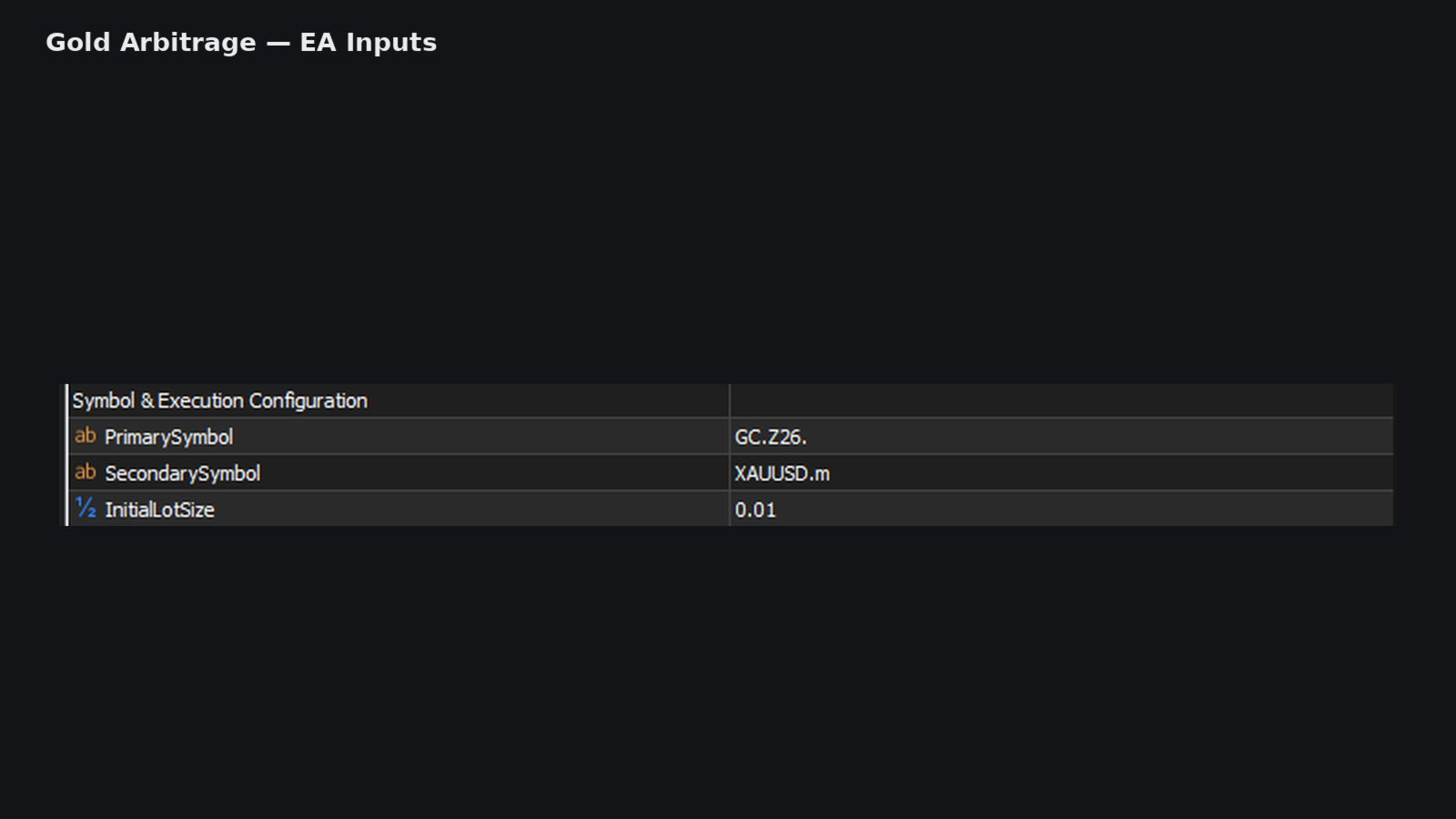
GoldArbitrage symbol and lot inputs
Original developer input illustration, retrieved 25 September 2026. The pictured GC.Z26. and XAUUSD.m names are broker-specific examples, not universal setup values.

The inputs image shows GC.Z26. and XAUUSD.m with an initial lot size of 0.01. A separate Market Watch example uses GOLD.DEC26 and XAUUSD.lm. The difference between those screenshots is useful: the names depend on the broker environment, so the buyer must configure actual tradable instruments rather than copy the illustration character for character.

The public overview specifies M1 even though other gallery charts show M5 and Daily views. A displayed chart can be used to inspect price history without being the required operating timeframe. For setup, the explicit written M1 instruction is the stronger reference.

Why a visible gap is not automatically profit

The two instruments can have different contract specifications, trading sessions and financing or expiry characteristics. Their quoted prices may differ without offering a freely collectible gain. The EA’s precise thresholds and complete hedge-sizing formula are not disclosed in the public description.

Before assessing the entry logic, compare the money exposure of both legs. Equal lot numbers do not by themselves establish equal exposure when contract sizes or tick values differ. Then account for the cost of opening and closing both positions, not just the spread displayed on the chart used to attach the EA.

This is especially relevant if the gap is small relative to costs or if one leg fills later. Synchronized execution is a software objective, not proof of simultaneous fills under every market condition. The listing acknowledges sensitivity to slippage, liquidity and execution speed.

What the journal helps you diagnose
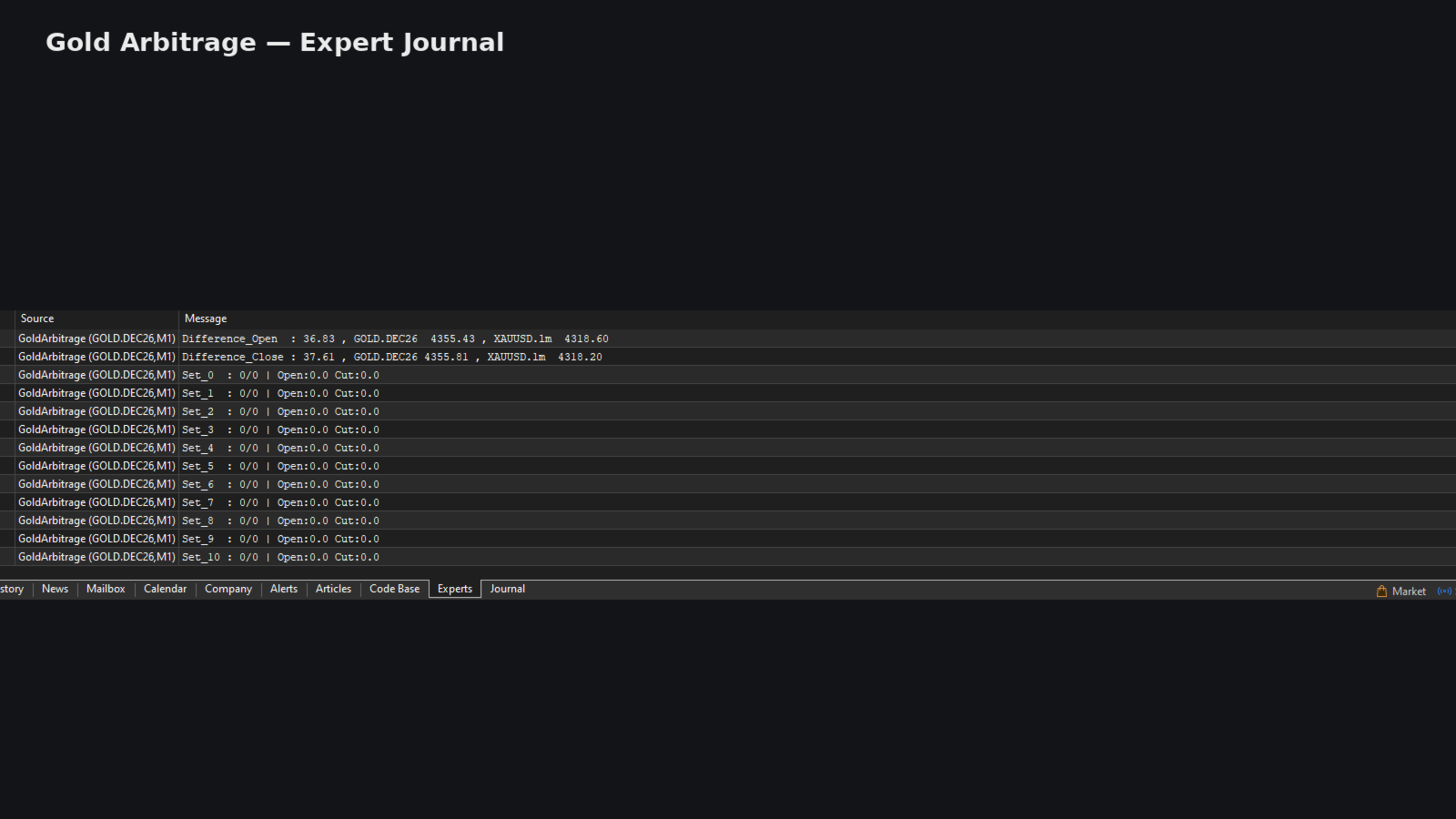
GoldArbitrage Expert Journal
Original developer Expert Journal illustration, retrieved 25 September 2026. It shows price-difference logging and trade-set status.

The developer’s journal image shows Difference_Open and Difference_Close values alongside a sequence of trade-set status lines. That provides a useful place to check whether the EA is observing both instruments and maintaining its internal trade states. It does not establish how a future rejected order or partial close will be handled.

During a demo evaluation, compare the recorded symbol prices with Market Watch, confirm both legs appear in the trade list, and check that a closing event actually removes the intended exposure. A log message alone should not be treated as confirmation that the broker executed every request.

The original trade-history illustration
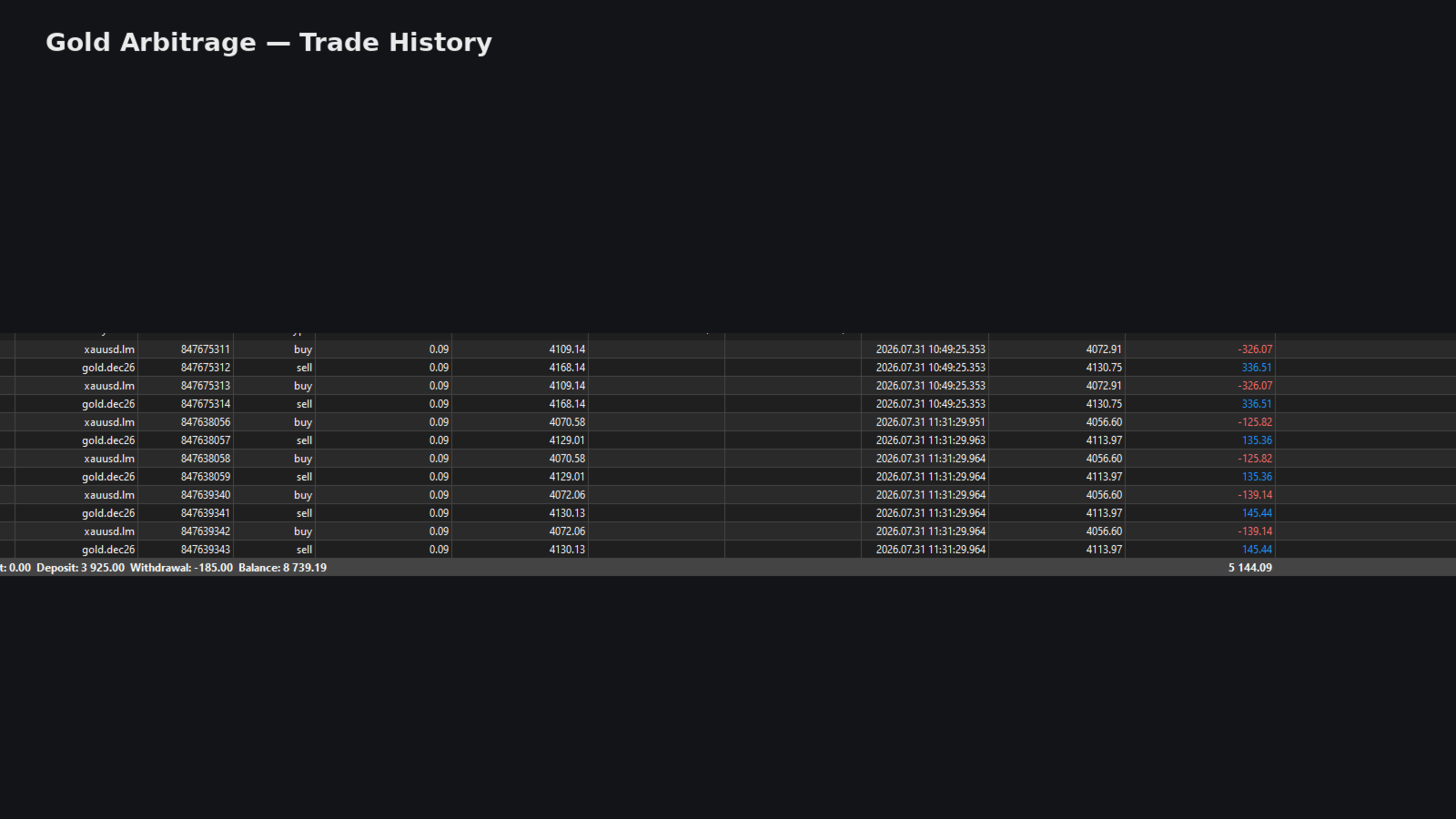
GoldArbitrage paired trade history
Original developer trade-history image, retrieved 25 September 2026. Selected closed trades and account totals are not an independently monitored performance record.

The visible rows pair buys in xauusd.lm with sells in gold.dec26. Several losing rows on one instrument sit beside profitable rows on the other, which is consistent with judging the combined setup instead of counting each ticket as an independent prediction about gold’s direction.

The screenshot presents selected closed history and account totals. It does not provide a complete equity curve, independently confirmed account type, peak floating drawdown or the full cost history for each pair. Its headline total should therefore not be converted into a return percentage or a claim that all detected gaps were profitable.

The listing was published on 22 September 2026, while the visible trade-history sample includes July dates. Earlier activity can be useful development evidence, but it is not proof of a long public track record for the current retail file. No linked public signal or buyer reviews were available at our check, and the comments page contained no discussion resolving these questions.

A practical broker evaluation

  1. Verify both exact instrument names are present and enabled in Market Watch.
  2. Compare contract size, tick value, lot increments and margin requirements for both legs.
  3. Check session overlap, holidays and any futures expiry or rollover handling.
  4. Measure the total spread, commission and observed slippage across opening and closing.
  5. Use demo observations to inspect paired fills, failed requests and any remaining open leg after an exit.

The source does not specify a universal minimum deposit or publish a broker whitelist. Inventing either would make the setup look more certain than it is. Compatibility should be established for the actual pair and account you plan to use.

Who is this approach for?

GoldArbitrage is more suitable for someone comfortable reading symbol specifications and terminal journals than for a buyer expecting a universal gold preset. The small number of visible inputs makes configuration compact, but it does not eliminate the work of checking execution and exposure. A longer public account record and clear documentation of exception handling would make a future assessment stronger.

Also from Ravikant Rajkumar Shete

Compare GoldRunnerPro EA MT5 and our GoldRunnerPro review. GoldRunnerPro focuses on basket and pending-order management with a cent hedging-account requirement. Its setup should not be copied into this two-symbol system.

Verify it yourself

View GoldArbitrage EA MT5 and current pricing