
Byrdi AI EA MT5
Version: Latest
Guaranteed genuine. No cracks, fakes or AI recreations. See why
Why we only sell the original
- Fakes are everywhere right now. AI recreations and cracked copies sell for $10 to $20 on other websites and channels. They are not the real EA.
- A fake doesn’t trade like the original. AI recreations only copy how an EA looks from the outside, so they can trade very differently.
- Cracks can hide malware that reaches your computer and your trading account.
- The real thing, with real support. The developer’s own, unmodified file, free updates, a setup guide, and real people on Telegram if you get stuck.
A $10 fake is your call. But with real money on the line, is it worth the risk? We only sell originals, at the lowest genuine price.
Free lifetime updates. You never pay twice.
Byrdi AI for MT5 by Brandon is a distributed trading intelligence system built as a living mesh — a genuinely different architecture from conventional single-terminal Expert Advisors. Where most EAs run in isolation (one terminal, one symbol, one decision at a time), Byrdi connects multiple instances running across multiple terminals, brokers, and accounts into a real-time communicating mesh network. Each node operates independently with its own AI strategy, while the mesh decides in rotation which asset is analysed where — creating diversification and shared intelligence across the entire network.
Byrdi comes from the developer who pioneered AI-integrated retail trading EAs on MQL5 (the same developer behind AiQ, Nano Machine, and the Syna ecosystem). It’s prop-firm ready, backed by a verified IC Markets live signal, and supported by an active community. Byrdi is a standalone product that operates independently — you can run it on its own or alongside other systems.
- ✅ Mesh node network architecture — multiple terminals communicating in real time, each node running its own AI strategy with mesh-coordinated asset rotation
- ✅ Prop firm ready, verified IC Markets live signal — built by the developer who pioneered AI-integrated retail EAs on MQL5
Distributed mesh trading intelligence for MT5.
 MT5Save 55%
What you receive
- Byrdi AI.ex5Genuine, unmodified developer file for MetaTrader 5Latest version
- Setup guide.pdfA general guide to installing expert advisors.Official step-by-step install guide
Delivered instantly to your account after payment
Free lifetime updates included
100% original. Never a crack, fake or AI recreation.
Regular priceRegular price was $997.97
$449.95 with card
Visa, Mastercard, Apple Pay and Google Pay accepted.
Card payments add bank fees, sales taxes and other charges.




 Apple Pay and Google Pay ready at checkout
- Official developer build · Latest version
- Instant downloadYour file is provided immediately after payment. In very rare cases we manually review an order first, then send your download straight after. If you don’t receive your file, you can request a full refund.
- Free lifetime updatesAll updates are free. They’re provided on a best-availability basis: we get new versions as fast as we can, led by customer demand, but we don’t guarantee them immediately. If you need every update the moment it’s released, our service may not be the best fit for you.
- 7-day money-backRefunds only cover an EA that fails to attach to your chart because of errors we can replicate. We don’t cover changing your mind or not liking the EA. All brokers are different, and results are never promised because markets are constantly changing.
- Unlimited activationsUse it on as many MT5 accounts and computers as you want, live or demo. There are no restrictions on how you use it.
What you receive
- Byrdi AI.ex5Genuine, unmodified developer file for MetaTrader 5Latest version
- Setup guide.pdfA general guide to installing expert advisors.Official step-by-step install guide
Delivered instantly to your account after payment
Free lifetime updates included
100% original. Never a crack, fake or AI recreation.


28,000+ tradersServed since 2019
Don’t miss thisSee the EA we recommend
The Gold EA we trade ourselves
DowGold for XAU and US30


We have tested thousands of EAs. DowGold is the one we use and recommend, and we rarely say that. We’re also an official reseller.
Real USD MyFXBook accounts. A live cloud, constantly evolving strategy.
See DowGoldOfficial versionsInstant downloadFree lifetime updatesExtra 20% off with cryptoReal people on support28,000+ tradersTrading since 2019Rated Excellent on Trustpilot
Product description
About Byrdi AI EA MT5
Quick Summary:
Byrdi AI for MT5 is a distributed trading intelligence system by Brandon — the developer who pioneered AI-integrated retail trading EAs on MQL5. Byrdi introduces a genuinely novel architecture: instead of running as an isolated single-terminal robot, it operates as a mesh node network where multiple instances across multiple terminals, brokers, and accounts communicate with each other in real time.
Each node operates independently with its own AI strategy, while the mesh coordinates in rotation which asset is analysed where. This creates diversification and shared intelligence across the entire network — every node benefits from the strategies running on the others. It’s a fundamentally different concept from conventional EAs, and one of the first genuine implementations of distributed mesh trading on the MQL5 platform.
✅ Included with your CheaperForex purchase:
- Full Byrdi user manual — installation, mesh configuration, every input and the on-chart display explained
- Developer’s optimised set files — preconfigured for the recommended brokers and ready to load
- Access to the developer’s active Telegram community — where users share configurations, settings, and practical guidance
- Standalone EA file
Official MQL5 Listing:
Byrdi AI MT5 — MQL5 Marketplace
Verified Live Signal:
Byrdi AI — MQL5 Signals (IC Markets)
The Developer Discusses Byrdi
Why Byrdi Is Different
- Mesh node network architecture — the core innovation. Multiple Byrdi instances communicate in real time across terminals, brokers, and accounts rather than running in isolation.
- Independent AI strategies per node — each terminal can run its own AI strategy, while the mesh coordinates the overall network behaviour.
- Mesh-coordinated asset rotation — the network decides in rotation which asset is analysed where, preventing duplication and maximising coverage across the available symbols.
- Shared intelligence — each node benefits from information shared by the others, creating diversification that a single-terminal EA cannot achieve.
- Prop firm ready — the architecture and risk controls are designed to be compatible with prop firm requirements.
- Verified live signal — Byrdi runs a public live signal on IC Markets using the same logic and execution rules supplied with the EA.
- Built by an established AI-EA developer — Brandon pioneered AI-integrated retail trading EAs on MQL5 and maintains a portfolio of well-regarded products.
- Manual, set files and active community included — every purchase ships with the developer’s full user manual, optimised set files, and access to his Telegram community for configuration and settings.
How the Mesh Works
Conventional Expert Advisors run in isolation: one terminal, one symbol, one decision at a time, with no awareness of anything happening elsewhere. This means each instance duplicates effort, can’t diversify intelligently across symbols, and has no way to coordinate risk across a portfolio of accounts.
Byrdi takes a different approach. When you run multiple Byrdi instances — across different terminals, brokers, or accounts — they connect into a mesh and communicate in real time. The practical benefits:
Coordinated asset coverage: Rather than every node analysing the same symbol, the mesh rotates which node covers which asset. With four nodes running nine assets (as one early reviewer described), the mesh distributes analysis intelligently rather than duplicating it.
Per-node AI strategy: Each node can run its own AI strategy configuration. This means a single mesh can blend multiple approaches — one node running a more aggressive configuration, another more conservative — with the mesh balancing the overall network.
Diversification through the mesh: Because each node benefits from the strategies running on the others, the network as a whole achieves diversification that’s impossible with isolated single-terminal EAs.
Scalable architecture: Start with one node and add more terminals over time. The mesh grows as you add instances, with each new node contributing to and benefiting from the shared intelligence.
What Early Users Are Saying
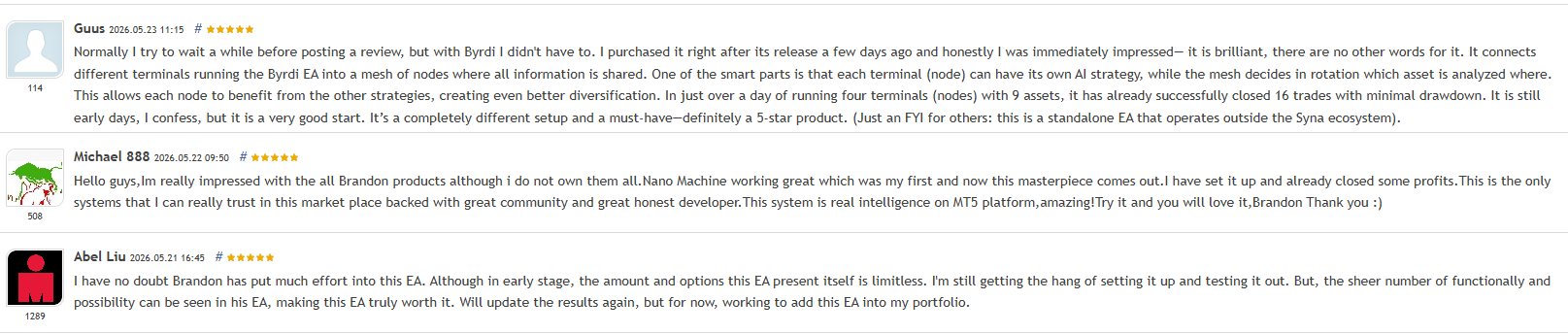
Byrdi launched to strong early reviews from buyers who recognised the novelty of the mesh approach. Reviewers highlighted the real-time node coordination, the diversification benefits of running multiple nodes, the ease of setup, and the developer’s established reputation across his product portfolio. Several reviewers referenced positive experiences with the developer’s other products (Nano Machine and others) as the reason they trusted Byrdi at launch.
Set Files and Active Community Support — Included

Every Byrdi purchase from CheaperForex includes the developer’s optimised set files — preconfigured for the recommended brokers so you can load and run rather than tune from scratch. You also receive access to the developer’s active Telegram community, where users share configurations, discuss optimal settings, and exchange practical knowledge about running multi-node setups. For a system as novel as a mesh node network, that community access is genuinely valuable: the optimal way to configure multiple nodes isn’t something a generic EA manual will tell you, and the community is where that practical knowledge gets shared.
Full User Manual — Included With Every Purchase
Byrdi ships with a detailed user manual covering installation, mesh configuration, and every input on the EA. It is not a one-page quickstart — it is a full document explaining how the mesh node network behaves, what each setting does, and what to look for on the on-chart display so you can verify each node is connecting and operating correctly.
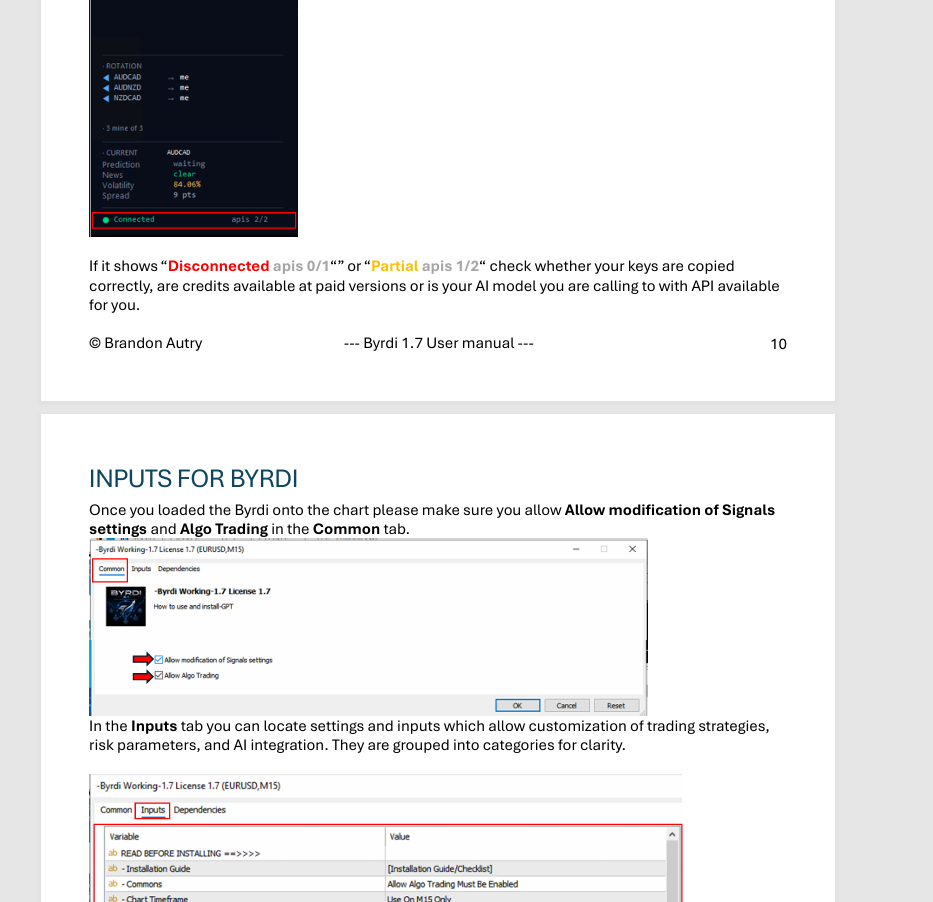
What the manual covers in depth:
- Installation and licensing — every step from purchase to a running terminal
- The on-chart mesh display — how to read the rotation panel, current prediction, news/volatility/spread indicators, and the Connected / Partial / Disconnected API status (so you know when something needs attention rather than guessing)
- Every input on the EA — what each setting in the Inputs tab does, grouped into categories: installation guide, commons, chart timeframe, AI integration, risk parameters, and trading strategy customisation
- Mesh configuration — how to set up a multi-node deployment so the network coordinates rather than duplicating effort
- Common issues and fixes — including what to do when API status shows Disconnected or Partial
Combined with the optimised set files and the active Telegram community, the manual means you are not on your own figuring out a novel architecture — you have the documentation, the preconfigured starting points, and the community in the same package.
Other Products by This Developer
Brandon maintains a portfolio of AI-integrated trading systems. CheaperForex also stocks:
- Syna — the developer’s flagship AI ecosystem EA. View Syna at CheaperForex →
- Nano Machine — the developer’s AI trading system referenced by multiple Byrdi reviewers. View Nano Machine at CheaperForex →
Note that Byrdi is a standalone product that operates independently of the Syna ecosystem — you can run it on its own, or alongside the developer’s other systems as part of a broader portfolio.
EA Setup at a Glance
- Platform: MetaTrader 5
- Architecture: Mesh node network (run one or multiple instances)
- Strategy: Per-node AI strategy with mesh-coordinated asset rotation
- Account Type: ECN / Raw Spread recommended (IC Markets or TMGM specified by developer)
- Risk Profile: Prop firm ready
- VPS: Required for continuous operation (one per terminal/node)
- Set Files: Optimised set files included with purchase
- Community: Telegram group access included
Who Byrdi Is For
Ideal for traders who:
- Want a genuinely novel architecture rather than another conventional single-terminal EA
- Run (or plan to run) multiple terminals, brokers, or accounts that can be connected into a mesh
- Value diversification through coordinated multi-node trading
- Trust the developer’s established track record with AI-integrated EAs on MQL5
- Want prop-firm-ready architecture with a verified live signal
- Want optimised set files and an active community to lean on for configuration
- Trade on IC Markets, TMGM, or similar ECN/Raw brokers
What You Receive
- Byrdi AI for MT5 — available file
- Full Byrdi user manual — complete walkthrough of installation, mesh configuration, every input, and the on-chart display
- Developer’s optimised set files — preconfigured for the recommended brokers
- Access to the developer’s active Telegram community — configurations, settings, and practical guidance
- Free lifetime updates
Risk Disclaimer
Trading financial instruments involves significant risk and may result in the loss of capital. While Byrdi’s mesh architecture is designed for diversification and coordinated risk management, no trading system can guarantee profits, and drawdown can occur during adverse market conditions. The verified live signal demonstrates the EA’s intended behaviour on a reputable ECN broker, but live results vary with broker conditions, spread, slippage, and configuration. Test on demo for 2-4 weeks before live deployment, use conservative position sizing during the initial period, and never deploy funds you cannot afford to lose. Past performance — whether from backtests or live signals — does not guarantee future results.
Want the Full Analysis?
📖 Read our complete Byrdi AI EA review →
Includes a detailed breakdown of the mesh node architecture, how to configure multiple nodes for optimal diversification, the verified live signal data, broker recommendations, the developer’s track record across his product portfolio, and our verdict on whether Byrdi is the right system for your trading setup.
Standalone MT5 file. Follow the delivery instructions supplied with your order. Free lifetime updates are included, added as soon as we receive them. You never pay twice. Free remote installation is available if you need it.
Every order
What’s included with Byrdi AI
- Instant downloadReady after checkout and kept in your account
- Free lifetime updatesAdded as soon as we receive them, every version kept in your account
- Unlimited activationsUnlimited live and demo accounts
- Free remote installationOptional: a one-time install over AnyDesk, with settings advice and custom presets
Product FAQs
Byrdi AI EA MT5 FAQs
Real people on support, by Telegram or our contact form.
What is Byrdi AI EA?
Byrdi AI is a distributed trading intelligence system for MetaTrader 5 by Brandon — the developer who pioneered AI-integrated retail trading EAs on MQL5. Unlike conventional EAs that run in isolation, Byrdi operates as a mesh node network: multiple instances running across multiple terminals, brokers, and accounts communicate with each other in real time. Each node runs its own AI strategy while the mesh coordinates which asset is analysed where, creating diversification and shared intelligence across the entire network.
How is Byrdi delivered?
This offer supplies the standalone MT5 file. Follow the delivery instructions supplied with your order. Free lifetime updates are included, added as soon as we receive them. You never pay twice. If you prefer managed installation, request it using your order instructions.
What is the mesh node network?
The mesh is Byrdi’s core innovation. When you run multiple Byrdi instances across different terminals, brokers, or accounts, they connect and communicate in real time. Rather than each instance duplicating the same analysis, the mesh rotates which node covers which asset — coordinating coverage across the network. Each node can run its own AI strategy, and every node benefits from the strategies running on the others. This creates diversification that’s impossible with isolated single-terminal EAs.
Do I need multiple terminals to use Byrdi?
No — you can run Byrdi as a single node to start. However, the mesh architecture is where Byrdi’s real advantage lies, so the system is designed to scale as you add more terminals over time. Many users start with one node and expand to a multi-node mesh as they get comfortable with the configuration. The developer’s Telegram community is a good resource for learning how to configure a multi-node setup optimally.
Is Byrdi part of the Syna ecosystem?
No. Byrdi is a standalone product that operates independently of the Syna ecosystem. While it’s built by the same developer (who also created Syna, Nano Machine, and other AI-integrated EAs), Byrdi runs on its own architecture. You can run Byrdi by itself, or alongside the developer’s other products as part of a broader portfolio — but it doesn’t require Syna or any other product to function.
Is Byrdi prop firm compatible?
Yes — the developer states Byrdi is prop firm ready. The architecture and risk controls are designed to be compatible with prop firm requirements. The mesh coordination can help manage risk across multiple accounts, which is relevant for traders running several prop firm challenges simultaneously. As with any EA on a prop firm challenge, test the configuration thoroughly on demo first and use conservative settings that align with your specific prop firm’s drawdown rules.
What broker should I use?
The developer specifically recommends IC Markets or TMGM — both reputable ECN/Raw-spread brokers. The verified live signal runs on IC Markets, so using a similar broker helps align your live trading behaviour with the signal’s execution characteristics. Low-spread ECN/Raw accounts are important for the EA’s performance. Each node in your mesh can run on a different broker, which is part of how the mesh achieves diversification.
- Excellent on Trustpilot 4.6 out of 5 from 120 reviews (opens in a new tab)
- 28,000+ traders since 2019
- 1,580+ official EAs
- Card or crypto payments
Related EAs
Traders also explore
Premium expert advisors at vault-low prices, with your crypto price on every card.
 MT5
MT5 MT5Save 50%
 MT5Save 63%
 MT5Save 50%
Ready when you are
Byrdi AI EA MT5 for $359.96 with crypto
Regular price was $997.97 · $449.95 with card · instant download · free lifetime updates

Byrdi AI EA MT5$359.96with crypto$449.95 with card