
Cortex Aurex EA MT5
Genuine files only. No cracks, fakes or AI copies. See why
Why our prices aren’t rock-bottom
- The official file. The developer’s own, unmodified EA. Never a crack, a decompiled copy or an AI recreation.
- It trades like the original, because it is the original. AI recreations only copy how an EA looks from the outside, so they can trade very differently.
- Safe to run. Cracked files can hide malware that reaches your computer and your trading account.
- Updates and help. Free updates, a setup guide, and real people on Telegram if you get stuck.
We keep prices as low as we can. We just won’t sell fakes to be the cheapest.
The system carries a published MQL5 live signal on RoboForex-ECN at 1:500 leverage and an on-chart info panel displaying day, month, and total profit alongside live balance, equity, and current drawdown. The architecture is laid out openly in the developer’s documentation rather than hidden behind marketing claims.
- ✅ Documented dual-exit architecture — trailing profit for winners (configurable trailing start and step) plus M1 opposite-signal detection for losing trades, clearly laid out in the developer’s strategy engine and trade management diagrams
- ✅ Realistic live distribution — 81.4% profit trades and 18.6% loss trades on the live signal (not the suspicious 100% live win rate we flag on other young products)
- ✅ Low trading activity at 3.5% — selective entry behaviour rather than every-tick aggression, consistent with the H1 timeframe approach
XAUUSD H1 gold specialist with M1 opposite-signal exit logic and a 6-week public live signal. Read our editorial review before deciding.
 MT5Save 46%
What you receive
- Cortex Aurex.ex5Genuine, unmodified developer file for MetaTrader 5Version 2.20
- Setup guide.pdfA general guide to installing expert advisors.Official step-by-step install guide
Delivered instantly to your account after payment
Regular priceRegular price was $499.00
$269.95 with card
Visa, Mastercard, Apple Pay and Google Pay accepted.
Card payments add bank fees, sales taxes and other charges.




 Apple Pay and Google Pay ready at checkout
- Official developer build · Version 2.20
- Instant downloadYour file is provided immediately after payment. In very rare cases we manually review an order first, then send your download straight after. If you don’t receive your file, you can request a full refund.
- Free lifetime updatesAll updates are free. They’re provided on a best-availability basis: we get new versions as fast as we can, led by customer demand, but we don’t guarantee them immediately. If you need every update the moment it’s released, our service may not be the best fit for you.
- 7-day money-backRefunds only cover an EA that fails to attach to your chart because of errors we can replicate. We don’t cover changing your mind or not liking the EA. All brokers are different, and results are never promised because markets are constantly changing.
- Unlimited activationsUse it on as many MT5 accounts and computers as you want, live or demo. There are no restrictions on how you use it.
What you receive
- Cortex Aurex.ex5Genuine, unmodified developer file for MetaTrader 5Version 2.20
- Setup guide.pdfA general guide to installing expert advisors.Official step-by-step install guide
Delivered instantly to your account after payment


28,000+ tradersServed since 2019
Don’t miss thisSee the EA we recommend
The Gold EA we trade ourselves
DowGold for XAU and US30


We have tested thousands of EAs. DowGold is the one we use and recommend, and we rarely say that. We’re also an official reseller.
Real USD MyFXBook accounts. A live cloud, constantly evolving strategy.
See DowGoldOfficial versionsInstant downloadFree lifetime updatesExtra 20% off with cryptoReal people on support28,000+ tradersTrading since 2019Rated Excellent on Trustpilot
Product description
About Cortex Aurex EA MT5
Quick Summary:
Cortex Aurex EA by Vladimir Mametov is a XAUUSD-only Expert Advisor for MetaTrader 5 trading Gold on the H1 timeframe. The architecture is documented openly: trailing profit logic for winning positions (configurable trailing start and step) plus M1 opposite-signal detection to close losing positions when the lower timeframe confirms a reversal. The product carries a published MQL5 live signal on RoboForex-ECN running at 1:500 leverage, and an on-chart info panel surfacing day, month, and total profit, live balance, equity, and current drawdown directly on the chart.
Official MQL5 Listing:
Cortex Aurex EA — MQL5 Marketplace
Developer’s Live Signal:
Cortex Aurex — MQL5 live signal (RoboForex-ECN)

Why Cortex Aurex EA
- Gold specialist — designed exclusively for XAUUSD on the H1 timeframe, not a generic multi-symbol EA repurposed for Gold
- Documented dual-exit architecture — trailing profit for winning trades plus M1 opposite-signal detection for losing trades, with the design philosophy and decision flow laid out openly in the developer’s documentation
- Configurable trailing logic — trailing start at 450 points by default with 10-point trailing step, both adjustable through the inputs panel
- M1 opposite-signal exit — losing positions close when the M1 timeframe confirms an opposite-direction signal, providing dynamic exit timing rather than a static price-based SL
- Smart money management — autolot logic sizes positions relative to free margin (0.01 lots per $300 default), with manual fixed-lot override available
- Visible on-chart info panel — day profit, month profit, total profit, balance, equity, and current drawdown displayed continuously on the chart
- Configurable trading hours — start and end hour inputs let you constrain trading to specific session windows (default 0-22)
- Public MQL5 live signal — real-money monitoring on RoboForex-ECN since launch with realistic profit-trade distribution
The Strategy Engine
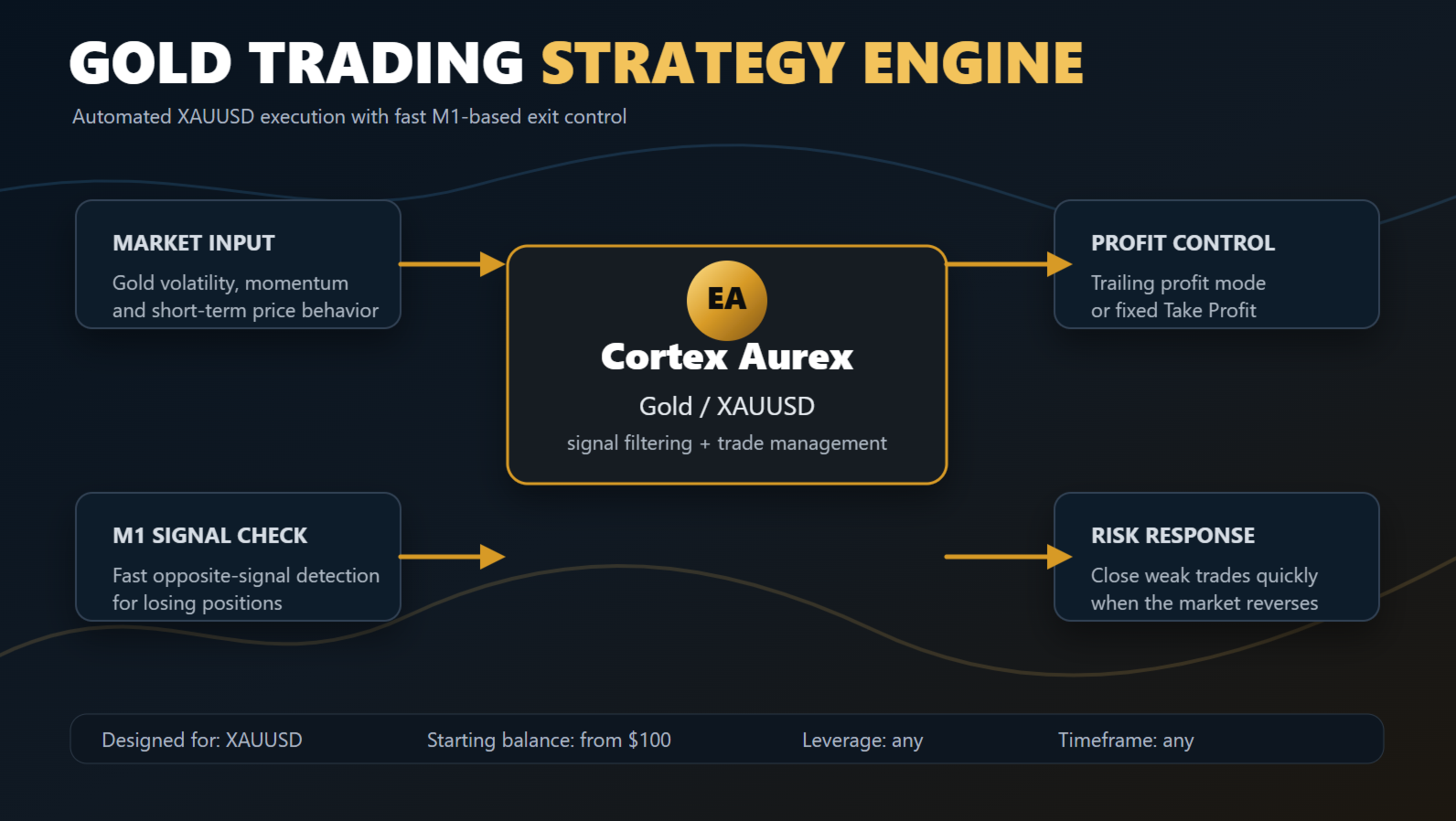
Cortex Aurex’s architecture has four documented components. Market input captures gold volatility, momentum, and short-term price behaviour. The Cortex Aurex EA filters that input through its signal logic and manages open positions. The M1 Signal Check provides fast opposite-signal detection for losing positions. And the Profit Control / Risk Response pair handles the two distinct exit paths — trailing profit (or fixed take-profit if configured) for winners, and fast closure when the M1 timeframe signals a reversal against a losing position.
What’s structurally interesting about this design is that the developer has been explicit about the dual-exit nature of the system rather than hiding it behind generic marketing language. Most marketplace EAs claim “advanced risk management” without specifying what that actually means. Cortex Aurex documents the two exit paths, the M1 timeframe dependency, and the trailing logic parameters openly — which makes evaluation easier and gives buyers a clearer mental model of what they’re running.
Live Signal Snapshot
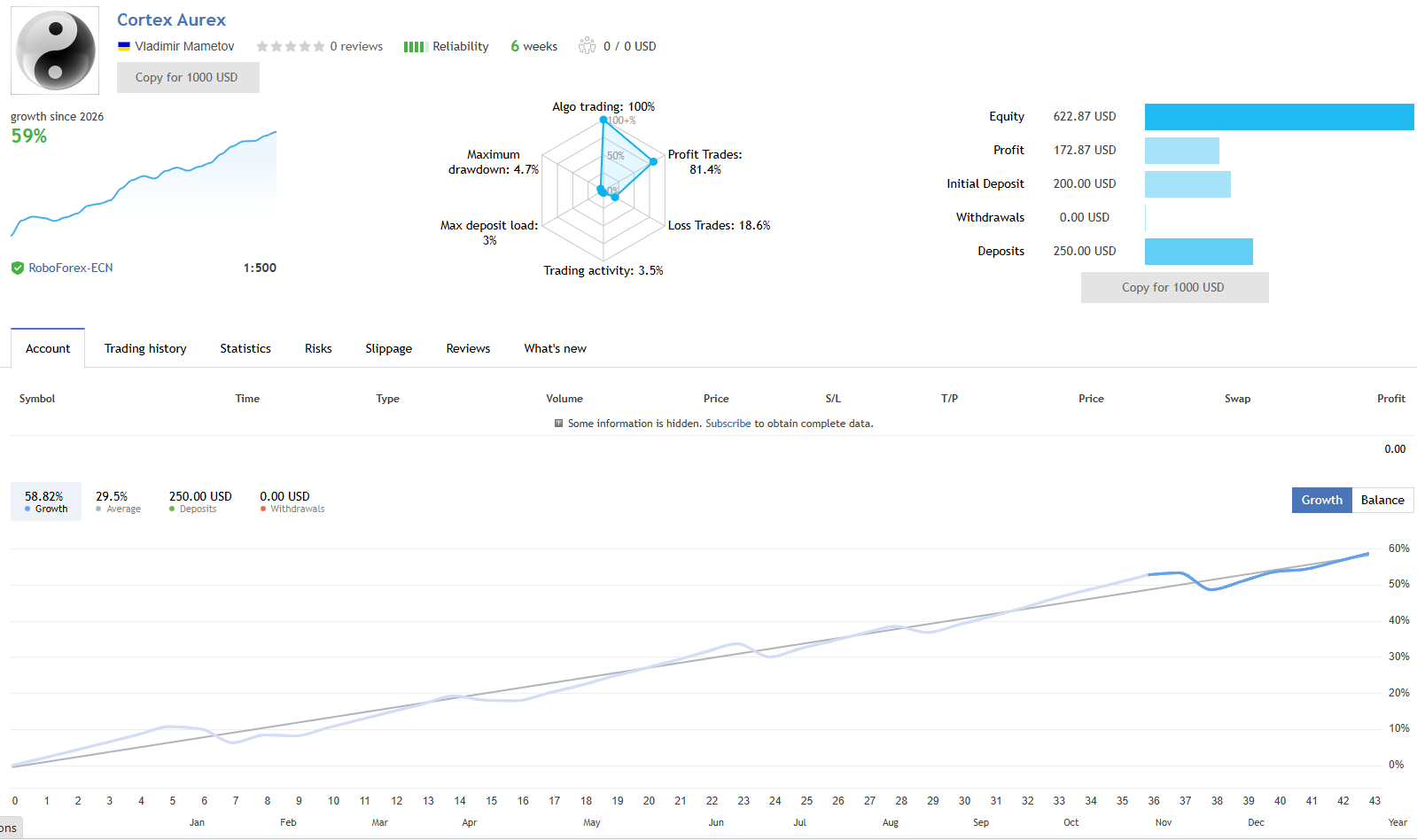
- Live signal broker: RoboForex-ECN at 1:500 leverage, ~6 weeks tracked
- Live profit trades: 81.4% with 18.6% loss trades — a realistic distribution, not the suspicious 100% rate we flag on some other products
- Live max drawdown: 4.7% on the young sample
- Trading activity: 3.5% (low frequency — selective entries consistent with H1 timeframe)
- Headline live growth: ~59% — note this is calculated against the $200 initial deposit; cumulative deposits show $250 in additional capital, so the cleaner absolute read is $172.87 cumulative profit against $450 total deposits (~38% absolute)
- Backtest period (per equity curve): Approximately January 2020 onwards on real-tick data — a multi-year window rather than the short backtests common on young products
The live signal evidence is encouraging for a 6-week sample — the realistic loss-trade distribution at 18.6% reflects the system genuinely taking losses as designed (rather than the suspicious 100% win rate that signals an artifact). The cleaner absolute-return number for forward expectations is the cumulative profit relative to total deposits, not the headline percentage. Read accordingly.
EA Setup at a Glance
- Platform: MetaTrader 5
- Instrument: XAUUSD (Gold) only
- Timeframe: H1 (with M1 used internally for opposite-signal exit detection)
- Account type: ECN or Raw Spread account with reasonable XAUUSD spreads
- Leverage: 1:500 used on the developer’s live signal — match to your jurisdiction’s availability
- Starting deposit: Developer documents from $100; live signal opened on $200. Larger accounts give more headroom for the M1 opposite-signal exit logic to operate without static SL coverage
- Default lot sizing: 0.01 lots per $300 free margin (autolot enabled by default)
- Trading hours: 0-22 by default (configurable)
- VPS: Strongly recommended — M1 opposite-signal exits are timing-sensitive
What You Receive
- Cortex Aurex EA for MT5 — available file
- Developer’s recommended settings, where supplied
Risk Disclaimer
Trading XAUUSD on the H1 timeframe involves significant volatility (NFP, CPI, FOMC, geopolitical events). Cortex Aurex’s documented architecture relies on M1 opposite-signal detection to close losing positions rather than a static stop loss — a deliberate design choice that should be understood before going live. During fast adverse moves where an opposite M1 signal doesn’t trigger promptly (price gaps, news spikes), losses can run further than they would with a fixed SL in place. The 6-week live signal is encouraging early evidence but not yet a multi-month track record. The published live growth figure is calculated against the initial deposit and is amplified by additional deposits during the tracking period — anchor expectations on cumulative profit relative to total deposits, not the headline percentage. The multi-year backtest’s compounded equity projection is illustrative of the strategy’s behaviour profile, not a forecast of forward returns. Test on demo on your intended broker first, use conservative position sizing while validating, and never deploy capital you cannot afford to lose. Past performance — backtest or live — does not guarantee future results.
Full Editorial Review
📖 Read our complete Cortex Aurex EA review →
A full editorial breakdown: the documented dual-exit architecture analysed in detail, the M1 opposite-signal exit interpreted with both its strengths and structural risks, the 6-week live signal with deposit-context walkthrough, the backtest profile read honestly, who the product suits, and our verdict.
Standalone MT5 file. Follow the delivery instructions supplied with your order. Free lifetime updates are included, added as soon as we receive them. You never pay twice.
Every order
What’s included with Cortex Aurex
- Instant downloadReady after checkout and kept in your account
- Free lifetime updatesAdded as soon as we receive them, every version kept in your account
- Unlimited activationsUnlimited live and demo accounts
- Setup helpReal people on Telegram or email
- 7-day money-back guaranteeIf the EA fails to attach to your chart because of errors we can replicate, you get a full refund.
Product FAQs
Cortex Aurex EA MT5 FAQs
Real people on support, by Telegram or our contact form.
What is Cortex Aurex EA?
A XAUUSD-only Expert Advisor for MetaTrader 5 by Vladimir Mametov. It trades Gold on the H1 timeframe with a documented dual-exit architecture — trailing profit logic for winning positions and M1 opposite-signal detection to close losing positions when the market reverses. The on-chart panel displays day, month, and total profit alongside live balance, equity, and current drawdown.
How does the exit logic work?
The system uses two distinct exit mechanisms. For winning trades, configurable trailing logic activates after a defined profit threshold (default 450 points) and steps along with price as it moves further in your favour. For losing trades, the EA monitors M1-timeframe signals for opposite-direction confirmation — when the lower timeframe signals a reversal against an existing losing position, the EA closes it. The design philosophy is “protect profitable trades, react fast to losing trades” per the developer’s documentation.
Does it have a stop loss?
Not a fixed price-based SL by default — the developer’s input defaults set SL to 0, which disables the static stop. The system instead relies on M1 opposite-signal detection to close losing positions dynamically. This is a documented architectural choice with real implications worth understanding before going live: during fast adverse moves where an opposite M1 signal doesn’t trigger promptly (gaps, news spikes), losses can run further than they would with a fixed SL in place. Buyers should evaluate this on demo with conservative position sizing first. Our full review covers the architectural tradeoff in detail.
What broker and account do I need?
A broker offering XAUUSD with reasonable spreads. ECN or Raw Spread accounts are preferred. The developer’s published live signal runs on RoboForex-ECN at 1:500 leverage. Match leverage to your jurisdiction’s availability.
What deposit should I start with?
The developer documents a starting balance from $100 and the live signal opened on $200. Both are small accounts — the EA’s autolot logic defaults to 0.01 lots per $300 of free margin, which means smaller accounts run at the minimum lot size for extended periods. Larger accounts provide more headroom for the realistic backtest drawdown the strategy targets. Start conservative and step up only after live behaviour on your own broker is validated.
Does it trade around news events?
The EA includes configurable trading hours (default 0-22, so it stops trading in the final hour of the day) but doesn’t include a built-in news filter in the visible default inputs. Manually pausing the EA around high-impact news events (NFP, CPI, FOMC) is the prudent approach until you have a feel for how the system handles news volatility on your account.
Do I need a VPS?
Yes — strongly recommended for any automated system. The M1 opposite-signal exit logic specifically benefits from continuous low-latency connection because exit decisions are timing-sensitive on the lower timeframe. A stable 24/5 VPS near your broker’s server is the right setup.
Why buy from CheaperForex instead of the MQL5 marketplace?
This is the same EA supplied as a standalone file, with free lifetime updates. You pay significantly less. For a young XAUUSD product with a credible architecture and a 6-week live signal, paying less to test it on demo and validate before scaling is the practical approach. Our full review walks through the architectural strengths and the honest caveats openly.
- Excellent on Trustpilot 4.6 out of 5 from 120 reviews (opens in a new tab)
- 28,000+ traders since 2019
- 1,570+ official EAs
- Card or crypto payments
Related EAs
Traders also explore
Premium expert advisors at vault-low prices, with your crypto price on every card.
 MT5Save 48%
 MT5Save 46%
 MT5Save 55%
 MT4Save 50%
Ready when you are
Cortex Aurex EA MT5 for $215.96 with crypto
Regular price was $499.00 · $269.95 with card · instant download · free lifetime updates

Cortex Aurex EA MT5$215.96with crypto$269.95 with card