/* Only complements native navigation; native search and Woo actions stay unchanged. */ (()=>{ const key='cfHeaderDraft40435'; window[key]?.dispose?.(); const abort=new AbortController(),media=matchMedia('(max-width:1024px)'); const header=()=>document.querySelector('.elementor-40435.elementor-location-header'); const toggle=()=>header()?.querySelector('.cf-header-nav .elementor-menu-toggle'); const expanded=t=>t&&(t.getAttribute('aria-expanded')==='true'||t.classList.contains('elementor-active')); const close=focus=>{const t=toggle();if(expanded(t)){t.click();if(focus)t.focus();}}; document.addEventListener('keydown',event=>{ if(event.key==='Escape'&&expanded(toggle())){close(true);event.preventDefault();} },{signal:abort.signal}); document.addEventListener('pointerdown',event=>{ const nav=header()?.querySelector('.cf-header-nav'); if(media.matches&&expanded(toggle())&&nav&&!nav.contains(event.target))close(false); },{signal:abort.signal}); const change=()=>close(false);media.addEventListener('change',change); const disposeCart=cfEnhanceDraftCart(header()); window[key]={dispose(){abort.abort();media.removeEventListener('change',change);disposeCart();}}; /* Proposal only. Call inside the draft header's existing behaviour IIFE: * const disposeCart = cfEnhanceDraftCart(header()); * Include disposeCart() in that IIFE's existing dispose method. * Native cart toggling, fragments and checkout links remain untouched. */ function cfEnhanceDraftCart(header) { if (!header || header.getAttribute('data-elementor-id') === '353') return () => {}; const abort = new AbortController(), owned = new Map(); let wasOpen = false, closing = false, frame = 0; const refs = () => { const widget = header.querySelector('.cf-header-cart'); return {widget, pane:widget?.querySelector('.elementor-menu-cart__main'), trigger:widget?.querySelector('.elementor-menu-cart__toggle_button'), close:widget?.querySelector('.elementor-menu-cart__close-button, .elementor-menu-cart__close-button-custom')}; }; const open = r => !!r.widget?.classList.contains('elementor-menu-cart--shown'); const attribute = (el, name, value) => { if (!el || el.getAttribute(name) === value) return; if (!owned.has(el)) owned.set(el, new Map()); const values = owned.get(el), old = values.has(name) ? values.get(name).old : el.getAttribute(name); values.set(name, {old, value}); el.setAttribute(name, value); }; const prepare = r => { if (!r.pane) return; if (!r.pane.id) attribute(r.pane, 'id', 'cf-cart-dialog-' + header.getAttribute('data-elementor-id')); attribute(r.pane, 'role', 'dialog'); attribute(r.pane, 'aria-modal', 'true'); if (!r.pane.hasAttribute('aria-label') && !r.pane.hasAttribute('aria-labelledby')) attribute(r.pane, 'aria-label', 'Shopping cart'); attribute(r.pane, 'tabindex', '-1'); attribute(r.trigger, 'aria-haspopup', 'dialog'); attribute(r.trigger, 'aria-controls', r.pane.id); if (r.close) { if (!r.close.matches('button, input[type="button"]')) attribute(r.close, 'role', 'button'); attribute(r.close, 'tabindex', '0'); if (!r.close.hasAttribute('aria-label') && !r.close.hasAttribute('aria-labelledby')) attribute(r.close, 'aria-label', 'Close shopping cart'); } }; const focusable = pane => [...pane.querySelectorAll('a[href],button,input,select,textarea,summary,[tabindex],[contenteditable="true"]')] .filter(el => el.tabIndex >= 0 && !el.matches(':disabled') && !el.closest('[hidden],[inert],[aria-hidden="true"]') && el.getClientRects().length && getComputedStyle(el).visibility === 'visible'); const focusInside = () => { const r = refs(); if (!open(r) || closing || !r.pane) return; (focusable(r.pane)[0] || r.pane).focus({preventScroll:true}); }; const returnFocus = () => { const t = refs().trigger; if (t?.isConnected) t.focus(); }; const sync = () => { const r = refs(); prepare(r); const now = open(r); if (now && !wasOpen) { closing = false; cancelAnimationFrame(frame); frame = requestAnimationFrame(focusInside); } else if (!now && wasOpen) { closing = true; cancelAnimationFrame(frame); returnFocus(); closing = false; } else if (now && r.pane && !r.pane.contains(document.activeElement) && !closing) { cancelAnimationFrame(frame); frame = requestAnimationFrame(focusInside); } wasOpen = now; }; const closeNative = () => { const r = refs(); if (!open(r)) return; closing = true; returnFocus(); // Invoke the existing handler; never change its internal isCartOpen state. (r.close || r.trigger)?.click(); if (open(refs())) { closing = false; focusInside(); } }; document.addEventListener('keydown', event => { const r = refs(); if (!open(r) || !r.pane) return; if (event.key === 'Escape') { event.preventDefault(); event.stopPropagation(); closeNative(); return; } if ((event.key === 'Enter' || event.key === ' ') && r.close?.contains(event.target) && !r.close.matches('button, input[type="button"]')) { event.preventDefault(); closeNative(); return; } if (event.key !== 'Tab') return; const list = focusable(r.pane), first = list[0], last = list[list.length - 1], current = document.activeElement; if (!first) { event.preventDefault(); r.pane.focus({preventScroll:true}); } else if (!r.pane.contains(current) || (event.shiftKey && (current === first || current === r.pane))) { event.preventDefault(); (event.shiftKey ? last : first).focus({preventScroll:true}); } else if (!event.shiftKey && current === last) { event.preventDefault(); first.focus({preventScroll:true}); } }, {capture:true, signal:abort.signal}); // Move focus before native click handlers apply aria-hidden to the pane. document.addEventListener('click', event => { const r = refs(); if (!open(r) || !r.pane) return; if (r.close?.contains(event.target) || !r.pane.contains(event.target)) { closing = true; returnFocus(); queueMicrotask(() => { if (open(refs())) { closing = false; focusInside(); } }); } }, {capture:true, signal:abort.signal}); document.addEventListener('focusin', event => { const r = refs(); if (!closing && open(r) && r.pane && !r.pane.contains(event.target)) focusInside(); }, {capture:true, signal:abort.signal}); const observer = new MutationObserver(sync); observer.observe(header, {subtree:true, childList:true, attributes:true, attributeFilter:['class','aria-hidden']}); sync(); return () => { observer.disconnect(); abort.abort(); cancelAnimationFrame(frame); for (const [el, attrs] of owned) for (const [name, {old, value}] of attrs) { if (el.getAttribute(name) !== value) continue; if (old === null) el.removeAttribute(name); else el.setAttribute(name, old); } }; } })();

Official MT4 version · Gold EA

CR7 EA Gold MT4

The Cr7 EA Gold is an automated trading system that trades exclusively on XAU/USD. The EA runs on the MetaTrader 4 (MT4) platform and trades exclusively on the XAU/USD pair in the 1-minute timeframe. The EA uses smart lot-sizing and stop-loss mechanisms to minimize loss.

The package includes:
+ Expert: CR7EAGold.ex4 file, readme.txt, pairandtimeframe.txt

Website:
+ https://www.cr7eafx.com

Note: This EA requires a DLL file which is included. Simply copy and paste the .dll file and use the terminal build supplied.

734 1MT4
This product is no longer available to buy.

If you already own it, your files and license details are still in your account.

Official versionsInstant downloadFuture updates includedExtra 20% off with cryptoReal people on support28,000+ tradersTrading since 2019Rated Excellent on Trustpilot

Product description

About CR7 EA Gold MT4

Cr7 EA Gold Strategy

Cr7 EA Gold is a forex robot that is specifically designed to trade on the XAU/USD pair, also known as Gold. It employs a scalping strategy that utilizes advanced technical analysis to identify potential trading opportunities and make multiple trades within a short period to exploit small price movements.

 

CR7 EA GOLD
CR7 EA GOLD


The EA runs on the MetaTrader 4 (MT4) platform and trades exclusively on the XAU/USD pair in the 1-minute timeframe. The EA uses smart lot-sizing and stop-loss mechanisms to minimize loss. One of its strengths includes a unique trailing stop feature that helps lock in profits and minimize losses.

However, the scalping strategy used by the EA involves opening and closing trades quickly, which can result in high risk and losses if proper risk management is not employed. The EA is also highly dependent on market conditions, and as a result of it’s scalping strategy, it is prone to high drawdowns.

The Cr7 EA Gold is worth considering for traders who want to scalp the gold market and are comfortable using automated trading tools. However, it is recommended to demo-test the EA and apply good risk management settings before using it with real money.

Cr7 EA Gold Features

  • Scalping strategy: The EA uses a scalping strategy to execute trades.
  • Gold Trading: Trades XAU/USD in a 1-minute timeframe.
  • Money management: The EA has a money management feature that can adjust the lot size for each trade.
  • Multiple take-profit options: The EA has multiple take-profit options including take-profit in pips and take-profit in money value.
  • Maximum trading levels: The EA has a maximum allowed trading levels feature that can limit the number of open trades to reduce risk.
  • 24/7 support: The EA comes with 24/7 support from the developer, who can help with any issues or questions that arise.
  • Compatible with multiple platforms: The EA is compatible with a range of trading platforms including MetaTrader 4 and 5.
  • User-friendly interface: The EA has a user-friendly interface that allows traders to monitor their trades, view performance reports, and adjust settings easily.

Cr7 EA Gold Settings

  • Start: This setting specifies the start hour of the trading session for the EA.
  • End: This setting specifies the end hour of the trading session for the EA.
  • Max Spread: This setting specifies the maximum allowed spread for trades opened by the EA.
  • Trailing stop: This setting enables or disables the use of a trailing stop for trades opened by the EA.
  • Use MM: This setting enables or disables the use of money management for trades opened by the EA.
  • Lot: This setting specifies the lot size for trades opened by the EA.
  • TP Money: This setting specifies the take profit level for trades opened by the EA in terms of money value.
  • TP Money Per Trade: This setting specifies the maximum allowed take profit level per trade opened by the EA in terms of money value.
  • Max Level: This setting specifies the maximum allowed trading levels for the EA.
  • Take Profit in Pips: This setting specifies the take profit level for trades opened by the EA in terms of pips.

Cr7 EA Gold Summary

The Cr7 EA Gold is an automated trading system designed to scalp the gold market using advanced algorithms and technical analysis. Its strengths include its ability to make quick trades in the market and it is straightforward to use.

However, the EA’s scalping strategy is highly dependent on market conditions, and in volatile markets, it can be difficult to execute trades accurately. Another weakness of the Cr7 EA Gold is its limited trading pairs (only XAUUSD) and timeframes. The Cr7 EA Gold is worth considering for traders who are familiar with scalping strategies and have experience with automated trading systems.
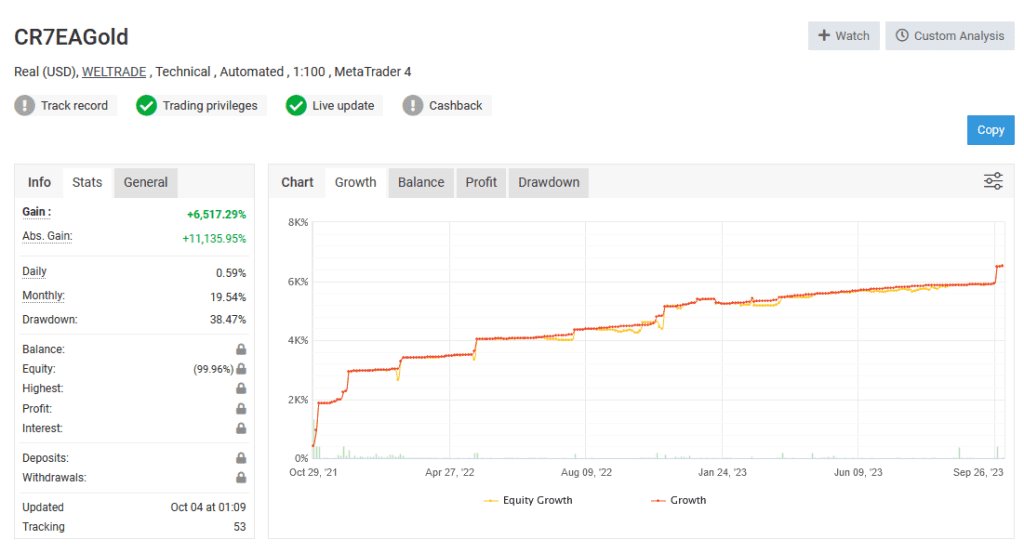
 

CR7 EA GOLD MYFXBOOK

Every order

What’s included with CR7 EA Gold

Download it, install it and keep it current: everything comes with your license.

  • Instant download

    Ready the moment checkout completes, and kept in your customer portal.

  • Installation guide

    Step-by-step PDF with screenshots.

  • Optimized presets

    Ready-to-use configuration files.

  • Future updates

    Included free when we receive them. You never pay twice, and every version stays in your account.

  • Unlimited activations

    Use it on as many terminals as you like: unlimited live and demo accounts, no activation keys.

  • Setup help

    Questions about installing or settings? Message us on Telegram or email and a real person answers.

7-day money-back guarantee

If the EA fails to attach to your chart because of errors we can replicate, you get a full refund.

*Refunds don’t cover changing your mind or not liking the EA. All brokers are different, and results are never promised because markets are constantly changing.

The CheaperForex difference

Why 28,000+ traders choose CheaperForex

Trustpilot rating Excellent 4.6 out of 5 Based on 120 reviews on Trustpilot Read the reviews on Trustpilot (opens in a new tab)
“Bought 2 EAs from them. Requested update for new version and was sent within 24hrs. Great support. Recommended, 5 STARS.”
Aceman · Trustpilot review (opens in a new tab)
“Fantastic service as always. Have gotten a lot from them in the past and never been disappointed.”
Paul Michael Lawrence · Trustpilot review (opens in a new tab)
“They were friendly and helpful in setting up my expert advisor.”
Sarah Francis · Trustpilot review (opens in a new tab)
  • Instant accessNo group buys or waiting
  • 7-day refund policyRefunds only cover an EA that fails to attach to your chart because of errors we can replicate. We don’t cover changing your mind or not liking the EA. All brokers are different, and results are never promised because markets are constantly changing.For product errors
  • Setup helpBy Telegram or email
  • Flexible paymentsCards, Apple Pay, Crypto
Official EAs1,180+
Customers28,000+
Trading since2019