/* Only complements native navigation; native search and Woo actions stay unchanged. */ (()=>{ const key='cfHeaderDraft40435'; window[key]?.dispose?.(); const abort=new AbortController(),media=matchMedia('(max-width:1024px)'); const header=()=>document.querySelector('.elementor-40435.elementor-location-header'); const toggle=()=>header()?.querySelector('.cf-header-nav .elementor-menu-toggle'); const expanded=t=>t&&(t.getAttribute('aria-expanded')==='true'||t.classList.contains('elementor-active')); const close=focus=>{const t=toggle();if(expanded(t)){t.click();if(focus)t.focus();}}; document.addEventListener('keydown',event=>{ if(event.key==='Escape'&&expanded(toggle())){close(true);event.preventDefault();} },{signal:abort.signal}); document.addEventListener('pointerdown',event=>{ const nav=header()?.querySelector('.cf-header-nav'); if(media.matches&&expanded(toggle())&&nav&&!nav.contains(event.target))close(false); },{signal:abort.signal}); const change=()=>close(false);media.addEventListener('change',change); const disposeCart=cfEnhanceDraftCart(header()); window[key]={dispose(){abort.abort();media.removeEventListener('change',change);disposeCart();}}; /* Proposal only. Call inside the draft header's existing behaviour IIFE: * const disposeCart = cfEnhanceDraftCart(header()); * Include disposeCart() in that IIFE's existing dispose method. * Native cart toggling, fragments and checkout links remain untouched. */ function cfEnhanceDraftCart(header) { if (!header || header.getAttribute('data-elementor-id') === '353') return () => {}; const abort = new AbortController(), owned = new Map(); let wasOpen = false, closing = false, frame = 0; const refs = () => { const widget = header.querySelector('.cf-header-cart'); return {widget, pane:widget?.querySelector('.elementor-menu-cart__main'), trigger:widget?.querySelector('.elementor-menu-cart__toggle_button'), close:widget?.querySelector('.elementor-menu-cart__close-button, .elementor-menu-cart__close-button-custom')}; }; const open = r => !!r.widget?.classList.contains('elementor-menu-cart--shown'); const attribute = (el, name, value) => { if (!el || el.getAttribute(name) === value) return; if (!owned.has(el)) owned.set(el, new Map()); const values = owned.get(el), old = values.has(name) ? values.get(name).old : el.getAttribute(name); values.set(name, {old, value}); el.setAttribute(name, value); }; const prepare = r => { if (!r.pane) return; if (!r.pane.id) attribute(r.pane, 'id', 'cf-cart-dialog-' + header.getAttribute('data-elementor-id')); attribute(r.pane, 'role', 'dialog'); attribute(r.pane, 'aria-modal', 'true'); if (!r.pane.hasAttribute('aria-label') && !r.pane.hasAttribute('aria-labelledby')) attribute(r.pane, 'aria-label', 'Shopping cart'); attribute(r.pane, 'tabindex', '-1'); attribute(r.trigger, 'aria-haspopup', 'dialog'); attribute(r.trigger, 'aria-controls', r.pane.id); if (r.close) { if (!r.close.matches('button, input[type="button"]')) attribute(r.close, 'role', 'button'); attribute(r.close, 'tabindex', '0'); if (!r.close.hasAttribute('aria-label') && !r.close.hasAttribute('aria-labelledby')) attribute(r.close, 'aria-label', 'Close shopping cart'); } }; const focusable = pane => [...pane.querySelectorAll('a[href],button,input,select,textarea,summary,[tabindex],[contenteditable="true"]')] .filter(el => el.tabIndex >= 0 && !el.matches(':disabled') && !el.closest('[hidden],[inert],[aria-hidden="true"]') && el.getClientRects().length && getComputedStyle(el).visibility === 'visible'); const focusInside = () => { const r = refs(); if (!open(r) || closing || !r.pane) return; (focusable(r.pane)[0] || r.pane).focus({preventScroll:true}); }; const returnFocus = () => { const t = refs().trigger; if (t?.isConnected) t.focus(); }; const sync = () => { const r = refs(); prepare(r); const now = open(r); if (now && !wasOpen) { closing = false; cancelAnimationFrame(frame); frame = requestAnimationFrame(focusInside); } else if (!now && wasOpen) { closing = true; cancelAnimationFrame(frame); returnFocus(); closing = false; } else if (now && r.pane && !r.pane.contains(document.activeElement) && !closing) { cancelAnimationFrame(frame); frame = requestAnimationFrame(focusInside); } wasOpen = now; }; const closeNative = () => { const r = refs(); if (!open(r)) return; closing = true; returnFocus(); // Invoke the existing handler; never change its internal isCartOpen state. (r.close || r.trigger)?.click(); if (open(refs())) { closing = false; focusInside(); } }; document.addEventListener('keydown', event => { const r = refs(); if (!open(r) || !r.pane) return; if (event.key === 'Escape') { event.preventDefault(); event.stopPropagation(); closeNative(); return; } if ((event.key === 'Enter' || event.key === ' ') && r.close?.contains(event.target) && !r.close.matches('button, input[type="button"]')) { event.preventDefault(); closeNative(); return; } if (event.key !== 'Tab') return; const list = focusable(r.pane), first = list[0], last = list[list.length - 1], current = document.activeElement; if (!first) { event.preventDefault(); r.pane.focus({preventScroll:true}); } else if (!r.pane.contains(current) || (event.shiftKey && (current === first || current === r.pane))) { event.preventDefault(); (event.shiftKey ? last : first).focus({preventScroll:true}); } else if (!event.shiftKey && current === last) { event.preventDefault(); first.focus({preventScroll:true}); } }, {capture:true, signal:abort.signal}); // Move focus before native click handlers apply aria-hidden to the pane. document.addEventListener('click', event => { const r = refs(); if (!open(r) || !r.pane) return; if (r.close?.contains(event.target) || !r.pane.contains(event.target)) { closing = true; returnFocus(); queueMicrotask(() => { if (open(refs())) { closing = false; focusInside(); } }); } }, {capture:true, signal:abort.signal}); document.addEventListener('focusin', event => { const r = refs(); if (!closing && open(r) && r.pane && !r.pane.contains(event.target)) focusInside(); }, {capture:true, signal:abort.signal}); const observer = new MutationObserver(sync); observer.observe(header, {subtree:true, childList:true, attributes:true, attributeFilter:['class','aria-hidden']}); sync(); return () => { observer.disconnect(); abort.abort(); cancelAnimationFrame(frame); for (const [el, attrs] of owned) for (const [name, {old, value}] of attrs) { if (el.getAttribute(name) !== value) continue; if (old === null) el.removeAttribute(name); else el.setAttribute(name, old); } }; } })();

Official MT4 version

EA Hecate Pro MT4

Welcome to EA Hecate Pro for MT4, a sophisticated Expert Advisor developed by Elcodex Labs, Inc. This advanced trading tool is designed to maximize your trading potential by leveraging a trailing pending order strategy based on Supply and Demals levels.

With its unique blend of cutting-edge technology and intuitive design, EA Hecate Pro offers a comprehensive solution for traders aiming to achieve consistent profitability. Available now on CheaperForex.com, this EA is set to redefine your trading experience.

This Package Contains an Instant Download of:
+ Expert: EA Hecate Pro (.ex4) V3.3 – Works on ALL MT4 Builds including 1420+
+ Indicator
+ Presets
+ Pairs/timeframes.txt
+ How to Install MT4 files.pdf

More Information:
+ Unknown

Live Performance Signal:
+ None known

EA Hecate Pro LogoMT4Save 95%

Regular priceRegular price was $750.00

$31.96Crypto priceUSDT, USDC, BTC or ETH. Extra 20% off at checkout.Save 96%You save $718.04 with crypto

$39.95 with card

Visa, Mastercard, Apple Pay and Google Pay accepted.

Card payments add bank fees, sales taxes and other charges.

  • Instant downloadYour file is provided immediately after payment. In very rare cases we manually review an order first, then send your download straight after. If you don’t receive your file, you can request a full refund.
  • Free future updatesAll updates are free. They’re provided on a best-availability basis: we get new versions as fast as we can, led by customer demand, but we don’t guarantee them immediately. If you need every update the moment it’s released, our service may not be the best fit for you.
  • 7-day money-backRefunds only cover an EA that fails to attach to your chart because of errors we can replicate. We don’t cover changing your mind or not liking the EA. All brokers are different, and results are never promised because markets are constantly changing.
  • Unlimited activationsUse it on as many MT4 accounts and computers as you want, live or demo. There are no restrictions on how you use it.

Source code (.mq4) available at checkout.

Orders over $300 include 3 months of PrismAlgo freeThe highly recommended cloud-connected EA for 28 FX pairs, Gold and Bitcoin. Added to your cart automatically. View PrismAlgo

Official versionsInstant downloadFuture updates includedExtra 20% off with cryptoReal people on support28,000+ tradersTrading since 2019Rated Excellent on Trustpilot

Product description

About EA Hecate Pro MT4
EA Hecate Pro for MT4 by Elcodex Labs, Inc.: Your Ultimate Trading Solution

Introduction

Welcome to EA Hecate Pro for MT4, a sophisticated Expert Advisor developed by Elcodex Labs, Inc. This advanced trading tool is designed to maximize your trading potential by leveraging a trailing pending order strategy based on Supply and Demals levels.

With its unique blend of cutting-edge technology and intuitive design, EA Hecate Pro offers a comprehensive solution for traders aiming to achieve consistent profitability. Available now on CheaperForex.com, this EA is set to redefine your trading experience.

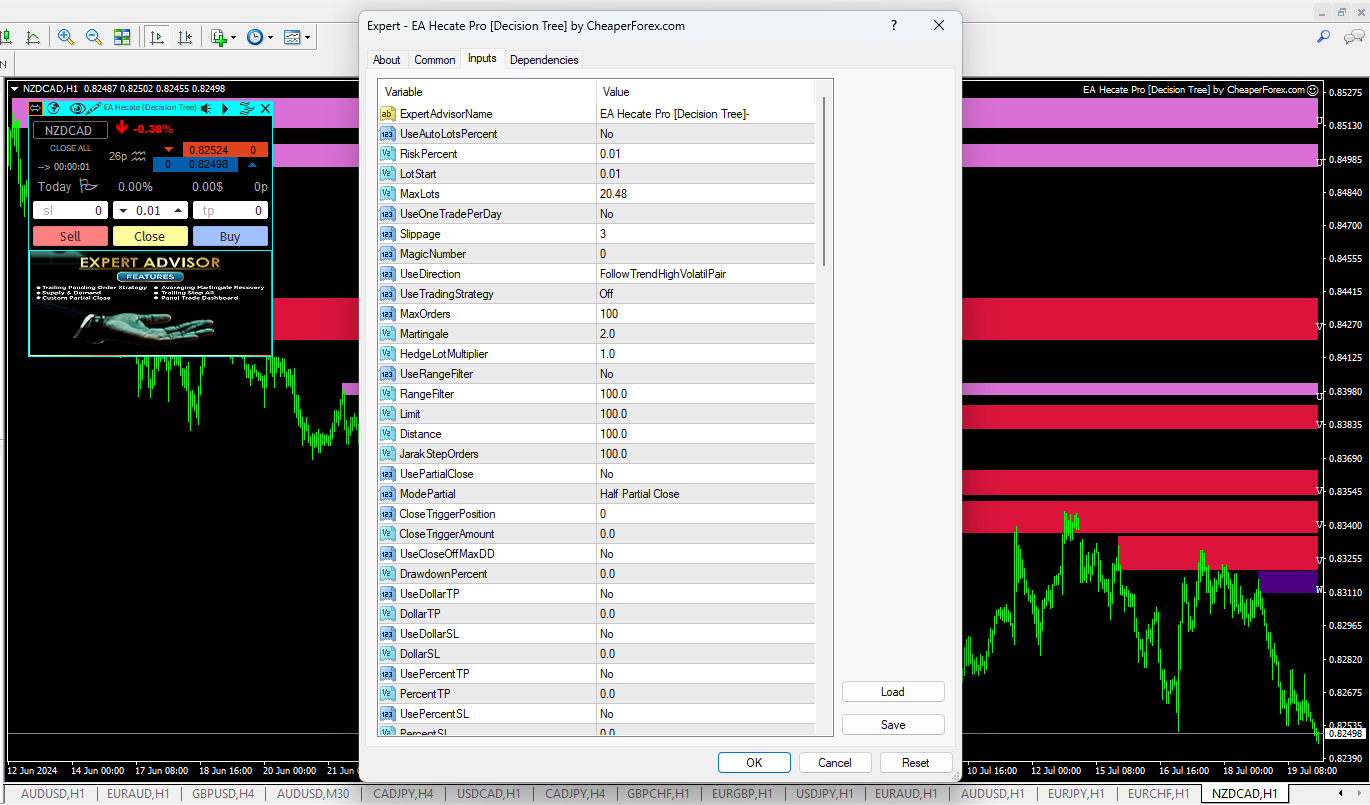
EA Hecate Pro on the Chart with Inputs Partially Visible

Detailed Description of the Product and Strategy

EA Hecate Pro is an innovative trading robot that utilizes a trailing pending order strategy to capitalize on market movements. By integrating Supply and Demals levels into its algorithm, the EA ensures that trades are placed with precision, maximizing profit potential while minimizing risk.

How the Strategy Works

  1. Trailing Pending Orders: EA Hecate Pro places trailing pending orders based on Supply and Demals levels. This strategy allows the EA to follow the market trend and enter trades at optimal points, ensuring high accuracy and profitability.
  2. Custom Partial Close: The EA features a custom partial close function, enabling it to lock in profits at various stages of the trade. This helps in managing risk and securing gains progressively.
  3. Martingale Averaging Recovery System: In case of unfavorable market conditions, the EA employs a martingale-based averaging recovery system. This system strategically increases trade sizes to recover losses, enhancing the likelihood of returning to profitability.
  4. Decision Tree Strategy: EA Hecate Pro incorporates a decision tree strategy, which systematically evaluates market conditions and makes informed trading decisions. This sophisticated approach ensures that the EA adapts to changing market dynamics effectively.
  5. Trade Dashboard: The EA includes a visually appealing trade dashboard that sits on the chart, providing real-time insights into trade performance and key metrics.
EA Hecate Pro Logo
EA Hecate Pro Logo

Trading Specifications: Recommended Pair, Timeframe, and Minimum Balance

Recommended Pairs: EA Hecate Pro is versatile and performs well across various currency pairs. However, it is optimized for major pairs such as EUR/USD, GBP/USD, and USD/JPY.

Timeframe: The EA is designed to operate on the H1 (one-hour) timeframe, offering a balance between capturing trading opportunities and managing market noise effectively.

Minimum Balance: To ensure optimal performance and effective risk management, a minimum account balance of $1,000 is recommended. This provides adequate margin for trade management and enhances the EA’s ability to recover from drawdowns.

Key Features and Functionalities

  1. Automatic Lot Sizing: The EA can automatically determine lot sizes based on your account balance, ensuring appropriate risk management.
  2. One Trade Per Day: For enhanced risk control, the EA is configured to place only one trade per day.
  3. Slippage Filter: The EA includes a slippage filter to avoid executing trades under unfavorable conditions, ensuring precise trade entries.
  4. Magic Number: This feature allows you to use the EA on multiple charts without interference, each with a unique identifier.
  5. Range Filter: To avoid ranging markets, the EA includes a range filter that ensures trades are only placed in trending conditions.
  6. Trailing Stops: The EA features trailing stops, which can be based on the ATR (Average True Range), ensuring that profits are protected as the market moves in your favor.
  7. Stop Loss Options: You can configure the stop loss to be off, based on fixed pips, or derived from the ATR, providing flexibility in risk management.
  8. Daily Target Percent: The EA includes a daily target percent option, which closes the EA once profit targets are met, ensuring consistent profitability.
  9. Spread Filters: To avoid trades during high volatility, the EA incorporates spread filters.
  10. Time Filters: The EA allows you to limit trading to specific times, ensuring trades are placed during optimal market conditions.
  11. Customizable Inputs: Traders can customize other parts of the EA’s inputs, including settings for Fractals, Bollinger Bands, and overbought/oversold levels, tailoring the EA to their specific preferences.

Our Thoughts About It

At CheaperForex.com, we are excited to offer EA Hecate Pro for MT4, a powerful and versatile trading tool. Its blend of advanced strategies, including trailing pending orders and a martingale-based recovery system, sets it apart from other EAs in the market. The user-friendly trade dashboard and comprehensive customization options make it suitable for traders of all experience levels.

We appreciate the EA’s robust risk management features, such as automatic lot sizing, one trade per day, and various filters, which enhance its reliability and effectiveness. The integration of a decision tree strategy ensures that EA Hecate Pro adapts to changing market conditions, providing consistent performance and profitability.

Reviews

John D.: “I’ve been using EA Hecate Pro for a few months now, and the results have been outstanding. The precision of trade entries and the custom partial close feature have significantly improved my trading performance.”

Sarah L.: “The trade dashboard is a game-changer. It provides all the information I need at a glance, making it easy to monitor trades and make informed decisions.”

Michael T.: “The martingale recovery system has helped me recover from several drawdowns. It’s reassuring to know that the EA has built-in mechanisms to manage and recover losses effectively.”

Conclusion

EA Hecate Pro for MT4 by Elcodex Labs, Inc. is a comprehensive trading solution designed to enhance your trading experience. Available now on CheaperForex.com, this EA combines advanced trading strategies with user-friendly features, making it an invaluable tool for achieving consistent profitability in the forex market.

Don’t miss the opportunity to elevate your trading game. Invest in EA Hecate Pro today and experience the benefits of a sophisticated, reliable, and customizable trading tool.

Important Note: Forex trading involves risk. Always practice proper risk management techniques and understand market dynamics before investing any funds.

Every order

What’s included with EA Hecate Pro

  • Instant downloadReady after checkout and kept in your account
  • Free future updatesIncluded when we receive them, every version kept in your account
  • Unlimited activationsUnlimited live and demo accounts
  • Setup helpReal people on Telegram or email
  • 7-day money-back guaranteeIf the EA fails to attach to your chart because of errors we can replicate, you get a full refund.

Ready when you are

EA Hecate Pro MT4 for $31.96 with crypto

Regular price was $750.00 · $39.95 with card · instant download · future updates included

EA Hecate Pro MT4$31.96with crypto$39.95 with card