/* Only complements native navigation; native search and Woo actions stay unchanged. */ (()=>{ const key='cfHeaderDraft40435'; window[key]?.dispose?.(); const abort=new AbortController(),media=matchMedia('(max-width:1024px)'); const header=()=>document.querySelector('.elementor-40435.elementor-location-header'); const toggle=()=>header()?.querySelector('.cf-header-nav .elementor-menu-toggle'); const expanded=t=>t&&(t.getAttribute('aria-expanded')==='true'||t.classList.contains('elementor-active')); const close=focus=>{const t=toggle();if(expanded(t)){t.click();if(focus)t.focus();}}; document.addEventListener('keydown',event=>{ if(event.key==='Escape'&&expanded(toggle())){close(true);event.preventDefault();} },{signal:abort.signal}); document.addEventListener('pointerdown',event=>{ const nav=header()?.querySelector('.cf-header-nav'); if(media.matches&&expanded(toggle())&&nav&&!nav.contains(event.target))close(false); },{signal:abort.signal}); const change=()=>close(false);media.addEventListener('change',change); const disposeCart=cfEnhanceDraftCart(header()); window[key]={dispose(){abort.abort();media.removeEventListener('change',change);disposeCart();}}; /* Proposal only. Call inside the draft header's existing behaviour IIFE: * const disposeCart = cfEnhanceDraftCart(header()); * Include disposeCart() in that IIFE's existing dispose method. * Native cart toggling, fragments and checkout links remain untouched. */ function cfEnhanceDraftCart(header) { if (!header || header.getAttribute('data-elementor-id') === '353') return () => {}; const abort = new AbortController(), owned = new Map(); let wasOpen = false, closing = false, frame = 0; const refs = () => { const widget = header.querySelector('.cf-header-cart'); return {widget, pane:widget?.querySelector('.elementor-menu-cart__main'), trigger:widget?.querySelector('.elementor-menu-cart__toggle_button'), close:widget?.querySelector('.elementor-menu-cart__close-button, .elementor-menu-cart__close-button-custom')}; }; const open = r => !!r.widget?.classList.contains('elementor-menu-cart--shown'); const attribute = (el, name, value) => { if (!el || el.getAttribute(name) === value) return; if (!owned.has(el)) owned.set(el, new Map()); const values = owned.get(el), old = values.has(name) ? values.get(name).old : el.getAttribute(name); values.set(name, {old, value}); el.setAttribute(name, value); }; const prepare = r => { if (!r.pane) return; if (!r.pane.id) attribute(r.pane, 'id', 'cf-cart-dialog-' + header.getAttribute('data-elementor-id')); attribute(r.pane, 'role', 'dialog'); attribute(r.pane, 'aria-modal', 'true'); if (!r.pane.hasAttribute('aria-label') && !r.pane.hasAttribute('aria-labelledby')) attribute(r.pane, 'aria-label', 'Shopping cart'); attribute(r.pane, 'tabindex', '-1'); attribute(r.trigger, 'aria-haspopup', 'dialog'); attribute(r.trigger, 'aria-controls', r.pane.id); if (r.close) { if (!r.close.matches('button, input[type="button"]')) attribute(r.close, 'role', 'button'); attribute(r.close, 'tabindex', '0'); if (!r.close.hasAttribute('aria-label') && !r.close.hasAttribute('aria-labelledby')) attribute(r.close, 'aria-label', 'Close shopping cart'); } }; const focusable = pane => [...pane.querySelectorAll('a[href],button,input,select,textarea,summary,[tabindex],[contenteditable="true"]')] .filter(el => el.tabIndex >= 0 && !el.matches(':disabled') && !el.closest('[hidden],[inert],[aria-hidden="true"]') && el.getClientRects().length && getComputedStyle(el).visibility === 'visible'); const focusInside = () => { const r = refs(); if (!open(r) || closing || !r.pane) return; (focusable(r.pane)[0] || r.pane).focus({preventScroll:true}); }; const returnFocus = () => { const t = refs().trigger; if (t?.isConnected) t.focus(); }; const sync = () => { const r = refs(); prepare(r); const now = open(r); if (now && !wasOpen) { closing = false; cancelAnimationFrame(frame); frame = requestAnimationFrame(focusInside); } else if (!now && wasOpen) { closing = true; cancelAnimationFrame(frame); returnFocus(); closing = false; } else if (now && r.pane && !r.pane.contains(document.activeElement) && !closing) { cancelAnimationFrame(frame); frame = requestAnimationFrame(focusInside); } wasOpen = now; }; const closeNative = () => { const r = refs(); if (!open(r)) return; closing = true; returnFocus(); // Invoke the existing handler; never change its internal isCartOpen state. (r.close || r.trigger)?.click(); if (open(refs())) { closing = false; focusInside(); } }; document.addEventListener('keydown', event => { const r = refs(); if (!open(r) || !r.pane) return; if (event.key === 'Escape') { event.preventDefault(); event.stopPropagation(); closeNative(); return; } if ((event.key === 'Enter' || event.key === ' ') && r.close?.contains(event.target) && !r.close.matches('button, input[type="button"]')) { event.preventDefault(); closeNative(); return; } if (event.key !== 'Tab') return; const list = focusable(r.pane), first = list[0], last = list[list.length - 1], current = document.activeElement; if (!first) { event.preventDefault(); r.pane.focus({preventScroll:true}); } else if (!r.pane.contains(current) || (event.shiftKey && (current === first || current === r.pane))) { event.preventDefault(); (event.shiftKey ? last : first).focus({preventScroll:true}); } else if (!event.shiftKey && current === last) { event.preventDefault(); first.focus({preventScroll:true}); } }, {capture:true, signal:abort.signal}); // Move focus before native click handlers apply aria-hidden to the pane. document.addEventListener('click', event => { const r = refs(); if (!open(r) || !r.pane) return; if (r.close?.contains(event.target) || !r.pane.contains(event.target)) { closing = true; returnFocus(); queueMicrotask(() => { if (open(refs())) { closing = false; focusInside(); } }); } }, {capture:true, signal:abort.signal}); document.addEventListener('focusin', event => { const r = refs(); if (!closing && open(r) && r.pane && !r.pane.contains(event.target)) focusInside(); }, {capture:true, signal:abort.signal}); const observer = new MutationObserver(sync); observer.observe(header, {subtree:true, childList:true, attributes:true, attributeFilter:['class','aria-hidden']}); sync(); return () => { observer.disconnect(); abort.abort(); cancelAnimationFrame(frame); for (const [el, attrs] of owned) for (const [name, {old, value}] of attrs) { if (el.getAttribute(name) !== value) continue; if (old === null) el.removeAttribute(name); else el.setAttribute(name, old); } }; } })();

Official MT4 version

FMM Ultimate Pro Scalper EA MT4

The FMM Ultimate Pro Scalper EA is a highly specialized trading robot that operates on the MetaTrader 4 (MT4) platform. It is designed for traders who prefer the scalping method, a strategy that involves making numerous small trades to capitalize on minor price movements.

This EA uses advanced technical analysis to monitor the market, making decisions based on the formation of new bars on the chart.

The Download Package Includes:
+ Expert: FMM Ultimate Pro Scalper (.ex4)
+ Presets
+ Pairs/Timeframes
+ How to Install MT4 Files.pdf

More Information:
+ https://t.me/forex_money_makers
+ https://www.instagram.com/forex_money_makers1/p/CocN7C4sK9S/

Live Performance Signal:
+ None public/known

FMM Ultimate Pro Scalper EA LogoMT4Save 95%

Regular priceRegular price was $1,000.00

$39.96Crypto priceUSDT, USDC, BTC or ETH. Extra 20% off at checkout.Save 96%You save $960.04 with crypto

$49.95 with card

Visa, Mastercard, Apple Pay and Google Pay accepted.

Card payments add bank fees, sales taxes and other charges.

  • Instant downloadYour file is provided immediately after payment. In very rare cases we manually review an order first, then send your download straight after. If you don’t receive your file, you can request a full refund.
  • Free future updatesAll updates are free. They’re provided on a best-availability basis: we get new versions as fast as we can, led by customer demand, but we don’t guarantee them immediately. If you need every update the moment it’s released, our service may not be the best fit for you.
  • 7-day money-backRefunds only cover an EA that fails to attach to your chart because of errors we can replicate. We don’t cover changing your mind or not liking the EA. All brokers are different, and results are never promised because markets are constantly changing.
  • Unlimited activationsUse it on as many MT4 accounts and computers as you want, live or demo. There are no restrictions on how you use it.

Source code (.mq4) available at checkout.

Orders over $300 include 3 months of PrismAlgo freeThe highly recommended cloud-connected EA for 28 FX pairs, Gold and Bitcoin. Added to your cart automatically. View PrismAlgo

Official versionsInstant downloadFuture updates includedExtra 20% off with cryptoReal people on support28,000+ tradersTrading since 2019Rated Excellent on Trustpilot

Product description

About FMM Ultimate Pro Scalper EA MT4
Introducing the FMM Ultimate Pro Scalper EA for MT4: Precision Scalping at Its Finest

In the world of forex trading, the ability to execute precise, quick trades is crucial for success. The FMM Ultimate Pro Scalper EA for MT4 is designed to meet this need, offering a robust and efficient solution for traders who rely on scalping strategies.

This Expert Advisor (EA) leverages cutting-edge technical analysis and a pure hedging system to deliver consistent results, making it a must-have tool for both novice and experienced traders.

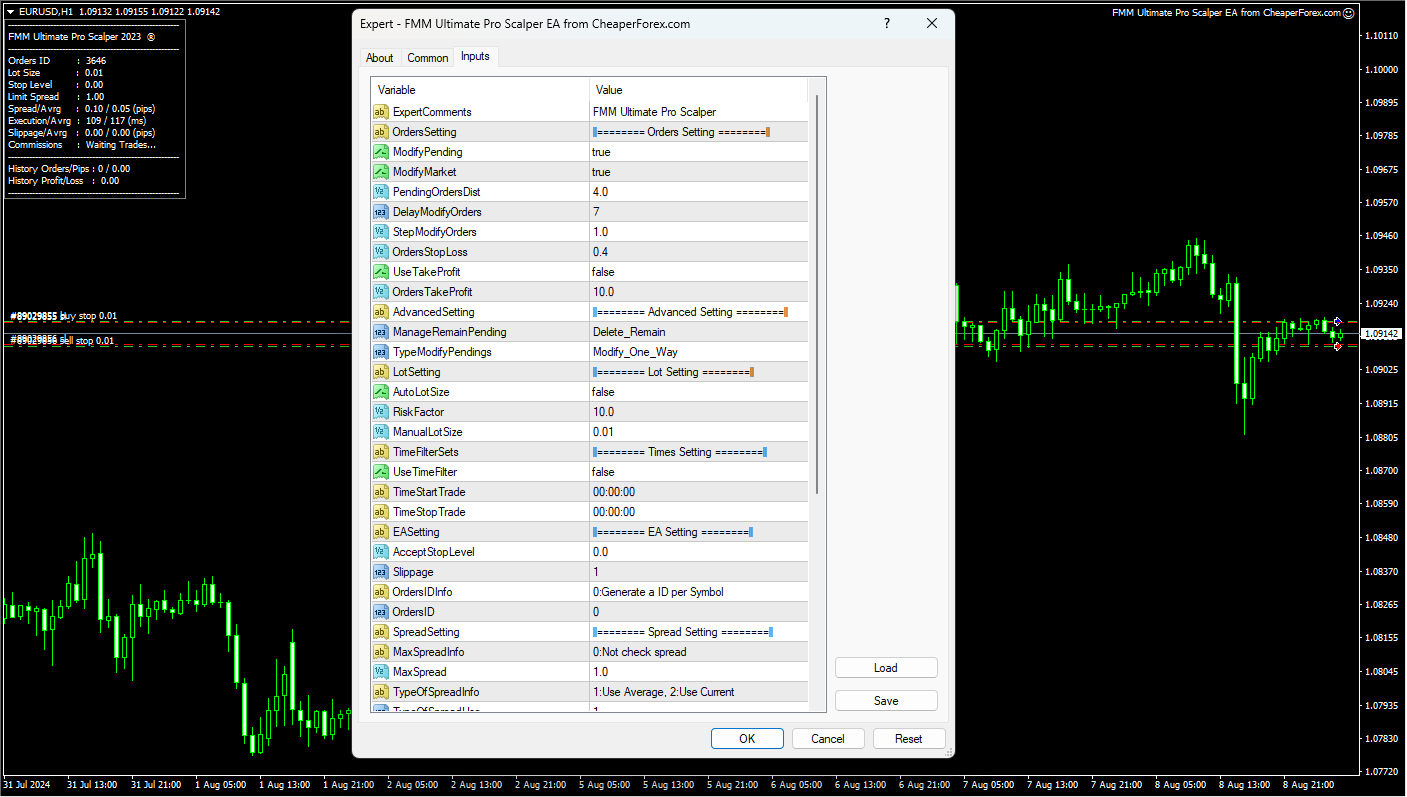
FMM Ultimate Pro Scalper EA on the Chart with Inputs Visible

Description of FMM Ultimate Pro Scalper EA

The FMM Ultimate Pro Scalper EA is a highly specialized trading robot that operates on the MetaTrader 4 (MT4) platform. It is designed for traders who prefer the scalping method, a strategy that involves making numerous small trades to capitalize on minor price movements. This EA uses advanced technical analysis to monitor the market, making decisions based on the formation of new bars on the chart.

How Does the FMM Ultimate Pro Scalper EA Work?

The FMM Ultimate Pro Scalper EA is designed to be straightforward and highly effective. Here’s how it operates:

  • Candle-Based Entry: The EA analyzes the chart with every new bar. If no existing positions are present, it will enter a trade based on the candle formation. For a bullish candle, the EA initiates a buy trade, while a bearish candle triggers a sell trade.
  • Stop Loss and Take Profit: The EA automatically sets a stop loss at a predetermined distance from the entry price, ensuring that potential losses are minimized. It also modifies the take profit level according to the account balance, optimizing the trade outcome.
  • Hedging Options: The EA can operate with or without hedging, based on your settings. If hedging is disabled, the EA closes all trades simultaneously without incurring a loss. If hedging is enabled, it opens trades in both directions, providing flexibility depending on market conditions.
  • Martingale Strategy: When hedging is off, the EA employs a martingale strategy, where subsequent trades in the same direction increase in lot size, depending on the initial trade direction.
  • Time Filters: The EA includes time filters to restrict trading to the most liquid times of the day, which is particularly useful for scalping strategies.
  • Slippage Filter: The EA incorporates a slippage filter, which helps to avoid trades when slippage is too high, ensuring that trades are executed under optimal conditions.
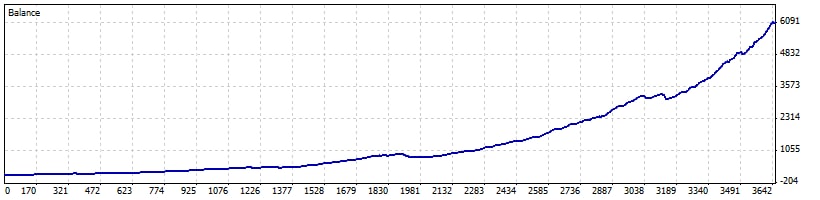
FMM Ultimate Pro Scalper EA Backtest Results

Scalping Made Simple

Despite its advanced capabilities, the FMM Ultimate Pro Scalper EA is simple to use. The default settings are optimized for performance, particularly on the EURUSD pair with a 1-minute (M1) timeframe. This simplicity, combined with the EA’s effectiveness, makes it an ideal choice for traders who want to capitalize on short-term market movements without getting bogged down in complex setups.

Trading Specifications

  • Recommended Pair: EURUSD (Ideal for pairs with tight spreads and low commissions)
  • Recommended Timeframe: M1
  • Minimum Balance: No specific minimum, but balance should be sufficient to support martingale and hedging strategies
  • Platform: MT4
  • Trading Strategy: Scalping with options for hedging and martingale strategies
  • Broker Requirements: Works best with brokers offering tight spreads and low commissions (commission plus spread equal or less than 0.5 pip)

Our Thoughts About the FMM Ultimate Pro Scalper EA

The FMM Ultimate Pro Scalper EA is a powerful tool for traders who are serious about scalping. Its blend of simplicity and sophistication allows it to perform well under various market conditions. The EA’s ability to adjust lot sizes based on account balance, combined with its hedging and martingale options, makes it highly adaptable. However, it’s important to note that the EA’s performance can be sensitive to broker conditions, particularly slippage, so selecting the right broker is crucial.

Reviews

Alex M.
Rating: ★★★★★
“The FMM Ultimate Pro Scalper EA has been a game-changer for my trading strategy. Its ability to analyze the market in real-time and execute trades based on candle formations is incredibly efficient. I appreciate the EA’s flexibility with hedging and martingale strategies, which has allowed me to adapt quickly to changing market conditions.”

Linda T.
Rating: ★★★★★
“As someone who is relatively new to scalping, the FMM Ultimate Pro Scalper EA has made the process much easier. The default settings work great out of the box, and I’ve been able to achieve consistent results on the EURUSD pair. The slippage filter is a fantastic feature that has helped me avoid bad trades.”

John D.
Rating: ★★★★☆
“The FMM Ultimate Pro Scalper EA is a solid tool for any trader looking to engage in scalping. I found the time filters particularly useful for limiting my trades to the most liquid hours of the day. My only concern is that the EA can be sensitive to slippage, so choosing the right broker is key.”

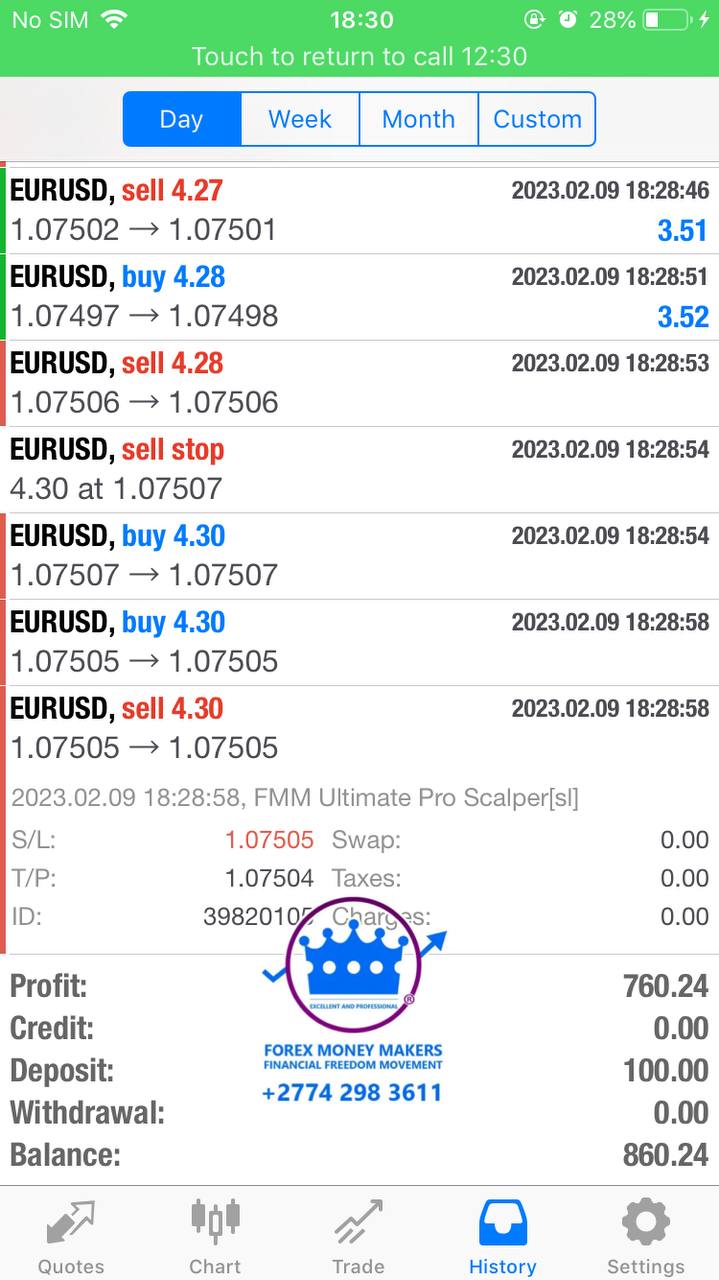
FMM Ultimate Pro Scalper EA Client Results

Conclusion

The FMM Ultimate Pro Scalper EA for MT4 is more than just a trading robot; it’s a comprehensive solution for traders who want to excel in scalping. Its combination of advanced features, such as hedging, martingale strategies, and slippage filters, provides traders with the tools they need to succeed in fast-paced markets. Available now on CheaperForex.com, the FMM Ultimate Pro Scalper EA is your gateway to mastering the art of scalping with precision and ease.

Embrace the power of automation and take your scalping strategy to the next level with the FMM Ultimate Pro Scalper EA for MT4.

Every order

What’s included with FMM Ultimate Pro Scalper

Download it, install it and keep it current: everything comes with your license.

  • Instant download

    Ready the moment checkout completes, and kept in your customer portal.

  • Installation guide

    Step-by-step PDF with screenshots.

  • Optimized presets

    Ready-to-use configuration files.

  • Future updates

    Included free when we receive them. You never pay twice, and every version stays in your account.

  • Unlimited activations

    Use it on as many terminals as you like: unlimited live and demo accounts, no activation keys.

  • Setup help

    Questions about installing or settings? Message us on Telegram or email and a real person answers.

7-day money-back guarantee

If the EA fails to attach to your chart because of errors we can replicate, you get a full refund.

*Refunds don’t cover changing your mind or not liking the EA. All brokers are different, and results are never promised because markets are constantly changing.

The CheaperForex difference

Why 28,000+ traders choose CheaperForex

Trustpilot rating Excellent 4.6 out of 5 Based on 120 reviews on Trustpilot Read the reviews on Trustpilot (opens in a new tab)
“Bought 2 EAs from them. Requested update for new version and was sent within 24hrs. Great support. Recommended, 5 STARS.”
Aceman · Trustpilot review (opens in a new tab)
“Fantastic service as always. Have gotten a lot from them in the past and never been disappointed.”
Paul Michael Lawrence · Trustpilot review (opens in a new tab)
“They were friendly and helpful in setting up my expert advisor.”
Sarah Francis · Trustpilot review (opens in a new tab)
  • Instant accessNo group buys or waiting
  • 7-day refund policyRefunds only cover an EA that fails to attach to your chart because of errors we can replicate. We don’t cover changing your mind or not liking the EA. All brokers are different, and results are never promised because markets are constantly changing.For product errors
  • Setup helpBy Telegram or email
  • Flexible paymentsCards, Apple Pay, Crypto
Official EAs1,180+
Customers28,000+
Trading since2019

Ready when you are

FMM Ultimate Pro Scalper EA MT4 for $39.96 with crypto

Regular price was $1,000.00 · $49.95 with card · instant download · future updates included

FMM Ultimate Pro Scalper EA MT4$39.96with crypto$49.95 with card