
Official MT4 version
FX Scalper X EA MT4 – Lifetime License
We’re rated Excellent on Trustpilot · 4.6/5 (opens in a new tab)FX Scalper X EA is an advanced trading robot designed to operate on the MT4 platform. This EA leverages cutting-edge technology and sophisticated algorithms to analyze market data, identify trading opportunities, and execute trades with unparalleled efficiency.
The core strategy of FX Scalper X revolves around real-time data analysis and high-frequency trading, making it ideal for scalpers and day traders who thrive on short-term market movements.
This Package Contains an Instant Download of:
+ Expert: FX Scalper X EA MT4 (.ex4) – Works on ALL MT4 Builds including 1420+
+ Pairs/timeframes.txt
+ How to Install MT4 files.pdf
More Information:
+ https://www.fxscalperx.com/
Video Information:
+ https://youtu.be/obk7b23LZDE
Live Performance Signal:
+ https://www.myfxbook.com/members/FXSCALPERX/fx-scalper-4x–standard/10314767
 MT4Save 93%
What you receive
- FX Scalper X.ex4Genuine, unmodified developer file for MetaTrader 4
- Setup guide.pdfA general guide to installing expert advisors.Official step-by-step install guide
Delivered instantly to your account after payment
Regular priceRegular price was $600.00
$39.95 with card
Visa, Mastercard, Apple Pay and Google Pay accepted.
Card payments add bank fees, sales taxes and other charges.
- Instant downloadYour file is provided immediately after payment. In very rare cases we manually review an order first, then send your download straight after. If you don’t receive your file, you can request a full refund.
- Free lifetime updatesAll updates are free. They’re provided on a best-availability basis: we get new versions as fast as we can, led by customer demand, but we don’t guarantee them immediately. If you need every update the moment it’s released, our service may not be the best fit for you.
- 7-day money-backRefunds only cover an EA that fails to attach to your chart because of errors we can replicate. We don’t cover changing your mind or not liking the EA. All brokers are different, and results are never promised because markets are constantly changing.
- Unlimited activationsUse it on as many MT4 accounts and computers as you want, live or demo. There are no restrictions on how you use it.
What you receive
- FX Scalper X.ex4Genuine, unmodified developer file for MetaTrader 4
- Setup guide.pdfA general guide to installing expert advisors.Official step-by-step install guide
Delivered instantly to your account after payment


28,000+ tradersServed since 2019
Orders over $300 include 3 months of PrismAlgo freeThe highly recommended cloud-connected EA, on all 28 Forex pairs for one MT5 account. Added to your cart automatically. View PrismAlgo
Official versionsInstant downloadFree lifetime updatesExtra 20% off with cryptoReal people on support28,000+ tradersTrading since 2019Rated Excellent on Trustpilot
Product description
About FX Scalper X EA MT4 – Lifetime License
FX Scalper X EA for MT4: Unleash the Power of Automated Trading
Introduction
Welcome to the future of trading with FX Scalper X EA for MT4, an innovative and highly efficient Expert Advisor (EA) designed to maximize your trading potential. This EA harnesses the power of advanced algorithms and mathematical models to make precise and timely trading decisions, allowing you to reap profits effortlessly. With FX Scalper X, you can experience the benefits of 100% automated trading, verified performance, and easy setup, all while sleeping soundly knowing your investments are managed by a reliable and proven system.
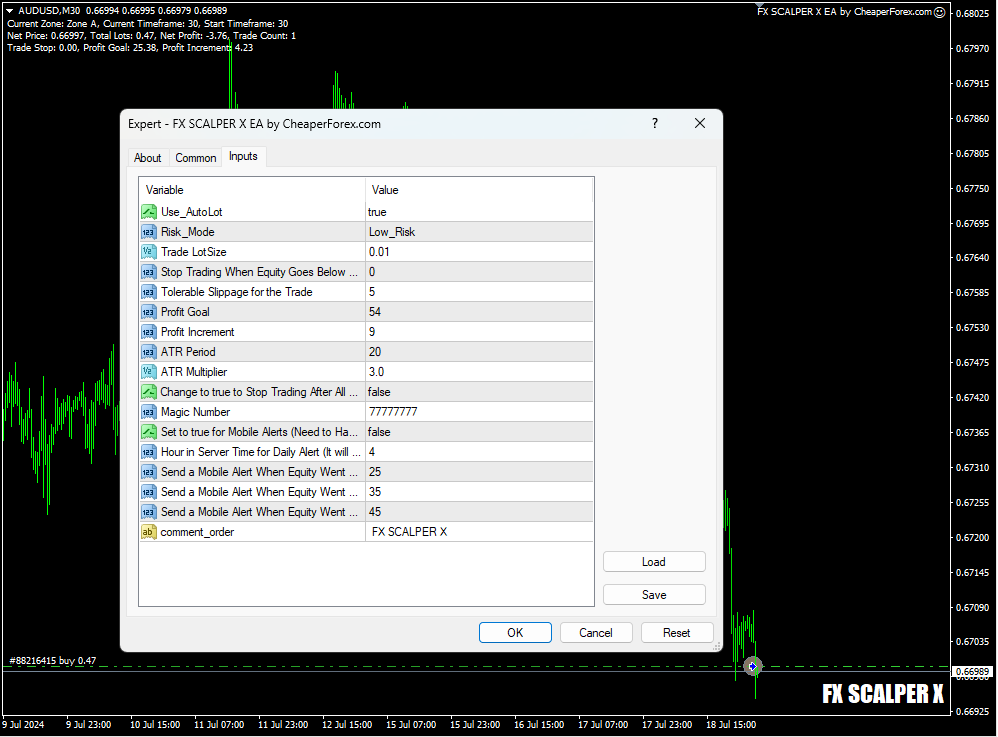
Detailed Description of the Product and Strategy
FX Scalper X EA is an advanced trading robot designed to operate on the MT4 platform. This EA leverages cutting-edge technology and sophisticated algorithms to analyze market data, identify trading opportunities, and execute trades with unparalleled efficiency. The core strategy of FX Scalper X revolves around real-time data analysis and high-frequency trading, making it ideal for scalpers and day traders who thrive on short-term market movements.
How the Strategy Works
- Data Analysis: FX Scalper X continuously monitors multiple market indicators and historical data to identify potential trading opportunities. The EA is capable of analyzing vast amounts of data in real-time, allowing it to make split-second decisions that humans simply cannot match.
- Automated Execution: Once a trading opportunity is identified, FX Scalper X executes the trade automatically. This eliminates the impact of human emotions and errors, ensuring that trades are executed precisely according to the predefined strategy.
- Risk Management: FX Scalper X includes robust risk management features. It allows traders to set their preferred risk levels, whether through autolot settings based on account balance or fixed lot sizes for more controlled trading. The EA also adjusts to the correct timeframe automatically, ensuring optimal performance across various market conditions.
- Profit Optimization: Utilizing advanced algorithms, FX Scalper X optimizes each trade to maximize profitability. The EA can handle multiple trades simultaneously, diversifying your portfolio and reducing risk exposure.
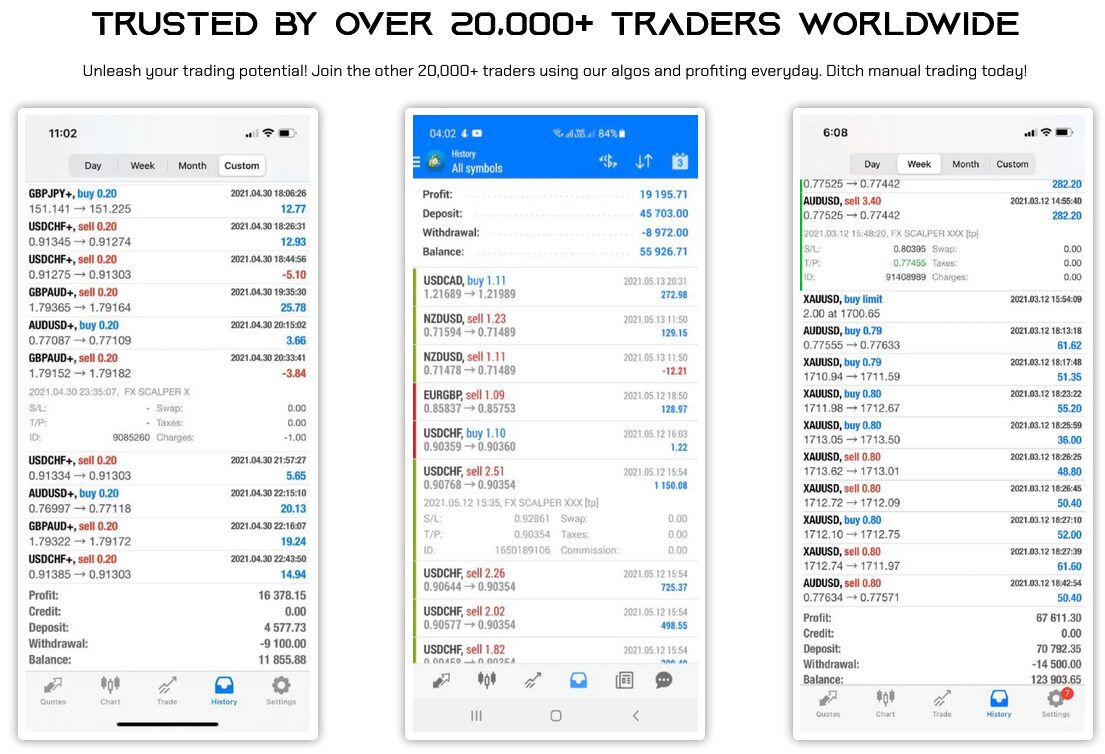
Trading Specifications: Recommended Pair, Timeframe, and Minimum Balance
Recommended Pair: FX Scalper X is designed to perform exceptionally well with major currency pairs such as EUR/USD, GBP/USD, and USD/JPY. These pairs are chosen for their liquidity and stable volatility, which are ideal for scalping strategies.
Timeframe: The EA is versatile and can adapt to various timeframes. However, it is optimized for short-term trading on minute charts, making it perfect for scalpers who need rapid execution and quick returns.
Minimum Balance: To fully leverage the capabilities of FX Scalper X, it is recommended to start with a minimum balance of $500. This ensures that the EA has sufficient capital to manage trades effectively and withstand short-term market fluctuations.
Key Features and Functionalities
- 100% Automated Trading: FX Scalper X operates entirely on autopilot, from market analysis to trade execution. This means you can enjoy profits without needing to constantly monitor the markets.
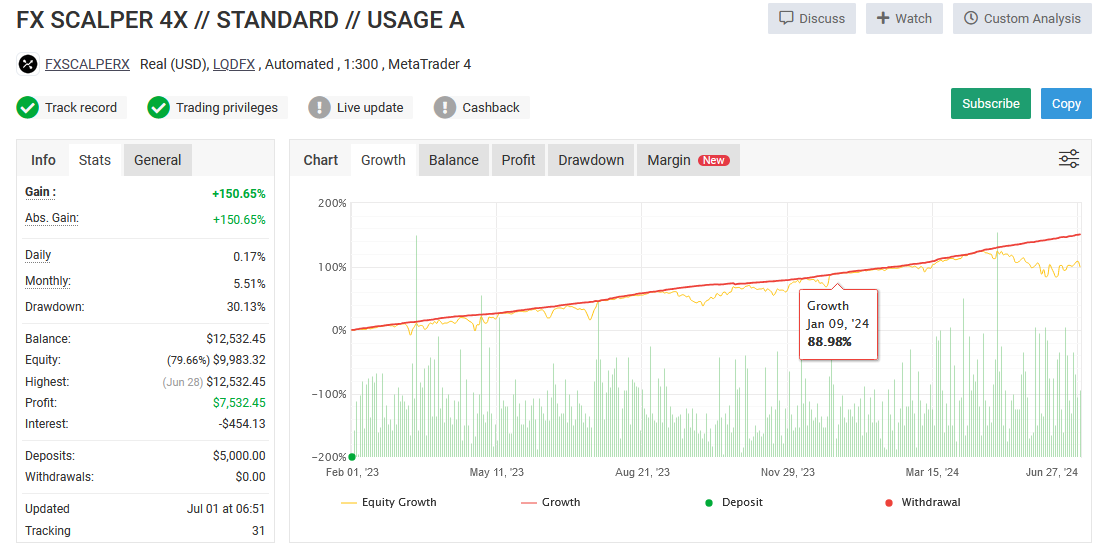
- MyFxBook Verified: The performance of FX Scalper X is fully verified on MyFxBook, providing transparency and proof of its effectiveness. You can trust the EA to deliver consistent and reliable results.
- Easy Setup: Setting up FX Scalper X is straightforward and user-friendly. With detailed instructions and support available, you can get started quickly and easily.
- Emotional Detachment: By removing human emotions from the trading process, FX Scalper X ensures that trades are executed based on data and strategy alone, eliminating common pitfalls such as fear and greed.
- Advanced Risk Management: Choose between autolot settings for dynamic risk management or fixed lots for a more conservative approach. FX Scalper X adapts to your trading style and risk tolerance.
- Diversified Trading: The EA is capable of monitoring and trading multiple markets and assets simultaneously, offering a diversified portfolio that reduces overall risk.
Our Thoughts About It
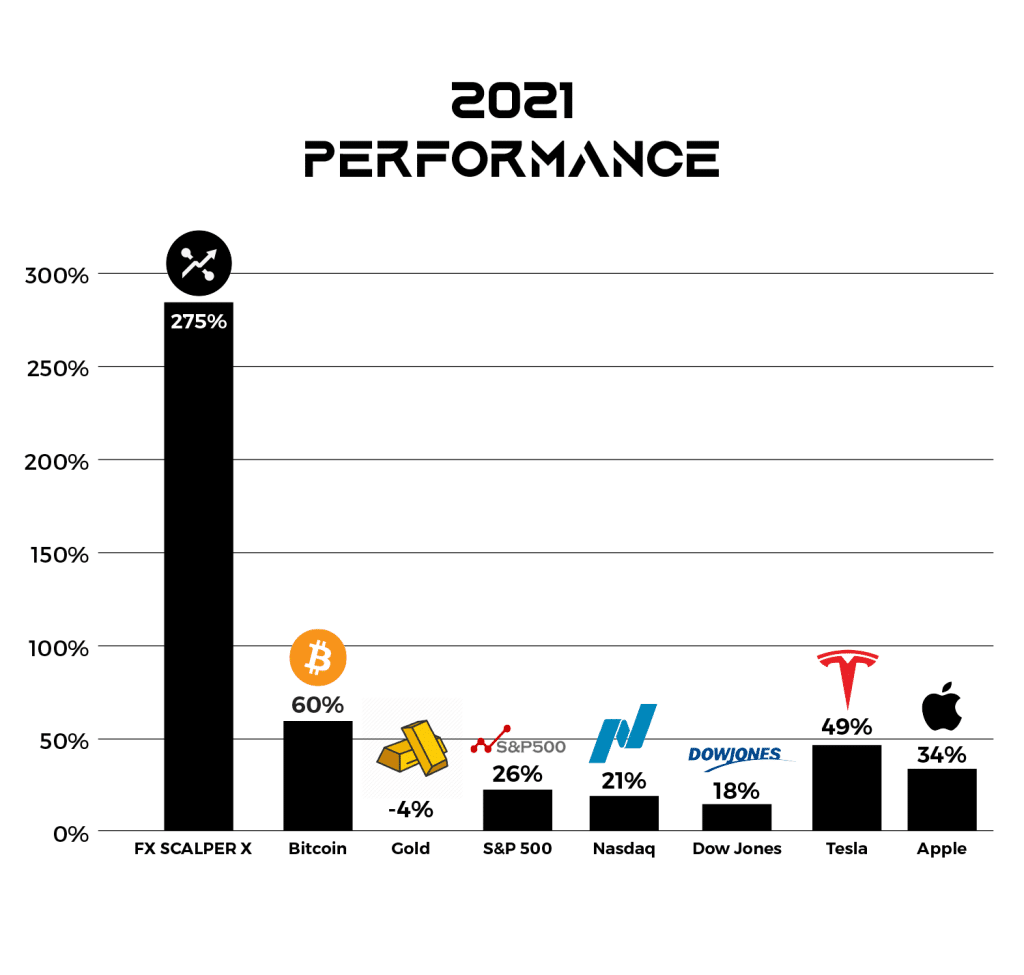
At CheaperForex.com, we believe FX Scalper X EA is a game-changer for retail traders. Its advanced algorithms and automated trading capabilities set it apart from traditional manual trading methods. The EA’s consistent performance, verified by MyFxBook, and its ability to outperform major investment assets such as the S&P 500, Bitcoin, and Gold, highlight its robustness and reliability.
The ease of setup and user-friendly interface make FX Scalper X accessible to traders of all experience levels. By automating the entire trading process, it saves time and effort while maximizing profitability. The comprehensive risk management features ensure that your investments are protected, allowing you to trade with confidence.
Conclusion
In the dynamic world of trading, having a reliable and efficient tool is crucial for success. FX Scalper X EA for MT4 is that tool, offering 100% automated trading, verified performance, and ease of use. Whether you are new to trading or an experienced trader looking to enhance your strategy, FX Scalper X provides the edge you need to succeed.
Available now on CheaperForex.com, FX Scalper X EA is your gateway to a more profitable and stress-free trading experience. Embrace the future of trading with FX Scalper X and watch your investments grow on autopilot. Start today and transform your trading journey into a path of consistent success and profitability.

Every order
What’s included with FX Scalper X
- Instant downloadReady after checkout and kept in your account
- Free lifetime updatesAdded as soon as we receive them, every version kept in your account
- Unlimited activationsUnlimited live and demo accounts
- Setup helpReal people on Telegram or email
- 7-day money-back guaranteeIf the EA fails to attach to your chart because of errors we can replicate, you get a full refund.
- Excellent on Trustpilot 4.6 out of 5 from 120 reviews (opens in a new tab)
- 28,000+ traders since 2019
- 1,560+ official EAs
- Card or crypto payments
Related EAs
Traders also explore
Premium expert advisors at vault-low prices, with your crypto price on every card.
 MT4Save 96%
 MT4Save 94%
 MT4Save 96%
 MT4Save 77%
Ready when you are
FX Scalper X EA MT4 – Lifetime License for $31.96 with crypto
Regular price was $600.00 · $39.95 with card · instant download · free lifetime updates

FX Scalper X EA MT4 – Lifetime License$31.96with crypto$39.95 with card