
Official MT4 version · Gold EA
GridSync Pro EA MT4
Version 1.2
We’re rated Excellent on Trustpilot · 4.6/5 (opens in a new tab)GridSync Pro EA for MT4 is a non-martingale grid trading system developed by Thushara Dissanayake.
It maintains continuous pending order grids in both directions with intelligent risk controls — daily profit/loss limits, 50% retracement recovery, trailing stops, and session filters to protect capital during volatile conditions.
- ✅ Non-martingale — fixed lot sizes, no exponential blowup risk
- ✅ 50% retracement recovery — closes losers at profit without full reversal
- ✅ Daily profit targets & loss limits auto-stop trading
- ✅ Professional dashboard with one-click manual overrides
- ✅ Session filters avoid high-impact news volatility
Grid trading with actual risk management.
 MT4Save 76%
What you receive
- GridSync Pro.ex4Genuine, unmodified developer file for MetaTrader 4Version 1.2
- Setup guide.pdfA general guide to installing expert advisors.Official step-by-step install guide
Delivered instantly to your account after payment
Regular priceRegular price was $1,249.00
$299.95 with card
Visa, Mastercard, Apple Pay and Google Pay accepted.
Card payments add bank fees, sales taxes and other charges.
- Official developer build · Version 1.2
- Instant downloadYour file is provided immediately after payment. In very rare cases we manually review an order first, then send your download straight after. If you don’t receive your file, you can request a full refund.
- Free lifetime updatesAll updates are free. They’re provided on a best-availability basis: we get new versions as fast as we can, led by customer demand, but we don’t guarantee them immediately. If you need every update the moment it’s released, our service may not be the best fit for you.
- 7-day money-backRefunds only cover an EA that fails to attach to your chart because of errors we can replicate. We don’t cover changing your mind or not liking the EA. All brokers are different, and results are never promised because markets are constantly changing.
- Unlimited activationsUse it on as many MT4 accounts and computers as you want, live or demo. There are no restrictions on how you use it.
What you receive
- GridSync Pro.ex4Genuine, unmodified developer file for MetaTrader 4Version 1.2
- Setup guide.pdfA general guide to installing expert advisors.Official step-by-step install guide
Delivered instantly to your account after payment


28,000+ tradersServed since 2019
Orders over $300 include 3 months of PrismAlgo freeThe highly recommended cloud-connected EA, on all 28 Forex pairs for one MT5 account. Added to your cart automatically. View PrismAlgo
Official versionsInstant downloadFree lifetime updatesExtra 20% off with cryptoReal people on support28,000+ tradersTrading since 2019Rated Excellent on Trustpilot
Product description
About GridSync Pro EA MT4
Quick Summary:
GridSync Pro EA for MT4 is a non-martingale grid trading system developed by Thushara Dissanayake.
Unlike traditional grid EAs that multiply lot sizes until accounts blow, GridSync Pro maintains fixed position sizing while building continuous pending order grids that capture price movements in both directions. The system’s 50% retracement recovery feature closes underwater positions at profit when price reverses just halfway — eliminating the need for full retracement that destroys most grid traders.
Built-in daily profit targets automatically stop trading once goals are hit, while loss limits protect against runaway drawdowns. Session filters let you avoid high-volatility news periods. The professional on-chart dashboard provides real-time P/L tracking with one-click manual overrides when you need to intervene.
Official MQL5 Listing:
GridSync Pro EA MT4
Developer Profile:
Thushara Dissanayake
What GridSync Pro Is Designed To Do
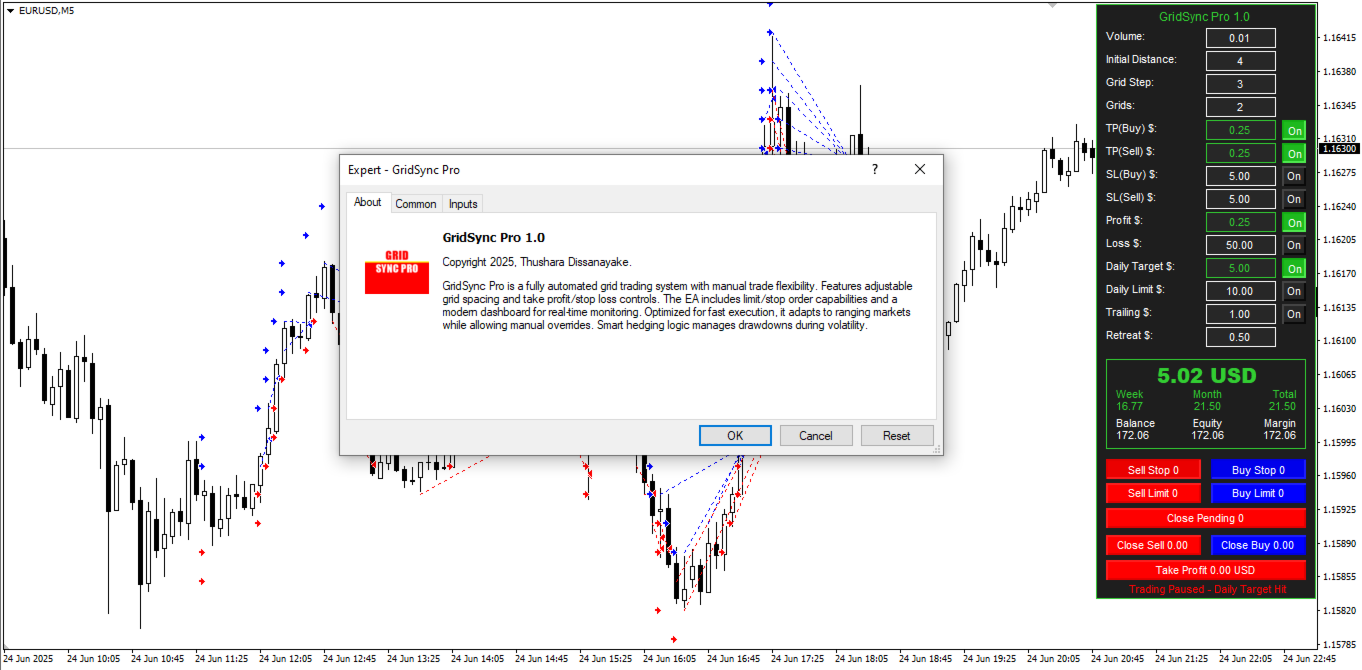
The EA automates risk-controlled grid trading without martingale:
- Grid Construction — Builds continuous pending orders (stop or limit) in both directions
- Gap Filling — Systematically captures price movements in ranging and trending markets
- 50% Recovery — Closes losing positions at profit when price reverses just halfway
- Daily Controls — Stops trading when profit targets or loss limits are hit
- Session Filters — Avoids high-impact news periods and overnight gaps
The philosophy: capture grid profits while eliminating the two biggest grid killers — martingale blowups and overtrading.
How the Strategy Works
The EA follows a structured approach to grid trading:
Step 1: Build the Grid Network
The EA places pending orders at fixed intervals above and below current price:
- Initial Distance: First orders placed 4 pips from entry (adjustable)
- Grid Step: Subsequent orders spaced 3 pips apart (adjustable)
- Grid Density: 2+ orders per side (adjustable)
- Order Types: Stop orders, limit orders, or hybrid approach
Step 2: Capture Price Movements
As price moves through the grid, orders trigger and close at take profit. The system profits from both ranging markets (price oscillating through grid) and trending markets (partial recovery on retracements).
Step 3: 50% Retracement Recovery
When positions move against you, traditional grids require full price reversal to close at profit. GridSync Pro’s recovery logic closes underwater positions when price reverses just 50% of the move — locking in small gains without waiting for full retracement that may never come.
Step 4: Daily Risk Controls
- Daily Profit Target: Trading stops when daily goal is hit (e.g., $5, $10, $15)
- Daily Loss Limit: Trading stops before drawdown exceeds threshold
- Session Filters: Avoid volatile periods by restricting trading hours
- Trailing Stops: Lock in gains during strong moves
The 50% Retracement Recovery Feature
This is GridSync Pro’s key differentiator from standard grid EAs.
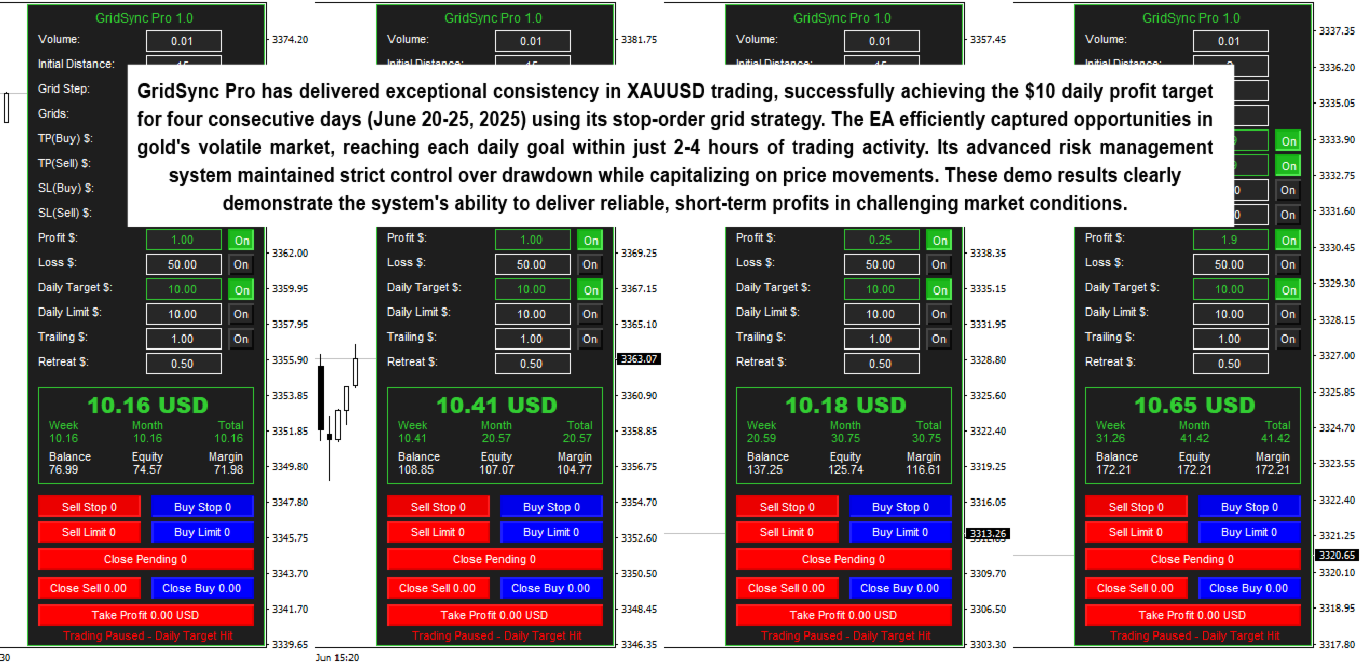
Traditional grid systems require price to fully retrace to your original entry before closing losing positions at profit. If you enter a sell at 1.3000 and price runs to 1.3100, you need price to return all the way to 1.3000 (or below) to exit profitably. During strong trends, this full retracement never comes — and accounts blow.
GridSync Pro’s recovery logic works differently. Using the same example: if price runs 100 pips against you to 1.3100 and then reverses just 50 pips back to 1.3050, the system recognizes this partial recovery and closes the position at a small profit. You capture the reversal without needing full retracement.
This feature turns potential losing scenarios into consistent small gains — the foundation of sustainable grid trading.
Key Features
Non-Martingale Architecture
Fixed lot sizes throughout the grid cycle. No exponential position increases. No doubling down until account destruction. The approach traditional grid traders wish they had from the start.
Flexible Grid Configuration
- FirstOrderDistance: 4 pips default (adjustable)
- GridStepSize: 3 pips default (adjustable)
- GridOrdersPerSide: 2 orders default (adjustable)
- Order Types: Stop orders, limit orders, or hybrid
Advanced Risk Controls
- TakeProfit: $0.25 per trade default (adjustable)
- StopLoss: $5 per trade default (adjustable)
- DailyProfitTarget: $5 default — stops trading when hit
- DailyLossLimit: $10 default — protects against runaway drawdown
Smart Trade Management
- Trailing Stops: TrailStart $1, TrailRetreat $0.50 (optional)
- Equity Auto-Shutdown: Stops if equity drops below threshold
- Session Filters: Restrict trading to specific hours
- Magic Number Tracking: Run multiple instances on different pairs
Professional Dashboard
Real-time on-chart panel showing:
- Current balance, equity, margin
- Daily, weekly, monthly P/L tracking
- Active grid status and pending orders
- One-click manual override buttons

Best Instruments for GridSync Pro
The EA performs optimally on instruments with consistent volatility and tight spreads:
Gold (XAUUSD)
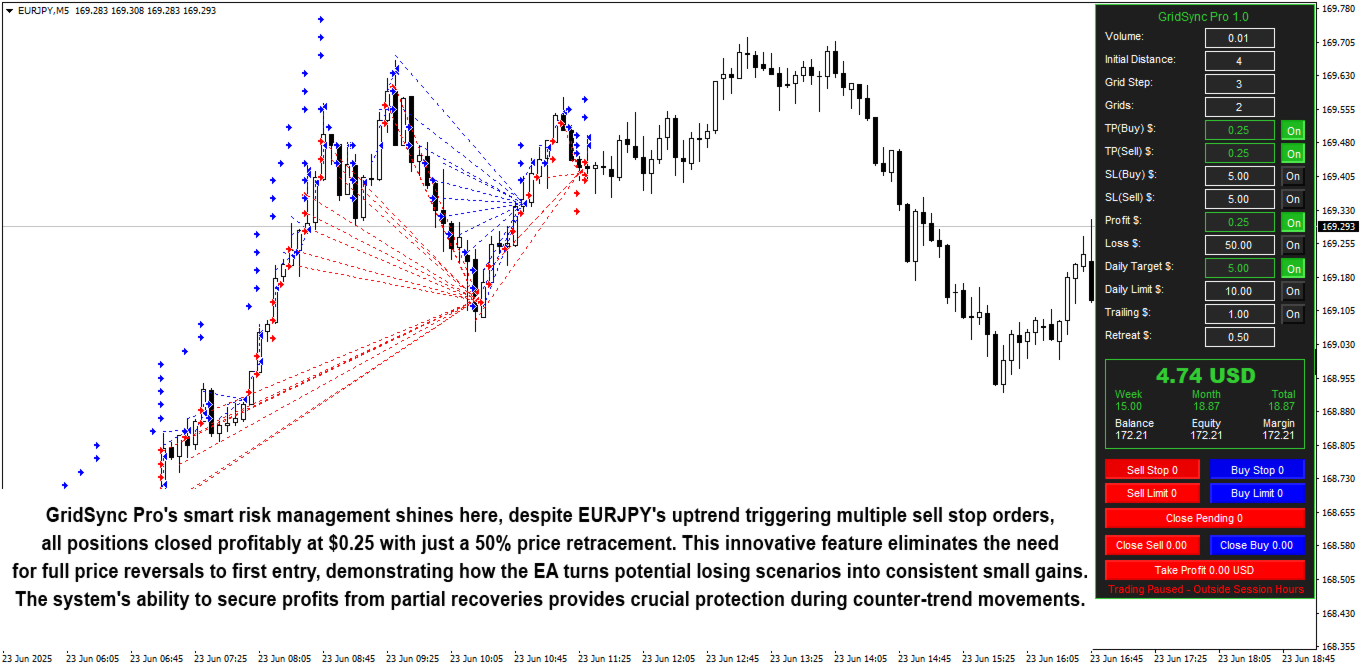
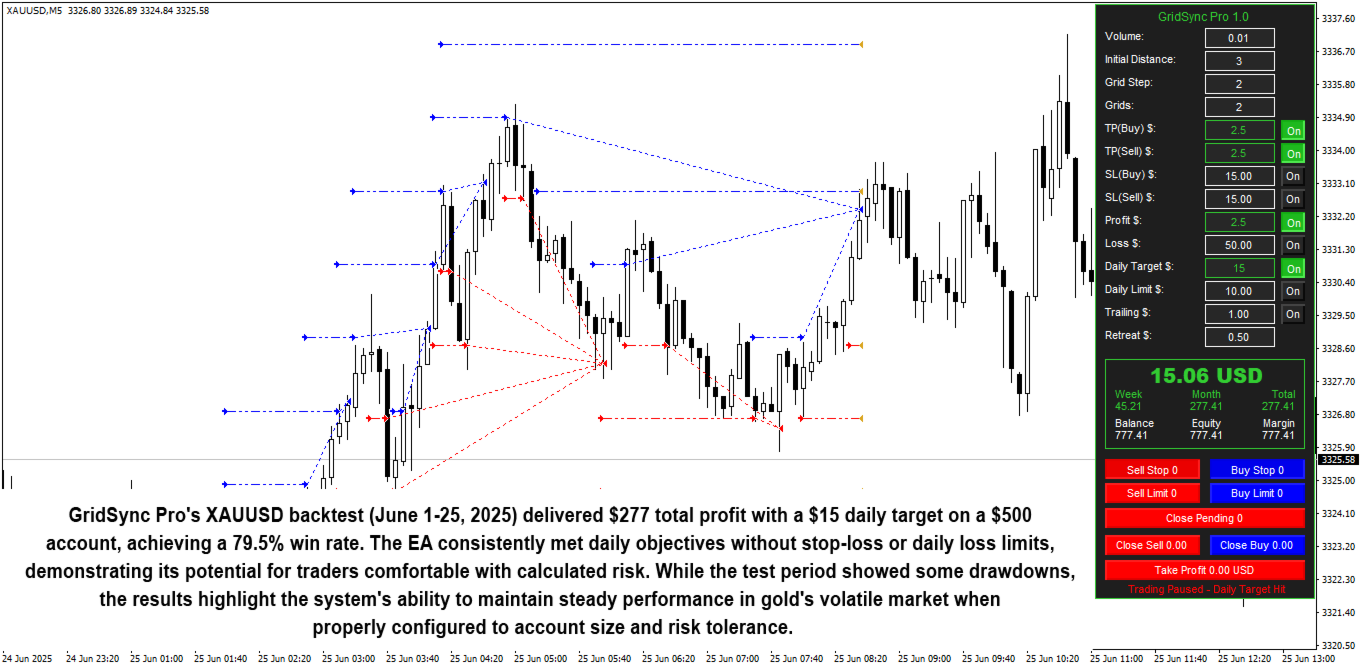
GridSync Pro’s primary testing ground. Gold’s intraday volatility creates frequent grid triggers, while the 50% recovery feature handles the inevitable retracements. The backtest below shows $277 profit on a $500 account over 25 days with 79.5% win rate.
Forex Majors
- EURUSD — Tight spreads, predictable ranging behavior
- GBPUSD — Higher volatility, larger grid captures
- USDJPY — Clean price action for grid systems
Bitcoin (BTCUSD)
For brokers offering crypto CFDs, BTCUSD’s volatility suits grid strategies when properly configured with wider step sizes.
Who Should Use This EA?
This tool is ideal for:
- Grid trading enthusiasts — Who want the strategy without martingale risk
- Gold scalpers — Capitalizing on XAUUSD intraday volatility
- Multi-pair traders — Running parallel grids across Forex and commodities
- Risk-conscious automated traders — Utilizing daily profit caps and loss limits
- Part-time traders — Who want hands-off execution with built-in controls
Technical Requirements
- Platform: MetaTrader 4
- Instruments: XAUUSD, BTCUSD, EURUSD, GBPUSD, USDJPY (recommended)
- Timeframe: Works across all timeframes
- Account Type: ECN preferred for tight spreads
- Minimum Deposit: $100+ recommended for 0.01 lot sizing
- VPS: Recommended for continuous grid monitoring
Quick Setup Guide
- Install the EA file into your MT4
Expertsfolder. - Restart MT4 and enable AutoTrading.
- Attach the EA to your chosen chart (XAUUSD, EURUSD, etc.).
- Configure grid parameters — step size, order density, order type.
- Set risk controls — TP, SL, daily profit target, daily loss limit.
- Enable session filters if avoiding specific trading hours.
- Enable trailing stops if desired (optional).
- Start with conservative settings — 0.01 lots, $0.25 TP.
- Test on demo for 2-3 weeks before live trading.
User Reviews
★★★★★ “Finally a grid EA that doesn’t blow accounts.”
I’ve lost money on three different grid EAs before — all martingale-based. GridSync Pro’s fixed lot sizing and daily loss limits saved me. The 50% recovery feature is genius. Running it on XAUUSD with conservative settings and seeing steady daily targets hit.
— Robert M., Chicago
★★★★★ “The daily profit target is everything.”
What I love is the EA stops trading when it hits the daily target. No overtrading, no giving back profits. I set $10/day on gold, it usually hits within a few hours, then I’m done. Consistent income without watching charts all day.
— Sandra K., Toronto
★★★★☆ “Great for ranging markets, needs patience in trends.”
Works beautifully when price oscillates. During strong trends, the 50% recovery feature does its job but you need patience. Not a get-rich-quick EA — it grinds out consistent small gains. Exactly what I wanted after blowing accounts on aggressive systems.
— Michael T., Sydney
★★★★★ “Dashboard makes all the difference.”
The on-chart panel showing real-time P/L and manual override buttons is professional-grade. I can see exactly what’s happening and intervene if needed. Most grid EAs are black boxes — this one is transparent.
— Elena V., London
★★★★★ “Session filters saved me during NFP.”
I forgot to disable trading before Non-Farm Payrolls once. The session filter I’d configured stopped trading automatically before the news. Avoided what would have been a disaster. Small feature, huge value.
— David L., Singapore
Our Assessment
Transparent evaluation based on feature review:
What We Found:
- Strategy: Non-martingale grid with fixed lot sizing and continuous pending orders
- Key Innovation: 50% retracement recovery — closes losers at profit without full reversal
- Risk Management: Daily profit targets, loss limits, trailing stops, equity shutdown
- Session Control: Time filters avoid high-volatility news periods
- Dashboard: Professional on-chart panel with real-time P/L and manual overrides
- Best Instruments: XAUUSD, EURUSD, GBPUSD — tight spreads, consistent volatility
- Best Suited For: Traders wanting grid profits without martingale blowup risk
- Approach: Conservative settings recommended — 0.01 lots, small daily targets
- Watch Out For: Strong one-way trends require patience; recovery feature handles but takes time
- Overall: The most sensible grid EA we’ve seen — actual risk controls instead of pray-and-hope
Understanding Grid Trading Risks
Grid trading is not risk-free. Understanding the mechanics helps set realistic expectations:
Why Most Grid EAs Fail
Traditional grid EAs use martingale — doubling lot sizes on losing positions. In ranging markets, this works beautifully. In strong trends, lot sizes compound exponentially until margin calls. GridSync Pro eliminates this by maintaining fixed position sizes.
The Trend Risk
Extended one-way moves challenge all grid systems. GridSync Pro’s 50% recovery feature mitigates this by closing losers at profit during partial retracements, but strong trends still require patience. The daily loss limit prevents catastrophic drawdowns.
The Spread Factor
Grid profitability depends heavily on spreads. Each grid cycle must overcome entry/exit spread costs. ECN brokers with tight spreads significantly improve results.
Capital Requirements
Grid trading requires sufficient capital to hold multiple positions. Conservative lot sizing (0.01) on a $500+ account provides breathing room for the strategy to work.
Conclusion
GridSync Pro EA for MT4 brings professional risk management to grid trading.
For traders who appreciate grid mechanics but have been burned by martingale blowups, GridSync Pro offers a sensible alternative. Fixed lot sizes eliminate exponential position growth. Daily profit targets stop overtrading. Daily loss limits prevent catastrophic drawdowns. And the 50% retracement recovery feature solves the classic grid problem of waiting for full reversals that never come.
The results from the images speak to the approach: consistent daily targets hit within hours, disciplined session control, and transparent dashboard monitoring. This isn’t promising 1000% monthly returns — it’s grinding out sustainable daily profits with actual risk controls.
Grid trading isn’t for everyone. But for those who understand and accept the strategy, GridSync Pro implements it more responsibly than any grid EA we’ve reviewed.
What Do You Receive?
– GridSync Pro EA for MT4 – available file
– Free lifetime updates
– Fully unlocked for unlimited brokers and accounts
– Delivered by email and allocated to your user account dashboard
Every order
What’s included with GridSync Pro
- Instant downloadReady after checkout and kept in your account
- Free lifetime updatesAdded as soon as we receive them, every version kept in your account
- Unlimited activationsUnlimited live and demo accounts
- Setup helpReal people on Telegram or email
- 7-day money-back guaranteeIf the EA fails to attach to your chart because of errors we can replicate, you get a full refund.
Product FAQs
GridSync Pro EA MT4 FAQs
Real people on support, by Telegram or our contact form.
What is grid trading?
A strategy that places pending orders at fixed intervals above and below current price. As price moves through the grid, orders trigger and close at take profit. The system profits from price oscillation without predicting direction.
What makes GridSync Pro different from other grid EAs?
Non-martingale architecture (fixed lot sizes, no exponential blowup), 50% retracement recovery (closes losers at profit without full reversal), and daily profit/loss controls that stop trading automatically.
What is the 50% retracement recovery feature?
Traditional grids require full price reversal to close losing positions profitably. GridSync Pro closes underwater positions when price reverses just 50% of the move — capturing partial recoveries instead of waiting for full retracements that may never come.
Does it use martingale?
No. Lot sizes remain fixed throughout the grid cycle. No doubling, no exponential position increases, no account-destroying multiplication.
What are the daily profit targets and loss limits?
Configurable thresholds that automatically stop trading. Default: $5 daily profit target, $10 daily loss limit. When either is hit, the EA stops opening new positions for the day.
What pairs work best?
XAUUSD (Gold) — primary testing instrument with excellent results. EURUSD, GBPUSD, USDJPY — Forex majors with tight spreads. BTCUSD — for brokers offering crypto with wider grid steps.
What order types are available?
Stop orders (triggered when price reaches level), limit orders (triggered at better prices), or hybrid approaches. Choose based on your trading style and market conditions.
Can I adjust the grid spacing?
Yes. FirstOrderDistance (default 4 pips), GridStepSize (default 3 pips), and GridOrdersPerSide (default 2) are all configurable.
What are the session filters?
Time-based controls that restrict trading to specific hours. Use them to avoid high-volatility news periods, overnight gaps, or sessions that don’t suit your pairs.
What’s the recommended starting capital?
$500+ for 0.01 lot sizing. Grid trading requires capital to hold multiple positions. Conservative lot sizing provides breathing room for the strategy.
Does the EA include trailing stops?
Yes. Optional trailing stops with configurable TrailStart ($1 default) and TrailRetreat ($0.50 default) to lock in gains during strong moves.
What does the dashboard show?
Real-time balance, equity, margin, daily/weekly/monthly P/L, active grid status, pending orders, and one-click manual override buttons for closing positions.
Is a VPS required?
Recommended for continuous grid monitoring. Missing price movements due to disconnection means missing grid triggers.
What’s the recommended testing period?
2-3 weeks on demo before live trading. Test different grid configurations, daily targets, and instruments to find optimal settings for your broker.
- Excellent on Trustpilot 4.6 out of 5 from 120 reviews (opens in a new tab)
- 28,000+ traders since 2019
- 1,560+ official EAs
- Card or crypto payments
Related EAs
Traders also explore
Premium expert advisors at vault-low prices, with your crypto price on every card.
 MT4Save 83%
 MT4Save 67%
 MT4Save 70%
 MT5Save 70%
Ready when you are
GridSync Pro EA MT4 for $239.96 with crypto
Regular price was $1,249.00 · $299.95 with card · instant download · free lifetime updates
GridSync Pro EA MT4$239.96with crypto$299.95 with card