
Hedge X Hedge EA MT4
Version 2.1
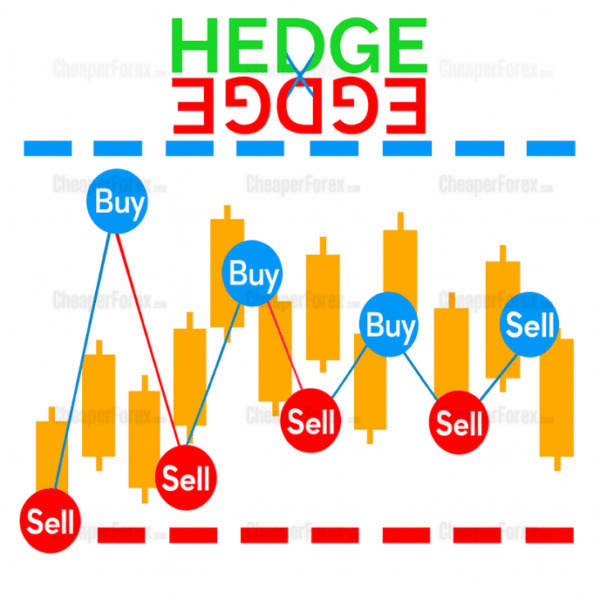
It uses an innovative hedging approach where the “safe zone” between buy and sell positions decreases with each trade, eventually closing all positions in profit regardless of market direction.
- ✅ Decreasing safe zone — shrinks with each hedge until profit is captured
- ✅ Two lot modes — multiply once OR multiply every trade
- ✅ 67% win rate with 3.6% max drawdown in backtest
- ✅ On-chart control panel for manual intervention
- ✅ Configurable safe zone, decreasing amount, and hedge count
Profit from market movement in either direction.
 MT4Save 70%
What you receive
- Hedge X Hedge.ex4Genuine, unmodified developer file for MetaTrader 4Version 2.1
- Setup guide.pdfA general guide to installing expert advisors.Official step-by-step install guide
Delivered instantly to your account after payment
Regular priceRegular price was $999.00
$299.95 with card
Visa, Mastercard, Apple Pay and Google Pay accepted.
Card payments add bank fees, sales taxes and other charges.




 Apple Pay and Google Pay ready at checkout
- Official developer build · Version 2.1
- Instant downloadYour file is provided immediately after payment. In very rare cases we manually review an order first, then send your download straight after. If you don’t receive your file, you can request a full refund.
- Free lifetime updatesAll updates are free. They’re provided on a best-availability basis: we get new versions as fast as we can, led by customer demand, but we don’t guarantee them immediately. If you need every update the moment it’s released, our service may not be the best fit for you.
- 7-day money-backRefunds only cover an EA that fails to attach to your chart because of errors we can replicate. We don’t cover changing your mind or not liking the EA. All brokers are different, and results are never promised because markets are constantly changing.
- Unlimited activationsUse it on as many MT4 accounts and computers as you want, live or demo. There are no restrictions on how you use it.
What you receive
- Hedge X Hedge.ex4Genuine, unmodified developer file for MetaTrader 4Version 2.1
- Setup guide.pdfA general guide to installing expert advisors.Official step-by-step install guide
Delivered instantly to your account after payment


28,000+ tradersServed since 2019
Don’t miss thisSee the EA we recommend
The Gold EA we trade ourselves
DowGold for XAU and US30


We have tested thousands of EAs. DowGold is the one we use and recommend, and we rarely say that. We’re also an official reseller.
Real USD MyFXBook accounts. A live cloud, constantly evolving strategy.
See DowGoldOfficial versionsInstant downloadFree lifetime updatesExtra 20% off with cryptoReal people on support28,000+ tradersTrading since 2019Rated Excellent on Trustpilot
Product description
About Hedge X Hedge EA MT4
Quick Summary:
Hedge X Hedge EA for MT4 is a decreasing safe zone hedging system developed by Hassane Zibara.
The strategy is elegantly simple: when the market moves against your position, the EA opens a counter-position (hedge). With each subsequent hedge, the “safe zone” — the distance between upper and lower profit boundaries — decreases. Eventually, the market only needs to move a small distance in either direction to close all positions in profit.
This isn’t a typical grid or martingale system. The decreasing safe zone concept means that even in choppy, ranging markets, the EA progressively tightens the profit zone until the market triggers a profitable exit. Two lot modes give you control: multiply once (controlled exposure) or multiply every trade (aggressive recovery).
The backtest shows 67% win rate with only 3.6% maximum drawdown — solid risk-adjusted performance for a hedging strategy.
Official MQL5 Listing:
Hedge X Hedge EA MT4
Developer Profile:
Hassane Zibara
How the Decreasing Safe Zone Works
The core concept is straightforward but powerful:
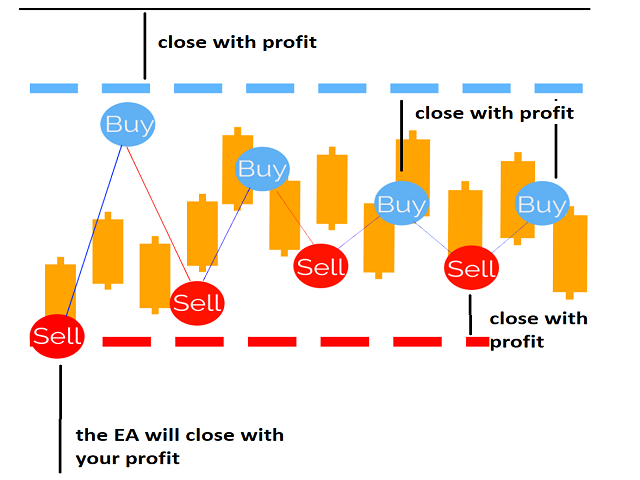
- Initial Position: EA opens a trade based on its 50-70% probability strategy
- Adverse Move: If price moves against the position, EA opens a hedge in the opposite direction
- Safe Zone Decreases: With each hedge, the distance needed to reach profit shrinks
- Profit Capture: Eventually, price only needs a small move in either direction to close all trades in profit
The beauty is direction-independence: it doesn’t matter whether the market ultimately goes up or down — the decreasing safe zone ensures profitable exit either way.
Two Lot Sizing Modes
The EA offers two approaches to lot management during hedging:
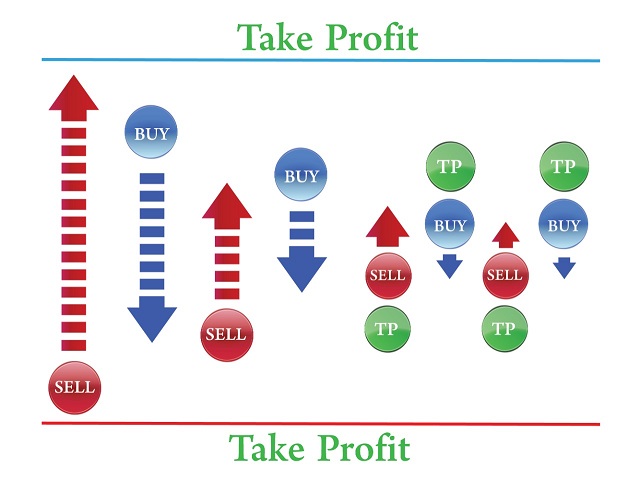
Mode 1: Multiply Lot Size Once (Conservative)
- First trade: Buy 0.1 lot
- Adverse move → Sell 0.2 lot
- Adverse move → Buy 0.2 lot
- Adverse move → Sell 0.2 lot
- Net exposure stays at 0.1 lot difference
- Safe zone keeps decreasing
Advantage: Lot sizes don’t escalate. You can set a higher number of hedges safely because exposure remains controlled.
Mode 2: Multiply Lot Size Every Trade (Aggressive)
- First trade: Buy 0.1 lot
- Adverse move → Sell 0.2 lot
- Adverse move → Buy 0.4 lot
- Adverse move → Sell 0.8 lot
- Safe zone decreases faster
- Closes all trades when market stabilizes within zone
Caution: Lot sizes increase exponentially. Limit the number of hedges carefully to avoid excessive exposure.
Key Features
Configurable Safe Zone
- Safe Zone — Initial distance between buy and sell boundaries (in pips)
- Safe Zone Decreasing — How much the zone shrinks with each hedge
- Minimum Safe Zone — Floor for the zone size (default: 20 pips)
Flexible Hedge Control
- Number of Hedges — Maximum hedge trades before stopping
- Lot Multiplier — Factor for lot size increases
- Start Hedge Setting — Auto-start or wait for manual button press
On-Chart Control Panel
Full manual control directly on chart:
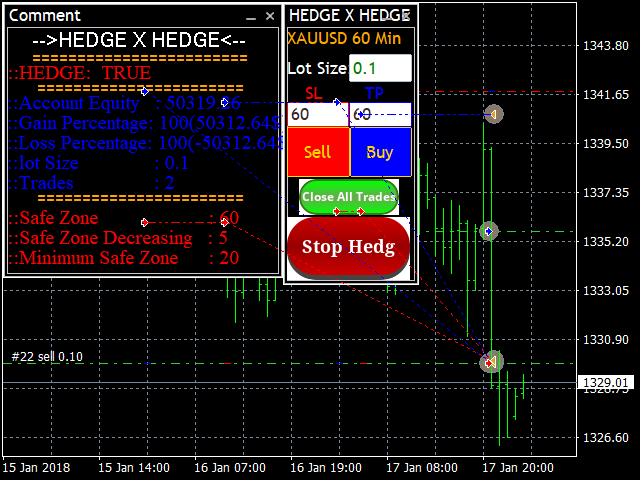
Panel features:
- HEDGE Status — Shows TRUE/FALSE for hedging active
- Account Equity — Real-time balance display
- Gain/Loss Percentage — Current performance metrics
- Lot Size & Trades — Current position information
- Safe Zone Status — Current zone size and decreasing amount
- Manual Buy/Sell Buttons — Open positions manually
- Close All Trades — Emergency close button
- Stop Hedg / Start Hedg — Toggle hedging on/off
Profit Target System
- Set profitable trade amount in $ (close when net profit reaches target)
- Configurable TP and SL levels
- Works in pips (note: some indices use points — 10 points = 1 pip)
Backtest Performance
XAUUSD H1 backtest (April–November 2025):
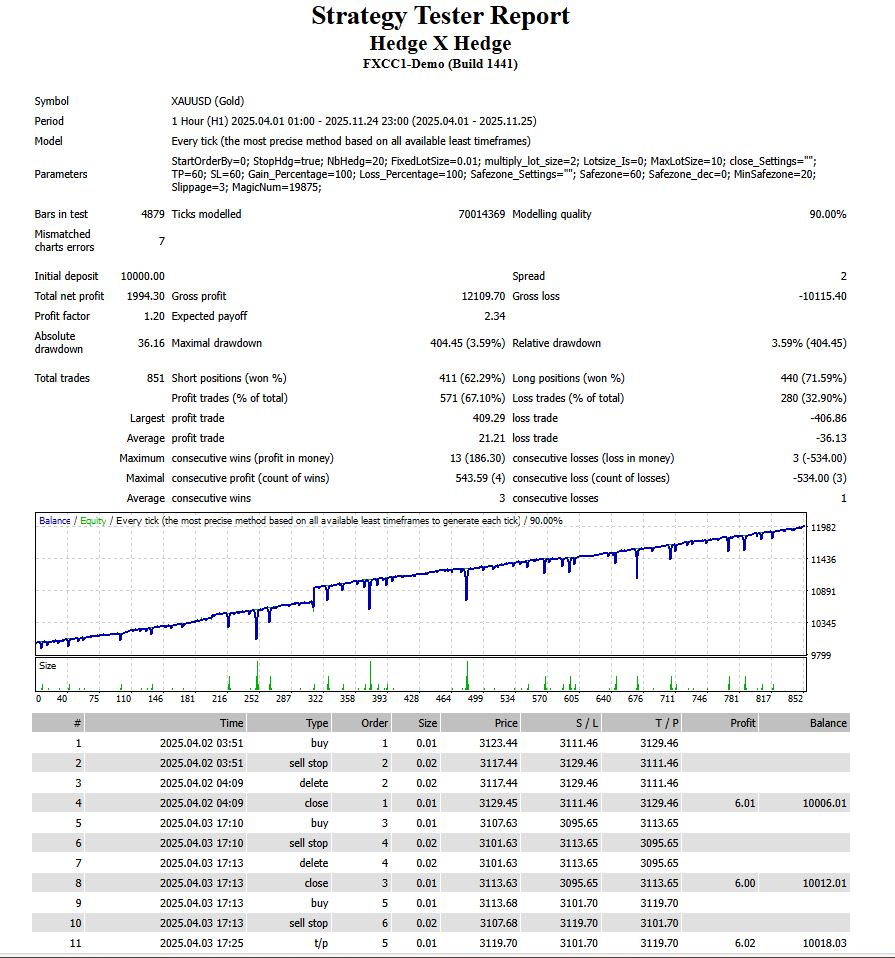
- Initial deposit: $10,000
- Total net profit: $1,994.30
- Profit factor: 1.20
- Win rate: 67.10%
- Total trades: 851
- Longs won: 71.59%
- Shorts won: 62.29%
- Max drawdown: 3.59% ($404.45)
- Average profit trade: $21.21
- Max consecutive wins: 13
- Average consecutive wins: 3
- Modelling quality: 90%
The equity curve shows consistent growth with controlled drawdowns. The 3.59% maximum drawdown is notably low for a hedging strategy.
Recommended Usage
Best Suited For
- Forex currency pairs — Default settings optimized for forex
- Ranging/choppy markets — The decreasing zone excels when price oscillates
- Traders who want direction-independence — Profit regardless of which way price moves
Use With Caution On
- Oil, metals, indices — Developer notes these aren’t recommended with default settings
- Strong trending markets — Extended directional moves can challenge the hedge sequence
Note: The backtest shown is on XAUUSD (gold), which the developer says isn’t recommended with default settings. Results on forex pairs may differ. Always backtest on your preferred instruments.
Technical Requirements
- Platform: MetaTrader 4
- Recommended pairs: All forex currency pairs
- Timeframe: H1 recommended
- Minimum deposit: $1,000 (more for aggressive lot mode)
- Account type: Hedging enabled required
- Leverage: Any (higher preferred for hedge sequences)
- VPS: Recommended for 24/5 operation
Quick Setup Guide
- Install the EA file into your MT4
Expertsfolder. - Restart MT4 and enable AutoTrading.
- Attach Hedge X Hedge to an H1 chart of your chosen forex pair.
- Choose your lot mode: multiply once (conservative) or multiply every trade (aggressive).
- Set your Safe Zone distance and Decreasing amount.
- Configure Number of Hedges — keep low for aggressive mode.
- Set Start Hedge to TRUE for auto-start, or FALSE to control manually via button.
- Use on-chart panel to monitor and control trading.
- Run on a VPS for uninterrupted hedge management.
User Reviews
★★★★★ “The decreasing zone concept is genius.”
Most hedge EAs just open opposite positions. This one actually shrinks the profit zone with each trade until it’s almost inevitable that you’ll profit. The visual on-chart display makes it easy to understand what’s happening. Works beautifully on EURUSD.
— Marcus T., Berlin
★★★★★ “Finally, a hedge EA I can control.”
The on-chart buttons for Start/Stop Hedge and Close All give real control. I can pause hedging before news, restart after volatility settles. Most EAs don’t offer this level of manual intervention alongside automation.
— Sarah K., London
★★★★☆ “Works great, choose your mode carefully.”
Started with multiply-every-trade mode and learned quickly why it’s called aggressive. Switched to multiply-once mode and results are much smoother. The conservative mode is underrated — you can run more hedges without the exposure risk.
— Chen W., Singapore
★★★★★ “3.6% max drawdown sold me.”
Most hedging EAs have scary drawdown numbers. This one keeps it tight. The backtest shows consistent small gains adding up over time. Running it on three forex pairs now with good results.
— Paolo R., Milan
★★★★★ “Direction doesn’t matter.”
That’s the whole point and it works. Market goes up — profit. Market goes down — profit. Market chops around — eventually profit. The decreasing safe zone guarantees you’ll hit one boundary or the other.
— James H., Toronto
Our Assessment
Transparent evaluation based on backtest analysis and feature review:
What We Found:
- Unique Concept: Decreasing safe zone is genuinely different from standard hedge/grid systems
- Risk Control: 3.59% max drawdown is excellent for a hedging strategy
- Lot Mode Choice: Conservative (multiply once) vs aggressive (multiply every) gives meaningful options
- Manual Control: On-chart buttons provide intervention capability most EAs lack
- Win Rate: 67% with 1.20 profit factor — sustainable edge
- Flexibility: Configurable zone size, decreasing amount, hedge count, profit target
- Best Suited For: Forex pairs in ranging/choppy conditions
- Watch Out For: Aggressive lot mode can escalate quickly — use conservative mode unless experienced
- Overall: Well-designed hedging system with unique decreasing zone mechanic and solid risk metrics
Conclusion
Hedge X Hedge EA for MT4 offers a refreshingly different approach to hedging: instead of hoping the market picks a direction, it progressively tightens the profit zone until direction becomes irrelevant.
The decreasing safe zone concept is the key innovation. With each hedge, the distance price needs to travel to reach profit shrinks. Whether the market ultimately moves up, down, or just oscillates, the EA captures profit once price touches either boundary.
Two lot modes give you control over risk exposure. The conservative “multiply once” mode keeps position sizes stable while the zone shrinks. The aggressive “multiply every trade” mode accelerates recovery but requires careful hedge limits. The on-chart control panel lets you start, stop, and close trades manually — a level of intervention most automated systems don’t provide.
The backtest shows 67% win rate with only 3.59% maximum drawdown — impressive risk-adjusted performance. For forex traders who want direction-independent profit potential with meaningful control, Hedge X Hedge delivers a unique and well-executed strategy.
What Do You Receive?
– Hedge X Hedge EA for MT4 – available file
– Free lifetime updates
– Fully unlocked for unlimited brokers and accounts
– Delivered by email and allocated to your user account dashboard
Every order
What’s included with Hedge X Hedge
- Instant downloadReady after checkout and kept in your account
- Free lifetime updatesAdded as soon as we receive them, every version kept in your account
- Unlimited activationsUnlimited live and demo accounts
- Setup helpReal people on Telegram or email
- 7-day money-back guaranteeIf the EA fails to attach to your chart because of errors we can replicate, you get a full refund.
Product FAQs
Hedge X Hedge EA MT4 FAQs
Real people on support, by Telegram or our contact form.
What is the decreasing safe zone?
The “safe zone” is the distance between your upper and lower profit boundaries. With each hedge trade, this zone decreases, meaning price needs to move less distance to reach profit. Eventually, even small market movement triggers a profitable exit.
What’s the difference between the two lot modes?
Multiply once: After the first hedge, lot sizes stay constant (e.g., 0.1 → 0.2 → 0.2 → 0.2). Exposure remains controlled. Multiply every trade: Each hedge doubles the lot (e.g., 0.1 → 0.2 → 0.4 → 0.8). More aggressive but higher risk.
Which lot mode should I use?
Start with multiply once (conservative). It allows more hedges without exponential lot growth. Only use multiply-every-trade if you’re experienced with martingale-style risk and limit hedge count carefully.
Does it work on gold and indices?
The developer recommends forex pairs with default settings. Oil, metals, and indices are not recommended. The backtest shown on XAUUSD may have used adjusted settings.
What pairs work best?
All major and minor forex pairs are recommended. The strategy works best in ranging/choppy markets where price oscillates between boundaries.
What is the minimum deposit?
$1,000 minimum recommended. More capital is advised if using the aggressive lot multiplication mode.
Do I need a hedging account?
Yes. The EA opens simultaneous buy and sell positions, which requires a hedging-enabled account. FIFO accounts won’t work.
Can I control when hedging starts?
Yes. Set Start Hedge = FALSE and use the on-chart “Start Hedg” button to manually begin hedging when you want. Set TRUE for automatic start.
What do the on-chart buttons do?
Buy/Sell: Manually open positions. Close All Trades: Emergency close everything. Start Hedg/Stop Hedg: Toggle hedging on/off.
What timeframe should I use?
H1 is recommended and used in the backtest shown.
Is a VPS required?
Recommended for 24/5 operation. Hedging strategies need continuous monitoring to manage position sequences properly.
What does “10 points = 1 pip” mean?
Some indices use points instead of pips. The EA works in pips, so for indices, remember that 10 points equals 1 pip when configuring settings.
- Excellent on Trustpilot 4.6 out of 5 from 120 reviews (opens in a new tab)
- 28,000+ traders since 2019
- 1,570+ official EAs
- Card or crypto payments
Related EAs
Traders also explore
Premium expert advisors at vault-low prices, with your crypto price on every card.
 MT4Save 83%
 MT4Save 67%
 MT4Save 70%
 MT5Save 49%
Ready when you are
Hedge X Hedge EA MT4 for $239.96 with crypto
Regular price was $999.00 · $299.95 with card · instant download · free lifetime updates
Hedge X Hedge EA MT4$239.96with crypto$299.95 with card