/* Only complements native navigation; native search and Woo actions stay unchanged. */ (()=>{ const key='cfHeaderDraft40435'; window[key]?.dispose?.(); const abort=new AbortController(),media=matchMedia('(max-width:1024px)'); const header=()=>document.querySelector('.elementor-40435.elementor-location-header'); const toggle=()=>header()?.querySelector('.cf-header-nav .elementor-menu-toggle'); const expanded=t=>t&&(t.getAttribute('aria-expanded')==='true'||t.classList.contains('elementor-active')); const close=focus=>{const t=toggle();if(expanded(t)){t.click();if(focus)t.focus();}}; document.addEventListener('keydown',event=>{ if(event.key==='Escape'&&expanded(toggle())){close(true);event.preventDefault();} },{signal:abort.signal}); document.addEventListener('pointerdown',event=>{ const nav=header()?.querySelector('.cf-header-nav'); if(media.matches&&expanded(toggle())&&nav&&!nav.contains(event.target))close(false); },{signal:abort.signal}); const change=()=>close(false);media.addEventListener('change',change); const disposeCart=cfEnhanceDraftCart(header()); window[key]={dispose(){abort.abort();media.removeEventListener('change',change);disposeCart();}}; /* Proposal only. Call inside the draft header's existing behaviour IIFE: * const disposeCart = cfEnhanceDraftCart(header()); * Include disposeCart() in that IIFE's existing dispose method. * Native cart toggling, fragments and checkout links remain untouched. */ function cfEnhanceDraftCart(header) { if (!header || header.getAttribute('data-elementor-id') === '353') return () => {}; const abort = new AbortController(), owned = new Map(); let wasOpen = false, closing = false, frame = 0; const refs = () => { const widget = header.querySelector('.cf-header-cart'); return {widget, pane:widget?.querySelector('.elementor-menu-cart__main'), trigger:widget?.querySelector('.elementor-menu-cart__toggle_button'), close:widget?.querySelector('.elementor-menu-cart__close-button, .elementor-menu-cart__close-button-custom')}; }; const open = r => !!r.widget?.classList.contains('elementor-menu-cart--shown'); const attribute = (el, name, value) => { if (!el || el.getAttribute(name) === value) return; if (!owned.has(el)) owned.set(el, new Map()); const values = owned.get(el), old = values.has(name) ? values.get(name).old : el.getAttribute(name); values.set(name, {old, value}); el.setAttribute(name, value); }; const prepare = r => { if (!r.pane) return; if (!r.pane.id) attribute(r.pane, 'id', 'cf-cart-dialog-' + header.getAttribute('data-elementor-id')); attribute(r.pane, 'role', 'dialog'); attribute(r.pane, 'aria-modal', 'true'); if (!r.pane.hasAttribute('aria-label') && !r.pane.hasAttribute('aria-labelledby')) attribute(r.pane, 'aria-label', 'Shopping cart'); attribute(r.pane, 'tabindex', '-1'); attribute(r.trigger, 'aria-haspopup', 'dialog'); attribute(r.trigger, 'aria-controls', r.pane.id); if (r.close) { if (!r.close.matches('button, input[type="button"]')) attribute(r.close, 'role', 'button'); attribute(r.close, 'tabindex', '0'); if (!r.close.hasAttribute('aria-label') && !r.close.hasAttribute('aria-labelledby')) attribute(r.close, 'aria-label', 'Close shopping cart'); } }; const focusable = pane => [...pane.querySelectorAll('a[href],button,input,select,textarea,summary,[tabindex],[contenteditable="true"]')] .filter(el => el.tabIndex >= 0 && !el.matches(':disabled') && !el.closest('[hidden],[inert],[aria-hidden="true"]') && el.getClientRects().length && getComputedStyle(el).visibility === 'visible'); const focusInside = () => { const r = refs(); if (!open(r) || closing || !r.pane) return; (focusable(r.pane)[0] || r.pane).focus({preventScroll:true}); }; const returnFocus = () => { const t = refs().trigger; if (t?.isConnected) t.focus(); }; const sync = () => { const r = refs(); prepare(r); const now = open(r); if (now && !wasOpen) { closing = false; cancelAnimationFrame(frame); frame = requestAnimationFrame(focusInside); } else if (!now && wasOpen) { closing = true; cancelAnimationFrame(frame); returnFocus(); closing = false; } else if (now && r.pane && !r.pane.contains(document.activeElement) && !closing) { cancelAnimationFrame(frame); frame = requestAnimationFrame(focusInside); } wasOpen = now; }; const closeNative = () => { const r = refs(); if (!open(r)) return; closing = true; returnFocus(); // Invoke the existing handler; never change its internal isCartOpen state. (r.close || r.trigger)?.click(); if (open(refs())) { closing = false; focusInside(); } }; document.addEventListener('keydown', event => { const r = refs(); if (!open(r) || !r.pane) return; if (event.key === 'Escape') { event.preventDefault(); event.stopPropagation(); closeNative(); return; } if ((event.key === 'Enter' || event.key === ' ') && r.close?.contains(event.target) && !r.close.matches('button, input[type="button"]')) { event.preventDefault(); closeNative(); return; } if (event.key !== 'Tab') return; const list = focusable(r.pane), first = list[0], last = list[list.length - 1], current = document.activeElement; if (!first) { event.preventDefault(); r.pane.focus({preventScroll:true}); } else if (!r.pane.contains(current) || (event.shiftKey && (current === first || current === r.pane))) { event.preventDefault(); (event.shiftKey ? last : first).focus({preventScroll:true}); } else if (!event.shiftKey && current === last) { event.preventDefault(); first.focus({preventScroll:true}); } }, {capture:true, signal:abort.signal}); // Move focus before native click handlers apply aria-hidden to the pane. document.addEventListener('click', event => { const r = refs(); if (!open(r) || !r.pane) return; if (r.close?.contains(event.target) || !r.pane.contains(event.target)) { closing = true; returnFocus(); queueMicrotask(() => { if (open(refs())) { closing = false; focusInside(); } }); } }, {capture:true, signal:abort.signal}); document.addEventListener('focusin', event => { const r = refs(); if (!closing && open(r) && r.pane && !r.pane.contains(event.target)) focusInside(); }, {capture:true, signal:abort.signal}); const observer = new MutationObserver(sync); observer.observe(header, {subtree:true, childList:true, attributes:true, attributeFilter:['class','aria-hidden']}); sync(); return () => { observer.disconnect(); abort.abort(); cancelAnimationFrame(frame); for (const [el, attrs] of owned) for (const [name, {old, value}] of attrs) { if (el.getAttribute(name) !== value) continue; if (old === null) el.removeAttribute(name); else el.setAttribute(name, old); } }; } })();

Official MT5 version · Gold EA

Lux Oro EA MT5

Lux Oro EA for MT5 trades Gold (XAUUSD) on the H1 timeframe using a pure technical strategy with no AI, no grid, and full risk control.

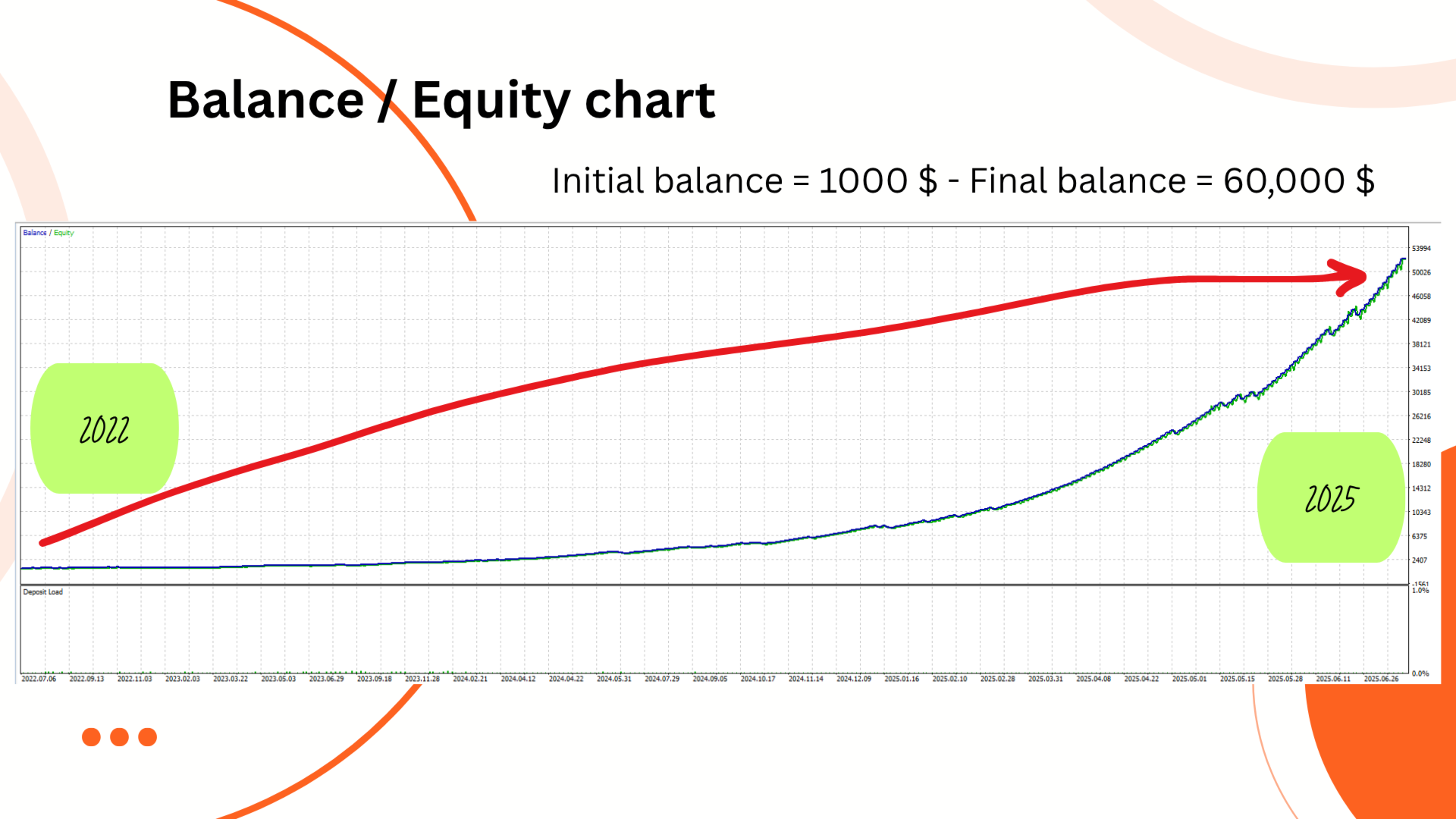
Designed for serious traders, it includes a customizable trailing stop, works with all major brokers, and shows verified backtested growth from $1k to over $60k with low drawdown.

Fully prop firm compatible.

This is the latest version with ongoing updates.

More Information:
+
https://www.mql5.com/en/market/product/144488

Live Performance Signals:
+
None known

Lux Oro Product LogoMT5
This product is no longer available to buy.

If you already own it, your files and license details are still in your account.

Official versionsInstant downloadFuture updates includedExtra 20% off with cryptoReal people on support28,000+ tradersTrading since 2019Rated Excellent on Trustpilot

Product description

About Lux Oro EA MT5

Lux Oro EA for MT5 by Seyed Davoud Nikkhouy Tanha – Precision Gold Trading on the H1 Timeframe

⚜️ Lux Oro EA for MT5 trades Gold (XAUUSD) on H1 with disciplined technical logic, no AI hype, and strict TrailStop risk control. Verified backtests show $1k growing to $60k with low drawdown and prop firm-safe settings.


Introduction to Lux Oro EA

Lux Oro EA for MT5 is a disciplined, fully automated Expert Advisor designed specifically for XAUUSD (Gold) on the H1 timeframe. Developed by Seyed Davoud Nikkhouy Tanha, this EA avoids overhyped AI gimmicks and focuses on what works — transparent, rule-based technical logic, customizable inputs, and protective trailing features.

Whether you’re aiming to trade manually alongside automation or want a serious EA to scale your gold strategy, Lux Oro is built for low drawdown, strong trailing profit protection, and broker versatility, including hedging support.


Key Features

  • Symbol Support: XAUUSD only (H1 chart)

  • Strategy Type: Technical trend-based logic (no AI or neural net)

  • Platform: MetaTrader 5

  • Risk Management: Built-in TrailStop system

  • Broker Compatibility: Works with standard or ECN accounts, hedging enabled

  • Naming Support: Customizable symbol suffix/prefix handling

  • Execution Mode: Market execution with strict control over slippage


Verified Performance – Backtest Proof

XAUUSD H1 (2022–2025)

  • Initial Balance: $1,000

  • Final Balance: $60,000+

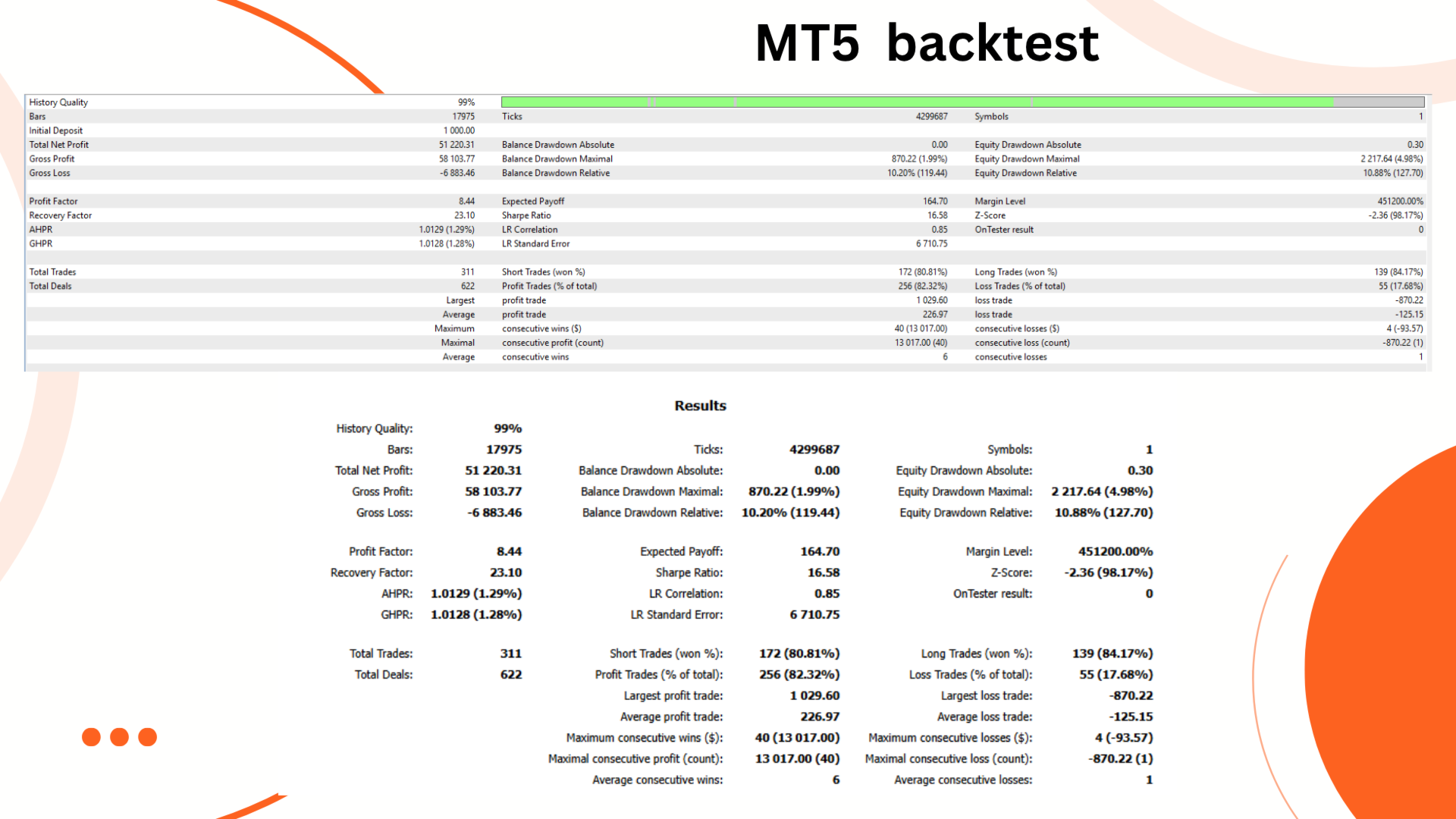
  • Profit Factor: 8.44

  • Recovery Factor: 23.10

  • Win Rate: 82.3%

  • Max Drawdown: 4.98%

  • Total Trades: 311

  • Largest Profit Trade: $1,029.60

  • Largest Loss Trade: -$870.22

Lux Oro Backtest Equity Growth with a $1000 Initial Balance
Lux Oro Backtest Report

All backtests were conducted using real tick data with variable spreads, demonstrating consistent equity growth even during volatile market periods.


How to Set Up

  1. Attach the EA to the XAUUSD H1 chart

  2. Use a low-spread standard or ECN account (e.g., IC Markets)

  3. Configure risk settings and any required symbol suffix

  4. Enable TrailStop if desired

  5. Let the EA manage trade entries and exits automatically


Recommended Settings & Conditions

  • Chart: XAUUSD H1 only

  • Min. Deposit: $1,000+

  • Account Type: ECN or standard

  • Supports Hedging: ✅

  • Broker Independence: Works on most brokers with proper spread and execution


Trader Reviews

⭐ 189114nickynomates
“Sensible EA. No AI, no gimmicks. 1 trade at a time with SL and trailing. Fixed lot or risk %. At this price it’s a steal.”

⭐ Charles
“Running on demo — matches backtest results so far. Will go live soon. Simple setup and solid performance.”

⭐ Aleksandr Davydov
“First trades — all in profit. Works on different brokers. I recommend it.”
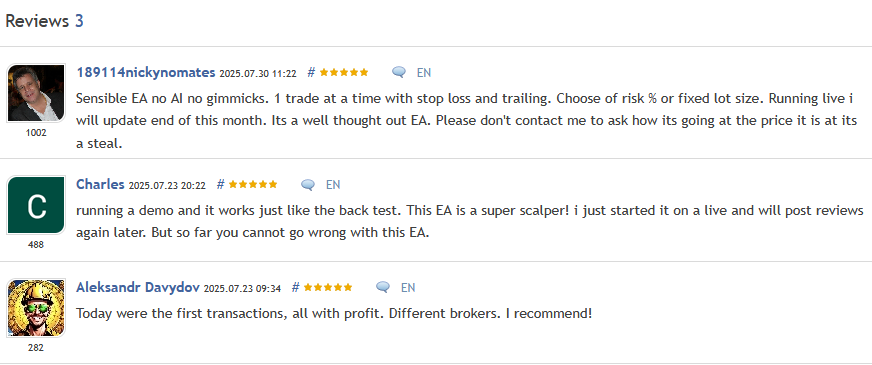
Lux Oro Customer Reviews Screenshot

Frequently Asked Questions

Can I use this EA on other symbols besides XAUUSD?

No. Lux Oro is optimized specifically for XAUUSD (Gold) on the H1 timeframe only.

Does the EA use martingale or grid logic?

No. It uses fixed SL/TP logic and optional trailing stop for controlled and safe trading.

Is Lux Oro prop firm friendly?

Yes. It uses hard stop-losses, avoids overtrading, and maintains low drawdown — ideal for prop firm challenges.

Does it work with brokers that use suffixes (like XAUUSDm or XAUUSD.pro)?

Yes. The EA allows custom symbol input to adapt to your broker’s format.

Can I adjust the trailing stop or disable it?

Yes. TrailStop is fully configurable and can be turned off/on depending on your strategy.

Is it beginner friendly?

Yes. Setup is straightforward, and it runs automatically once attached and configured properly.


Conclusion

Lux Oro EA for MT5 is a transparent, powerful, and focused solution for gold traders. If you’re tired of over-complicated bots and AI marketing fluff, this EA delivers what really matters: clear strategy, disciplined risk management, and consistent performance.

It’s built to work with your broker, protect your capital, and help grow accounts without gambling. A true gold-focused tool for serious traders.

Standalone MT5 file, latest version. Follow the delivery instructions supplied with your order. Future file updates are included when we receive them. Managed installation is also available on request.

Every order

What’s included with Lux Oro

Download it, install it and keep it current: everything comes with your license.

  • Instant download

    Ready the moment checkout completes, and kept in your customer portal.

  • Installation guide

    Step-by-step PDF with screenshots.

  • Optimized presets

    Ready-to-use configuration files.

  • Future updates

    Included free when we receive them. You never pay twice, and every version stays in your account.

  • Unlimited activations

    Use it on as many terminals as you like: unlimited live and demo accounts, no activation keys.

  • Setup help

    Questions about installing or settings? Message us on Telegram or email and a real person answers.

7-day money-back guarantee

If the EA fails to attach to your chart because of errors we can replicate, you get a full refund.

*Refunds don’t cover changing your mind or not liking the EA. All brokers are different, and results are never promised because markets are constantly changing.

The CheaperForex difference

Why 28,000+ traders choose CheaperForex

Trustpilot rating Excellent 4.6 out of 5 Based on 120 reviews on Trustpilot Read the reviews on Trustpilot (opens in a new tab)
“Bought 2 EAs from them. Requested update for new version and was sent within 24hrs. Great support. Recommended, 5 STARS.”
Aceman · Trustpilot review (opens in a new tab)
“Fantastic service as always. Have gotten a lot from them in the past and never been disappointed.”
Paul Michael Lawrence · Trustpilot review (opens in a new tab)
“They were friendly and helpful in setting up my expert advisor.”
Sarah Francis · Trustpilot review (opens in a new tab)
  • Instant accessNo group buys or waiting
  • 7-day refund policyRefunds only cover an EA that fails to attach to your chart because of errors we can replicate. We don’t cover changing your mind or not liking the EA. All brokers are different, and results are never promised because markets are constantly changing.For product errors
  • Setup helpBy Telegram or email
  • Flexible paymentsCards, Apple Pay, Crypto
Official EAs1,180+
Customers28,000+
Trading since2019