
Official MT4 version · Gold EA
M1 Gold Indicator MT4
We’re rated Excellent on Trustpilot · 4.6/5 (opens in a new tab)The M1 Gold Indicator uses a multi-layered approach to analyze market movements and generate precise trading signals.
The indicator works by assessing historical price data, analyzing market trends, and filtering potential noise to identify the most profitable moments to enter and exit trades.
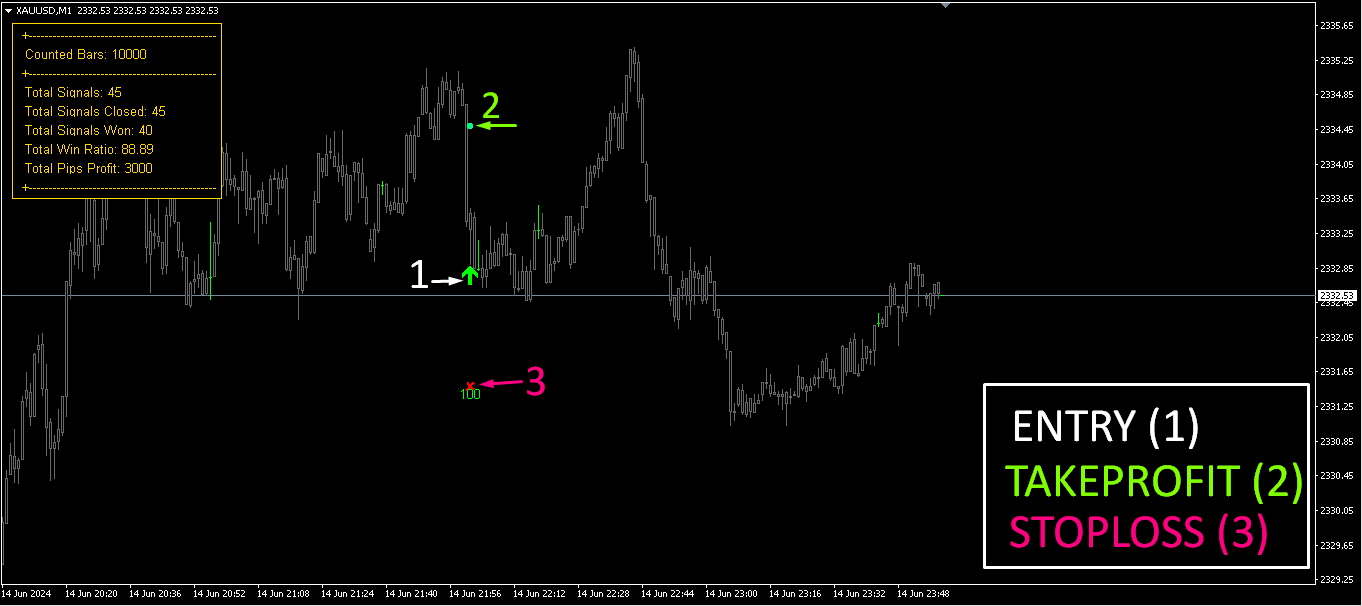
Each trade opportunity includes entry points, take profit (TP), and stop loss (SL) levels, making it easier for traders to set and manage their trades effectively.
The Download Package Includes:
+ Indicator: M1 Gold Indicator (.ex4 file) V1.0
+ How to Install files.pdf
+ Pairs and Timeframes.txt
More Information:
+ https://www.mql5.com/en/market/product/118727
Live Signal Performance:
+ N/A
 MT4Save 88%
What you receive
- M1 Gold Indicator.ex4Genuine, unmodified developer file for MetaTrader 4
- Setup guide.pdfA general guide to installing expert advisors.Official step-by-step install guide
Delivered instantly to your account after payment
Regular priceRegular price was $400.00
$49.95 with card
Visa, Mastercard, Apple Pay and Google Pay accepted.
Card payments add bank fees, sales taxes and other charges.
- Instant downloadYour file is provided immediately after payment. In very rare cases we manually review an order first, then send your download straight after. If you don’t receive your file, you can request a full refund.
- Free lifetime updatesAll updates are free. They’re provided on a best-availability basis: we get new versions as fast as we can, led by customer demand, but we don’t guarantee them immediately. If you need every update the moment it’s released, our service may not be the best fit for you.
- 7-day money-backRefunds only cover an EA that fails to attach to your chart because of errors we can replicate. We don’t cover changing your mind or not liking the EA. All brokers are different, and results are never promised because markets are constantly changing.
- Unlimited activationsUse it on as many MT4 accounts and computers as you want, live or demo. There are no restrictions on how you use it.
What you receive
- M1 Gold Indicator.ex4Genuine, unmodified developer file for MetaTrader 4
- Setup guide.pdfA general guide to installing expert advisors.Official step-by-step install guide
Delivered instantly to your account after payment


28,000+ tradersServed since 2019
Orders over $300 include 3 months of PrismAlgo freeThe highly recommended cloud-connected EA, on all 28 Forex pairs for one MT5 account. Added to your cart automatically. View PrismAlgo
Official versionsInstant downloadFree lifetime updatesExtra 20% off with cryptoReal people on support28,000+ tradersTrading since 2019Rated Excellent on Trustpilot
Product description
About M1 Gold Indicator MT4
M1 Gold Indicator for MT4: A High Win-Rate Strategy for XAUUSD Trading
Introduction
The M1 Gold Indicator is a sophisticated trading tool developed by Abdulkarim Karazon for MetaTrader 4 (MT4), specifically designed to generate high-quality trading signals for the XAUUSD (Gold) pair on the M1 (1-minute) timeframe. Built with precision and aiming for a remarkable win rate of over 88%, this indicator stands out as a reliable option for traders focusing on short-term gold trading. It uses a combination of entry signals, confirmations, and filtering mechanisms to provide traders with optimal buy and sell opportunities.
Designed primarily for Gold on M1, the indicator can also be adapted to other currency pairs and timeframes. However, the best results have been recorded on M1 Gold, with a risk-to-reward ratio (RRR) designed to maximize profitability without repainting signals.
How the M1 Gold Indicator Works: An Inside Look at the Strategy
The M1 Gold Indicator uses a multi-layered approach to analyze market movements and generate precise trading signals. The indicator works by assessing historical price data, analyzing market trends, and filtering potential noise to identify the most profitable moments to enter and exit trades. Each trade opportunity includes entry points, take profit (TP), and stop loss (SL) levels, making it easier for traders to set and manage their trades effectively.
Key Strategy Highlights:
- High Accuracy with Non-Repainting Signals: The indicator is engineered to provide signals that do not repaint. Once a signal is generated, it stays fixed, giving you confidence that the indicator’s signals are stable and accurate.
- Win Rate Over 88%: Through its meticulous filtering and signal confirmation, the indicator has demonstrated an 88%+ win rate in backtesting and live testing.
- Risk-to-Reward Ratio (RRR) Options: The indicator supports 1:1 and 2:1 RRR configurations, allowing traders to choose their preferred risk management strategy. This flexibility ensures that the strategy can be adapted to different trading styles and risk tolerances.
Trading Specifications: Pairs, Timeframe, and Settings
Recommended Pair and Timeframe
- Pair: XAUUSD (Gold) is the recommended pair due to its high liquidity and volatility on the M1 timeframe.
- Timeframe: M1 (1-minute chart) is where the indicator excels, capturing quick price movements and allowing for frequent trading opportunities.
Trading Parameters and Inputs
The M1 Gold Indicator comes with a variety of settings and parameters to ensure customization and optimization:
- ENTRY SIGNAL SETTINGS:
- HISTORY: (10,000) – The number of bars or candles to analyze in the chart’s history. This deep analysis ensures a robust understanding of past price behavior.
- Signal Period: (20) – The period used to determine the main entry signals.
- Filter: (40) – An additional filter setting to refine entry points and remove false signals.
- CONFIRMATION SIGNAL SETTINGS:
- Signal Period: (10) – A separate period setting used to confirm the main entry signal.
- Filter: (15) – Works alongside the entry signal filter to confirm that trade signals are reliable and aligned with the trend.
- TREND FILTER SETTINGS:
- TREND FILTER: (1,000) – A broader trend filter to ensure that trades align with the dominant trend. This helps avoid counter-trend trades that may have lower probabilities of success.
- GENERAL SETTINGS:
- TP in Points (Take Profit): (100) – The number of points for the take profit level. For example, 100 points means the trade will close when this level of profit is achieved.
- SL in Points (Stop Loss): (200) – The number of points for the stop loss level. This is a larger buffer to prevent premature trade closures while still managing risk.
- VISUAL & ALERT SETTINGS:
- Board Position & Style: The indicator’s visual panel can be placed in any corner of the chart, with customizable font size, color (Gold for visibility), and board background color (Black for contrast).
- Alerts Configuration: Allows for different types of alerts—pop-up messages, sounds, email notifications, and mobile push notifications—ensuring you never miss a trading signal.
Performance Insights: RRR and Signal Accuracy
1:1 Risk-to-Reward Ratio (RRR)
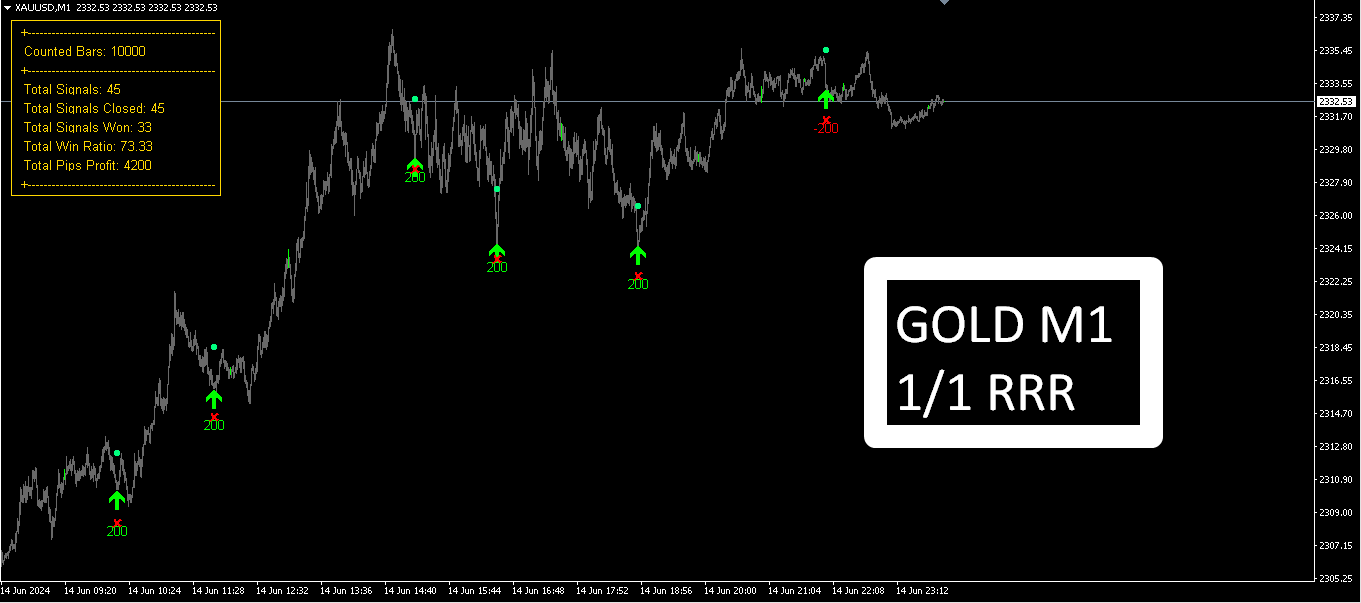
In the 1:1 RRR setting, the indicator aims to achieve an equal level of risk to reward. For example, if the stop loss is set at 200 points, the take profit will be set at 200 points. This balanced approach results in a high frequency of trades and has demonstrated:
- 45 Total Signals
- 33 Wins (73.33% Win Rate)
- Total Pips Profit: 4,200 Pips
2:1 Risk-to-Reward Ratio (RRR)
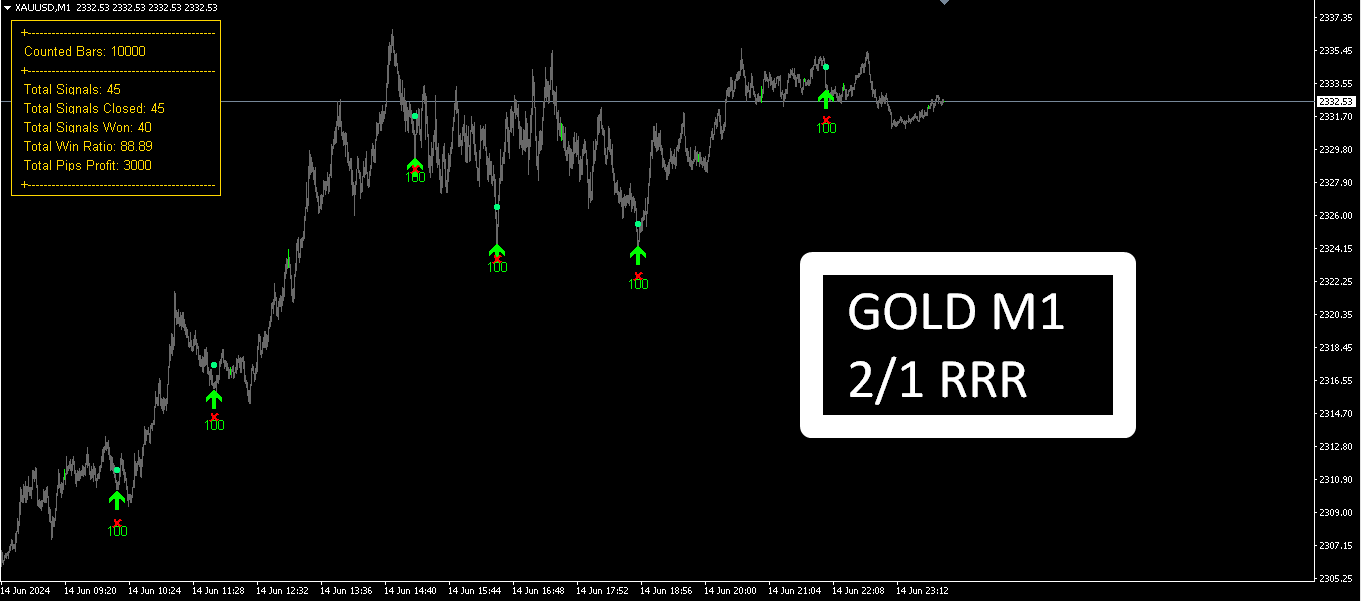
The 2:1 RRR configuration aims for a higher profit target relative to the risk, which means that for every unit of risk, the potential reward is double. This setting has shown:
- 45 Total Signals
- 40 Wins (88.89% Win Rate)
- Total Pips Profit: 3,000 Pips
The slight reduction in total pips is counterbalanced by the higher win rate and a better reward-to-risk profile, making this option preferable for traders seeking more consistency in their results.
Our Thoughts on M1 Gold Indicator
The M1 Gold Indicator is highly effective for scalpers and short-term traders who want to maximize their profitability on the Gold (XAUUSD) market. Its high win rate and the fact that it does not repaint make it a reliable indicator that provides a clear and robust trading framework. With its ability to be customized according to different RRR strategies and its clear visual interface, this indicator is suitable for both beginner and experienced traders.
We appreciate the detailed settings and options that allow traders to adjust the indicator to fit their unique trading style and market conditions. The indicator’s ability to provide precise entry points, coupled with configurable take profit and stop loss settings, make it an excellent addition to any trader’s toolkit.
User Reviews and Feedback
Alex T. (2024.06.15):
“I’ve been trading Gold for a while, and the M1 Gold Indicator is a game-changer. The signals are accurate, and I like that it doesn’t repaint. The high win rate is real—I’ve seen consistent results every day.”
Julia M. (2024.07.02):
“The indicator’s visual panel is a great addition. It’s easy to track how many signals have been won, and the take profit and stop loss levels are well-calculated. It’s a great tool for M1 scalping.”
Marcus H. (2024.07.10):
“I was skeptical about using any indicator on M1 because of the noise, but the M1 Gold Indicator filters out the noise effectively. The signals have been profitable, and I can confirm the win rate is solid.”
Conclusion: M1 Gold Indicator – Your Key to High Win-Rate Gold Trading
The M1 Gold Indicator for MT4 is a top-tier tool for traders who focus on scalping Gold (XAUUSD) on the 1-minute chart. With its adaptive signal confirmation, trend filtering, and high win rate, this indicator stands out as one of the best options for those who want to trade profitably and efficiently. Its flexibility in RRR settings and non-repainting signals ensure that you receive accurate and reliable trade setups.
If you’re looking to take your Gold trading to the next level, the M1 Gold Indicator is now available on CheaperForex.com. With its clear signals, high win rate, and easy-to-use interface, it’s time to add this winning tool to your trading arsenal and maximize your profits.
Key Takeaways
- Over 88% win rate for trading Gold on the M1 timeframe.
- Non-repainting signals for accurate, reliable entries.
- Customizable settings for RRR and signal filters.
- Clear visual panel to track performance, signals, and results.
- Adaptable to other pairs and timeframes for those willing to explore.
Take advantage of the M1 Gold Indicator today and transform your Gold trading strategy with confidence and precision!
Every order
What’s included with M1 Gold Indicator
- Instant downloadReady after checkout and kept in your account
- Free lifetime updatesAdded as soon as we receive them, every version kept in your account
- Unlimited activationsUnlimited live and demo accounts
- Setup helpReal people on Telegram or email
- 7-day money-back guaranteeIf the EA fails to attach to your chart because of errors we can replicate, you get a full refund.
- Excellent on Trustpilot 4.6 out of 5 from 120 reviews (opens in a new tab)
- 28,000+ traders since 2019
- 1,560+ official EAs
- Card or crypto payments
Related EAs
Traders also explore
Premium expert advisors at vault-low prices, with your crypto price on every card.
 MT4Save 89%
 MT4Save 90%
 Save 80%
 MT5Save 51%
Ready when you are
M1 Gold Indicator MT4 for $39.96 with crypto
Regular price was $400.00 · $49.95 with card · instant download · free lifetime updates

M1 Gold Indicator MT4$39.96with crypto$49.95 with card