
Official MT4 version · AI EA
Opal EA MT4
We’re rated Excellent on Trustpilot · 4.6/5 (opens in a new tab)Opal EA for MT4 is an AI-driven EURUSD H1 robot with round-level detection, two-step trailing stop, news/time filters, and robust money management.
Low–mid risk defaults. ECN/RAW + VPS recommended.
The Download Package Includes:
+ Opal EA (.ex4) – V1.0
+ Pairs/Timeframes.txt
+ How to Install MT4 files.pdf
More Information:
+ https://www.mql5.com/en/market/product/106596
Live Performance Signal:
+ https://www.mql5.com/en/signals/2116681
 MT4Save 90%
What you receive
- Opal.ex4Genuine, unmodified developer file for MetaTrader 4
- Setup guide.pdfA general guide to installing expert advisors.Official step-by-step install guide
Delivered instantly to your account after payment
Regular priceRegular price was $480.00
$49.95 with card
Visa, Mastercard, Apple Pay and Google Pay accepted.
Card payments add bank fees, sales taxes and other charges.
- Instant downloadYour file is provided immediately after payment. In very rare cases we manually review an order first, then send your download straight after. If you don’t receive your file, you can request a full refund.
- Free lifetime updatesAll updates are free. They’re provided on a best-availability basis: we get new versions as fast as we can, led by customer demand, but we don’t guarantee them immediately. If you need every update the moment it’s released, our service may not be the best fit for you.
- 7-day money-backRefunds only cover an EA that fails to attach to your chart because of errors we can replicate. We don’t cover changing your mind or not liking the EA. All brokers are different, and results are never promised because markets are constantly changing.
- Unlimited activationsUse it on as many MT4 accounts and computers as you want, live or demo. There are no restrictions on how you use it.
What you receive
- Opal.ex4Genuine, unmodified developer file for MetaTrader 4
- Setup guide.pdfA general guide to installing expert advisors.Official step-by-step install guide
Delivered instantly to your account after payment


28,000+ tradersServed since 2019
Orders over $300 include 3 months of PrismAlgo freeThe highly recommended cloud-connected EA, on all 28 Forex pairs for one MT5 account. Added to your cart automatically. View PrismAlgo
Official versionsInstant downloadFree lifetime updatesExtra 20% off with cryptoReal people on support28,000+ tradersTrading since 2019Rated Excellent on Trustpilot
Product description
About Opal EA MT4
Quick Summary: Opal EA for MT4 by Oeyvind Borgsoe is a fully automated EURUSD H1 system that blends AI-driven logic, psychological round-level detection, strict money management, a two-step trailing stop, news/time filters, and an optional recovery layer. Default risk: low–mid. ECN/RAW + VPS recommended.
Introduction
Opal focuses on disciplined execution, capital protection, and adaptability. It uses AI calculations to score setups, aligns entries around round numbers where orders often cluster, and manages exits with a two-stage trailing engine. Filters for session time and news reduce low-quality trades.
Key Features at a Glance
| Feature | Details |
|---|---|
| Money Management | Risk-based sizing, equity guards, and optional recovery module. |
| Round-Level Logic | Detects psychological prices; adapts entries/exits near whole numbers. |
| Two-Step Trailing Stop | Stage 1 lock-in, Stage 2 follow-through for trend persistence. |
| Filters | Time filter and news protection to avoid adverse windows. |
| AI Scoring | Combines technical structure with model-based probabilities. |
| User Experience | Clean panel, presets, and simple parameter groups. |
How Opal Trades
Opal evaluates market structure and volatility, then checks proximity to psychological levels where liquidity concentrates. Entries are confirmed by AI score and filter state. After entry, the two-step trailing secures break-even then follows momentum, while money-management caps exposure.
Specifications & Requirements
- Platform: MT4.
- Symbol: EURUSD.
- Timeframe: H1.
- Minimum Deposit: ≈ $100.
- Account: ECN/RAW spreads + reliable VPS.
- Default Risk: low–mid.
Settings Overview
- Lot Sizing: fixed or risk-percent; equity-based guards.
- Recovery: optional controlled recovery profile (off by default for caution).
- Trailing Engine: step-1 lock, step-2 dynamic trail.
- Round-Level Params: sensitivity near whole numbers.
- News Filter: pause before/after high-impact events; minutes configurable.
- Time Filter: trading sessions by day/hour.
- Panel/ID: magic number, comment, and UI options.
📈 Proof of Results
Developer-supplied materials. Independent verification advised. Backtests illustrate behavior; live results vary.
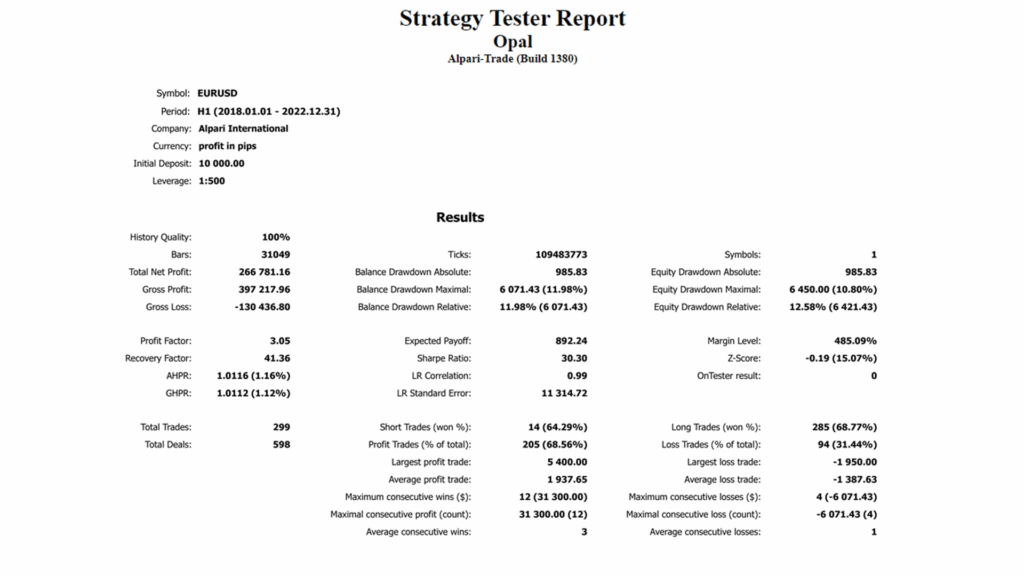
- Backtest Report (EURUSD H1, 2018–2022) — Profit Factor 3.05, Recovery 41.36, Sharpe 30.30, Total Trades 299, Balance DD rel ≈12%, Equity DD max ≈10.8%.
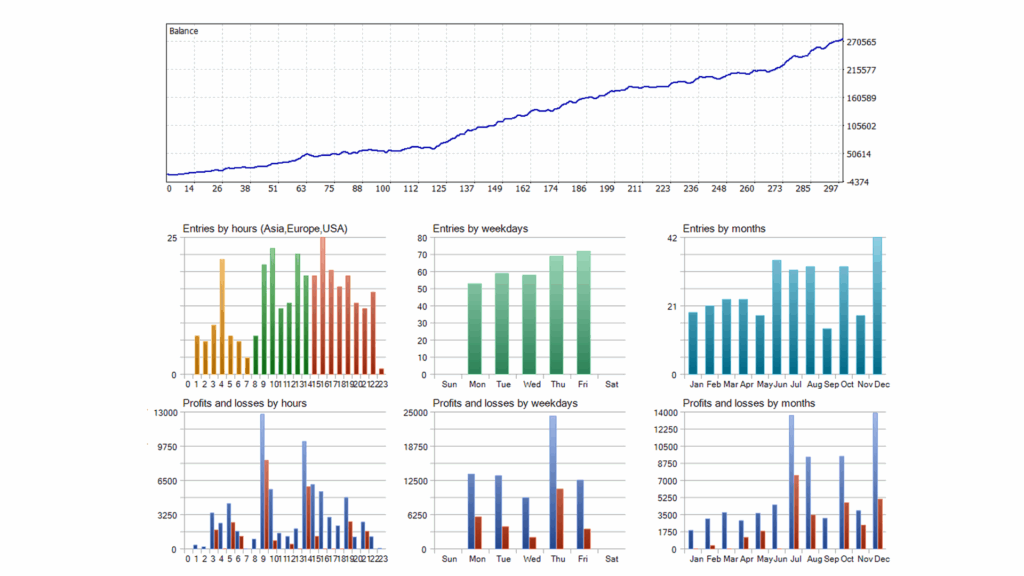
- Backtest Distributions — smooth balance curve and entries/profit by hour/day/month visuals.
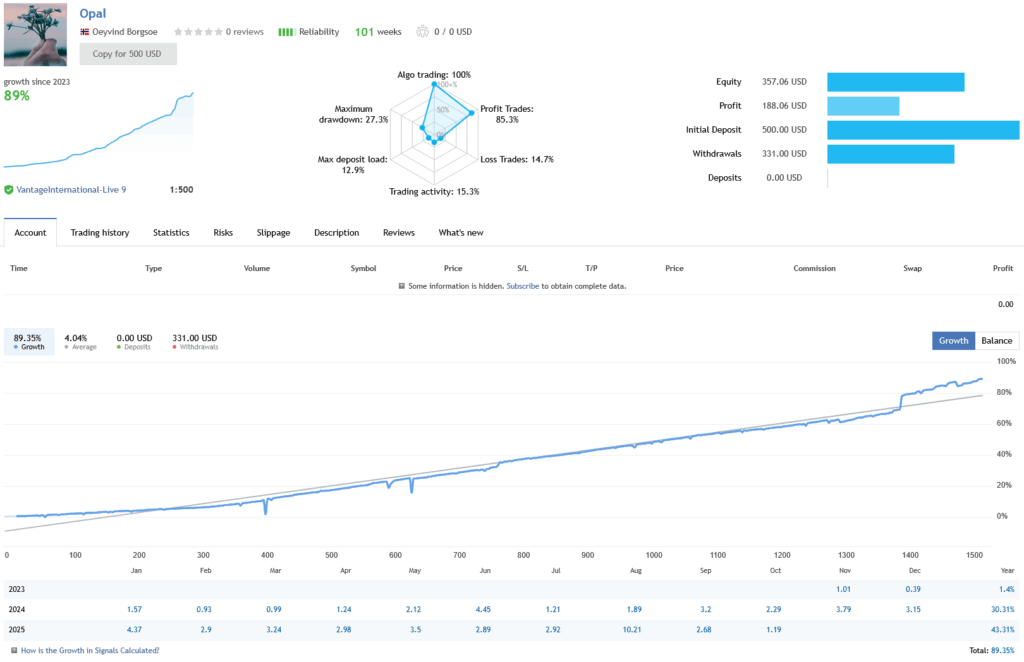
- Live Signal Snapshot — Growth since 2023 ≈89%, Max DD ≈27.3%, Profit trades ≈85.3%, Trading activity ≈15.3%, leverage 1:500.
⚙️ Deployment Guidelines
- Use ECN/RAW account and a Windows VPS for uptime.
- Attach Opal to EURUSD H1. Start with default low–mid risk.
- Enable news and time filters to match your broker session.
- Scale lot size only after a period of forward validation.
📦 What You Get
- MT4 EA: Opal for EURUSD H1.
- Preset(s): conservative default plus recovery profile.
- User Guide
- Updates & support
FAQs
Does Opal use martingale or grid?
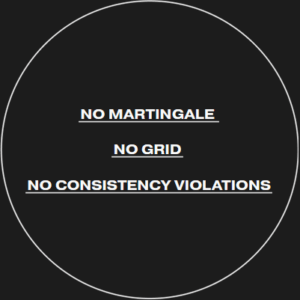
No. Sizing is fixed or risk-percent with equity guards. An optional recovery profile exists but is not martingale and is off by default.
Why round-level logic?
Orders cluster at whole numbers. Opal adapts entries/exits around these psychological prices.
Minimum deposit and leverage?
From about $100 on ECN/RAW. Use broker leverage per your policy; risk-percent controls exposure.
Do I need a VPS?
Yes. Uptime and stable latency improve execution.
Backtest vs live?
Backtests are favorable and informational. Expect live variation due to spread, slippage, and news conditions.
Reviews
- Daniel K. (live user): “Install took minutes. Round-number behavior is noticeable—fewer whipsaws around 1.0800/1.0900. Trailing logic is clean.”
- María S. (prop eval): “Passed phase 1 using low-mid risk. The news filter kept me out of messy CPI prints.”
- Igor P. (forward test): “Three weeks on ECN with VPS. Equity curve steady, no runaway exposure. Recovery profile stayed off as advised.”
Conclusion
Opal EA for MT4 offers a pragmatic EURUSD H1 approach: AI scoring, round-level awareness, and strict risk engineering. Run it on ECN/RAW with a VPS, validate forward, and scale deliberately.
Risk Disclaimer
Trading involves risk. Developer materials are informative, not guarantees. Results vary by broker, liquidity, and settings. Test on demo before going live.
Every order
What’s included with Opal
- Instant downloadReady after checkout and kept in your account
- Free lifetime updatesAdded as soon as we receive them, every version kept in your account
- Unlimited activationsUnlimited live and demo accounts
- Setup helpReal people on Telegram or email
- 7-day money-back guaranteeIf the EA fails to attach to your chart because of errors we can replicate, you get a full refund.
- Excellent on Trustpilot 4.6 out of 5 from 120 reviews (opens in a new tab)
- 28,000+ traders since 2019
- 1,560+ official EAs
- Card or crypto payments
Related EAs
Traders also explore
Premium expert advisors at vault-low prices, with your crypto price on every card.
 MT4Save 96%
 MT4Save 96%
 MT4Save 95%
 MT5Save 50%
Ready when you are
Opal EA MT4 for $39.96 with crypto
Regular price was $480.00 · $49.95 with card · instant download · free lifetime updates

Opal EA MT4$39.96with crypto$49.95 with card