
PipFinite Breakout EDGE Indicator MT4
Version: 6.0
Guaranteed genuine. No cracks, fakes or AI recreations. See why
Why we only sell the original
- Fakes are everywhere right now. AI recreations and cracked copies sell for $10 to $20 on other websites and channels. They are not the real EA.
- A fake doesn’t trade like the original. AI recreations only copy how an EA looks from the outside, so they can trade very differently.
- Cracks can hide malware that reaches your computer and your trading account.
- The real thing, with real support. The developer’s own, unmodified file, free updates, a setup guide, and real people on Telegram if you get stuck.
A $10 fake is your call. But with real money on the line, is it worth the risk? We only sell originals, at the lowest genuine price.
Free lifetime updates. You never pay twice.
The PipFinite Breakout EDGE Indicator for MT4 simplifies breakout trading with automated signals, entry/exit levels, and success rate statistics.
Its proven algorithm works across all timeframes and financial instruments, helping traders catch high-probability breakouts with ease. Ideal for traders seeking precision and reliability!
The Download Package Includes:
+ Indicator: PipFinite Breakout EDGE (.ex4 file) V6.0
+ How to Install files.pdf
+ Pairs and Timeframes.txt
More Information:
+ https://www.mql5.com/en/market/product/33638
Live Signal Performance:
+ N/A
 Save 80%
What you receive
- PipFinite Breakout EDGE Indicator.ex4Genuine, unmodified developer file for MetaTrader 4Version 6.0
- Setup guide.pdfA general guide to installing expert advisors.Official step-by-step install guide
Delivered instantly to your account after payment
Free lifetime updates included
100% original. Never a crack, fake or AI recreation.
Regular priceRegular price was $98.00
$19.95 with card
Visa, Mastercard, Apple Pay and Google Pay accepted.
Card payments add bank fees, sales taxes and other charges.




 Apple Pay and Google Pay ready at checkout
- Official developer build · Version 6.0
- Instant downloadYour file is provided immediately after payment. In very rare cases we manually review an order first, then send your download straight after. If you don’t receive your file, you can request a full refund.
- Free lifetime updatesAll updates are free. They’re provided on a best-availability basis: we get new versions as fast as we can, led by customer demand, but we don’t guarantee them immediately. If you need every update the moment it’s released, our service may not be the best fit for you.
- 7-day money-backRefunds only cover an EA that fails to attach to your chart because of errors we can replicate. We don’t cover changing your mind or not liking the EA. All brokers are different, and results are never promised because markets are constantly changing.
- Unlimited activationsUse it on as many MetaTrader accounts and computers as you want, live or demo. There are no restrictions on how you use it.
What you receive
- PipFinite Breakout EDGE Indicator.ex4Genuine, unmodified developer file for MetaTrader 4Version 6.0
- Setup guide.pdfA general guide to installing expert advisors.Official step-by-step install guide
Delivered instantly to your account after payment
Free lifetime updates included
100% original. Never a crack, fake or AI recreation.


28,000+ tradersServed since 2019
Don’t miss thisSee the EA we recommend
The Forex EA we trade ourselves
PrismAlgo for Forex


We have tested thousands of EAs. PrismAlgo is the one we use and recommend for Forex, and we rarely say that. We’re also an official reseller.
Real USD MyFXBook account. A live cloud, constantly evolving strategy.
See PrismAlgoOfficial versionsInstant downloadFree lifetime updatesExtra 20% off with cryptoReal people on support28,000+ tradersTrading since 2019Rated Excellent on Trustpilot
Product description
About PipFinite Breakout EDGE Indicator MT4
PipFinite Breakout EDGE Indicator for MT4 by Karlo Wilson Vendiola
Introduction to PipFinite Breakout EDGE
The PipFinite Breakout EDGE Indicator is the ultimate tool to master breakout trading with ease. It combines a robust price-action-based algorithm with an intuitive design, providing traders with a step-by-step system to identify and execute the most powerful breakout trades. Whether you’re trading forex, cryptocurrencies, metals, or indices, this indicator offers precise signals and detailed statistics, ensuring confidence in every trade.
With automatic entry, exit, stop-loss, and take-profit levels, PipFinite Breakout EDGE takes the complexity out of trading and helps traders make informed decisions in any market condition. Never repainting, backpainting, or recalculating, it delivers reliable signals strictly at the close of the bar.
Key Features
- Powerful Price Action Algorithm:
- Proven to work in any market condition and across all financial instruments.
- Auto-Generated Trade Levels:
- Entry, exit, stop loss, and take profit levels are automatically calculated and displayed.
- Accurate Statistics:
- Calculates the success rate and win/loss conditions for each signal to guide trading decisions.
- Multi-Asset Compatibility:
- Works with forex, cryptocurrencies, metals, stocks, and indices.
- Never Repaints or Recalculates:
- Ensures all signals are reliable and based on confirmed data.
- Customizable Alerts:
- Get notified via pop-up, email, push notifications, or sound alerts.
- Timeframe Agnostic:
- Works on any timeframe, from M1 to D1.
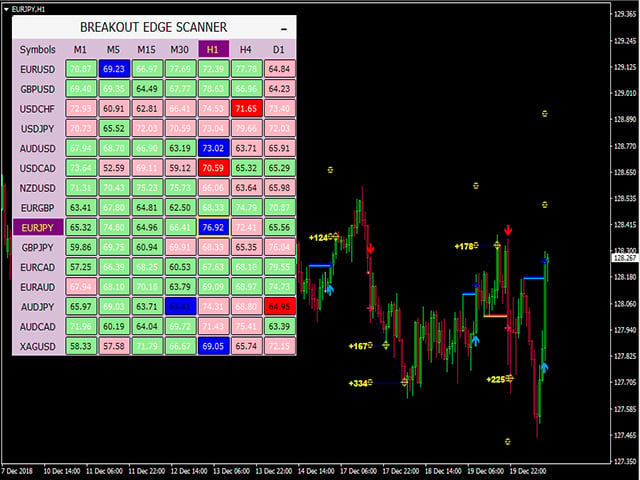
- Integrated Dashboard:
- Displays success rates, win/loss statistics, and other essential data for better pair and timeframe selection.
How to Trade with PipFinite Breakout EDGE
Execute trades in 3 simple steps:
- Ideal Trade Setup:
- Enter trades only when the success rate is ≥66%.
- Use the dashboard to identify the best-performing pairs and timeframes.
- Set Stop Loss:
- Option 1: Recent Swing—Stop loss is based on the most recent swing highs and lows.
- Option 2: Opposite Signal—Exit trades when an opposite signal is generated.
- Set Take Profit:
- Option 1: Close trades at TP1 for secure profits.
- Option 2: Take partial profits at TP1 and close remaining positions at TP2.
- Option 3: Maximize breakout trades by exiting on an opposite signal.
Win/Loss Conditions and Statistics
- Win Condition:
- TP1 or TP2 hit.
- Positive profit when exiting on an opposite signal.
- Loss Condition:
- Stop-loss hit.
- Negative profit when exiting on an opposite signal.
The indicator calculates the success rate (percentage of winning signals), helping traders filter and optimize their trades for better performance.
Parameters
- Period: Adjusts the number of bars used in the algorithm.
- Range Filter: Filters ranging markets for better signal quality.
- Stop Loss Mode: Select either Recent Swing or Opposite Signal.
- Target Factor: Multiplier for calculating take profit levels.
- Display Parameters: Customize the appearance of chart objects.
- Dashboard Parameters: Toggle visibility and colors of on-screen statistics.
- Alert Parameters: Enable alerts for trade opportunities.
Reviews from Users
⭐️⭐️⭐️⭐️⭐️
Katharine Jones
“Great indicator, I love it!”
⭐️⭐️⭐️⭐️⭐️
jmfamily1721
“Great tool.”
⭐️⭐️⭐️⭐️⭐️
Hanin1945
“Awesome.”
⭐️⭐️⭐️⭐️⭐️
Trinh Thai Ninh
“Very nice indicator, thanks.”
Observations from the Chart
The PipFinite Breakout EDGE Indicator provides clear visual signals on the chart:
- Entry and Exit Points:
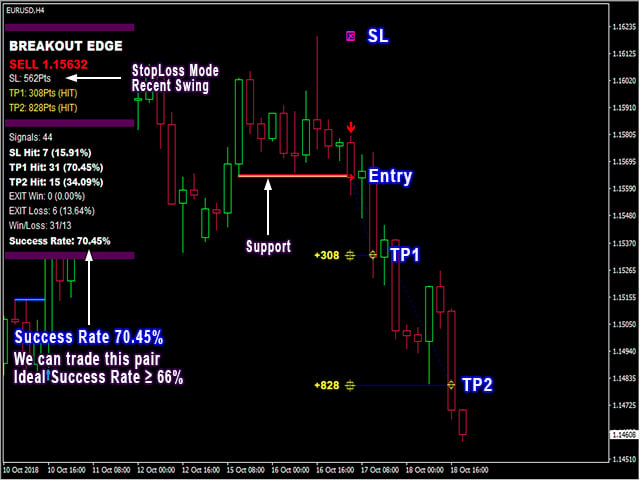
- Entry points are marked with arrows, while stop loss (SL) and take profit (TP1 and TP2) levels are clearly drawn.
- Dashboard Insights:
- The integrated dashboard displays success rates for various pairs and timeframes, helping traders focus on the most profitable setups.
- Trend Confirmation:
- Visual cues such as support and resistance levels ensure trades align with market trends.
The indicator’s design simplifies breakout trading while maintaining precision and reliability, as shown in the provided images.
Conclusion
The PipFinite Breakout EDGE Indicator is a professional-grade tool for traders seeking to capitalize on breakout opportunities with precision and confidence. Its automated features, statistical insights, and visual clarity make it an invaluable resource for both novice and experienced traders. With a proven algorithm and extensive customization options, PipFinite Breakout EDGE ensures that you’ll never miss a high-probability breakout again.
Take your breakout trading to the next level with PipFinite Breakout EDGE—where precision meets simplicity.
Every order
What’s included with PipFinite Breakout EDGE Indicator
- Instant downloadReady after checkout and kept in your account
- Free lifetime updatesAdded as soon as we receive them, every version kept in your account
- Unlimited activationsUnlimited live and demo accounts
- Setup helpReal people on Telegram or email
Customer reviews
Reviews of PipFinite Breakout EDGE Indicator MT4
You must be logged in to post a review.
- Excellent on Trustpilot 4.6 out of 5 from 120 reviews (opens in a new tab)
- 28,000+ traders since 2019
- 1,580+ official EAs
- Card or crypto payments
Related EAs
Traders also explore
Premium expert advisors at vault-low prices, with your crypto price on every card.
 MT4Save 80%
 Save 90%
 MT4Save 80%
 MT4Save 88%
Ready when you are
PipFinite Breakout EDGE Indicator MT4 for $15.96 with crypto
Regular price was $98.00 · $19.95 with card · instant download · free lifetime updates
PipFinite Breakout EDGE Indicator MT4$15.96with crypto$19.95 with card
There are no reviews yet.