
TWK Auto Support & Resistance Indicator MT4
Guaranteed genuine. No cracks, fakes or AI recreations. See why
Why we only sell the original
- Fakes are everywhere right now. AI recreations and cracked copies sell for $10 to $20 on other websites and channels. They are not the real EA.
- A fake doesn’t trade like the original. AI recreations only copy how an EA looks from the outside, so they can trade very differently.
- Cracks can hide malware that reaches your computer and your trading account.
- The real thing, with real support. The developer’s own, unmodified file, free updates, a setup guide, and real people on Telegram if you get stuck.
A $10 fake is your call. But with real money on the line, is it worth the risk? We only sell originals, at the lowest genuine price.
Free lifetime updates. You never pay twice.
The TWK Auto Support & Resistance Indicator is built around a proven trading strategy that focuses on identifying key support and resistance levels based on the most recent price action. These levels are crucial in trading as they often serve as barriers where the price tends to reverse or consolidate, providing traders with optimal entry and exit points.
This Package Contains an Instant Download of:
+ Indicator: TWK Auto Support & Resistance (.ex4) V2.0 – Works on ALL MT4 Builds
+ Template
+ Setup Video
+ How to Install MT4 files.pdf
More Information:
+ https://simpletradingsolutions.com/indicators/twk-auto-support-resistance-indicator/
Live Performance Signal:
+ N/A
 Save 90%
What you receive
- TWK Auto Support & Resistance Indicator.ex4Genuine, unmodified developer file for MetaTrader 4
- Setup guide.pdfA general guide to installing expert advisors.Official step-by-step install guide
Delivered instantly to your account after payment
Free lifetime updates included
100% original. Never a crack, fake or AI recreation.
Regular priceRegular price was $200.00
$19.95 with card
Visa, Mastercard, Apple Pay and Google Pay accepted.
Card payments add bank fees, sales taxes and other charges.




 Apple Pay and Google Pay ready at checkout
- Instant downloadYour file is provided immediately after payment. In very rare cases we manually review an order first, then send your download straight after. If you don’t receive your file, you can request a full refund.
- Free lifetime updatesAll updates are free. They’re provided on a best-availability basis: we get new versions as fast as we can, led by customer demand, but we don’t guarantee them immediately. If you need every update the moment it’s released, our service may not be the best fit for you.
- 7-day money-backRefunds only cover an EA that fails to attach to your chart because of errors we can replicate. We don’t cover changing your mind or not liking the EA. All brokers are different, and results are never promised because markets are constantly changing.
- Unlimited activationsUse it on as many MetaTrader accounts and computers as you want, live or demo. There are no restrictions on how you use it.
What you receive
- TWK Auto Support & Resistance Indicator.ex4Genuine, unmodified developer file for MetaTrader 4
- Setup guide.pdfA general guide to installing expert advisors.Official step-by-step install guide
Delivered instantly to your account after payment
Free lifetime updates included
100% original. Never a crack, fake or AI recreation.


28,000+ tradersServed since 2019
Don’t miss thisSee the EA we recommend
The Forex EA we trade ourselves
PrismAlgo for Forex


We have tested thousands of EAs. PrismAlgo is the one we use and recommend for Forex, and we rarely say that. We’re also an official reseller.
Real USD MyFXBook account. A live cloud, constantly evolving strategy.
See PrismAlgoOfficial versionsInstant downloadFree lifetime updatesExtra 20% off with cryptoReal people on support28,000+ tradersTrading since 2019Rated Excellent on Trustpilot
Product description
About TWK Auto Support & Resistance Indicator MT4
TWK Auto Support & Resistance Indicator for MT4: Master the Markets with Precision
Introduction
Introducing the TWK Auto Support & Resistance Indicator for MT4, a powerful tool designed to enhance your trading experience by automatically identifying and plotting key support and resistance levels on your charts. This innovative indicator simplifies trading by highlighting the most recent swing points, making it easier for traders to capitalize on price movements and make informed trading decisions. Available now on CheaperForex.com, this indicator is perfect for both beginners and experienced traders seeking to improve their market analysis.
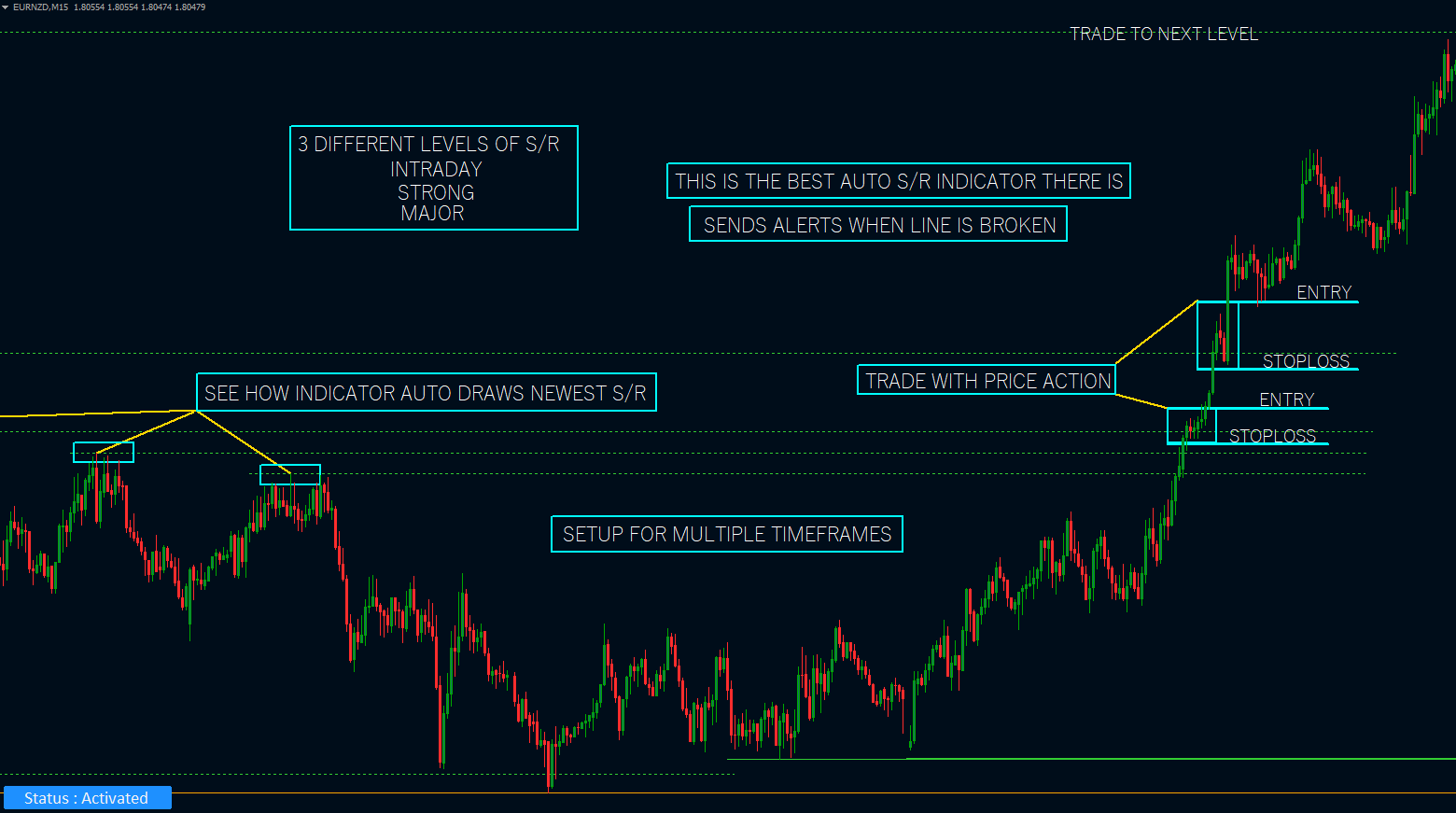
Detailed Description of the Product and Strategy
The TWK Auto Support & Resistance Indicator is built around a proven trading strategy that focuses on identifying key support and resistance levels based on the most recent price action. These levels are crucial in trading as they often serve as barriers where the price tends to reverse or consolidate, providing traders with optimal entry and exit points.
How the Strategy Works
- Automatic Level Detection: The indicator automatically draws the best and most recent swing points on any currency pair. It works seamlessly on all timeframes, ensuring that traders are always aware of the current market conditions.
- Non-Repainting Levels: One of the standout features of this indicator is its non-repainting nature. It updates only when new support and resistance levels appear, ensuring that you are always trading the most recent price action without any misleading signals.
- Price Action Analysis: The indicator uses recent price action points to determine key levels. By combining these points from higher timeframes, it allows traders to enter trades with small setups, offering huge risk-to-reward opportunities.
- Visual Clarity: The indicator differentiates between minor and major levels using different colors. Minor lines (purple) provide great intraday opportunities, while major lines (orange and red) are ideal for reversal trading or swing trades.
- Alerts and Notifications: To keep traders informed, the indicator sends alerts when the price reaches the identified support and resistance levels. This feature ensures that traders never miss a potential trading opportunity.
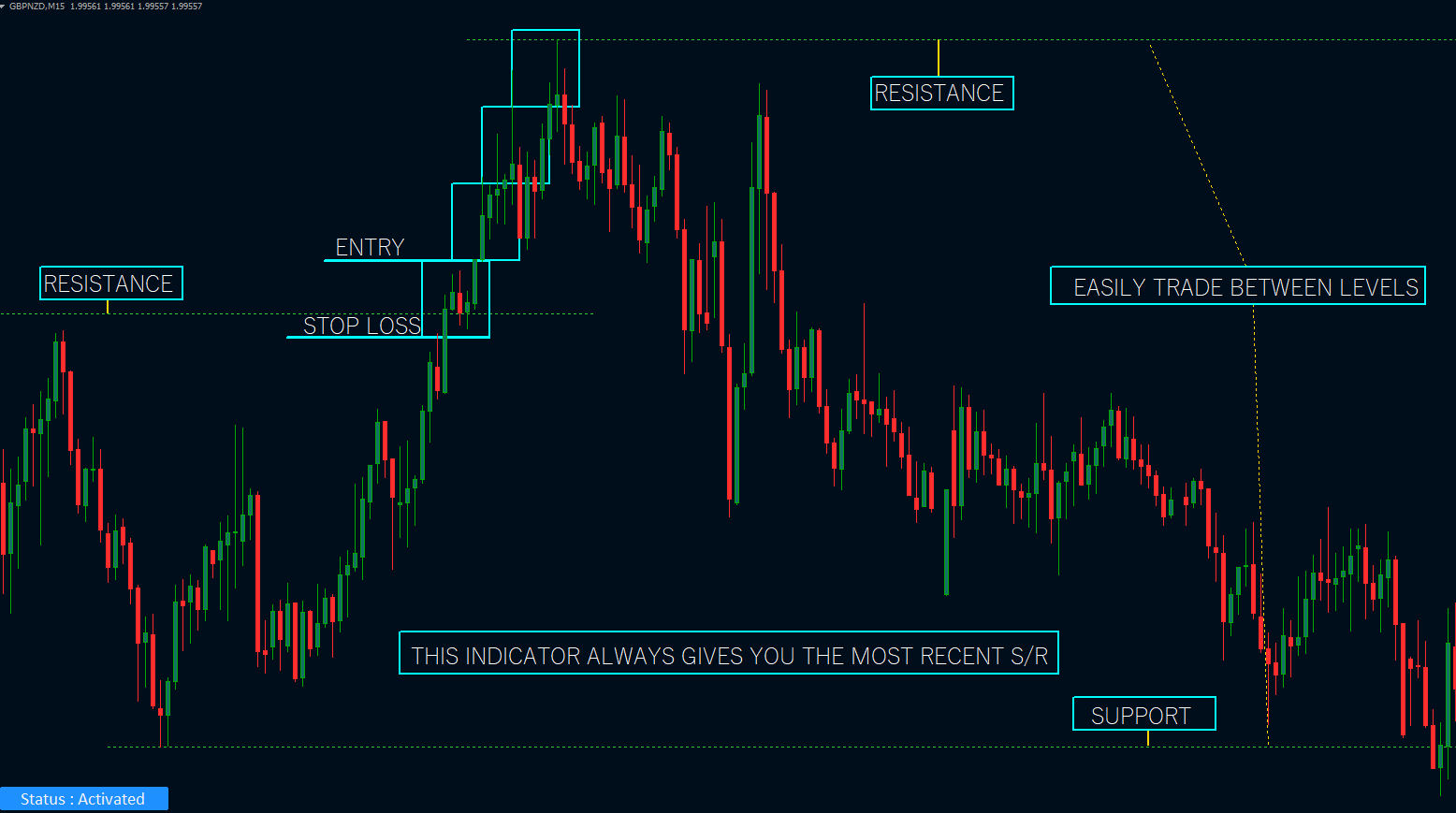
Trading Specifications: Recommended Pair, Timeframe, and Minimum Balance
Recommended Pair: The TWK Auto Support & Resistance Indicator is versatile and can be used on any currency pair. This flexibility allows traders to apply it to their preferred trading instruments, whether they are major, minor, or exotic pairs.
Timeframe: This indicator is effective on all timeframes. Whether you are a scalper focusing on minute charts or a swing trader analyzing daily charts, the TWK Auto Support & Resistance Indicator provides valuable insights across different trading styles.
Minimum Balance: There is no specific minimum balance required to use this indicator. However, it is advisable to start with an account size that allows for proper risk management and trading flexibility, typically around $500.
Key Features and Functionalities
- Automatic Levels: The indicator automatically updates as new price levels appear, ensuring that traders are always working with the most recent price action. This feature keeps your charts clear and focused on current market conditions.
- Ease of Use: Designed with simplicity in mind, this indicator is perfect for beginners. Its straightforward design helps keep charts uncluttered while providing optimum trade levels, making it easy for traders to follow and execute their trading plans.
- Proven Trade Plan: The strategy used with this indicator is incredibly easy to follow. Even traders without prior price action training have found success using this tool, thanks to its clear signals and reliable performance.
- Comprehensive Alerts: The indicator provides alerts when price levels are reached, allowing traders to stay on top of the market without constantly monitoring their charts.
- Full Setup Support: The download package from CheaperForex.com includes a comprehensive setup video. This ensures that traders can get started quickly and with full confidence, understanding how to utilize the indicator effectively.
Our Thoughts About It
At CheaperForex.com, we believe the TWK Auto Support & Resistance Indicator is a game-changer for traders looking to enhance their market analysis and trading performance. Its automatic level detection and non-repainting feature ensure that traders are always working with the freshest data, reducing the likelihood of errors and increasing trading accuracy.
The ease of use and visual clarity make it an excellent choice for both novice and seasoned traders. By highlighting key support and resistance levels, the indicator provides clear entry and exit points, improving overall trading efficiency.
Moreover, the inclusion of alerts ensures that traders do not miss out on important trading opportunities, while the setup video makes the installation and utilization of the indicator straightforward and hassle-free.
Conclusion
The TWK Auto Support & Resistance Indicator for MT4 is an indispensable tool for traders aiming to master the markets with precision. Its ability to automatically detect and plot key support and resistance levels, combined with its user-friendly design and reliable alerts, makes it a must-have for any trading arsenal.
Available now on CheaperForex.com, this indicator empowers traders to make informed decisions, capitalize on price movements, and achieve consistent profitability. Enhance your trading strategy with the TWK Auto Support & Resistance Indicator and experience the difference in your trading performance. Start today and unlock the potential for greater trading success.
Every order
What’s included with TWK Auto Support
- Instant downloadReady after checkout and kept in your account
- Free lifetime updatesAdded as soon as we receive them, every version kept in your account
- Unlimited activationsUnlimited live and demo accounts
- Setup helpReal people on Telegram or email
Customer reviews
Reviews of TWK Auto Support & Resistance Indicator MT4
You must be logged in to post a review.
- Excellent on Trustpilot 4.6 out of 5 from 120 reviews (opens in a new tab)
- 28,000+ traders since 2019
- 1,580+ official EAs
- Card or crypto payments
Related EAs
Traders also explore
Premium expert advisors at vault-low prices, with your crypto price on every card.
 MT4Save 80%
 MT4Save 80%
 Save 80%
 MT5Save 51%
Ready when you are
TWK Auto Support & Resistance Indicator MT4 for $15.96 with crypto
Regular price was $200.00 · $19.95 with card · instant download · free lifetime updates

TWK Auto Support & Resistance Indicator MT4$15.96with crypto$19.95 with card
There are no reviews yet.