
Official MT4 version · Gold EA
Quantum Matrix AI EA MT4
Version 4.0
We’re rated Excellent on Trustpilot · 4.6/5 (opens in a new tab)It uses matrix-layered grid groups with mirror-balancing logic across forex, gold, indices, and cryptocurrencies — featuring daily profit targets, Fibonacci-based spacing, and intelligent basket management.
- ✅ Multi-pair compatible — forex, gold, indices, crypto
- ✅ Matrix group engine with individual TP logic per group
- ✅ Mirror-balancing for buy/sell exposure management
- ✅ Daily profit targets with automatic reset
- ✅ Professional on-chart control panel
Structured grid trading with daily compounding targets.
 MT4Save 69%
What you receive
- Quantum Matrix AI.ex4Genuine, unmodified developer file for MetaTrader 4Version 4.0
- Setup guide.pdfA general guide to installing expert advisors.Official step-by-step install guide
Delivered instantly to your account after payment
Regular priceRegular price was $799.00
$249.95 with card
Visa, Mastercard, Apple Pay and Google Pay accepted.
Card payments add bank fees, sales taxes and other charges.
- Official developer build · Version 4.0
- Instant downloadYour file is provided immediately after payment. In very rare cases we manually review an order first, then send your download straight after. If you don’t receive your file, you can request a full refund.
- Free lifetime updatesAll updates are free. They’re provided on a best-availability basis: we get new versions as fast as we can, led by customer demand, but we don’t guarantee them immediately. If you need every update the moment it’s released, our service may not be the best fit for you.
- 7-day money-backRefunds only cover an EA that fails to attach to your chart because of errors we can replicate. We don’t cover changing your mind or not liking the EA. All brokers are different, and results are never promised because markets are constantly changing.
- Unlimited activationsUse it on as many MT4 accounts and computers as you want, live or demo. There are no restrictions on how you use it.
What you receive
- Quantum Matrix AI.ex4Genuine, unmodified developer file for MetaTrader 4Version 4.0
- Setup guide.pdfA general guide to installing expert advisors.Official step-by-step install guide
Delivered instantly to your account after payment


28,000+ tradersServed since 2019
Orders over $300 include 3 months of PrismAlgo freeThe highly recommended cloud-connected EA, on all 28 Forex pairs for one MT5 account. Added to your cart automatically. View PrismAlgo
Official versionsInstant downloadFree lifetime updatesExtra 20% off with cryptoReal people on support28,000+ tradersTrading since 2019Rated Excellent on Trustpilot
Product description
About Quantum Matrix AI EA MT4
Quick Summary:
Quantum Matrix AI EA for MT4 is a multi-pair adaptive grid system developed by Hassane Zibara.
Unlike single-instrument EAs, Quantum Matrix AI is designed to operate across forex pairs, gold, indices, and cryptocurrencies using a matrix-layered grid approach with Fibonacci-based spacing, mirror-balancing logic, and daily profit targets.
The system uses Matrix Groups — controlled grid sequences where each group has its own take-profit logic and restarts automatically after closing. A mirror-balancing engine manages buy/sell exposure to maintain more stable equity curves. The on-chart panel provides full control with real-time monitoring of baskets, targets, and daily progress.
The developer’s philosophy centers on daily compounding: targeting consistent small gains that compound over time rather than chasing large individual trades.
Official MQL5 Listing:
Quantum Matrix AI EA MT4
Developer Profile:
Hassane Zibara
What Quantum Matrix AI Is Designed To Do
Quantum Matrix AI operates on a structured grid philosophy with daily profit targets:
- Multi-Pair Operation — Works on forex, gold, indices, and cryptocurrencies
- Matrix Group Engine — Opens smart grid groups with individual TP logic
- Mirror-Balancing — Manages buy/sell exposure for equity curve stability
- Daily Targets — Aims for consistent daily gains that compound over time
- Adaptive Spacing — Fibonacci-based grid spacing adjusts to market conditions
The core idea: structured, repeatable daily gains that compound into long-term growth.
Key Features
Matrix-Layered Grid System
The EA uses “Matrix Groups” — controlled grid sequences rather than unlimited position accumulation:
- You control how many grid groups can activate (e.g., 3 groups)
- Each group has its own take-profit logic
- Groups restart automatically after closing
- Fibonacci-based step spacing (FIB 400/47 default)
Mirror-Balancing Engine
Instead of pure directional trading, the system balances buy/sell exposure:
- Manages both buy and sell baskets simultaneously
- Aims for more stable equity curves
- Reduces exposure to single-direction moves
Daily Profit Target System
The EA operates on a daily compounding philosophy:
- Sets daily profit targets based on account balance
- Tracks progress in real-time on the panel
- “Target crushed. Matrix locked. Repeat tomorrow” — resets daily
- Designed for consistent small gains over time
Professional On-Chart Control Panel
Full trading control directly on chart:
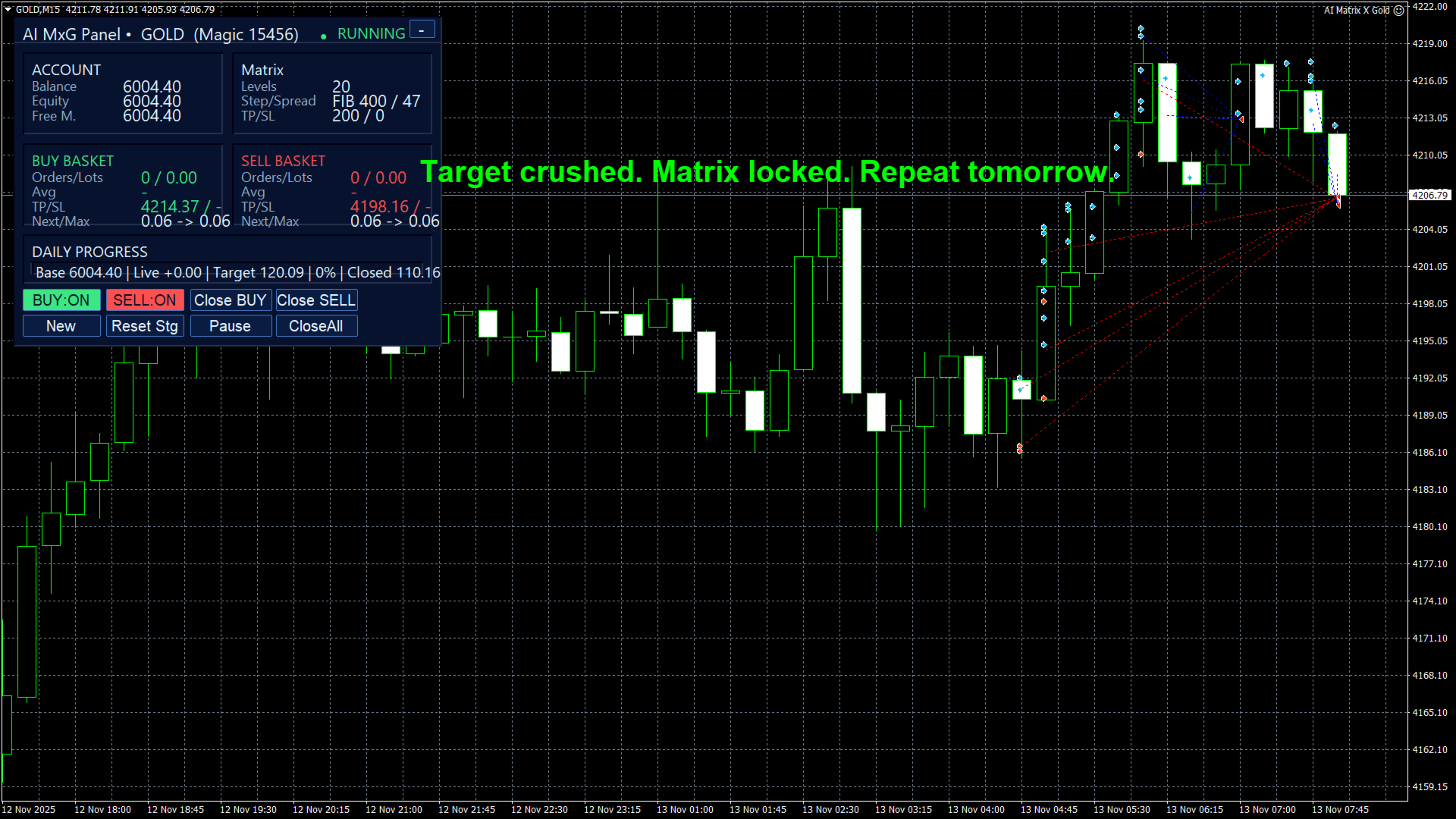
Panel features:
- Account Section — Balance, equity, free margin
- Matrix Section — Levels, step/spread, TP/SL settings
- Buy/Sell Baskets — Orders, lots, average price, TP/SL for each direction
- Daily Progress — Base balance, live P/L, target, percentage, closed profit
- Control Buttons — BUY:ON/OFF, SELL:ON/OFF, Close BUY, Close SELL, Pause, CloseAll, Reset
Multi-Market Compatibility
Works across multiple asset classes:
- Major and minor forex pairs
- Gold (XAUUSD) and silver
- Indices (US30, NAS100, etc.)
- Cryptocurrencies (BTCUSD, etc.)
- Energies
Six Internal Strategies
Multiple strategy modules work together:
- When one strategy is inactive, others may be active
- Adaptive to different market conditions
- Coordinated through the matrix engine
Backtest Performance
XAUUSD H1 backtest results:
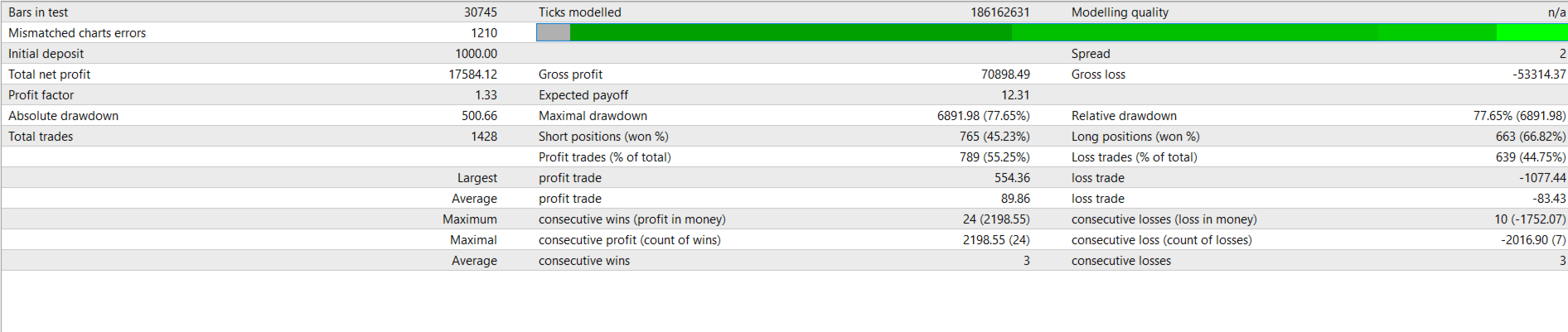
- Initial deposit: $1,000
- Total net profit: $17,584.12
- Profit factor: 1.33
- Win rate: 55.25%
- Total trades: 1,428
- Longs won: 66.82%
- Shorts won: 45.23%
- Average profit trade: $89.86
- Max consecutive wins: 24
- Average consecutive wins: 3

Important Risk Note:
The backtest shows significant drawdown periods (visible in the equity curve dips). Grid-based systems can experience substantial drawdowns during extended directional moves. This is inherent to the strategy type. Appropriate capital and conservative settings are essential.
The Daily Compounding Philosophy
The developer targets approximately 2% daily growth under optimal conditions. The mathematical illustration:
- Starting balance: $1,000
- Daily target: 2%
- Compounded over 355 trading days → $1,000,000+
Important: This is a mathematical illustration of compounding power, not a guarantee. Actual results depend on market conditions, settings, and risk management. The 2% daily target is an aim, not a promise.
Technical Requirements
- Platform: MetaTrader 4
- Instruments: Forex, Gold, Indices, Crypto
- Timeframe: M1–H4 (fully adaptive)
- Minimum deposit: $1,000
- Recommended leverage: 1:500
- Account type: ECN/Raw/Low-spread, Hedging enabled
- VPS: Required for 24/5 operation
- Recommended brokers: IC Markets, Pepperstone, RoboForex, Exness, Eightcap
Quick Setup Guide
- Install the EA file into your MT4
Expertsfolder. - Restart MT4 and enable AutoTrading.
- Attach Quantum Matrix AI to your chosen chart (any timeframe).
- Configure your preferred risk level and matrix group settings.
- Set daily profit target appropriate for your account.
- Use the on-chart panel to enable/disable BUY and SELL directions.
- Run on a VPS for 24/5 uninterrupted operation.
- Monitor daily progress through the panel’s tracking display.
User Reviews
★★★★★ “The matrix group concept is smart.”
Instead of unlimited grid positions, you control how many groups can open. Each group closes at its own TP and restarts. Much more controlled than typical grid systems. The daily target tracking keeps everything focused.
— Marcus T., Frankfurt
★★★★☆ “Works well, but respect the drawdown.”
Made consistent daily gains for weeks. Then gold moved 400 pips against me and drawdown hit hard. Recovered eventually, but learned to use conservative settings. The system works — just size appropriately.
— Chen W., Singapore
★★★★★ “Multi-pair capability is excellent.”
Running it on gold, EURUSD, and US30 simultaneously. The mirror-balancing helps smooth the equity curve. Different pairs hit their targets at different times, which creates more consistent daily results overall.
— Sarah K., London
★★★★★ “The control panel is professional.”
Everything you need right on the chart. Can pause trading, close specific directions, see daily progress. The “Target crushed” message when the day’s goal is hit is satisfying. Real control over the automation.
— Paolo R., Milan
★★★★☆ “Good concept, requires adequate capital.”
Started with minimum deposit and settings were too aggressive for my risk tolerance. Increased capital and reduced grid levels — now running smoothly. This isn’t a small-account EA.
— James H., Toronto
Our Assessment
Transparent evaluation based on backtest analysis and feature review:
What We Found:
- Strategy Type: Adaptive grid with matrix groups — more controlled than unlimited grids
- Multi-Pair: Genuine multi-market compatibility across forex, metals, indices, crypto
- Mirror-Balancing: Buy/sell exposure management for equity curve smoothing
- Daily Targets: Compounding philosophy with daily profit goals and tracking
- Control Panel: Professional interface with full trading control on-chart
- Drawdown Risk: Grid systems can experience significant drawdowns during extended moves — appropriate capital essential
- Capital Requirement: $1,000 minimum, but more recommended for conservative grid operation
- Best Suited For: Traders who understand grid mechanics and have adequate capital buffer
- Watch Out For: Don’t underestimate drawdown potential — size conservatively
- Overall: Well-structured grid system with intelligent controls, but requires respect for inherent grid risks
Conclusion
Quantum Matrix AI EA for MT4 brings structure and control to grid-based trading through its matrix group system, mirror-balancing, and daily profit targets.
The matrix group approach is the key differentiator — instead of unlimited position accumulation, you control how many grid groups can activate, each with its own TP logic. The mirror-balancing engine manages buy/sell exposure for more stable equity curves. And the daily target system provides clear goals with compounding potential.
The multi-pair capability means you can run it across forex, gold, indices, and crypto from a single installation. The professional on-chart panel gives you full control: pause trading, close specific directions, track daily progress, and monitor basket status in real-time.
Grid trading carries inherent drawdown risk during extended directional moves. This is true of all grid systems, and Quantum Matrix AI is no exception. Use appropriate capital, conservative settings, and understand that drawdowns are part of the strategy. For traders who accept these dynamics and want structured grid trading with intelligent controls, Quantum Matrix AI delivers a professional solution.
What Do You Receive?
– Quantum Matrix AI EA for MT4 – available file
– Free lifetime updates
– Fully unlocked for unlimited brokers and accounts
– Delivered by email and allocated to your user account dashboard
Every order
What’s included with Quantum Matrix AI
- Instant downloadReady after checkout and kept in your account
- Free lifetime updatesAdded as soon as we receive them, every version kept in your account
- Unlimited activationsUnlimited live and demo accounts
- Setup helpReal people on Telegram or email
- 7-day money-back guaranteeIf the EA fails to attach to your chart because of errors we can replicate, you get a full refund.
Product FAQs
Quantum Matrix AI EA MT4 FAQs
Real people on support, by Telegram or our contact form.
What is the matrix group system?
Instead of unlimited grid positions, the EA uses “Matrix Groups” — controlled grid sequences where you set the maximum number of groups. Each group has its own take-profit logic and restarts automatically after closing.
What pairs does it work on?
Forex pairs, gold, indices, and cryptocurrencies. The EA is designed for multi-market operation with the same logic adapting to different instruments.
What is mirror-balancing?
The system manages both buy and sell baskets, balancing exposure between directions to maintain more stable equity curves rather than being exposed to single-direction moves.
Is this a martingale system?
The developer states it uses “risk-managed compounding” rather than martingale gambling. Lot sizing evolves based on account growth with controlled grid groups. However, like all grid systems, drawdowns can occur during extended directional moves.
What’s the 2% daily target?
The EA aims for approximately 2% daily growth under optimal conditions. This is a target, not a guarantee. The developer uses this to illustrate compounding potential — actual results vary by market conditions.
What’s the minimum deposit?
$1,000 minimum. However, more capital is recommended for conservative settings and to handle grid drawdowns safely.
What leverage is recommended?
1:500 recommended. Higher leverage provides more margin for grid positions during drawdown periods.
What timeframe should I use?
The EA is fully adaptive from M1 to H4. Attach to any timeframe — the internal logic adjusts accordingly.
What does the on-chart panel show?
Account info (balance, equity, free margin), matrix settings (levels, step/spread, TP/SL), buy/sell basket status, daily progress tracking (base, live P/L, target, percentage), and control buttons for trading management.
Can I control buy and sell separately?
Yes. The panel includes BUY:ON/OFF and SELL:ON/OFF buttons, plus Close BUY and Close SELL options to manage each direction independently.
Is a VPS required?
Required for 24/5 operation. Grid systems need continuous monitoring to manage positions and hit daily targets.
What brokers work best?
ECN/Raw/Low-spread brokers with hedging enabled: IC Markets, Pepperstone, RoboForex, Exness (Raw), Eightcap ECN, or similar.
- Excellent on Trustpilot 4.6 out of 5 from 120 reviews (opens in a new tab)
- 28,000+ traders since 2019
- 1,560+ official EAs
- Card or crypto payments
Related EAs
Traders also explore
Premium expert advisors at vault-low prices, with your crypto price on every card.
 MT4Save 28%
 MT4Save 93%
 MT4Save 95%
 MT5Save 74%
Ready when you are
Quantum Matrix AI EA MT4 for $199.96 with crypto
Regular price was $799.00 · $249.95 with card · instant download · free lifetime updates

Quantum Matrix AI EA MT4$199.96with crypto$249.95 with card