
Official MT4 version · Gold EA
Quantum Speed EA MT4 – 2,484% Gain With 4.5% Drawdown
We’re rated Excellent on Trustpilot · 4.6/5 (opens in a new tab)The Quantum Speed EA is an advanced automated trading system specifically optimized for trading XAUUSD (Gold) on the MT4 platform.
This EA is designed to exploit rapid price movements in the gold market, leveraging cutting-edge algorithms that execute trades with unmatched precision and speed.
The Download Package Includes:
+ Expert: Quantum Speed EA (.ex4) V2.0
+ Pairs/Timeframes
+ How to Install MT4 Files.pdf
More Information:
+ Unknown
Live Performance Signal:
+ https://www.myfxbook.com/members/atlantisvn/quantum-speed/10984634
 MT4Save 97%
What you receive
- Quantum Speed.ex4Genuine, unmodified developer file for MetaTrader 4
- Setup guide.pdfA general guide to installing expert advisors.Official step-by-step install guide
Delivered instantly to your account after payment
Regular priceRegular price was $1,499.00
$49.95 with card
Visa, Mastercard, Apple Pay and Google Pay accepted.
Card payments add bank fees, sales taxes and other charges.
- Instant downloadYour file is provided immediately after payment. In very rare cases we manually review an order first, then send your download straight after. If you don’t receive your file, you can request a full refund.
- Free lifetime updatesAll updates are free. They’re provided on a best-availability basis: we get new versions as fast as we can, led by customer demand, but we don’t guarantee them immediately. If you need every update the moment it’s released, our service may not be the best fit for you.
- 7-day money-backRefunds only cover an EA that fails to attach to your chart because of errors we can replicate. We don’t cover changing your mind or not liking the EA. All brokers are different, and results are never promised because markets are constantly changing.
- Unlimited activationsUse it on as many MT4 accounts and computers as you want, live or demo. There are no restrictions on how you use it.
What you receive
- Quantum Speed.ex4Genuine, unmodified developer file for MetaTrader 4
- Setup guide.pdfA general guide to installing expert advisors.Official step-by-step install guide
Delivered instantly to your account after payment


28,000+ tradersServed since 2019
Orders over $300 include 3 months of PrismAlgo freeThe highly recommended cloud-connected EA, on all 28 Forex pairs for one MT5 account. Added to your cart automatically. View PrismAlgo
Official versionsInstant downloadFree lifetime updatesExtra 20% off with cryptoReal people on support28,000+ tradersTrading since 2019Rated Excellent on Trustpilot
Product description
About Quantum Speed EA MT4 – 2,484% Gain With 4.5% Drawdown
Quantum Speed EA for MT4: Master the Market with Precision and Speed
Introduction
In the fast-paced world of Forex trading, having a tool that can keep up with rapid market movements is crucial. The Quantum Speed EA for MT4 is a state-of-the-art automated trading solution designed to excel in high-speed trading environments.
Developed by a team of experienced traders and programmers, this Expert Advisor (EA) is engineered to capitalize on the volatility of the market, particularly in trading gold (XAUUSD). Available on CheaperForex.com, the Quantum Speed EA is ideal for traders who want to maximize their profits while keeping risks under control.
Description of the Quantum Speed EA for MT4
The Quantum Speed EA is an advanced automated trading system specifically optimized for trading XAUUSD (Gold) on the MT4 platform. This EA is designed to exploit rapid price movements in the gold market, leveraging cutting-edge algorithms that execute trades with unmatched precision and speed.
The core strategy of Quantum Speed EA revolves around filtering trades based on market conditions, ensuring that positions are only opened when the spread and other key factors align perfectly. This is especially important when trading XAUUSD, as the gold market can experience significant fluctuations in spread due to its high volatility. The EA’s ability to adapt to these conditions ensures that trades are executed at the most opportune moments, minimizing risk and maximizing potential profit.
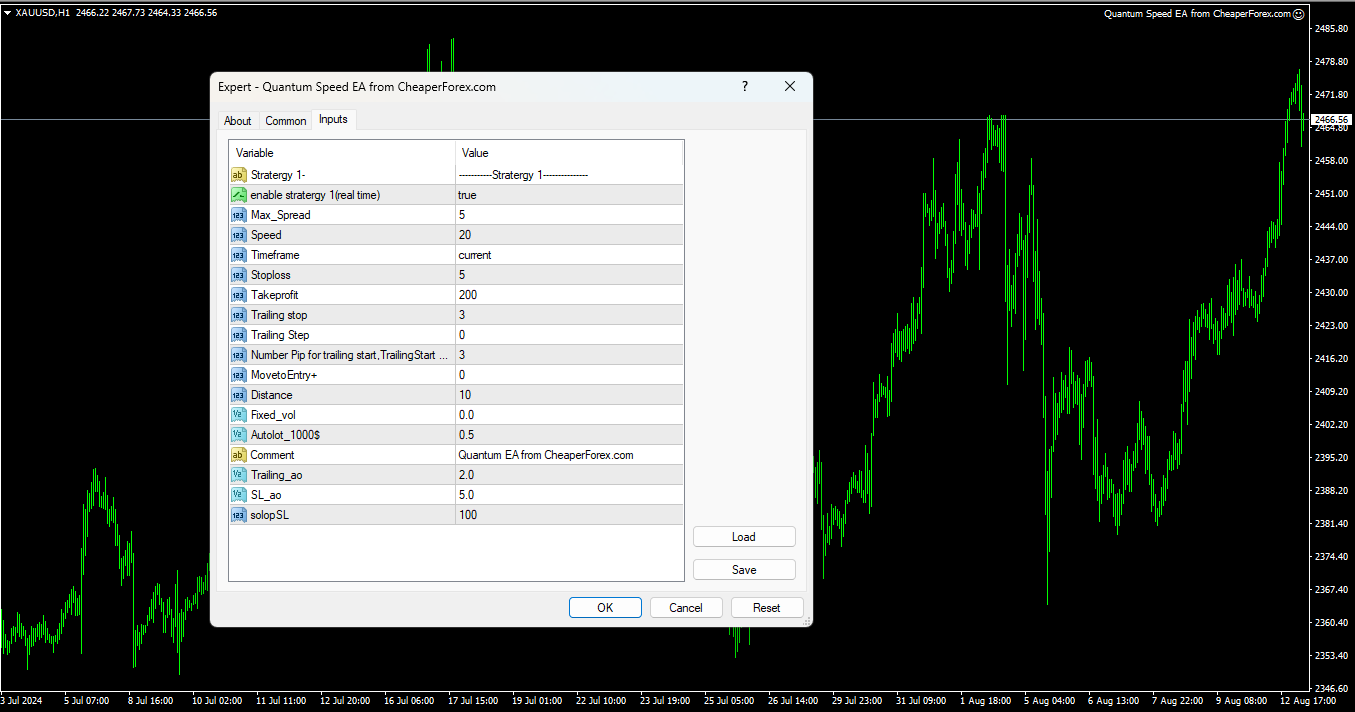
Key features of the Quantum Speed EA include a speed setting with a default value of 20, which allows the EA to quickly react to market changes. Additionally, the EA offers extensive customization options, such as adjustable stop loss, take profit, trailing stop, and step functions. Traders can choose between auto lot sizing, which automatically adjusts the lot size based on account equity, or a fixed lot size, giving full control over risk management.
The EA’s design includes a max spread filter that prevents the EA from entering trades during unfavorable market conditions. This is crucial for maintaining profitability, especially when trading in a volatile market like gold. The Quantum Speed EA also includes a time frame selection feature, giving traders the flexibility to choose the most effective time frame for their strategy.
Trading Specifications: Recommended Pair, Timeframe, and Minimum Balance
The Quantum Speed EA is optimized for trading the XAUUSD (Gold) pair, making it an excellent choice for traders who specialize in gold trading.
The recommended timeframe for using Quantum Speed EA is the M5 (5-minute chart). This timeframe is ideal for capturing the rapid price movements in the gold market, allowing the EA to take advantage of short-term trends and market fluctuations.
To ensure the EA operates effectively, it is recommended that traders start with a minimum balance of $1,000. This balance provides sufficient margin to handle the potentially large price swings in the XAUUSD market, especially when using the auto lot sizing feature.
Our Thoughts About It
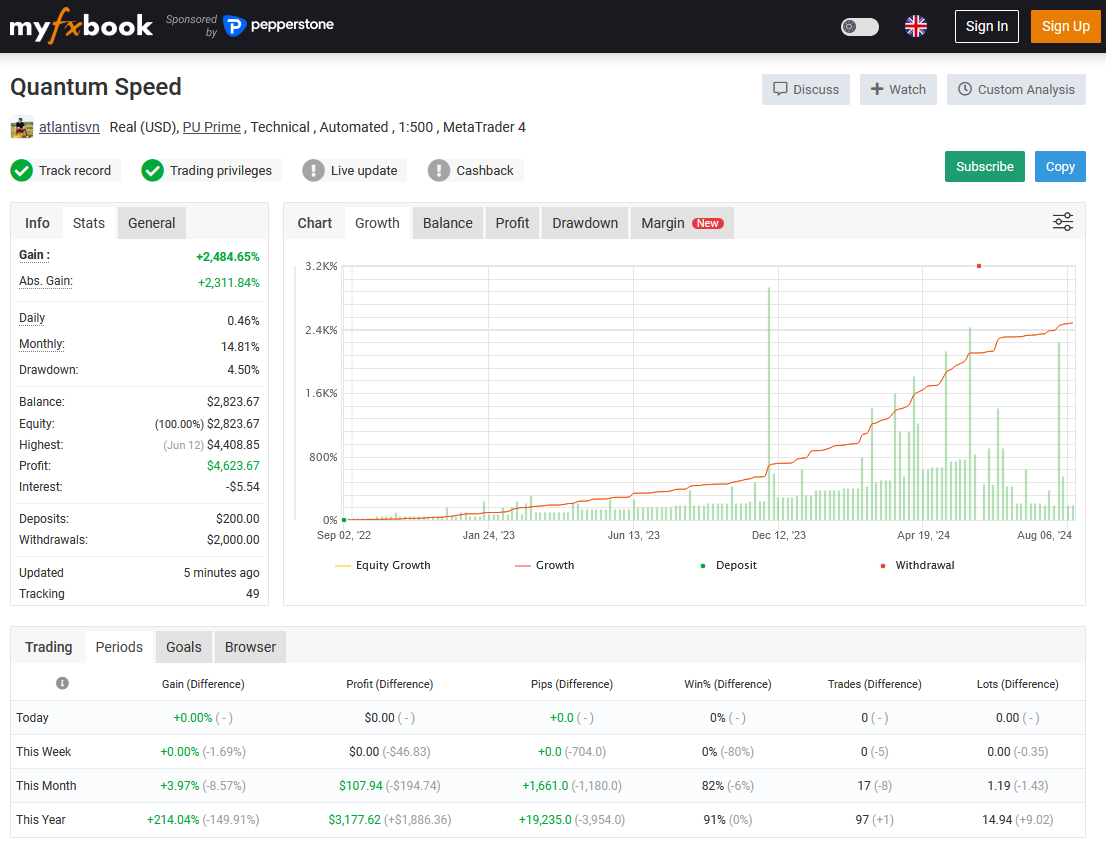
After a thorough analysis of the Quantum Speed EA’s performance, particularly on XAUUSD, we are extremely impressed with its capability to generate significant returns with controlled risk. The EA’s live trading results on a real account with the PuPrime broker, showing a 2,484% gain with only a 4.5% drawdown, are nothing short of remarkable. These results highlight the EA’s efficiency in navigating the volatile gold market while maintaining a disciplined approach to risk management.
One of the Quantum Speed EA’s greatest strengths is its flexibility. The ability to fine-tune parameters such as speed sensitivity, max spread filters, and risk management settings means that traders can tailor the EA to fit their specific trading needs and market conditions. This adaptability is particularly valuable when trading gold, as market conditions can change rapidly.
We also appreciate the developers’ recommendation to conduct demo tests before live trading. Given the varying conditions across different brokers, it’s important to test the EA in a demo environment to optimize the settings for your specific broker. This ensures that when you transition to live trading, the EA performs at its best.
Reviews
The Quantum Speed EA has received glowing reviews from traders who have implemented it in their gold trading strategies. Here’s what users have to say:
Emma L. (2024.08.15) shares her experience:
“Quantum Speed EA has been a game-changer for my XAUUSD trading. The speed at which it reacts to market movements is impressive, and I’ve been able to capture profits that I would have otherwise missed. The customization options are also a big plus, allowing me to tweak the settings to suit my trading style perfectly. This EA is a must-have for serious gold traders.”
David R. (2024.08.11) praises the risk management:
“I was initially drawn to Quantum Speed EA because of its low drawdown, and it has not disappointed. The EA manages risk exceptionally well, especially in the often volatile gold market. The trailing stop feature has helped me lock in profits consistently, and the max spread filter ensures I’m not caught in bad trades. Highly recommended!”
Sophia K. (2024.07.28) highlights the EA’s precision:
“Speed and precision are crucial when trading XAUUSD, and Quantum Speed EA delivers both. The performance on the M5 timeframe is outstanding, and I’ve seen a significant improvement in my trading results since I started using it. The live signal on a real account with PuPrime broker was the final push I needed to try it, and I’m glad I did.”
Conclusion
The Quantum Speed EA for MT4 is a top-tier trading tool specifically designed for traders who want to excel in the gold market. With its advanced algorithms, customizable settings, and proven live trading results, this EA stands out as a powerful and reliable option for those looking to maximize their profits while keeping risks under control.
Whether you are an experienced trader or new to trading XAUUSD, Quantum Speed EA offers the speed, precision, and flexibility you need to succeed. The EA’s impressive performance, including a 2,484% gain with a low drawdown, demonstrates its capability in real market conditions.
Don’t miss out on the opportunity to elevate your gold trading strategy with Quantum Speed EA. Available now on CheaperForex.com, this EA could be the key to unlocking your full trading potential and achieving consistent, profitable results.
Every order
What’s included with Quantum Speed
- Instant downloadReady after checkout and kept in your account
- Free lifetime updatesAdded as soon as we receive them, every version kept in your account
- Unlimited activationsUnlimited live and demo accounts
- Setup helpReal people on Telegram or email
- 7-day money-back guaranteeIf the EA fails to attach to your chart because of errors we can replicate, you get a full refund.
- Excellent on Trustpilot 4.6 out of 5 from 120 reviews (opens in a new tab)
- 28,000+ traders since 2019
- 1,560+ official EAs
- Card or crypto payments
Related EAs
Traders also explore
Premium expert advisors at vault-low prices, with your crypto price on every card.
 MT4Save 96%
 MT4Save 96%
 MT4Save 95%
 MT5Save 50%
Ready when you are
Quantum Speed EA MT4 – 2,484% Gain With 4.5% Drawdown for $39.96 with crypto
Regular price was $1,499.00 · $49.95 with card · instant download · free lifetime updates

Quantum Speed EA MT4 – 2,484% Gain With 4.5% Drawdown$39.96with crypto$49.95 with card