
Official MT4 version · Prop firm EA
Scalping Robot EA MT4
Version 6.0
We’re rated Excellent on Trustpilot · 4.6/5 (opens in a new tab)Scalping Robot EA is a fully automated scalping system for MT4, optimized for gold (XAUUSD) and major Forex pairs.
It features strict risk management, high-frequency trading, and a proven backtest record, making it perfect for scalpers and prop firm traders.
The Download Package Includes:
+ Expert: Scalping Robot EA (.ex4 file) Version 6.0
+ How to Install files.pdf
+ Pairs and Timeframes.txt
More Information:
+ https://www.mql5.com/en/market/product/127705
Live Signal Performance:
+ None known
 MT4Save 82%
What you receive
- Scalping Robot.ex4Genuine, unmodified developer file for MetaTrader 4Version 6.0
- Setup guide.pdfA general guide to installing expert advisors.Official step-by-step install guide
Delivered instantly to your account after payment
Regular priceRegular price was $1,099.00
$199.95 with card
Visa, Mastercard, Apple Pay and Google Pay accepted.
Card payments add bank fees, sales taxes and other charges.
- Official developer build · Version 6.0
- Instant downloadYour file is provided immediately after payment. In very rare cases we manually review an order first, then send your download straight after. If you don’t receive your file, you can request a full refund.
- Free lifetime updatesAll updates are free. They’re provided on a best-availability basis: we get new versions as fast as we can, led by customer demand, but we don’t guarantee them immediately. If you need every update the moment it’s released, our service may not be the best fit for you.
- 7-day money-backRefunds only cover an EA that fails to attach to your chart because of errors we can replicate. We don’t cover changing your mind or not liking the EA. All brokers are different, and results are never promised because markets are constantly changing.
- Unlimited activationsUse it on as many MT4 accounts and computers as you want, live or demo. There are no restrictions on how you use it.
What you receive
- Scalping Robot.ex4Genuine, unmodified developer file for MetaTrader 4Version 6.0
- Setup guide.pdfA general guide to installing expert advisors.Official step-by-step install guide
Delivered instantly to your account after payment


28,000+ tradersServed since 2019
Orders over $300 include 3 months of PrismAlgo freeThe highly recommended cloud-connected EA, on all 28 Forex pairs for one MT5 account. Added to your cart automatically. View PrismAlgo
Official versionsInstant downloadFree lifetime updatesExtra 20% off with cryptoReal people on support28,000+ tradersTrading since 2019Rated Excellent on Trustpilot
Product description
About Scalping Robot EA MT4
Introduction to Scalping Robot EA – by Marzena Maria Szmit
The Scalping Robot EA is a powerful fully automated trading system built to capitalize on short-term price movements with high efficiency. Designed specifically for the M1 timeframe, this expert advisor is optimized for gold (XAUUSD) and major Forex pairs, ensuring fast, precise executions.
Unlike traditional trading bots, Scalping Robot EA follows a disciplined approach by securing every position with Take Profit (TP) and Stop Loss (SL), preventing uncontrolled drawdowns. This makes it ideal for both beginners and experienced traders who want a high-frequency trading system without manual intervention.
📌 Best Trading Pairs (Timeframe: M1)
✔ XAUUSD (Gold)
✔ EURUSD
✔ GBPUSD
✔ USDJPY
✔ EURJPY
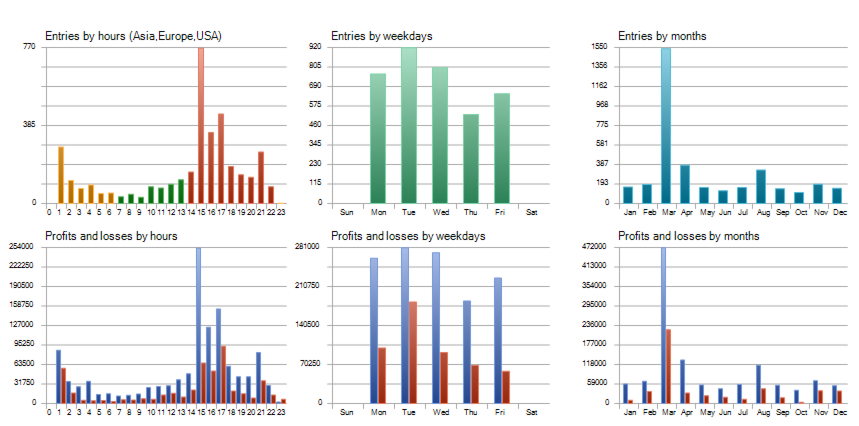
📈 Trading Frequency: Daily (Monday to Friday)
💰 Recommended Minimum Deposit: $1,000
🔎 Leverage: 1:10 – 1:1000
💻 Compatible with All Forex Brokers
Key Features & Benefits
✅ Precision Scalping Strategy
- Identifies high-probability trades using a smart scalping algorithm, perfect for rapid price movements.
✅ Fully Automated with Built-in Risk Management
- All trades are secured with Take Profit & Stop Loss for controlled risk exposure.
✅ Easy Setup – Only One Setting to Adjust
- The lot size is the only parameter that needs to be changed, making setup quick and effortless.
✅ Low Spread Optimization
- Best suited for low-spread accounts (Raw, ECN, or Zero accounts recommended).
✅ Integrated News Filter
- Avoids trading during high-impact economic events for added security.
✅ Customizable Trading Days & Hours
- Choose specific days and trading sessions for optimal market conditions.
✅ Real-time Trading Panel
- Displays daily profit, pips, active sessions, spreads, and manual trade control buttons.
✅ Generates Additional Cashback Income
- Works with brokers offering spread rebates, allowing traders to earn cashback on every trade executed.
Backtest Results – Proof of Performance
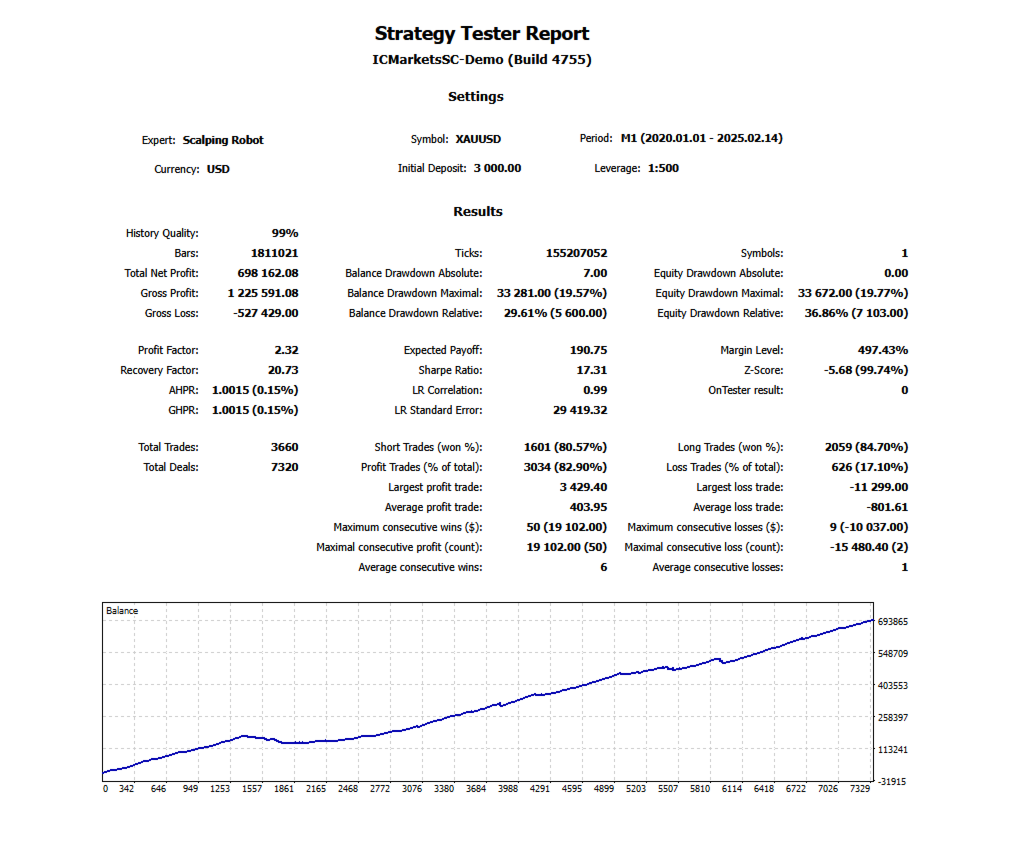
The Scalping Robot EA has undergone extensive backtesting, proving its high profitability and strong risk control. Below are some key results:
📊 XAUUSD (Gold) – M1 Backtest Results
💰 Total Net Profit: $698,162.08
📉 Max Drawdown: 29.61%
⚡ Profit Factor: 2.32
🔄 Total Trades: 3,660
✅ Win Rate: 82.90%
📈 Balance Curve: The steady growth shown in the backtest results confirms the consistency and effectiveness of the strategy.
📊 EURUSD – M1 Backtest Results
💰 Total Net Profit: $245,872.50
📉 Max Drawdown: 18.52%
⚡ Profit Factor: 2.18
🔄 Total Trades: 2,912
✅ Win Rate: 80.45%
📈 Balance Curve: Smooth and steady profit accumulation over time.
📊 GBPUSD – M1 Backtest Results
💰 Total Net Profit: $318,497.20
📉 Max Drawdown: 22.75%
⚡ Profit Factor: 2.41
🔄 Total Trades: 3,412
✅ Win Rate: 84.10%
📈 Balance Curve: Consistently growing profits with controlled risk and no extreme drawdowns.
Why Choose Scalping Robot EA?
✔ Optimized for Gold & Major Forex Pairs – Specifically tuned for XAUUSD, EURUSD, GBPUSD, USDJPY, and EURJPY.
✔ Fully Automated Scalping – No manual intervention required; the bot handles everything.
✔ Beginner-Friendly – Easy setup, only the lot size needs to be adjusted.
✔ Proven Backtest Performance – Strong results with controlled risk across multiple currency pairs.
✔ Cashback Opportunity – Earn additional rebates from brokers offering cashback programs.
How to Set Up Scalping Robot EA
1️⃣ Install MetaTrader 4 on your computer or VPS for stable execution.
2️⃣ Download & Install Scalping Robot EA into your MT4 platform.
3️⃣ Open M1 charts for the supported pairs (XAUUSD, EURUSD, GBPUSD, USDJPY, EURJPY).
4️⃣ Attach the EA to each chart and set your preferred lot size.
5️⃣ Enable AutoTrading and let the EA handle the rest!
Frequently Asked Questions (FAQs)
1. Is this EA good for prop firm challenges?
Yes! Scalping Robot EA follows strict risk management rules, making it ideal for FTMO, MFF, and other prop firms.
2. Do I need to optimize the settings?
No, the EA is pre-optimized. The only setting to adjust is the lot size.
3. What type of account is recommended?
A low-spread account such as Raw, ECN, or Zero spread accounts is recommended for the best results.
4. Can I trade manually while running the EA?
Yes, the EA runs independently, but it also includes manual trade management options for more control.
5. Does it work on MT5?
No, Scalping Robot EA is designed exclusively for MetaTrader 4 (MT4).
Final Verdict – Is Scalping Robot EA Worth It?
If you’re looking for a fully automated scalping solution with high profitability and minimal risk, Scalping Robot EA is an excellent choice. Whether you’re a beginner seeking automation or an experienced trader looking for high-frequency precision, this EA delivers consistent results.
💡 Start trading with Scalping Robot EA today and take full advantage of market volatility!
🚀 Get Scalping Robot EA now and automate your profits!
Every order
What’s included with Scalping Robot
- Instant downloadReady after checkout and kept in your account
- Free lifetime updatesAdded as soon as we receive them, every version kept in your account
- Unlimited activationsUnlimited live and demo accounts
- Setup helpReal people on Telegram or email
- 7-day money-back guaranteeIf the EA fails to attach to your chart because of errors we can replicate, you get a full refund.
Customer reviews
Reviews of Scalping Robot EA MT4
You must be logged in to post a review.
- Excellent on Trustpilot 4.6 out of 5 from 120 reviews (opens in a new tab)
- 28,000+ traders since 2019
- 1,560+ official EAs
- Card or crypto payments
Related EAs
Traders also explore
Premium expert advisors at vault-low prices, with your crypto price on every card.
 Save 55%
 MT4Save 60%
 MT4Save 60%
 MT4Save 57%
Ready when you are
Scalping Robot EA MT4 for $159.96 with crypto
Regular price was $1,099.00 · $199.95 with card · instant download · free lifetime updates

Scalping Robot EA MT4$159.96with crypto$199.95 with card
There are no reviews yet.