/* Only complements native navigation; native search and Woo actions stay unchanged. */ (()=>{ const key='cfHeaderDraft40435'; window[key]?.dispose?.(); const abort=new AbortController(),media=matchMedia('(max-width:1024px)'); const header=()=>document.querySelector('.elementor-40435.elementor-location-header'); const toggle=()=>header()?.querySelector('.cf-header-nav .elementor-menu-toggle'); const expanded=t=>t&&(t.getAttribute('aria-expanded')==='true'||t.classList.contains('elementor-active')); const close=focus=>{const t=toggle();if(expanded(t)){t.click();if(focus)t.focus();}}; document.addEventListener('keydown',event=>{ if(event.key==='Escape'&&expanded(toggle())){close(true);event.preventDefault();} },{signal:abort.signal}); document.addEventListener('pointerdown',event=>{ const nav=header()?.querySelector('.cf-header-nav'); if(media.matches&&expanded(toggle())&&nav&&!nav.contains(event.target))close(false); },{signal:abort.signal}); const change=()=>close(false);media.addEventListener('change',change); const disposeCart=cfEnhanceDraftCart(header()); window[key]={dispose(){abort.abort();media.removeEventListener('change',change);disposeCart();}}; /* Proposal only. Call inside the draft header's existing behaviour IIFE: * const disposeCart = cfEnhanceDraftCart(header()); * Include disposeCart() in that IIFE's existing dispose method. * Native cart toggling, fragments and checkout links remain untouched. */ function cfEnhanceDraftCart(header) { if (!header || header.getAttribute('data-elementor-id') === '353') return () => {}; const abort = new AbortController(), owned = new Map(); let wasOpen = false, closing = false, frame = 0; const refs = () => { const widget = header.querySelector('.cf-header-cart'); return {widget, pane:widget?.querySelector('.elementor-menu-cart__main'), trigger:widget?.querySelector('.elementor-menu-cart__toggle_button'), close:widget?.querySelector('.elementor-menu-cart__close-button, .elementor-menu-cart__close-button-custom')}; }; const open = r => !!r.widget?.classList.contains('elementor-menu-cart--shown'); const attribute = (el, name, value) => { if (!el || el.getAttribute(name) === value) return; if (!owned.has(el)) owned.set(el, new Map()); const values = owned.get(el), old = values.has(name) ? values.get(name).old : el.getAttribute(name); values.set(name, {old, value}); el.setAttribute(name, value); }; const prepare = r => { if (!r.pane) return; if (!r.pane.id) attribute(r.pane, 'id', 'cf-cart-dialog-' + header.getAttribute('data-elementor-id')); attribute(r.pane, 'role', 'dialog'); attribute(r.pane, 'aria-modal', 'true'); if (!r.pane.hasAttribute('aria-label') && !r.pane.hasAttribute('aria-labelledby')) attribute(r.pane, 'aria-label', 'Shopping cart'); attribute(r.pane, 'tabindex', '-1'); attribute(r.trigger, 'aria-haspopup', 'dialog'); attribute(r.trigger, 'aria-controls', r.pane.id); if (r.close) { if (!r.close.matches('button, input[type="button"]')) attribute(r.close, 'role', 'button'); attribute(r.close, 'tabindex', '0'); if (!r.close.hasAttribute('aria-label') && !r.close.hasAttribute('aria-labelledby')) attribute(r.close, 'aria-label', 'Close shopping cart'); } }; const focusable = pane => [...pane.querySelectorAll('a[href],button,input,select,textarea,summary,[tabindex],[contenteditable="true"]')] .filter(el => el.tabIndex >= 0 && !el.matches(':disabled') && !el.closest('[hidden],[inert],[aria-hidden="true"]') && el.getClientRects().length && getComputedStyle(el).visibility === 'visible'); const focusInside = () => { const r = refs(); if (!open(r) || closing || !r.pane) return; (focusable(r.pane)[0] || r.pane).focus({preventScroll:true}); }; const returnFocus = () => { const t = refs().trigger; if (t?.isConnected) t.focus(); }; const sync = () => { const r = refs(); prepare(r); const now = open(r); if (now && !wasOpen) { closing = false; cancelAnimationFrame(frame); frame = requestAnimationFrame(focusInside); } else if (!now && wasOpen) { closing = true; cancelAnimationFrame(frame); returnFocus(); closing = false; } else if (now && r.pane && !r.pane.contains(document.activeElement) && !closing) { cancelAnimationFrame(frame); frame = requestAnimationFrame(focusInside); } wasOpen = now; }; const closeNative = () => { const r = refs(); if (!open(r)) return; closing = true; returnFocus(); // Invoke the existing handler; never change its internal isCartOpen state. (r.close || r.trigger)?.click(); if (open(refs())) { closing = false; focusInside(); } }; document.addEventListener('keydown', event => { const r = refs(); if (!open(r) || !r.pane) return; if (event.key === 'Escape') { event.preventDefault(); event.stopPropagation(); closeNative(); return; } if ((event.key === 'Enter' || event.key === ' ') && r.close?.contains(event.target) && !r.close.matches('button, input[type="button"]')) { event.preventDefault(); closeNative(); return; } if (event.key !== 'Tab') return; const list = focusable(r.pane), first = list[0], last = list[list.length - 1], current = document.activeElement; if (!first) { event.preventDefault(); r.pane.focus({preventScroll:true}); } else if (!r.pane.contains(current) || (event.shiftKey && (current === first || current === r.pane))) { event.preventDefault(); (event.shiftKey ? last : first).focus({preventScroll:true}); } else if (!event.shiftKey && current === last) { event.preventDefault(); first.focus({preventScroll:true}); } }, {capture:true, signal:abort.signal}); // Move focus before native click handlers apply aria-hidden to the pane. document.addEventListener('click', event => { const r = refs(); if (!open(r) || !r.pane) return; if (r.close?.contains(event.target) || !r.pane.contains(event.target)) { closing = true; returnFocus(); queueMicrotask(() => { if (open(refs())) { closing = false; focusInside(); } }); } }, {capture:true, signal:abort.signal}); document.addEventListener('focusin', event => { const r = refs(); if (!closing && open(r) && r.pane && !r.pane.contains(event.target)) focusInside(); }, {capture:true, signal:abort.signal}); const observer = new MutationObserver(sync); observer.observe(header, {subtree:true, childList:true, attributes:true, attributeFilter:['class','aria-hidden']}); sync(); return () => { observer.disconnect(); abort.abort(); cancelAnimationFrame(frame); for (const [el, attrs] of owned) for (const [name, {old, value}] of attrs) { if (el.getAttribute(name) !== value) continue; if (old === null) el.removeAttribute(name); else el.setAttribute(name, old); } }; } })();

Official MT4 version

SPARTA EA MT4 Unlimited

SPARTA EA employs three strategies to initiate profitable positions and implements an averaging method to offset losses from transactions. This advisor operates entirely independently, eliminating the need for human intervention.

Included in the package:

  • Expert: Sparta EA v1.14 .ex4
  • How To Install MT4 Files.pdf
SPARTA EAMT4
This product is no longer available to buy.

If you already own it, your files and license details are still in your account.

Official versionsInstant downloadFuture updates includedExtra 20% off with cryptoReal people on support28,000+ tradersTrading since 2019Rated Excellent on Trustpilot

Product description

About SPARTA EA MT4 Unlimited

SPARTA EA MT4 represents a program meticulously designed for streamlining trading operations. The primary objective of any automated advisor robot is to streamline decision-making processes, thereby achieving complete automation. This currency trading robot operates autonomously, executing transactions in the FOREX market. Integrated into the trading terminal, it can automatically execute trades based on specified settings. All that’s required is to monitor its functions while generating profits.

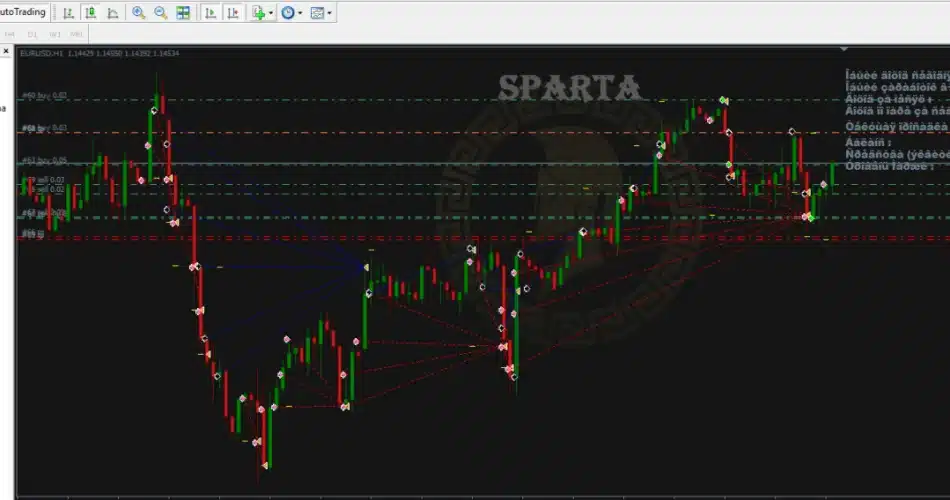
Distinguished by a distinctive algorithm, SPARTA EA employs three strategies to initiate profitable positions and implements an averaging method to offset losses from transactions. This advisor operates entirely independently, eliminating the need for human intervention. Its transaction-opening algorithm is crafted to prevent simultaneous opening of transactions in one direction across all three strategies for a single trading instrument (currency pair). This approach maintains a higher margin collateral level and generates profits in the event of downturns. Furthermore, the EA is versatile, supporting multiple currency pairs and configurations.

SPARTA EA MT4
SPARTA EA MT4

Recommendations for SPARTA EA:


  • A minimum account balance of $100 in a cent account or an equivalent standard account is recommended.
  • It is advisable to tailor your risk level and deposit according to your preferences since the EA can potentially double a $100 account within a day or two, although there is a risk of account depletion. This risk can be mitigated by deactivating the EA and closing all trades during volatile market conditions or news events.
  • The strategy with this EA emphasizes quick profit accumulation followed by fast withdrawal, aiming to withdraw the initial deposit once it has doubled. This approach has shown significant potential for successful outcomes.
  • Exercise caution during volatile market conditions or news events and consider closing trades accordingly.
  • For stable and uninterrupted performance, SPARTA EA should operate on a Virtual Private Server (VPS). It is recommended to use a reliable and trustworthy FOREX VPS..
  • Using a low spread account is also recommended for optimal performance.


The SPARTA EA offers users both a set of recommended settings and the flexibility to customize their trading according to individual preferences.

  • Conservative sets: Configured for cautious trading with a target of 10% monthly profit across 7 currency pairs. Optimized for the M30 and H1 timeframes. Recommended currency pairs: EURUSD, EURJPY, GBPUSD (optional); EURCHF, USDJPY, AUDUSD, NZDUSD, USDCAD
  • Standard sets: Designed for relatively conservative trading aiming at profits ranging between 20-40% per month across 7 currency pairs. Optimized for the M30 and H1 timeframes. Recommended currency pairs: EURUSD, EURJPY, GBPUSD, USDJPY, AUDUSD, NZDUSD, USDCAD
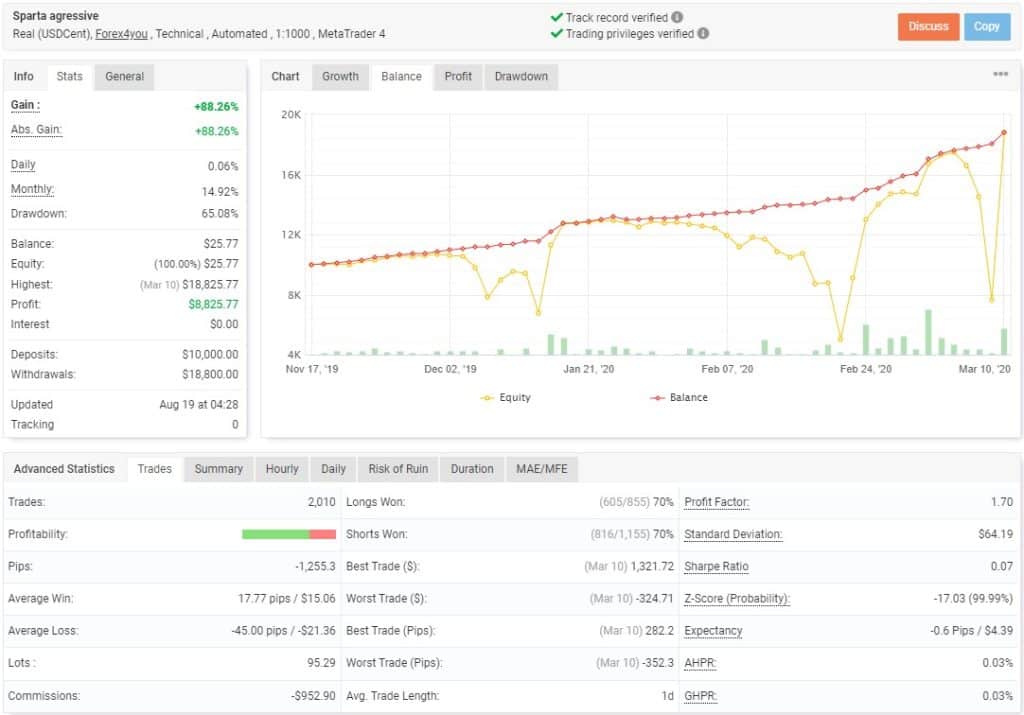
  • Aggressive sets: Geared towards aggressive trading and higher risk, targeting profits exceeding 50% per month. Operates across 5 currency pairs exclusively on the M1 timeframe. Recommended timeframe: M1 Recommended currency pairs: EURUSD, EURJPY, GBPUSD, NZDUSD, USDCAD
SPARTA EA MT4 MYFXBOOK

Every order

What’s included with SPARTA

  • Instant downloadReady after checkout and kept in your account
  • Free future updatesIncluded when we receive them, every version kept in your account
  • Unlimited activationsUnlimited live and demo accounts
  • Setup helpReal people on Telegram or email
  • 7-day money-back guaranteeIf the EA fails to attach to your chart because of errors we can replicate, you get a full refund.

*Refunds don’t cover changing your mind or not liking the EA. All brokers are different, and results are never promised because markets are constantly changing.