
SpreadFX EA MT5
Version 5.30
SpreadFX EA MT5 trades the relative divergence and convergence of two Forex instruments as a basket. It combines D1 and M15 analysis with RSI, candle and volatility filters, then manages the two legs together.
- Five selectable currency baskets with independent trade identification.
- Diagnostic dashboard, normalised comparison charts and manual basket exits.
- Cost-aware profit targets, configurable loss limits and fixed-lot or optional martingale averaging.
 MT5Save 44%
What you receive
- SpreadFX.ex5Genuine, unmodified developer file for MetaTrader 5Version 5.30
- Setup guide.pdfA general guide to installing expert advisors.Official step-by-step install guide
Delivered instantly to your account after payment
Regular priceRegular price was $1,250.00
$699.95 with card
Visa, Mastercard, Apple Pay and Google Pay accepted.
Card payments add bank fees, sales taxes and other charges.




 Apple Pay and Google Pay ready at checkout
- Official developer build · Version 5.30
- Instant downloadYour file is provided immediately after payment. In very rare cases we manually review an order first, then send your download straight after. If you don’t receive your file, you can request a full refund.
- Free lifetime updatesAll updates are free. They’re provided on a best-availability basis: we get new versions as fast as we can, led by customer demand, but we don’t guarantee them immediately. If you need every update the moment it’s released, our service may not be the best fit for you.
- 7-day money-backRefunds only cover an EA that fails to attach to your chart because of errors we can replicate. We don’t cover changing your mind or not liking the EA. All brokers are different, and results are never promised because markets are constantly changing.
- Unlimited activationsUse it on as many MT5 accounts and computers as you want, live or demo. There are no restrictions on how you use it.
What you receive
- SpreadFX.ex5Genuine, unmodified developer file for MetaTrader 5Version 5.30
- Setup guide.pdfA general guide to installing expert advisors.Official step-by-step install guide
Delivered instantly to your account after payment


28,000+ tradersServed since 2019
Official versionsInstant downloadFree lifetime updatesExtra 20% off with cryptoReal people on support28,000+ tradersTrading since 2019Rated Excellent on Trustpilot
Product description
About SpreadFX EA MT5
- Developer source link: SpreadFX on MQL5
- Live signal link: No public signal linked in the developer listing checked on 15 September 2026.
SpreadFX EA MT5 by Giuseppe Daniele Piscitelli is a relative-value Forex system. Here, “spread” means the distance between two instruments, rather than just a broker’s Bid/Ask charge. When its entry filters align, the EA opens opposing positions in a basket and manages their combined result.
Five baskets from one chart
- EURUSD / USDCHF
- AUDUSD / USDCAD
- NZDUSD / EURNZD
- USDCAD / EURUSD
- EURAUD / AUDCAD
Enable individual baskets and choose between one and five simultaneous baskets. Each has its own Magic Number. Broker prefixes and suffixes are supported; several baskets share currencies, so enabling more baskets can also increase concentrated exposure.
See why a basket is waiting
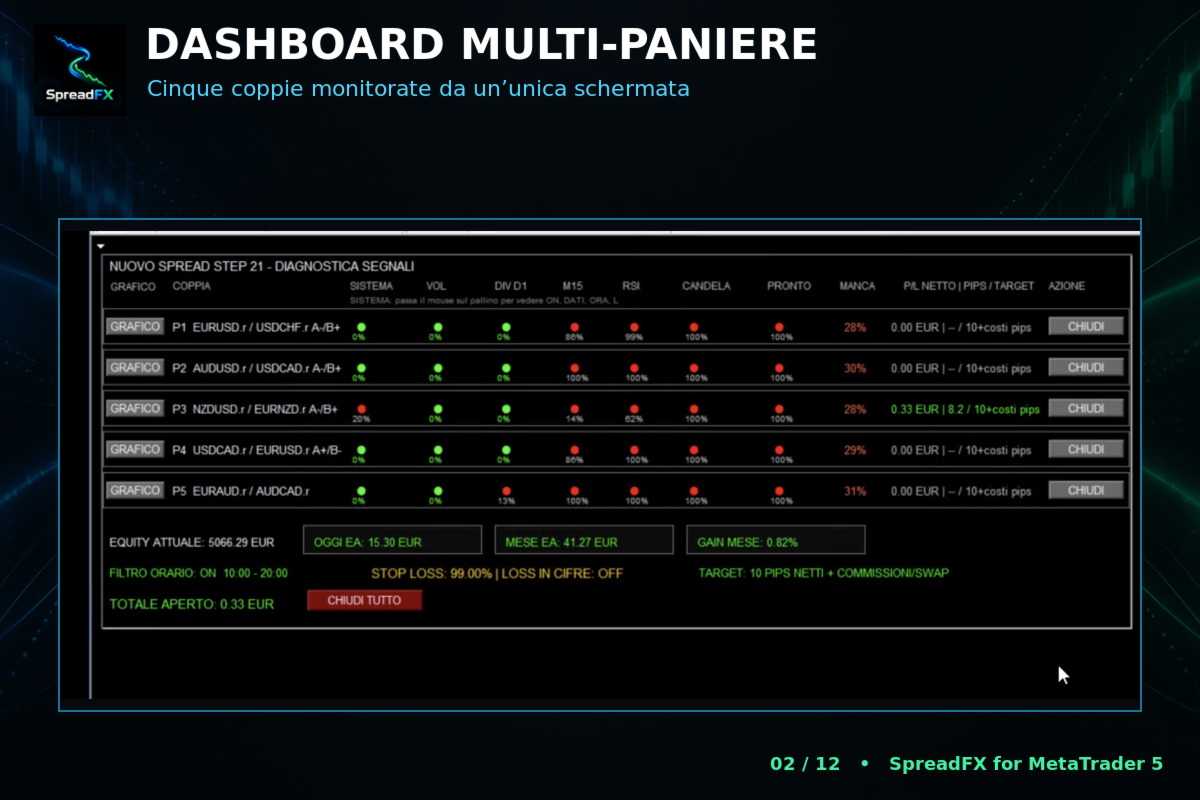
The dashboard displays divergence, M15 conditions, RSI, candle and volatility checks, together with basket profit/loss and entry readiness. A CHART control opens normalised instrument lines; individual close buttons and CLOSE ALL provide manual exit control.
Targets, averaging and protection
Basket targets use the combined pip result. Optional cost inclusion also checks net money after detected commissions, swap and estimated closing commission. SpreadFX supports fixed-lot averaging by default and optional ×2 martingale. Additional entries increase exposure; doubling can increase margin use sharply.
Configure equity-percentage and account-currency loss limits before use. Setting either limit to zero disables it. If an active limit is reached, the EA attempts to close its own trades and stops operating; execution conditions can still affect the final loss.
MT5 requirements
Use a hedging account and one M15 chart, with historical data for every enabled symbol, correct symbol naming and AutoTrading enabled. The time filter uses broker server time and limits new entries while existing trades continue to be managed. A stable connection or VPS supports continuous operation.
Explore the SpreadFX review for dashboard screenshots, testing considerations and averaging risks.
Standalone file: supplied for MT5. Follow the delivery instructions provided with your order.
Every order
What’s included with SpreadFX
- Instant downloadReady after checkout and kept in your account
- Free lifetime updatesAdded as soon as we receive them, every version kept in your account
- Unlimited activationsUnlimited live and demo accounts
- Free remote installationOptional: a one-time install over AnyDesk, with settings advice and custom presets
- 7-day money-back guaranteeIf the EA fails to attach to your chart because of errors we can replicate, you get a full refund.
Product FAQs
SpreadFX EA MT5 FAQs
Real people on support, by Telegram or our contact form.
Which platform and account type are required?
MetaTrader 5 with a hedging account. Attach the EA to one M15 chart and provide historical data for all enabled symbols.
Does SpreadFX use martingale?
Fixed-lot averaging is the documented default. Optional ×2 martingale progression is available and increases exposure and margin requirements.
Is the spread the broker’s Bid/Ask spread?
No. The strategy trades the relative distance between two instruments. Broker spread and other transaction costs still affect results.
Is a public live signal available?
No public signal was linked from the listing when checked on 15 September 2026.
Which version is supplied?
Supplied as a standalone MT5 file. Follow the delivery instructions provided with your order.
Customer reviews
Reviews of SpreadFX EA MT5
You must be logged in to post a review.
- Excellent on Trustpilot 4.6 out of 5 from 120 reviews (opens in a new tab)
- 28,000+ traders since 2019
- 1,560+ official EAs
- Card or crypto payments
Related EAs
Traders also explore
Premium expert advisors at vault-low prices, with your crypto price on every card.
 MT5
MT5 MT5
MT5 MT5Save 36%
 MT5Save 51%
Ready when you are
SpreadFX EA MT5 for $559.96 with crypto
Regular price was $1,250.00 · $699.95 with card · instant download · free lifetime updates

SpreadFX EA MT5$559.96with crypto$699.95 with card
There are no reviews yet.