
Official MT4 version
Stock Indexes EA MT4
Version 4.0
We’re rated Excellent on Trustpilot · 4.6/5 (opens in a new tab)Stock Indexes EA is a sophisticated trading robot meticulously engineered to capitalize on the dynamics of the US30. This expert advisor employs advanced algorithms and technical indicators to analyze market trends, identify potential entry and exit points, and execute trades with precision.
Its core strategy integrates both technical and fundamental analysis to assess market conditions and identify profitable trading opportunities within the US30 pairs.
This Package Contains an Instant Download of:
+ Expert: Stock Indexes EA V4.0 (.ex4)
+ WebRequest URL list Instructions
+ How to Install.pdf
More Information:
+ https://www.mql5.com/en/market/product/92251
Live Performance Signal:
+ https://fxmerge.com/strategies-results/999703/stock-indexes-ea
 MT4Save 86%
What you receive
- Stock Indexes.ex4Genuine, unmodified developer file for MetaTrader 4Version 4.0
- Setup guide.pdfA general guide to installing expert advisors.Official step-by-step install guide
Delivered instantly to your account after payment
Regular priceRegular price was $1,999.00
$279.95 with card
Visa, Mastercard, Apple Pay and Google Pay accepted.
Card payments add bank fees, sales taxes and other charges.
- Official developer build · Version 4.0
- Instant downloadYour file is provided immediately after payment. In very rare cases we manually review an order first, then send your download straight after. If you don’t receive your file, you can request a full refund.
- Free lifetime updatesAll updates are free. They’re provided on a best-availability basis: we get new versions as fast as we can, led by customer demand, but we don’t guarantee them immediately. If you need every update the moment it’s released, our service may not be the best fit for you.
- 7-day money-backRefunds only cover an EA that fails to attach to your chart because of errors we can replicate. We don’t cover changing your mind or not liking the EA. All brokers are different, and results are never promised because markets are constantly changing.
- Unlimited activationsUse it on as many MT4 accounts and computers as you want, live or demo. There are no restrictions on how you use it.
What you receive
- Stock Indexes.ex4Genuine, unmodified developer file for MetaTrader 4Version 4.0
- Setup guide.pdfA general guide to installing expert advisors.Official step-by-step install guide
Delivered instantly to your account after payment


28,000+ tradersServed since 2019
Orders over $300 include 3 months of PrismAlgo freeThe highly recommended cloud-connected EA, on all 28 Forex pairs for one MT5 account. Added to your cart automatically. View PrismAlgo
Official versionsInstant downloadFree lifetime updatesExtra 20% off with cryptoReal people on support28,000+ tradersTrading since 2019Rated Excellent on Trustpilot
Product description
About Stock Indexes EA MT4
Stock Indexes EA for MT4 by Marzena Maria Szmit
Introduction
Welcome to the Stock Indexes EA, an expertly crafted trading robot designed to optimize your trading experience in the stock indexes market, specifically tailored for the US30. Developed by Marzena Maria Szmit, this expert advisor (EA) is built to leverage advanced algorithms and technical indicators, making it a top choice for traders looking to automate their strategies and achieve consistent results.
Available now on CheaperForex.com, Stock Indexes EA offers a unique combination of precision, adaptability, and sophisticated risk management to maximize your trading potential.
Description of Stock Indexes EA
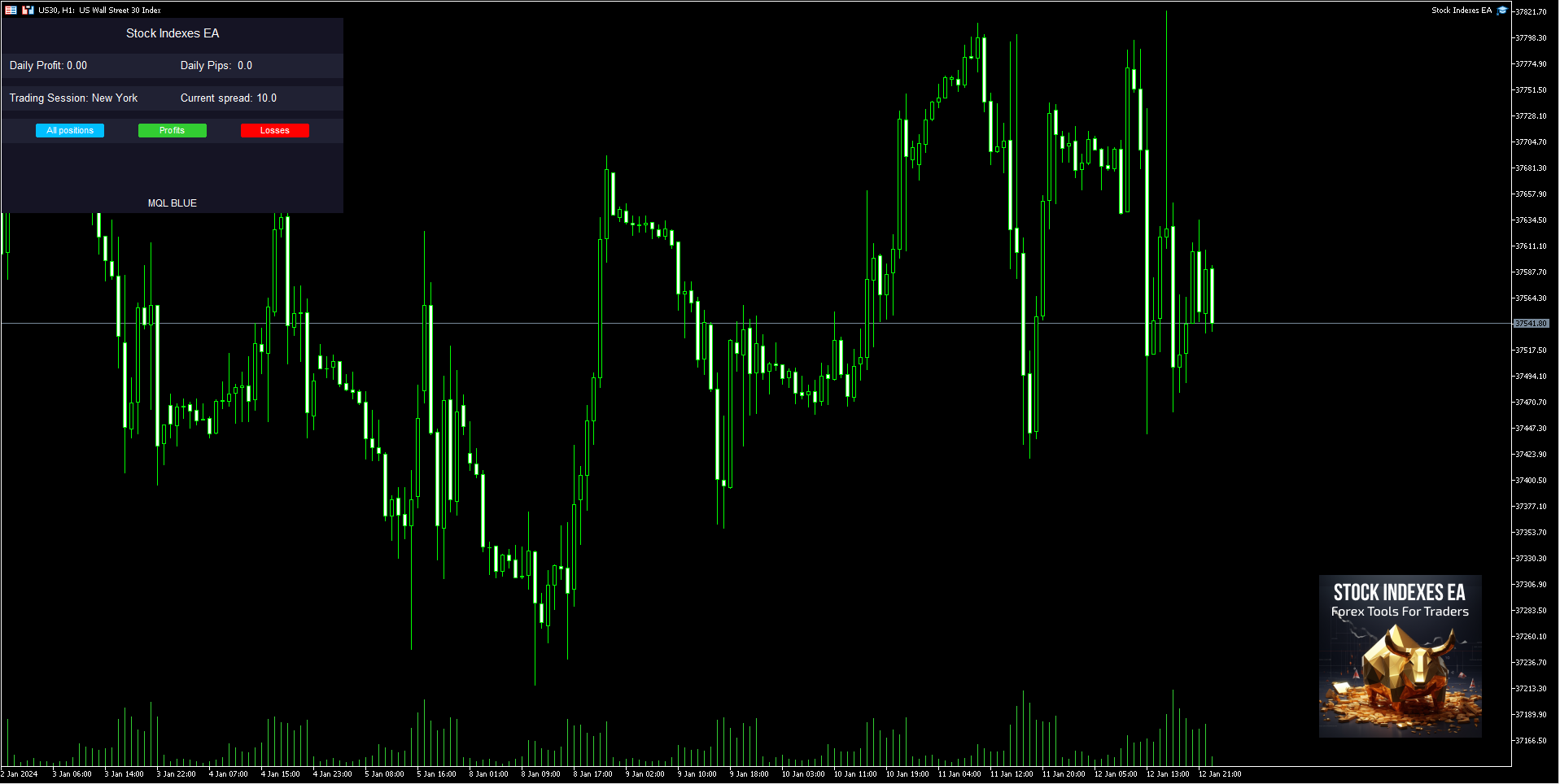
Stock Indexes EA is a sophisticated trading robot meticulously engineered to capitalize on the dynamics of the US30. This expert advisor employs advanced algorithms and technical indicators to analyze market trends, identify potential entry and exit points, and execute trades with precision. Its core strategy integrates both technical and fundamental analysis to assess market conditions and identify profitable trading opportunities within the US30 pairs.
One of the standout features of Stock Indexes EA is its news filter, which prevents the robot from opening positions during significant economic announcements, thereby minimizing the risk of trading during volatile periods. This EA also allows traders to specify the days and hours for trading, with a recommendation to disable trading on Fridays to avoid end-of-week market fluctuations.
Moreover, the EA can be tested on the DAX-GER40, where it has shown promising results in several tests. However, traders should be mindful that the minimum lot size for US30 with some MT4 brokers is 1.0 lots, while many MT5 brokers offer trading for US30 at 0.01 lots. It is advised to verify this with your broker before proceeding.
Trading Specifications
- Recommended Pair: US30 (Dow Jones Index)
- Additional Pair: DAX-GER40 (optional testing recommended)
- Timeframe: M5
- Minimum Balance: $1,000
- Platform: MetaTrader 4 (MT4)
- Minimum Lot Size: 0.01 (check broker’s requirements for US30)
- Leverage: 1:30 up to 1:1000
- Account Types: Hedging, Zero, Cent, Micro, Standard, Premium, or ECN
Our Thoughts About It
Stock Indexes EA stands out due to its adaptability and precision in trading. The ability to adjust to various market conditions using both technical and fundamental analysis ensures that traders are not merely reacting to market movements but are proactively positioned to capture gains. The inclusion of a news filter is a significant advantage, as it shields the trading account from unexpected volatility caused by economic announcements.
Another impressive feature is the EA’s customizable trading schedule, allowing users to dictate when trades are executed, thus avoiding potentially risky market times such as late Fridays. The EA’s comprehensive risk management tools, including stop-loss orders, take-profit levels, and adjustable position sizing, offer traders control over their risk exposure, which is crucial in a volatile market like stock indexes.
Live Performance
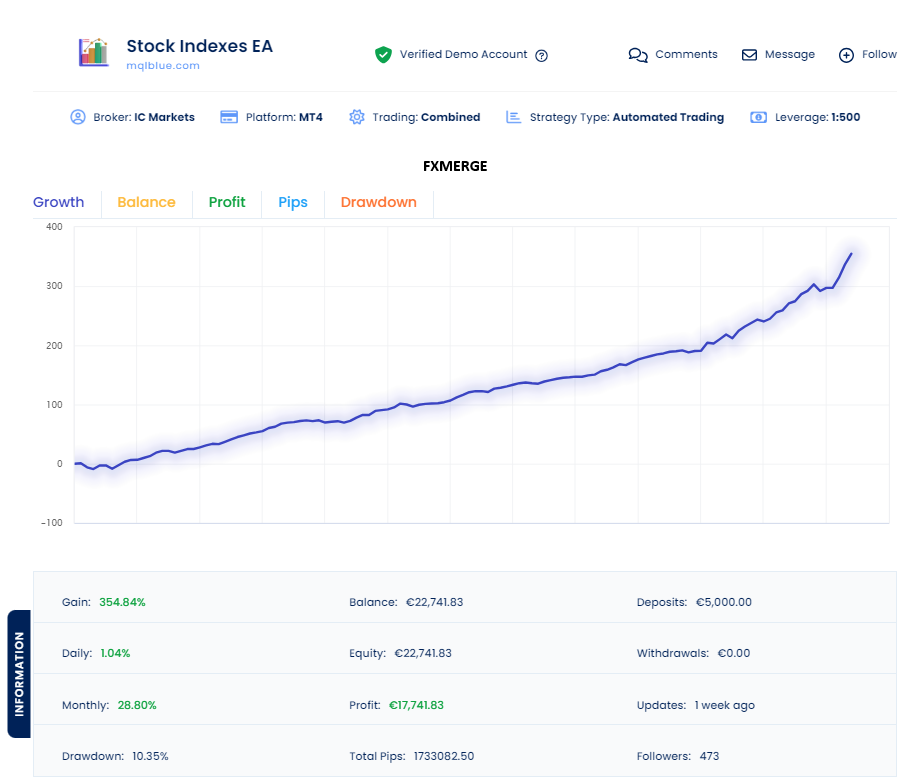
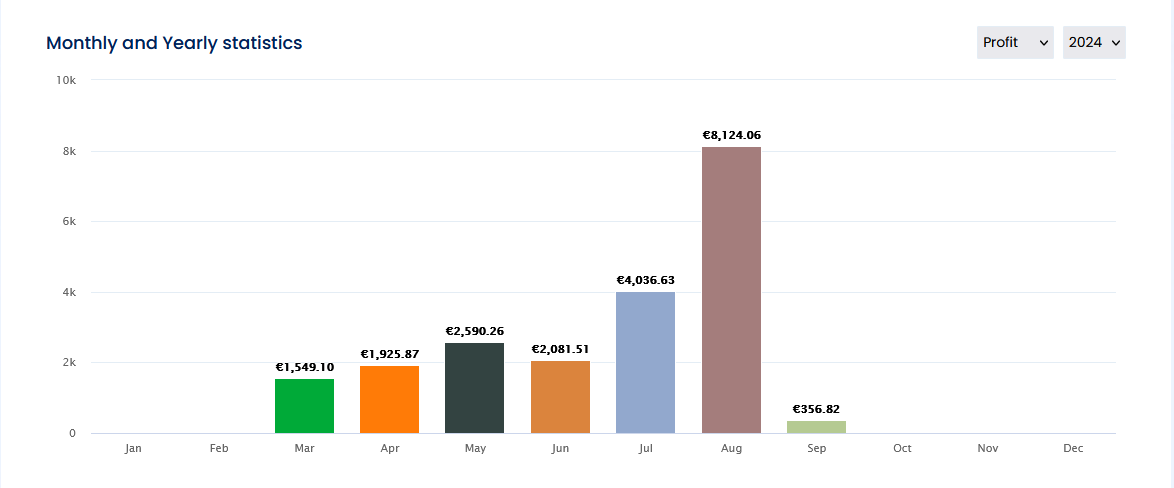
The Stock Indexes EA has demonstrated remarkable performance in live trading conditions, as evidenced by the verified demo account hosted on IC Markets with a leverage of 1:500. The EA has achieved a gain of 354.84% with a daily increase of 1.04% and a monthly gain of 28.80%. The equity balance stands at €22,741.83, with no withdrawals, highlighting the EA’s consistent profitability and robust capital growth.
The performance chart showcases a steady and consistent upward trajectory, reflecting the EA’s ability to generate profits under various market conditions. With a drawdown of just 10.35%, the Stock Indexes EA strikes an excellent balance between aggressive trading and capital preservation.
Reviews
David Thompson
“I’ve been using Stock Indexes EA for the past six months, and it has transformed my trading experience. The automated strategy, combined with the news filter, keeps my trades secure during volatile times. I particularly love how easy it is to set up, and the results speak for themselves. Highly recommend!”
Emma Garcia
“This EA has taken my trading to the next level. The ability to trade indices with such precision is impressive. I’ve seen my account grow steadily without the stress of managing each trade manually. Plus, the support from CheaperForex.com has been outstanding!”
Michael Lee
“Fantastic EA! The integration of both technical and fundamental analysis ensures that trades are well-informed and profitable. I was initially hesitant about automated trading, but Stock Indexes EA has exceeded my expectations. It’s a must-have for serious traders.”
Conclusion
Stock Indexes EA for MT4 by Marzena Maria Szmit is more than just an automated trading tool; it is a comprehensive trading solution designed for traders who want to harness the full potential of stock index trading. Whether you are new to trading or a seasoned professional, this EA offers a robust set of features that cater to various trading styles and preferences.
Its adaptability, combined with powerful risk management and an easy-to-use interface, make it an excellent choice for those looking to automate their trading strategy on the US30 and beyond. By purchasing the Stock Indexes EA from CheaperForex.com, you are investing in a reliable and high-performance trading robot that has been tested and optimized for real-world conditions.
Transform your trading approach with the Stock Indexes EA and take advantage of the proven strategies it offers. With 24/5 trading capabilities, continuous performance monitoring, and a dedicated support team, your path to trading success has never been more accessible.
Every order
What’s included with Stock Indexes
- Instant downloadReady after checkout and kept in your account
- Free lifetime updatesAdded as soon as we receive them, every version kept in your account
- Unlimited activationsUnlimited live and demo accounts
- Setup helpReal people on Telegram or email
- 7-day money-back guaranteeIf the EA fails to attach to your chart because of errors we can replicate, you get a full refund.
Customer reviews
Reviews of Stock Indexes EA MT4
You must be logged in to post a review.
- Excellent on Trustpilot 4.6 out of 5 from 120 reviews (opens in a new tab)
- 28,000+ traders since 2019
- 1,560+ official EAs
- Card or crypto payments
Related EAs
Traders also explore
Premium expert advisors at vault-low prices, with your crypto price on every card.
 MT4Save 53%
 MT4Save 69%
 Save 53%
 MT5Save 53%
Ready when you are
Stock Indexes EA MT4 for $223.96 with crypto
Regular price was $1,999.00 · $279.95 with card · instant download · free lifetime updates
Stock Indexes EA MT4$223.96with crypto$279.95 with card
There are no reviews yet.