
Official MT4 version · AI EA
Supply Demand EA Pro MT4
Latest version
We’re rated Excellent on Trustpilot · 4.6/5 (opens in a new tab)Enhance your manual trading with one-click precision using Supply Demand EA Pro for MT4 by Georgios Kalomoiropoulos.
Featuring MTF zone logic, auto lot sizing, and hands-free trade management, this tool turns your supply and demand analysis into fully managed trades with just one click.
The Download Package Includes:
+ Expert: Supply Demand EA Pro (.ex4) – Version 1.7
+ Pairs/Timeframes.txt
+ How to Install MT4 files.pdf
More Information:
+ https://www.mql5.com/en/market/product/66734
Live Performance Signal:
+ Unknown
 MT4Save 65%
What you receive
- Supply Demand EA Pro.ex4Genuine, unmodified developer file for MetaTrader 4Latest version
- Setup guide.pdfA general guide to installing expert advisors.Official step-by-step install guide
Delivered instantly to your account after payment
Regular priceRegular price was $289.00
$99.95 with card
Visa, Mastercard, Apple Pay and Google Pay accepted.
Card payments add bank fees, sales taxes and other charges.
- Official developer build · Latest version
- Instant downloadYour file is provided immediately after payment. In very rare cases we manually review an order first, then send your download straight after. If you don’t receive your file, you can request a full refund.
- Free lifetime updatesAll updates are free. They’re provided on a best-availability basis: we get new versions as fast as we can, led by customer demand, but we don’t guarantee them immediately. If you need every update the moment it’s released, our service may not be the best fit for you.
- 7-day money-backRefunds only cover an EA that fails to attach to your chart because of errors we can replicate. We don’t cover changing your mind or not liking the EA. All brokers are different, and results are never promised because markets are constantly changing.
- Unlimited activationsUse it on as many MT4 accounts and computers as you want, live or demo. There are no restrictions on how you use it.
What you receive
- Supply Demand EA Pro.ex4Genuine, unmodified developer file for MetaTrader 4Latest version
- Setup guide.pdfA general guide to installing expert advisors.Official step-by-step install guide
Delivered instantly to your account after payment


28,000+ tradersServed since 2019
Orders over $300 include 3 months of PrismAlgo freeThe highly recommended cloud-connected EA, on all 28 Forex pairs for one MT5 account. Added to your cart automatically. View PrismAlgo
Official versionsInstant downloadFree lifetime updatesExtra 20% off with cryptoReal people on support28,000+ tradersTrading since 2019Rated Excellent on Trustpilot
Product description
About Supply Demand EA Pro MT4
⚙️ Introduction to Supply Demand EA Pro MT4
Supply Demand EA Pro is not your typical auto-trading robot. Built by Georgios Kalomoiropoulos, this EA is designed to enhance your manual trading decisions, not replace them. Powered by a robust multi-timeframe supply and demand algorithm, it allows you to execute limit and market orders with one click—while it automatically manages risk and trade logic behind the scenes.
This EA is the perfect companion for traders who analyze zones manually but want a smarter, automated way to manage entries, stop loss, breakeven, and position sizing.
No more dragging SL lines, calculating lot sizes, or babysitting trades. Just mark your zone and let the EA handle the rest.
🔑 Key Features
✅ One-Click Order Placement
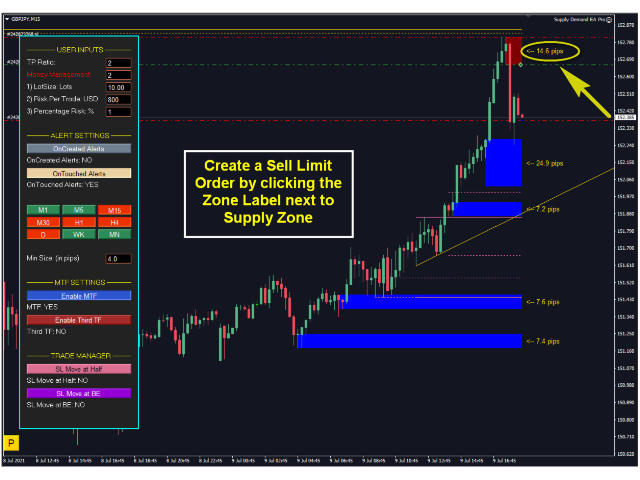
Place trades directly from the chart by clicking zone labels. Supports both limit and market orders.
✅ Multi-Timeframe Zone Logic
Visualize supply and demand zones from current, 1st higher, 2nd higher, and even 3rd higher timeframes. All zones are color-coded and style-customizable.
✅ Auto Lot Size Calculation
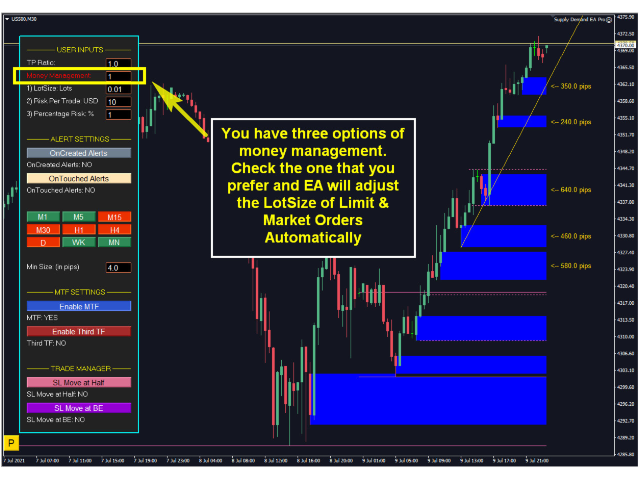
Automatically calculates lot size based on your selected risk percentage, fixed dollar amount, or manual input.
✅ Smart Stop Loss Handling
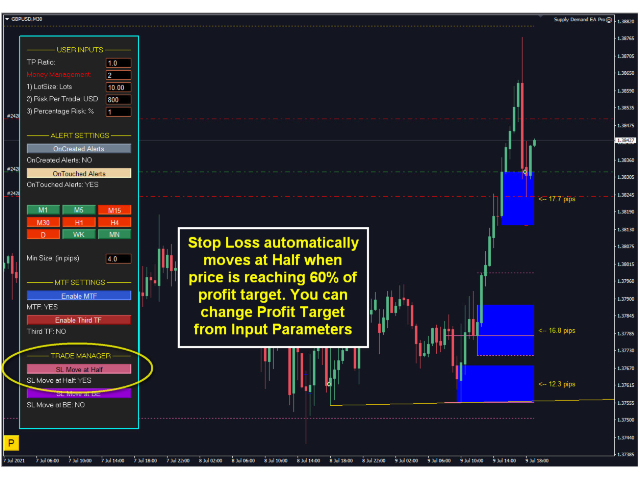
Built-in trade manager can auto-move stop loss to breakeven or halfway point based on profit progress.
✅ Instant Alerts System
Get alerts when price touches a zone, when new zones are created, or when nested zones are activated.
✅ User-Friendly Visual Panel
Control all parameters from an on-screen panel—no need to dig into the inputs menu.
✅ Built with 10,000+ Lines of Code
This is not a gimmick—it’s a serious toolkit developed for professional traders who demand precision.
💡 Key Benefits
-
Boost speed and precision of manual zone trading
-
Eliminate emotion from trade entries and exits
-
Reduce errors with automatic money management
-
Maintain full control over your strategy while automating execution
-
Save time and focus only on choosing the right zones
📊 Visual Interface & Chart Examples
Three powerful money management modes built-in.
Click-to-trade from a supply zone in seconds.
Stop loss auto-moves to halfway when trade progresses.
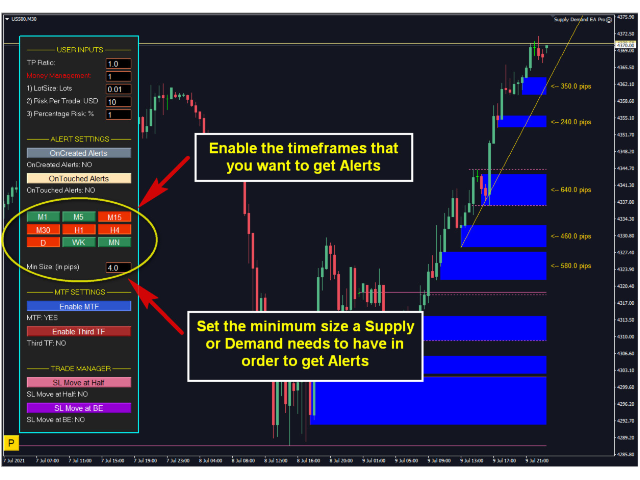
Choose the timeframes and zone sizes for alert filtering.
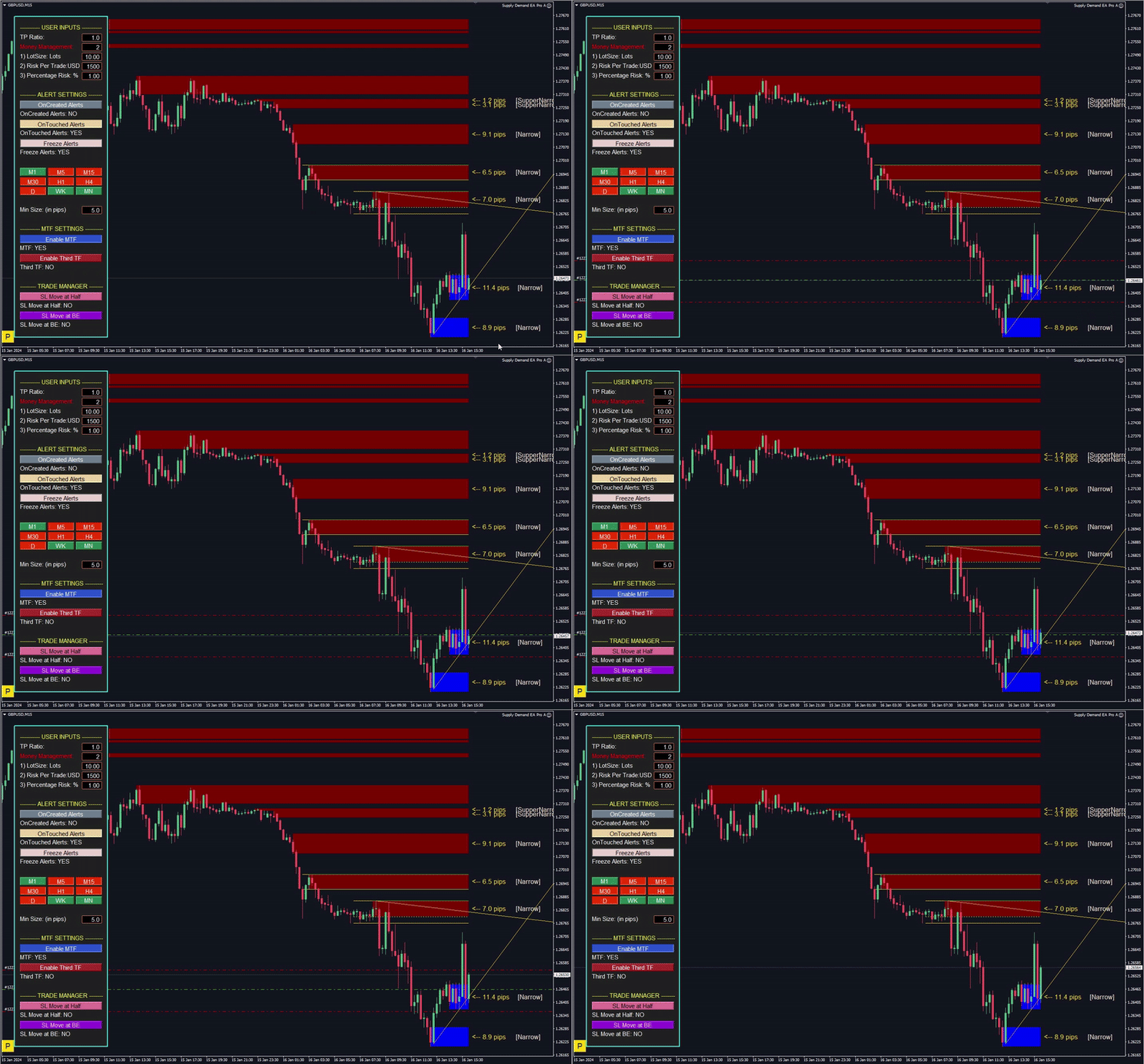
Elegant zone visualization with fully customizable inputs.
🗣️ Real User Reviews
🟡 lightswitchx:
“This is one of the best supply and demand EAs I’ve ever used. It’s accurate, light on CPU, and lets me manage trades cleanly across 28 pairs.”
🟡 wuzzy66:
“Just click on the zones you’ve analyzed, and the EA handles the rest. Profits follow.”
🟡 dagas:
“Great money management and risk-reward handling. Already seeing solid results on demo.”
🟡 hunqng1992:
“Helps me learn S&D faster. EA guides my entries and teaches me zone structure visually.”
🟡 RomanG:
“Reliable, responsive dev. The EA is built seriously—great value for money.”
🧠 FAQs
Q: Does the EA trade on its own?
No, this EA does not auto-trade. You manually select the zones you want to trade from, and the EA manages execution and risk after that.
Q: Can I customize the zone visuals?
Yes, the EA allows you to fully configure zone color, style, and which timeframes are displayed.
Q: What types of alerts does it send?
Alerts are triggered on zone creation, zone touch, or nested zone conditions—fully optional and customizable.
Q: Does it support prop firm trading?
Absolutely. With built-in lot sizing, risk control, and manual zone selection, it’s ideal for prop firm trading styles.
Q: Will it slow down MT4 if I load many charts?
Unlike most zone tools, this one is highly optimized. Many users confirm stable performance even on 20+ charts.
✅ Conclusion
If you’re tired of clunky supply/demand indicators and want a serious manual trading assistant, Supply Demand EA Pro delivers. Built by a respected developer, trusted by thousands, and designed for performance—it bridges the gap between strategic analysis and mechanical execution.
🔗 Get started today and experience one-click precision trading with full zone control.
Every order
What’s included with Supply Demand EA Pro
- Instant downloadReady after checkout and kept in your account
- Free lifetime updatesAdded as soon as we receive them, every version kept in your account
- Unlimited activationsUnlimited live and demo accounts
- Setup helpReal people on Telegram or email
- 7-day money-back guaranteeIf the EA fails to attach to your chart because of errors we can replicate, you get a full refund.
- Excellent on Trustpilot 4.6 out of 5 from 120 reviews (opens in a new tab)
- 28,000+ traders since 2019
- 1,550+ official EAs
- Card or crypto payments
Related EAs
Traders also explore
Premium expert advisors at vault-low prices, with your crypto price on every card.
 MT4Save 93%
 MT4Save 83%
 MT4Save 97%
 MT5Save 51%
Ready when you are
Supply Demand EA Pro MT4 for $79.96 with crypto
Regular price was $289.00 · $99.95 with card · instant download · free lifetime updates

Supply Demand EA Pro MT4$79.96with crypto$99.95 with card