
ThraeX EA MT4
Latest version
Built for XAUUSD (Gold) and DAX on the 1-minute timeframe, it uses self-adaptive algorithms to react to micro-fluctuations with configurable recovery logic, trailing stops, and session filtering.
- ✅ M1 high-frequency scalping — fast execution architecture
- ✅ Self-adaptive parameters — adjusts to changing price dynamics
- ✅ Configurable recovery mode with controlled lot progression
- ✅ Percentage and points-based trailing stops
- ✅ Session time filter and weekend skip
Roman discipline meets modern scalping precision.
 MT4Save 72%
What you receive
- ThraeX.ex4Genuine, unmodified developer file for MetaTrader 4Latest version
- Setup guide.pdfA general guide to installing expert advisors.Official step-by-step install guide
Delivered instantly to your account after payment
Regular priceRegular price was $987.00
$279.95 with card
Visa, Mastercard, Apple Pay and Google Pay accepted.
Card payments add bank fees, sales taxes and other charges.




 Apple Pay and Google Pay ready at checkout
- Official developer build · Latest version
- Instant downloadYour file is provided immediately after payment. In very rare cases we manually review an order first, then send your download straight after. If you don’t receive your file, you can request a full refund.
- Free lifetime updatesAll updates are free. They’re provided on a best-availability basis: we get new versions as fast as we can, led by customer demand, but we don’t guarantee them immediately. If you need every update the moment it’s released, our service may not be the best fit for you.
- 7-day money-backRefunds only cover an EA that fails to attach to your chart because of errors we can replicate. We don’t cover changing your mind or not liking the EA. All brokers are different, and results are never promised because markets are constantly changing.
- Unlimited activationsUse it on as many MT4 accounts and computers as you want, live or demo. There are no restrictions on how you use it.
What you receive
- ThraeX.ex4Genuine, unmodified developer file for MetaTrader 4Latest version
- Setup guide.pdfA general guide to installing expert advisors.Official step-by-step install guide
Delivered instantly to your account after payment


28,000+ tradersServed since 2019
Don’t miss thisSee the EA we recommend
The Gold EA we trade ourselves
DowGold for XAU and US30


We have tested thousands of EAs. DowGold is the one we use and recommend, and we rarely say that. We’re also an official reseller.
Real USD MyFXBook accounts. A live cloud, constantly evolving strategy.
See DowGoldOfficial versionsInstant downloadFree lifetime updatesExtra 20% off with cryptoReal people on support28,000+ tradersTrading since 2019Rated Excellent on Trustpilot
Product description
About ThraeX EA MT4
Quick Summary:
ThraeX EA for MT4 is a high-frequency scalping system developed by Vasile Verdes, designed specifically for the 1-minute timeframe on XAUUSD (Gold) and DAX.
Named after the Thracian gladiator class known for speed and precision, ThraeX is built to detect and react to short-term price movements with self-adaptive algorithms that adjust to changing market dynamics.
This isn’t a simple scalper. ThraeX offers deep customization across trailing stops, recovery logic, averaging options, and time filtering — all fully autonomous with no external dependencies. The parameter set is comprehensive, giving experienced traders granular control over every aspect of the scalping logic.
The backtest shows consistent growth over 21,000+ trades with steady equity progression. But this is M1 scalping with recovery options — understand the mechanics before deploying.
Official MQL5 Listing:
ThraeX EA MT4
Developer Profile:
optimus-v (Vasile Verdes)
What ThraeX Is Designed To Do
ThraeX operates on a straightforward principle: capture micro-movements on the M1 timeframe with speed and adaptability. The core approach:
- High-Frequency Decision Making — Processes real-time market data on 1-minute charts
- Self-Adaptive Parameters — Internal algorithms adjust to changing price dynamics
- Fast Execution Architecture — Optimized for low-latency environments
- Fully Autonomous — No external APIs, platforms, or data dependencies
- Continuous Refinement — Adapts behavior based on latest market data
The system is compact and self-contained — everything it needs is built into the EA logic.
Key Features
M1 Scalping Architecture
Built specifically for the 1-minute timeframe, ThraeX targets rapid market fluctuations that longer timeframes miss. The execution system is engineered for quick reaction to micro-price movements in volatile instruments like Gold and DAX.
Flexible Trailing Stop System
Two trailing modes available:
- Percent Trailing — Trail by percentage of profit (default: 0.34%)
- Points Trailing — Trail by fixed points (default: 34 points)
Configure trailing step and activation thresholds independently.
Configurable Recovery Mode
Optional recovery logic for managing adverse positions:
- ApplyRecovery — Enable/disable recovery system
- RecoverMode — Recovery behavior selection
- RecoverDeals — Maximum deals in recovery sequence
- RecoverFactor — Lot progression factor (default: 1.3)
Important: Recovery mode increases lot sizes on losing sequences. Use with appropriate capital and understand the risks.
Averaging Options
Optional position averaging with configurable parameters:
- DoAveraging — Enable/disable averaging
- CheckTrend — Only average with trend confirmation
- LotMultiply — Multiplication factor (default: 1.0 = flat lots)
- PointsStep / PercentStep — Distance between averaging entries
Session Time Filter
Control exactly when the EA trades:
- CheckTime — Enable time filtering
- StartHour / EndHour — Trading window (default: 8:00–21:00)
- SkipWeekend — Avoid weekend gaps
Spread Protection
- CheckSpread — Enable spread filtering
- MaxSpread — Maximum allowed spread (default: 89 points)
Prevents entries during high-spread conditions.
Backtest Performance
XAUUSD M1 backtest using every-tick modelling:
The equity curve shows steady progression with controlled drawdowns. The green volume indicator at the bottom shows consistent trading activity throughout the test period.

Settings Analysis
ThraeX offers comprehensive parameter customization across multiple categories:
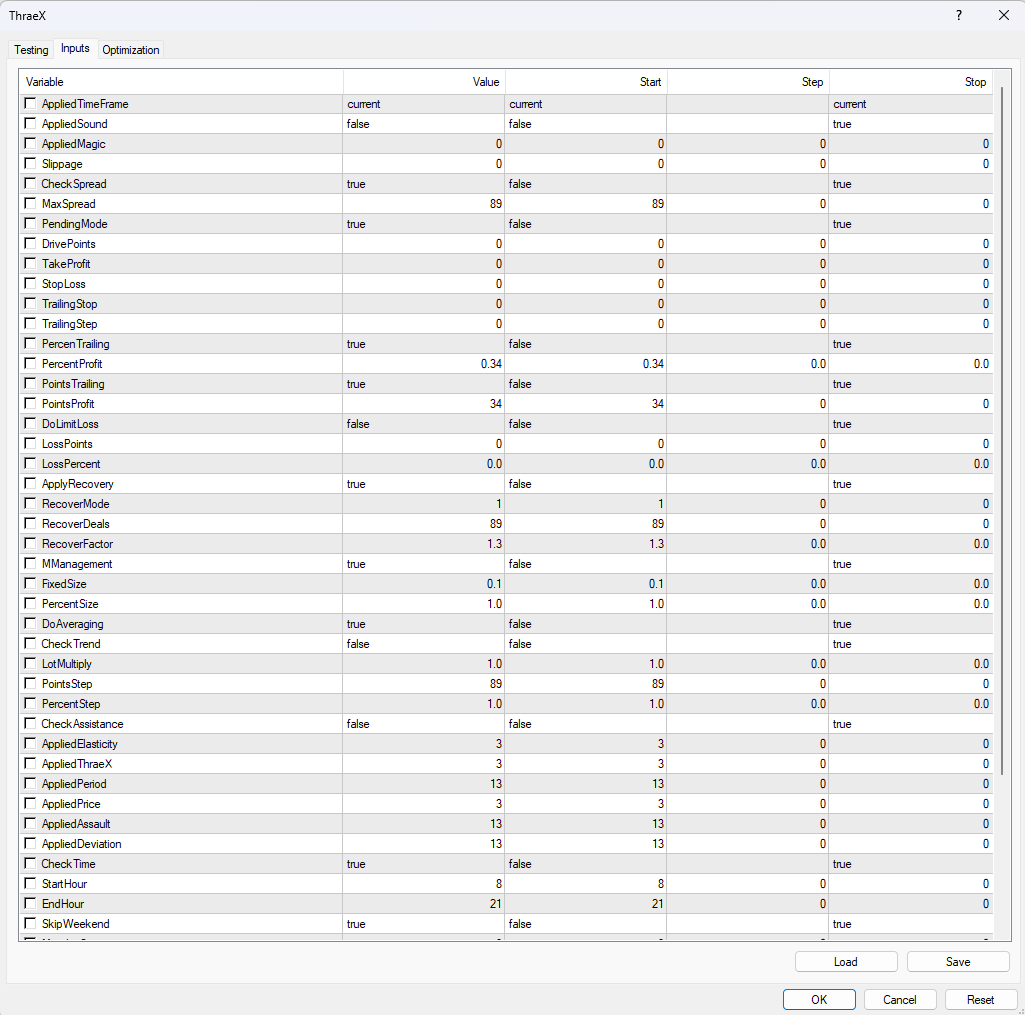
Basic Settings
- AppliedTimeFrame — Timeframe selection (default: current)
- AppliedSound — Audio alerts on trades
- AppliedMagic — Magic number for trade identification
- Slippage — Maximum allowed slippage
- PendingMode — Use pending orders vs market orders
Take Profit & Stop Loss
- TakeProfit — Fixed TP in points
- StopLoss — Fixed SL in points
- DoLimitLoss — Enable loss limiting
- LossPoints / LossPercent — Loss thresholds
Trailing Stop Settings
- TrailingStop — Trailing distance
- TrailingStep — Trailing step increment
- PercentTrailing — Use percentage-based trailing
- PercentProfit — Profit threshold for percent trailing (default: 0.34)
- PointsTrailing — Use points-based trailing
- PointsProfit — Profit threshold for points trailing (default: 34)
Money Management
- MManagement — Enable auto lot sizing
- FixedSize — Fixed lot size (default: 0.1)
- PercentSize — Risk percentage for auto sizing
Strategy Parameters
- CheckAssistance — Enable assistance logic
- AppliedElasticity — Elasticity factor (default: 3)
- AppliedThraeX — Core strategy parameter (default: 3)
- AppliedPeriod — Analysis period (default: 13)
- AppliedPrice — Price type for calculations
- AppliedAssault — Entry aggressiveness (default: 13)
- AppliedDeviation — Deviation threshold (default: 13)
Technical Requirements
- Platform: MetaTrader 4
- Timeframe: M1 (1-minute)
- Recommended pairs: XAUUSD (Gold), DAX
- Account type: ECN/Raw spread recommended for tight spreads
- Minimum deposit: $500 recommended
- Leverage: Any
- VPS: Essential for M1 scalping — low latency required
Quick Setup Guide
- Install the EA file into your MT4
Expertsfolder. - Restart MT4 and enable AutoTrading.
- Attach ThraeX to an XAUUSD M1 or DAX M1 chart.
- Configure money management — FixedSize or PercentSize.
- Set MaxSpread appropriate for your broker.
- Configure time filter (default: 8:00–21:00) for your preferred sessions.
- Enable SkipWeekend to avoid gap risk.
- Decide on Recovery and Averaging — understand risks before enabling.
- Run on a low-latency VPS — essential for M1 scalping.
- Test on demo first to validate behavior with your broker.
Important Considerations
- M1 scalping requires low latency — VPS near your broker’s servers is essential
- Recovery mode increases lot sizes — ensure sufficient capital if enabled
- Averaging adds positions — understand drawdown implications
- Spread matters significantly — ECN/Raw accounts strongly recommended
- Test thoroughly on demo — M1 execution varies between brokers
User Reviews
★★★★★ “EA gets better with every update.”
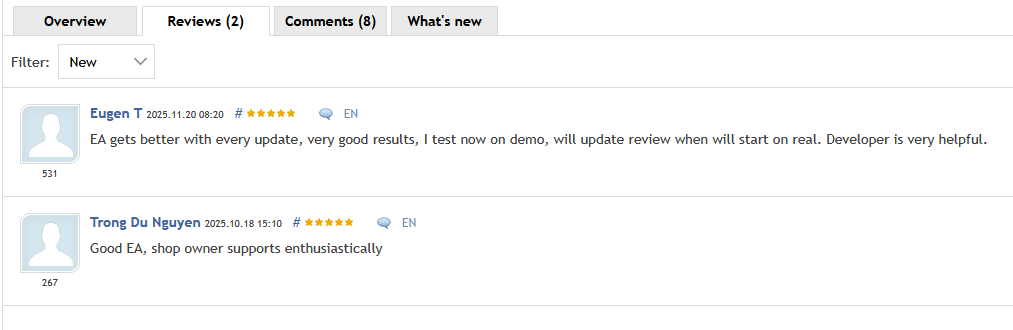
EA gets better with every update, very good results. I test now on demo, will update review when will start on real. Developer is very helpful.
— Eugen T (MQL5 verified, November 2025)
★★★★★ “Good EA, shop owner supports enthusiastically.”
Good EA, shop owner supports enthusiastically.
— Trong Du Nguyen (MQL5 verified, October 2025)
★★★★★ “The parameter depth is impressive.”
I’ve tested many M1 scalpers and most have 10-15 settings. ThraeX has dozens — trailing modes, recovery options, strategy parameters, time filters. You can really dial in exactly how you want it to behave. Takes time to understand but worth it.
— Marcus K., Berlin
★★★★☆ “Works great on Gold, needs proper VPS.”
Initially had issues with execution. Moved to a low-latency VPS near my broker and results improved dramatically. This is serious M1 scalping — you need proper infrastructure. Once set up correctly, the consistency is excellent.
— Chen W., Singapore
★★★★★ “Recovery mode saved positions multiple times.”
I run it with conservative recovery settings (low RecoverFactor). Several times what would have been losses recovered to profit. You need the capital to support it, but the logic works. The developer clearly understands position management.
— Paolo R., Milan
★★★★★ “Time filter keeps it out of bad hours.”
Gold M1 is crazy during news. The time filter (8-21) keeps ThraeX out of the most volatile periods. Combined with weekend skip, it only trades during predictable sessions. Smart design.
— Anna S., Stockholm
Our Assessment
Transparent evaluation based on backtest analysis and feature review:
What We Found:
- Parameter Depth: Exceptionally comprehensive — dozens of meaningful settings across multiple categories
- Architecture: Self-contained with no external dependencies — clean, autonomous design
- Flexibility: Multiple trailing modes, optional recovery, optional averaging — adapt to your style
- Risk Features: Recovery mode and averaging can increase exposure — understand before enabling
- Backtest Quality: Consistent equity growth over 21,000+ trades — no hockey-stick curves
- Developer Support: Reviews mention responsive, helpful developer with regular updates
- Best Suited For: Experienced traders who want granular control over M1 scalping
- Watch Out For: Requires low-latency VPS, ECN broker, sufficient capital for recovery mode
- Overall: Well-engineered M1 scalper with serious customization for serious traders
Conclusion
ThraeX EA for MT4 delivers what serious M1 scalpers need: comprehensive parameter control, self-adaptive logic, and flexible risk management options — all in a self-contained system with no external dependencies.
The parameter depth is impressive. Trailing stops can be configured by percentage or points. Recovery mode offers controlled lot progression for adverse positions. Averaging is optional with trend confirmation. Time filtering keeps the EA out of dangerous sessions. Spread protection prevents bad entries. Every aspect of the scalping logic is configurable.
Named after the Thracian gladiator known for speed and precision, ThraeX lives up to its inspiration. This is M1 scalping built for traders who want control — not a black box that hopes for the best.
The reviews highlight a responsive developer who pushes regular updates, improving the EA over time. For Gold and DAX M1 scalping with professional-grade customization, ThraeX delivers the tools.
What Do You Receive?
– ThraeX EA for MT4 – available file
– Free lifetime updates
– Fully unlocked for unlimited brokers and accounts
– Delivered by email and allocated to your user account dashboard
Every order
What’s included with ThraeX
- Instant downloadReady after checkout and kept in your account
- Free lifetime updatesAdded as soon as we receive them, every version kept in your account
- Unlimited activationsUnlimited live and demo accounts
- Setup helpReal people on Telegram or email
- 7-day money-back guaranteeIf the EA fails to attach to your chart because of errors we can replicate, you get a full refund.
Product FAQs
ThraeX EA MT4 FAQs
Real people on support, by Telegram or our contact form.
What pairs and timeframe does ThraeX trade?
Recommended for XAUUSD (Gold) and DAX on the M1 timeframe. The EA is optimized for high-frequency scalping on these volatile instruments.
Does it use martingale?
The EA has optional Recovery Mode with configurable lot progression (RecoverFactor). This is not classical martingale — it’s controlled recovery with maximum deal limits. It can be disabled entirely by setting ApplyRecovery to false.
What’s the difference between Percent and Points trailing?
Percent Trailing trails based on profit percentage (e.g., 0.34%). Points Trailing trails based on fixed points (e.g., 34 points). Choose based on your preference — both can be enabled or disabled independently.
Do I need a VPS?
Essential. M1 scalping requires low-latency execution. A VPS near your broker’s servers is critical for consistent results. This is not optional for serious M1 trading.
What broker should I use?
ECN or Raw spread accounts strongly recommended. Lower spreads directly improve M1 scalping profitability. The MaxSpread parameter protects against high-spread entries.
What’s the minimum deposit?
$500 recommended, more if using Recovery Mode. The lot progression in recovery requires sufficient capital buffer.
What does DoAveraging do?
When enabled, the EA can add positions at configured intervals (PointsStep/PercentStep) to average entry price. LotMultiply controls whether lots increase (>1.0) or stay flat (1.0). CheckTrend adds trend confirmation before averaging.
What hours does it trade by default?
8:00–21:00 broker time with weekend skip enabled. This avoids low-liquidity periods and weekend gaps. Adjust based on your broker’s timezone.
Is it fully autonomous?
Yes. ThraeX has no external dependencies — no APIs, no external platforms, no file requirements. Everything operates within the EA logic.
Why are there so many parameters?
ThraeX is built for experienced traders who want control. Each parameter allows fine-tuning of specific behavior. Start with defaults and adjust as you understand the system.
Does the developer provide support?
Yes. Reviews mention responsive, helpful support and regular updates that improve the EA over time.
- Excellent on Trustpilot 4.6 out of 5 from 120 reviews (opens in a new tab)
- 28,000+ traders since 2019
- 1,570+ official EAs
- Card or crypto payments
Related EAs
Traders also explore
Premium expert advisors at vault-low prices, with your crypto price on every card.
 MT4Save 53%
 MT4Save 69%
 Save 53%
 MT5Save 53%
Ready when you are
ThraeX EA MT4 for $223.96 with crypto
Regular price was $987.00 · $279.95 with card · instant download · free lifetime updates

ThraeX EA MT4$223.96with crypto$279.95 with card