/* Only complements native navigation; native search and Woo actions stay unchanged. */ (()=>{ const key='cfHeaderDraft40435'; window[key]?.dispose?.(); const abort=new AbortController(),media=matchMedia('(max-width:1024px)'); const header=()=>document.querySelector('.elementor-40435.elementor-location-header'); const toggle=()=>header()?.querySelector('.cf-header-nav .elementor-menu-toggle'); const expanded=t=>t&&(t.getAttribute('aria-expanded')==='true'||t.classList.contains('elementor-active')); const close=focus=>{const t=toggle();if(expanded(t)){t.click();if(focus)t.focus();}}; document.addEventListener('keydown',event=>{ if(event.key==='Escape'&&expanded(toggle())){close(true);event.preventDefault();} },{signal:abort.signal}); document.addEventListener('pointerdown',event=>{ const nav=header()?.querySelector('.cf-header-nav'); if(media.matches&&expanded(toggle())&&nav&&!nav.contains(event.target))close(false); },{signal:abort.signal}); const change=()=>close(false);media.addEventListener('change',change); const disposeCart=cfEnhanceDraftCart(header()); window[key]={dispose(){abort.abort();media.removeEventListener('change',change);disposeCart();}}; /* Proposal only. Call inside the draft header's existing behaviour IIFE: * const disposeCart = cfEnhanceDraftCart(header()); * Include disposeCart() in that IIFE's existing dispose method. * Native cart toggling, fragments and checkout links remain untouched. */ function cfEnhanceDraftCart(header) { if (!header || header.getAttribute('data-elementor-id') === '353') return () => {}; const abort = new AbortController(), owned = new Map(); let wasOpen = false, closing = false, frame = 0; const refs = () => { const widget = header.querySelector('.cf-header-cart'); return {widget, pane:widget?.querySelector('.elementor-menu-cart__main'), trigger:widget?.querySelector('.elementor-menu-cart__toggle_button'), close:widget?.querySelector('.elementor-menu-cart__close-button, .elementor-menu-cart__close-button-custom')}; }; const open = r => !!r.widget?.classList.contains('elementor-menu-cart--shown'); const attribute = (el, name, value) => { if (!el || el.getAttribute(name) === value) return; if (!owned.has(el)) owned.set(el, new Map()); const values = owned.get(el), old = values.has(name) ? values.get(name).old : el.getAttribute(name); values.set(name, {old, value}); el.setAttribute(name, value); }; const prepare = r => { if (!r.pane) return; if (!r.pane.id) attribute(r.pane, 'id', 'cf-cart-dialog-' + header.getAttribute('data-elementor-id')); attribute(r.pane, 'role', 'dialog'); attribute(r.pane, 'aria-modal', 'true'); if (!r.pane.hasAttribute('aria-label') && !r.pane.hasAttribute('aria-labelledby')) attribute(r.pane, 'aria-label', 'Shopping cart'); attribute(r.pane, 'tabindex', '-1'); attribute(r.trigger, 'aria-haspopup', 'dialog'); attribute(r.trigger, 'aria-controls', r.pane.id); if (r.close) { if (!r.close.matches('button, input[type="button"]')) attribute(r.close, 'role', 'button'); attribute(r.close, 'tabindex', '0'); if (!r.close.hasAttribute('aria-label') && !r.close.hasAttribute('aria-labelledby')) attribute(r.close, 'aria-label', 'Close shopping cart'); } }; const focusable = pane => [...pane.querySelectorAll('a[href],button,input,select,textarea,summary,[tabindex],[contenteditable="true"]')] .filter(el => el.tabIndex >= 0 && !el.matches(':disabled') && !el.closest('[hidden],[inert],[aria-hidden="true"]') && el.getClientRects().length && getComputedStyle(el).visibility === 'visible'); const focusInside = () => { const r = refs(); if (!open(r) || closing || !r.pane) return; (focusable(r.pane)[0] || r.pane).focus({preventScroll:true}); }; const returnFocus = () => { const t = refs().trigger; if (t?.isConnected) t.focus(); }; const sync = () => { const r = refs(); prepare(r); const now = open(r); if (now && !wasOpen) { closing = false; cancelAnimationFrame(frame); frame = requestAnimationFrame(focusInside); } else if (!now && wasOpen) { closing = true; cancelAnimationFrame(frame); returnFocus(); closing = false; } else if (now && r.pane && !r.pane.contains(document.activeElement) && !closing) { cancelAnimationFrame(frame); frame = requestAnimationFrame(focusInside); } wasOpen = now; }; const closeNative = () => { const r = refs(); if (!open(r)) return; closing = true; returnFocus(); // Invoke the existing handler; never change its internal isCartOpen state. (r.close || r.trigger)?.click(); if (open(refs())) { closing = false; focusInside(); } }; document.addEventListener('keydown', event => { const r = refs(); if (!open(r) || !r.pane) return; if (event.key === 'Escape') { event.preventDefault(); event.stopPropagation(); closeNative(); return; } if ((event.key === 'Enter' || event.key === ' ') && r.close?.contains(event.target) && !r.close.matches('button, input[type="button"]')) { event.preventDefault(); closeNative(); return; } if (event.key !== 'Tab') return; const list = focusable(r.pane), first = list[0], last = list[list.length - 1], current = document.activeElement; if (!first) { event.preventDefault(); r.pane.focus({preventScroll:true}); } else if (!r.pane.contains(current) || (event.shiftKey && (current === first || current === r.pane))) { event.preventDefault(); (event.shiftKey ? last : first).focus({preventScroll:true}); } else if (!event.shiftKey && current === last) { event.preventDefault(); first.focus({preventScroll:true}); } }, {capture:true, signal:abort.signal}); // Move focus before native click handlers apply aria-hidden to the pane. document.addEventListener('click', event => { const r = refs(); if (!open(r) || !r.pane) return; if (r.close?.contains(event.target) || !r.pane.contains(event.target)) { closing = true; returnFocus(); queueMicrotask(() => { if (open(refs())) { closing = false; focusInside(); } }); } }, {capture:true, signal:abort.signal}); document.addEventListener('focusin', event => { const r = refs(); if (!closing && open(r) && r.pane && !r.pane.contains(event.target)) focusInside(); }, {capture:true, signal:abort.signal}); const observer = new MutationObserver(sync); observer.observe(header, {subtree:true, childList:true, attributes:true, attributeFilter:['class','aria-hidden']}); sync(); return () => { observer.disconnect(); abort.abort(); cancelAnimationFrame(frame); for (const [el, attrs] of owned) for (const [name, {old, value}] of attrs) { if (el.getAttribute(name) !== value) continue; if (old === null) el.removeAttribute(name); else el.setAttribute(name, old); } }; } })();

Official MT4 version · Indicator

TPSpro RFI Levels Indicator MT4 V5.4

The TPSpro RFI Levels Indicator utilizes the concept of Reversal First Impulse (RFI) levels to pinpoint significant areas of market activity. These levels are crucial as they represent zones of maximum volume where market reversals are most likely to occur.

By tracking these initial impulse levels, the indicator helps traders identify potential entry and exit points with high precision.

This Package Contains an Instant Download of:
+ Indicator: TPSpro RFI Levels Indicator (.ex4) V5.4
+ How to Install.pdf

More Information:
+ https://www.mql5.com/en/market/product/106671

TPSpro RFI Levels LogoMT4
This product is no longer available to buy.

If you already own it, your files and license details are still in your account.

Official versionsInstant downloadFuture updates includedExtra 20% off with cryptoReal people on support28,000+ tradersTrading since 2019Rated Excellent on Trustpilot

Product description

About TPSpro RFI Levels Indicator MT4 V5.4

TPSpro RFI Levels Indicator for MT4

Introduction

Welcome to a new era of precision trading with the TPSpro RFI Levels Indicator for MT4. This expert advisor is designed to elevate your trading strategy by accurately identifying critical zones and levels for buy and sell decisions.

Developed with the latest trading algorithms, the TPSpro RFI Levels Indicator reveals the hidden footprints left by major market players, enabling you to make informed trading decisions with confidence. Available exclusively on CheaperForex.com, this tool is a must-have for traders seeking to enhance their market analysis and execution.

TPSpro RFI Levels Indicator RFI Buy

Strategy Overview

The TPSpro RFI Levels Indicator utilizes the concept of Reversal First Impulse (RFI) levels to pinpoint significant areas of market activity. These levels are crucial as they represent zones of maximum volume where market reversals are most likely to occur. By tracking these initial impulse levels, the indicator helps traders identify potential entry and exit points with high precision.

Key Features of the TPSpro RFI Levels Indicator:

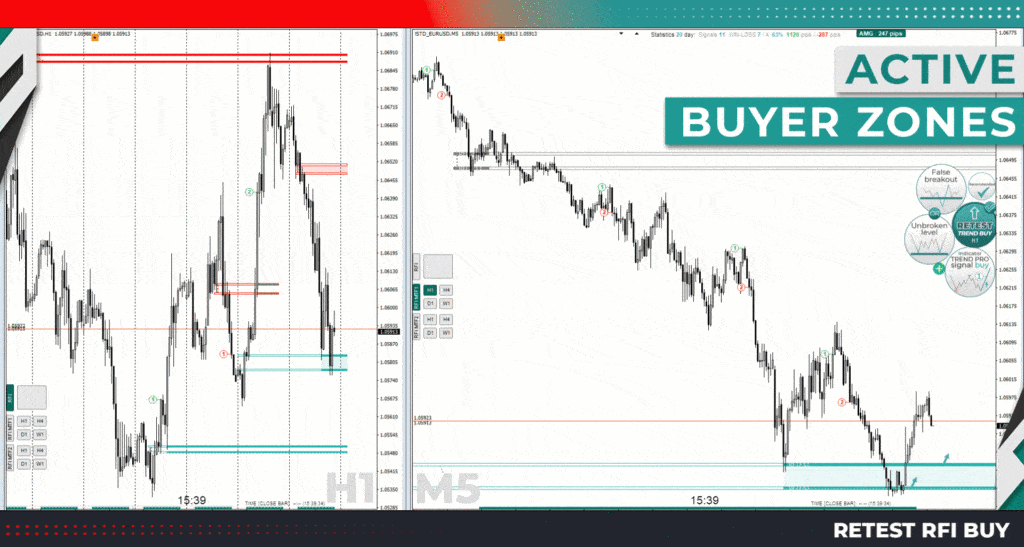
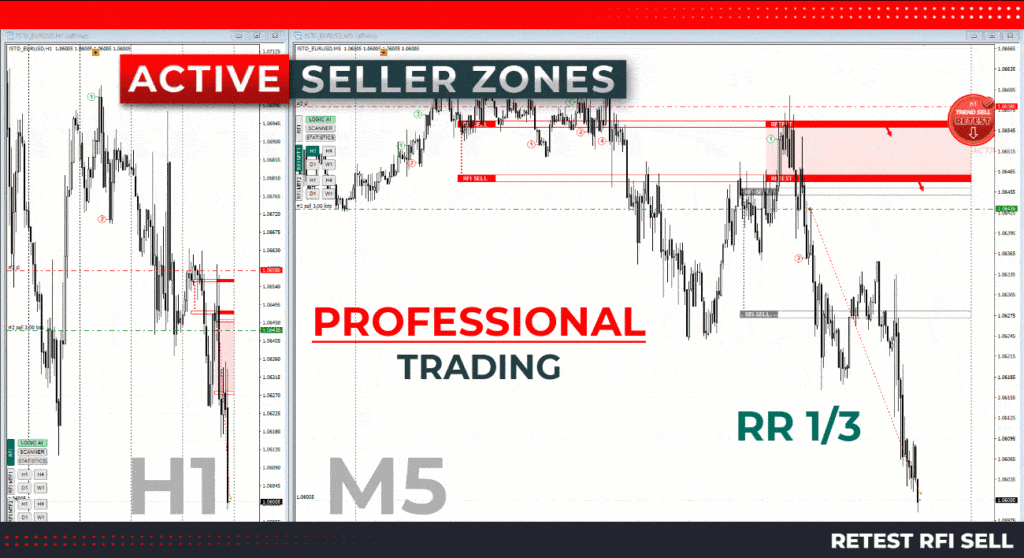
  • Active Zone Display: Highlights zones where buyers and sellers are most active. These zones are color-coded and shaded for easy identification.
  • Higher Timeframe Levels (MTF Mode): Shows levels from higher timeframes, enhancing your market perspective.
  • Automatic Trend Detection (TPSproTREND PRO): Automatically detects and displays current market trends.
  • Intraday Trading Algorithm: A professional step-by-step algorithm designed for intraday trading, both trend-following and counter-trend.
  • Multi-Timeframe Compatibility: Works on all timeframes from one-minute (M1) to monthly (MN) charts.
  • Alerts and Notifications: Provides graphic and sound alerts, as well as mobile notifications, ensuring you never miss a trading signal.
  • Active Pattern Scanner: Compact scanner that alerts you to pattern activations across all timeframes in one direction.
TPSpro RFI Levels Indicator RFI Sell

Trading Specifications

  • Recommended Pair: All Pairs
  • Timeframe: Any
  • Minimum Balance: Any

Detailed Functionality

Active Zone Display

The TPSpro RFI Levels Indicator visually marks active buying and selling zones, making it easy to see where significant market actions are taking place. When these levels are activated, they change color and fill with specific shades, and arrows appear for a more intuitive understanding. This visual clarity helps traders to quickly identify and react to market conditions.

Higher Timeframe Levels (MTF Mode)

With the MTF mode, the indicator can display levels and zones from higher time intervals. This feature is essential for traders who want to align their intraday strategies with broader market trends. The automatic trend detection function (TPSproTREND PRO) further simplifies this process by identifying and displaying current market trends without manual intervention.

Professional Trading Algorithm

The included trading algorithm is designed for intraday traders. It provides a detailed, step-by-step guide for executing trades both in line with the current trend and against it. Each active template comes with comprehensive instructions, ensuring that traders can implement the strategy effectively.

Multi-Timeframe Compatibility

The TPSpro RFI Levels Indicator is versatile, functioning across all timeframes on the MT4 platform. Whether you prefer short-term trading on a one-minute chart or long-term strategies on a monthly chart, this indicator adapts to your needs, providing consistent and reliable signals.

Alerts and Notifications

Stay on top of your trading game with graphic and sound alerts that notify you of important market events. The indicator also supports mobile notifications, so you can receive alerts on your phone and never miss a trading opportunity, even when you are away from your computer.

Active Pattern Scanner

The compact active pattern scanner is a powerful tool that automatically alerts you to pattern activations. This scanner works across all timeframes, providing notifications when patterns form in one direction, thus offering an additional layer of market insight.

Hotkeys for Efficiency

  • R: Show all RFI levels on history
  • Z: Hide/show panel

These hotkeys allow you to quickly access and manage the display of RFI levels, enhancing your trading efficiency.

Final Verdict

The TPSpro RFI Levels Indicator for MT4 is a comprehensive and advanced trading tool that provides unparalleled insights into market dynamics. Its ability to accurately identify and display crucial trading zones, combined with its user-friendly alerts and robust trading algorithm, makes it an indispensable asset for traders of all levels. Available now on CheaperForex.com, the TPSpro RFI Levels Indicator is your gateway to smarter and more profitable trading.

Experience the power of precision trading with the TPSpro RFI Levels Indicator. Elevate your trading strategy and make informed decisions with confidence. Visit CheaperForex.com today to get started.

Every order

What’s included with TPSpro RFI Levels Indicator

  • Instant downloadReady after checkout and kept in your account
  • Free future updatesIncluded when we receive them, every version kept in your account
  • Unlimited activationsUnlimited live and demo accounts
  • Setup helpReal people on Telegram or email
  • 7-day money-back guaranteeIf the EA fails to attach to your chart because of errors we can replicate, you get a full refund.

*Refunds don’t cover changing your mind or not liking the EA. All brokers are different, and results are never promised because markets are constantly changing.

Customer reviews

Reviews of TPSpro RFI Levels Indicator MT4 V5.4

There are no reviews yet.

Be the first to review “TPSpro RFI Levels Indicator MT4 V5.4”