
Official MT4 version · Prop firm EA
VTEC Turbo EA MT4
Version 9.9
We’re rated Excellent on Trustpilot · 4.6/5 (opens in a new tab)VTEC Turbo EA for MT4 by Wan Mohammad Shazly Bin Wan Zulkifli is a GER40 (DAX40) specialist EA designed for small accounts from $20+.
Using a pending order breakout system with dynamic trailing stops, it targets 15–30% daily growth under optimal conditions.
No martingale, no grid — just disciplined, automated GER40 trading with strict broker spread filters.
The Download Package Includes:
+ VTEC Turbo EA (.ex4) – available file
+ Pairs/Timeframes.txt
+ How to Install MT4 files.pdf
More Information:
+ https://www.mql5.com/en/market/product/148754
Live Performance Signal:
+ None known
 MT4Save 77%
What you receive
- VTEC Turbo.ex4Genuine, unmodified developer file for MetaTrader 4Version 9.9
- Setup guide.pdfA general guide to installing expert advisors.Official step-by-step install guide
Delivered instantly to your account after payment
Regular priceRegular price was $1,500.00
$349.95 with card
Visa, Mastercard, Apple Pay and Google Pay accepted.
Card payments add bank fees, sales taxes and other charges.
- Official developer build · Version 9.9
- Instant downloadYour file is provided immediately after payment. In very rare cases we manually review an order first, then send your download straight after. If you don’t receive your file, you can request a full refund.
- Free lifetime updatesAll updates are free. They’re provided on a best-availability basis: we get new versions as fast as we can, led by customer demand, but we don’t guarantee them immediately. If you need every update the moment it’s released, our service may not be the best fit for you.
- 7-day money-backRefunds only cover an EA that fails to attach to your chart because of errors we can replicate. We don’t cover changing your mind or not liking the EA. All brokers are different, and results are never promised because markets are constantly changing.
- Unlimited activationsUse it on as many MT4 accounts and computers as you want, live or demo. There are no restrictions on how you use it.
What you receive
- VTEC Turbo.ex4Genuine, unmodified developer file for MetaTrader 4Version 9.9
- Setup guide.pdfA general guide to installing expert advisors.Official step-by-step install guide
Delivered instantly to your account after payment


28,000+ tradersServed since 2019
Orders over $300 include 3 months of PrismAlgo freeThe highly recommended cloud-connected EA, on all 28 Forex pairs for one MT5 account. Added to your cart automatically. View PrismAlgo
Official versionsInstant downloadFree lifetime updatesExtra 20% off with cryptoReal people on support28,000+ tradersTrading since 2019Rated Excellent on Trustpilot
Product description
About VTEC Turbo EA MT4
Introduction to VTEC Turbo EA for MT4
VTEC Turbo EA for MT4 by Wan Mohammad Shazly Bin Wan Zulkifli is a specialist Expert Advisor built for the GER40 (DAX40). Designed for traders who want to start with as little as $20, this EA leverages a disciplined pending order breakout strategy with dynamic trailing to capture the DAX’s explosive volatility. With the right broker and tight spreads, it has the potential to achieve 15–30% daily returns under optimal conditions — all without martingale or dangerous grid systems.
Key Features
- Low Minimum Deposit — Start from just $20.
- High Daily Profit Target — Strategy aims for 15–30% per day in favorable conditions.
- GER40 Specialist — Optimized specifically for the German DAX index.
- Smart Pending Orders — Places Buy/Sell Stop orders only on confirmed momentum.
- Dynamic Order Trailing — Pending orders adjust as price action develops.
- Trailing Stop Management — Automatically locks in profit and manages risk.
- Broker-Aware Risk Filters — Spread limits, lot normalization, and margin checks built-in.
Key Benefits
- Accessible — Start small; perfect for new or low-capital traders.
- Safe from Martingale — No doubling down; each trade is independent and risk-managed.
- Hands-Free Trading — Fully automated strategy for the volatile DAX market.
- Profit Protection — Dynamic trailing stop secures gains while reducing risk.
- Prop-Firm Potential — With careful broker selection and spread control, the EA can be aligned to challenge rules.
📊 How It Works
Pending Order Breakout Logic
The EA strategically places Buy Stop and Sell Stop orders at defined distances from price. This ensures trades are triggered only during confirmed momentum, not random market noise.
Dynamic Trailing System
Both pending orders and active trades use dynamic trailing distances. Pending orders follow price action closely, while active trades lock in profit with trailing stops.
Broker Sensitivity
The EA includes strict spread filters and margin checks. It will not trade if broker spreads exceed your defined threshold (recommended: 50–80 pips for GER40).
⚙️ Input Parameters
- SL: Stop Loss (pips)
- OrderDistance: Distance for pending order placement
- SpreadLimit: Maximum allowable spread (recommended 50–80)
- TrailDistSl: Trailing stop distance for open trades
- TrailDistOrder: Trailing distance for pending orders
- LotSize: Fixed lot size (set 0.1 for $20 accounts)
- CandlesPerTrade: Number of candles to wait before a new trade
- Debug: Optional log output
📈 Proof of Performance
Backtest Performance
Historical testing on GER40 (M1) shows the EA’s ability to steadily grow accounts using the pending order + trailing stop framework. While individual broker conditions vary, the principle remains robust: small accounts can achieve high growth with tight execution.
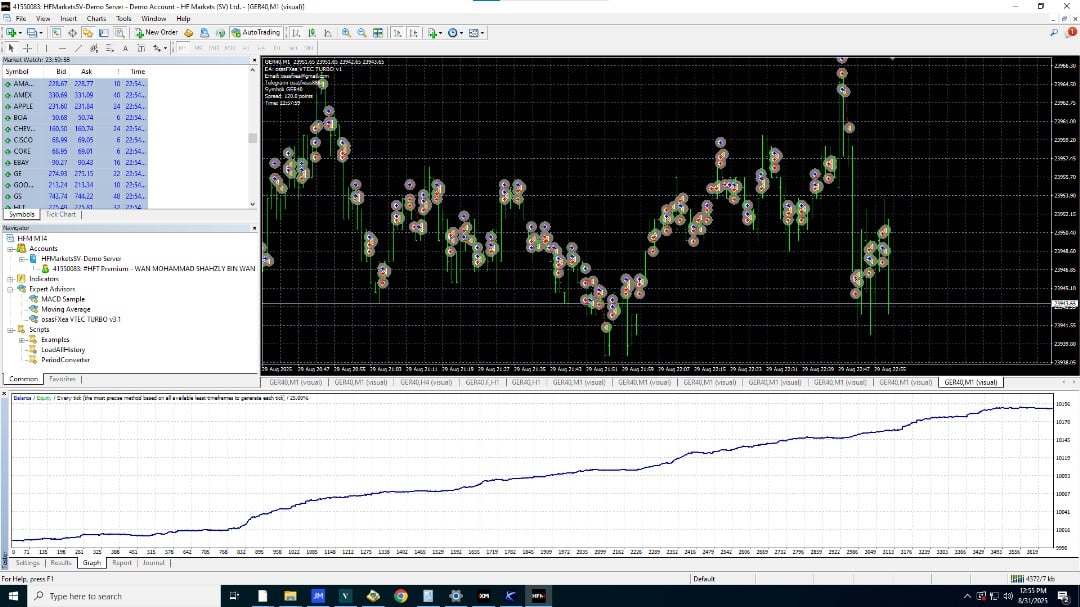
Live Demo Results
Forward demo trading on GER40 demonstrates consistent order placement, strict SL control, and a smooth equity curve under tight spread conditions.
❓ Frequently Asked Questions
What is the minimum deposit?
$20 is the recommended minimum starting balance.
Which broker should I use?
You must use a broker with tight GER40 spreads (50–80 pips maximum). ECN/Raw accounts are best.
Does the EA use martingale?
No. It does not use martingale or grid — every trade is independent and risk-controlled.
Which timeframe should I use?
M1 (1-minute) is the recommended chart for GER40.
Do I need a VPS?
Yes. To ensure 24/5 uninterrupted execution, a VPS is recommended.
⭐ Trader Reviews
- “Turned my $30 test account into over $100 in a week. Pending order logic is genius.” — Ravi S.
- “High risk, high reward — but not reckless. I love that it doesn’t use martingale.” — Daniel P.
- “I finally have an EA that works with a tiny account size. Spread filter saves me from bad fills.” — Jin K.
⚙️ Deployment Guidelines
- Symbol: GER40 / DAX40
- Timeframe: M1
- Deposit: $20+
- Lot Size: 0.10
- Spread Requirement: 50–80 pips max
- Broker: ECN/Raw spread strongly recommended
- VPS: Yes, required for stability
📦 What You Get
- ✔️ VTEC Turbo EA (MT4)
- ✔️ Lifetime updates
- ✔️ Setup guide with recommended settings
- ✔️ Remote installation assistance (optional)
- ✔️ Access to proof pack (backtest + demo screenshots)
Conclusion
VTEC Turbo EA for MT4 is a high-return, low-capital pending order system built for the GER40/DAX40. With as little as $20, traders can access the DAX’s volatility using a smart, disciplined strategy with trailing order management and strict risk controls. Ambitious but controlled, this EA makes the DAX accessible to small traders without relying on martingale or grid tactics.
Every order
What’s included with VTEC Turbo
- Instant downloadReady after checkout and kept in your account
- Free lifetime updatesAdded as soon as we receive them, every version kept in your account
- Unlimited activationsUnlimited live and demo accounts
- Free remote installationOptional: a one-time install over AnyDesk, with settings advice and custom presets
- 7-day money-back guaranteeIf the EA fails to attach to your chart because of errors we can replicate, you get a full refund.
- Excellent on Trustpilot 4.6 out of 5 from 120 reviews (opens in a new tab)
- 28,000+ traders since 2019
- 1,560+ official EAs
- Card or crypto payments
Related EAs
Traders also explore
Premium expert advisors at vault-low prices, with your crypto price on every card.
 MT4Save 65%
 MT4Save 88%
 MT4Save 78%
 MT4Save 97%
Ready when you are
VTEC Turbo EA MT4 for $279.96 with crypto
Regular price was $1,500.00 · $349.95 with card · instant download · free lifetime updates

VTEC Turbo EA MT4$279.96with crypto$349.95 with card