

Two Ways to Buy
Choose card or crypto at checkout. Crypto payments receive 20% off.
Buy with Card
Secure checkout with card, Apple Pay or Google Pay. The price is shown above.
Buy with Crypto
Pay with BTC, ETH or USDT and save 20%, applied automatically at checkout.


TradePanel Utility for MT4 by Alfiya Fazylova
Introduction
Discover the power of efficient trading with the TradePanel Utility for MT4, meticulously crafted by Alfiya Fazylova. This multifunctional trading assistant is designed to revolutionize your manual trading experience by automating a wide range of trading actions. With over 50 robust features, TradePanel simplifies the complex processes of trading, offering everything from basic operations to advanced risk management tools.
Whether you’re a seasoned trader or just starting out, TradePanel is your go-to utility for streamlined and effective trading. Available on CheaperForex.com, this tool is continually updated based on user feedback to ensure it remains at the forefront of trading technology.
Description of TradePanel Utility for MT4
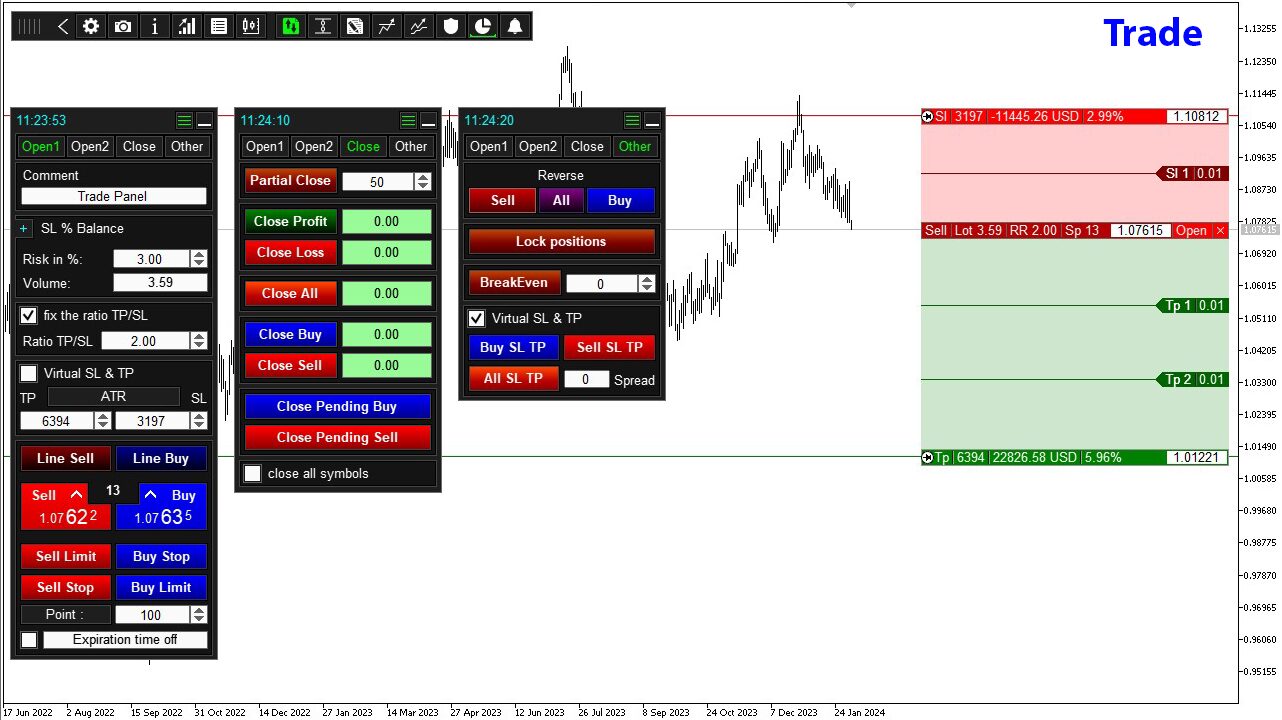
TradePanel is more than just a trading tool—it’s a comprehensive trading assistant that consolidates multiple functionalities into one intuitive interface. The application supports a wide array of manual trading operations, empowering traders with one-click actions that save time and reduce the potential for errors.
Key Features of TradePanel:
- Trade Execution: Perform basic trading operations with ease, including opening and closing positions, setting up grids of orders, and reversing positions. The utility also allows for partial position closures and setting uniform Take Profit (TP) and Stop Loss (SL) levels across all positions.
- Automated Order Management: TradePanel simplifies order management with automated volume calculations based on preset risk parameters. It enables traders to open multiple orders in a single click, visualize trading levels on the chart, and set limits on the maximum spread.
- Advanced Risk Management: This utility offers robust risk management features, including a built-in risk manager that displays profit and loss data for the day, week, and month, and limits on daily, weekly, and monthly profits or losses. It also provides options to close all positions, lock positions, or even close the terminal when limits are reached.
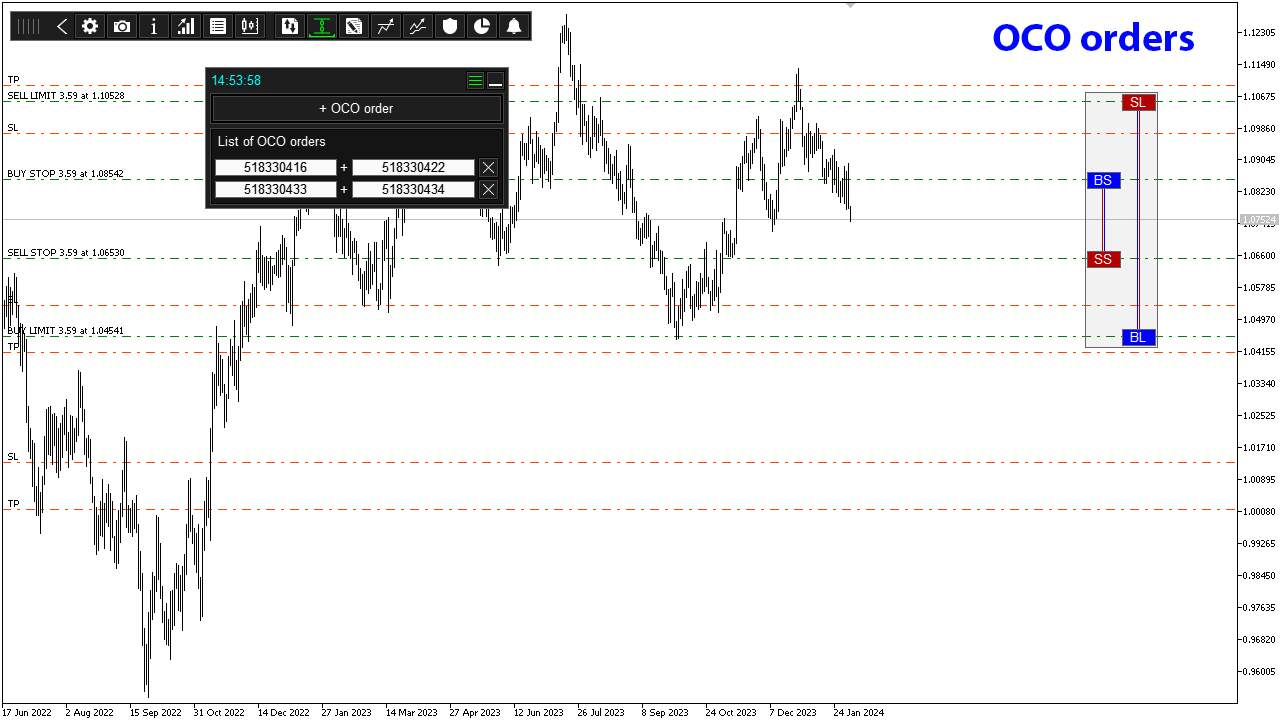
- OCO Orders: TradePanel supports One-Cancels-Other (OCO) orders, allowing traders to place two interconnected pending orders. When one order is executed, the other is automatically canceled, providing an efficient way to manage risk in volatile markets.
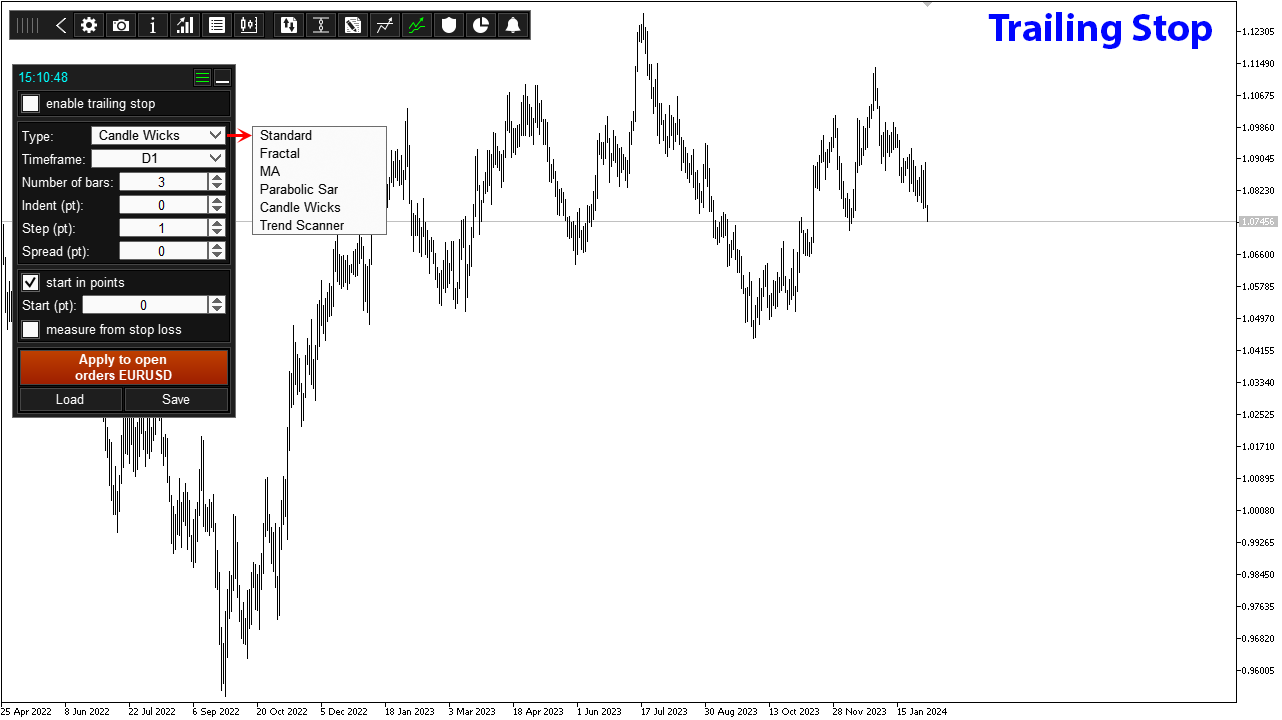
- Trailing Stop and Break-even Functions: Enhance your trading strategy with advanced trailing stop features, including six different types such as Standard, Fractal, MA, Parabolic SAR, Candle Wicks, and Trend Scanner. The Break-even function helps secure profits by moving the stop loss to the breakeven level once a certain profit threshold is reached.
- Partial Closing and Alerts: Customize your trade management with partial closing options that let you close portions of a position based on specific profit targets. Additionally, set alerts for price touches or time-based conditions, with notifications sent directly to your mobile or email.
- Comprehensive Chart Management: TradePanel allows for efficient chart management by switching between symbols, analyzing data, and creating custom symbol lists. It displays key market information such as spread, ATR readings, and breakeven levels, making it easier to make informed trading decisions.
Trading Specifications
While TradePanel is versatile and compatible with various trading instruments and accounts, it is optimized for the following specifications:
- Recommended Pair: Suitable for all currency pairs, but most effective on major pairs such as EURUSD.
- Timeframe: Any timeframe as per trader’s strategy.
- Minimum Balance: Works on all account sizes, but a minimum of $100 is recommended for optimal performance.
To achieve the best results, it is advisable to use brokers with low spreads, low commissions, and fast execution speeds. This ensures that the TradePanel’s advanced functions can operate with minimal friction, maximizing your trading efficiency.
Our Thoughts About TradePanel Utility
TradePanel stands out in the crowded field of trading utilities due to its extensive customization options and ease of use. Our experience with the tool shows that it not only simplifies the trading process but also enhances decision-making by providing real-time, actionable insights directly on the chart. The utility’s OCO order functionality and trailing stop features are particularly valuable, offering traders the ability to manage positions with precision and confidence. Moreover, the built-in risk management and reporting features make TradePanel an indispensable tool for any trader looking to maintain discipline and control over their trading activities.
Reviews
Wdbnz1 (2024.04.23):
“Greetings Alfiya, Thank you very much for the TradePanel MT4 EA as it has taken my FX Trading to a new level! The ‘General Close’ functionality is First Class and gives me the versatility to manage and close out Hedged trades to Break Even or Profit. The ability to revise or update a Trade on the Charts without having to access the MT4 Terminal along with the Profit/Loss and Swap readings is extremely convenient and eliminates the need for manual calculations. Well done!”
Willy Ruiz (2024.04.21):
“Es un buen gestor de riesgo, me gusta mucho… pero le falta incluir una opción de cuánto se está arriesgando en todas las operaciones.” (It’s a good risk manager, I like it a lot… but it needs an option to show how much is being risked in all operations.)
Pa1x Paul (2024.03.24):
“Very complex and interesting, I just bought it. For now, it is the best of this range.”
Jia Bin Zheng (2024.03.13):
“This product has been useful for a long, long time and is an excellent tool, and the author listens carefully to product suggestions. With each product optimization and update, it gets stronger and stronger!”
OlaTechie (2024.03.01):
“TradePanel MT4, with a high rating of 4.9, stands out as an essential trading assistant for the MetaTrader 4 platform, offering a comprehensive suite of over 50 functions tailored for manual trading and automation. This tool, crafted by Alfiya Fazylova, is continuously refined, with the latest version 17.72 reflecting ongoing improvements based on user feedback.”
Conclusion
In conclusion, the TradePanel Utility for MT4 by Alfiya Fazylova is a comprehensive trading assistant that offers a vast array of features to support and enhance your trading strategy. From basic order management to advanced risk controls and trade automation, TradePanel delivers a seamless and efficient trading experience. Its intuitive interface, combined with extensive customization options, makes it suitable for traders of all levels. Whether you are managing a single account or multiple portfolios, TradePanel is designed to meet your needs and exceed your expectations.
Available on CheaperForex.com, TradePanel continues to evolve with regular updates and optimizations, ensuring that it remains an invaluable asset in the ever-changing landscape of forex trading. Elevate your trading to new heights with TradePanel Utility for MT4 and experience the ease and efficiency of truly automated trading.
