
Official MT4 version · Prop firm EA
GBPUSD Robot EA MT4 – Official Version 7.5
Latest version
The GBPUSD Robot EA for MT4 is a precision-engineered trading system designed exclusively for the GBP/USD pair.
With advanced risk management, no martingale or grid strategies, and an intuitive panel for real-time stats, it delivers exceptional results with minimal drawdown. Ideal for all traders, it’s easy to set up with only the lot size to adjust.
The Download Package Includes:
+ Expert: GBPUSD Robot (.ex4 file) Version 7.5
+ WebRequest URLs
+ How to Install files.pdf
+ Pairs and Timeframes.txt
More Information:
+ https://www.mql5.com/en/market/product/123849
Live Signal Performance:
+ https://fxmerge.com/strategies-results/gbpusd-robot
 MT4Save 68%
Regular priceRegular price was $599.00
$189.95 with card
Visa, Mastercard, Apple Pay and Google Pay accepted.
Card payments add bank fees, sales taxes and other charges.
- Latest version
- Instant downloadYour file is provided immediately after payment. In very rare cases we manually review an order first, then send your download straight after. If you don’t receive your file, you can request a full refund.
- Free future updatesAll updates are free. They’re provided on a best-availability basis: we get new versions as fast as we can, led by customer demand, but we don’t guarantee them immediately. If you need every update the moment it’s released, our service may not be the best fit for you.
- 7-day money-backRefunds only cover an EA that fails to attach to your chart because of errors we can replicate. We don’t cover changing your mind or not liking the EA. All brokers are different, and results are never promised because markets are constantly changing.
- Unlimited activationsUse it on as many MT4 accounts and computers as you want, live or demo. There are no restrictions on how you use it.
Source code (.mq4) available at checkout.


28,000+ tradersServed since 2019
Orders over $300 include 3 months of PrismAlgo freeThe highly recommended cloud-connected EA for 28 FX pairs, Gold and Bitcoin. Added to your cart automatically. View PrismAlgo
Official versionsInstant downloadFuture updates includedExtra 20% off with cryptoReal people on support28,000+ tradersTrading since 2019Rated Excellent on Trustpilot
Product description
About GBPUSD Robot EA MT4 – Official Version 7.5
GBPUSD Robot EA for MT4 by Marzena Maria Szmit
The Ultimate Automated Trading Solution for GBP/USD
The GBPUSD Robot EA is a meticulously crafted expert advisor designed specifically for the GBP/USD currency pair on the M5 timeframe. Created by Marzena Maria Szmit, this EA leverages advanced technical analysis, including Moving Averages, recovery systems, and precise trade management tools.
With all positions secured by Take Profit, Stop Loss, Trailing Stop, Break-Even, and a Recovery System, it ensures your trading is as safe and efficient as possible.
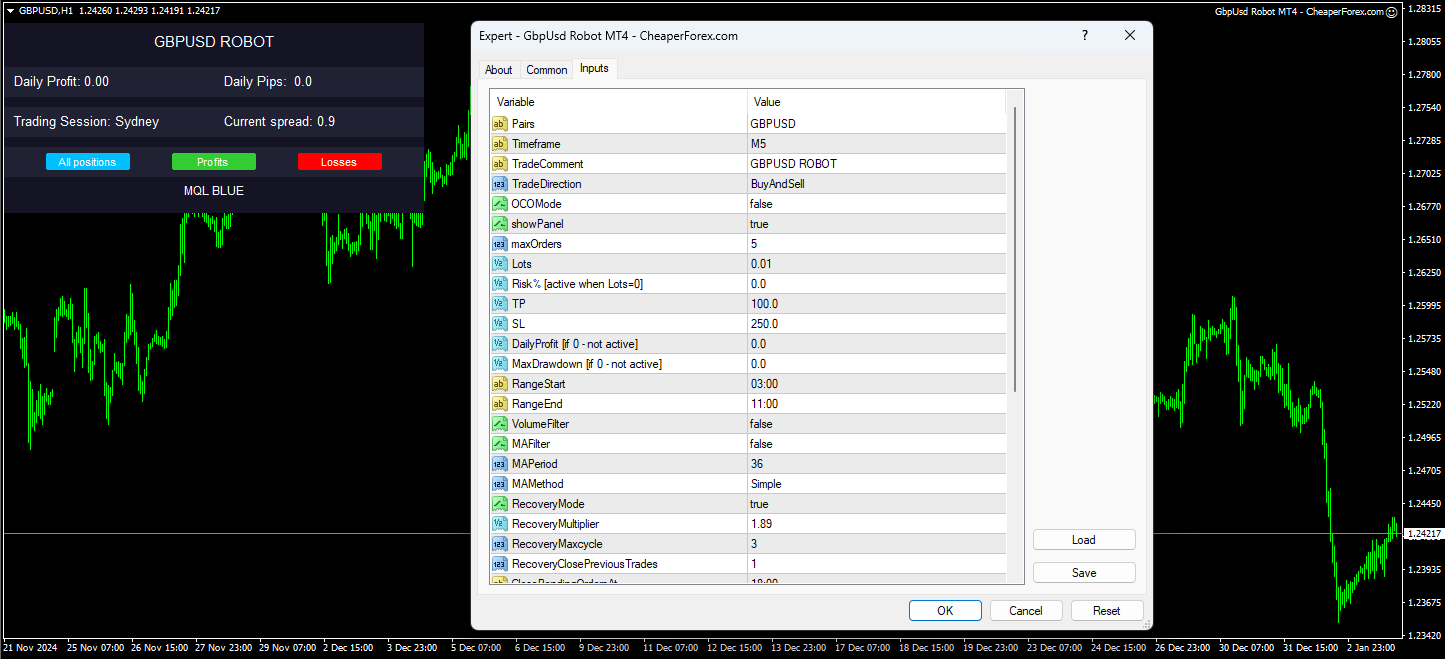
Key Features of GBPUSD Robot EA
- Fully Automated for GBP/USD
- Designed specifically for the dynamics of the GBP/USD pair.
- Trades daily, Monday to Friday, with precise execution.
- Comprehensive Risk Management
- Stop Loss and Take Profit: Protects every position.
- Trailing Stop and Break-Even: Secures profits dynamically.
- Recovery System: Mitigates losses efficiently without relying on martingale or grid trading.
- Customizable Settings
- Lot Size Control: Flexible lot sizing for any account size.
- Maximum Orders Per Day: Limit trades based on your preferences.
- Trading Days: Customize trading days to suit your strategy.
- User-Friendly Panel
- Displays daily profit, pips, spread, market session, and more.
- Manual controls for closing positions.
- No Martingale or Grid Trading
- Ensures a safer trading strategy compared to high-risk systems.
- Quick Setup
- Only one parameter, lot size, needs to be adjusted. The rest are pre-optimized.
Performance Results – Backtest Overview
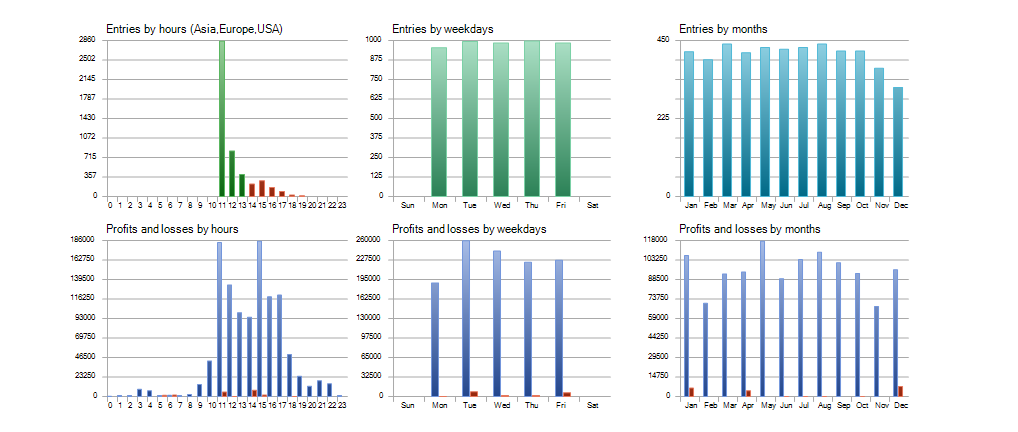
Backtest Highlights (2021–2024)
- Total Net Profit: $1,089,236.38
- Profit Factor: 21.41
- Drawdown: Only 3.30% – exceptionally low for such high returns.
- Total Trades: 4,918 with an impressive 98.64% win rate.
- Average Consecutive Wins: 270 trades.
This backtest showcases the EA’s ability to maintain consistent profitability with minimal risk.
Detailed Insights into Inputs and Parameters
- Lot Size (Lots)
- Control the size of each trade based on your account size and risk tolerance.
- Take Profit (TP) and Stop Loss (SL)
- Automatically set for each trade, ensuring profits are locked and risks minimized.
- Recovery Mode
- Activates when trades encounter losses, working to recover them efficiently without aggressive methods.
- Trading Range
- Trades during the most active market hours (e.g., 03:00–11:00) for optimal performance.
- Max Orders Per Day
- Allows control over the number of daily trades, ensuring disciplined trading.
- Magic Number and Trade Comment
- Personalize your EA settings to differentiate trades in your account history.
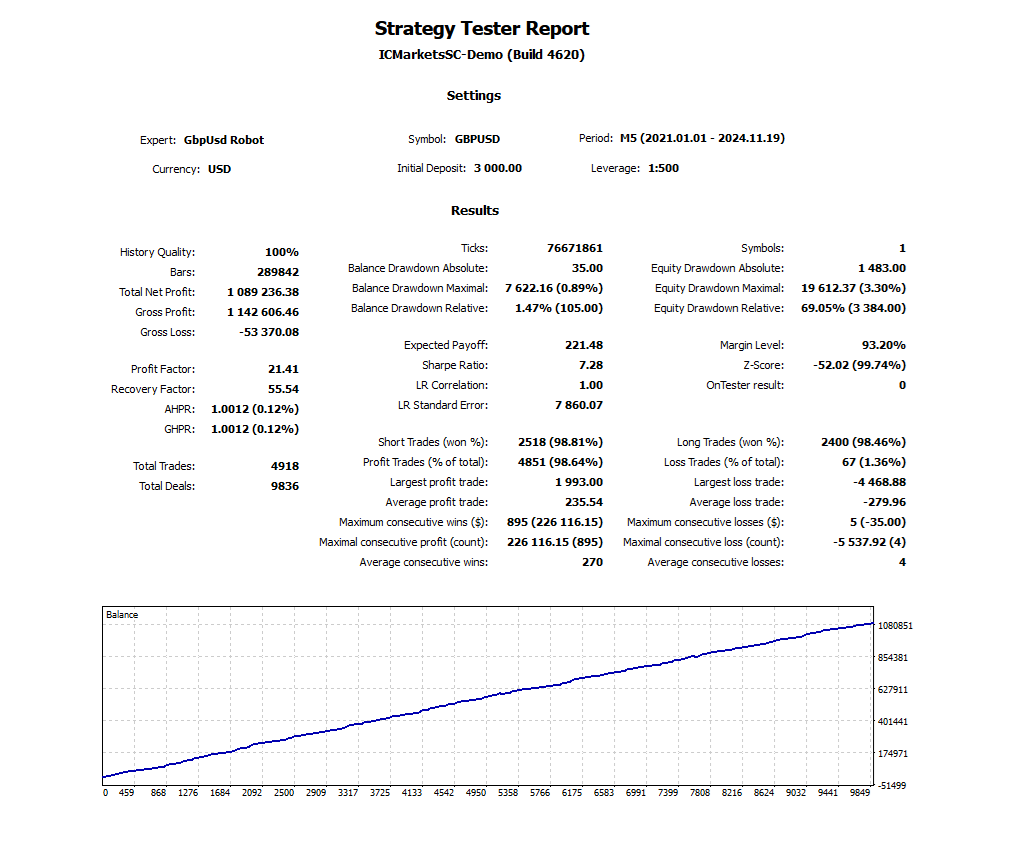
Backtest Statistics by Hours, Weekdays, and Months
Entries and Profits by Hours
- Most trades executed during high-volume trading hours for GBP/USD.
Entries by Weekdays and Months
- Consistent performance throughout the week with minor variations, showcasing robustness.
- High profitability in specific months reflects optimized seasonal adjustments.
How to Start Trading with GBPUSD Robot EA
- Set Up
- Attach the EA to the M5 timeframe on the GBP/USD chart.
- Adjust the lot size based on your account size and preferences.
- Compatibility
- Works with any Forex broker offering MetaTrader 4.
- Recommended for low spread accounts with a minimum deposit of $1,000.
- Use a VPS
- Ensures uninterrupted 24/7 trading for maximum efficiency.
Recommended Settings
- Currency Pair: GBP/USD
- Timeframe: M5
- Minimum Deposit: $1,000
- Leverage: 1:30 to 1:1000
- Account Types: Hedging, Netting, ECN, Micro, Cent, Standard, or Premium
Reviews from Users
- kitokitousagi: “The quality of the EA and support is good. It’s easy to set up. I’m happy with my purchase!”
- fmw1961: “Fantastic results in 3 weeks. Great support and quick replies. Looking forward to buying the EUR/USD EA!”
- Nguyen Viet Duy Khanh: “After one week, the results are so good. I’m so happy with this. Thank you!”
Why Choose GBPUSD Robot EA?
- Proven Results: Over $1 million in backtested profits with minimal drawdown.
- Safe and Reliable: Comprehensive risk management with no martingale or grid trading.
- User-Friendly: Simplified setup and a detailed control panel.
- Dedicated Support: Access to a private group for assistance and updates.
❓ Frequently Asked Questions (FAQs)
Does this EA use martingale or grid trading?
No — the GBPUSD Robot EA avoids all high-risk strategies. It does not use martingale, grid, or hedging. Instead, it uses a safe recovery system with fixed stop loss and take profit on every trade.
What currency pair and timeframe does it support?
This EA is designed exclusively for GBP/USD and optimized for the M5 timeframe. Using it on other pairs or timeframes is not recommended.
How does the recovery system work?
When a loss occurs, the EA activates RecoveryMode, which adjusts the next trades intelligently to recover losses — without increasing lot sizes aggressively like a martingale system.
What’s the minimum deposit required?
A deposit of $1,000 or more is recommended for optimal performance, though it can run on smaller accounts with adjusted lot sizing.
What is the win rate based on backtesting?
Over a 3-year backtest (2021–2024), the EA achieved a 98.64% win rate across nearly 5,000 trades, with only 3.30% drawdown, demonstrating consistent and stable performance.
Is this EA beginner-friendly?
Yes. It’s designed for easy setup — you only need to adjust the lot size. All other settings are pre-optimized. A user-friendly panel also displays real-time profit, session info, and manual controls.
Conclusion
The GBPUSD Robot EA is a powerful and reliable trading system designed specifically for the GBP/USD pair. Its blend of advanced technical analysis, flexible settings, and robust risk management makes it ideal for traders of all levels. Whether you’re looking to grow a personal account or manage a professional trading portfolio, this EA offers unmatched precision and profitability.
Check out the Sister Product – FX EURUSD Robot MT4 EA
Looking to expand your trading strategy? Check out the FX EURUSD Robot MT4 EA, the perfect companion to the GBPUSD Robot, designed specifically for the EUR/USD pair. With similar advanced features and robust risk management, it ensures precision and profitability for another major currency pair.
👉 Explore the FX EURUSD Robot MT4 EA now! Click here
Every order
What’s included with GBPUSD Robot
- Instant downloadReady after checkout and kept in your account
- Free future updatesIncluded when we receive them, every version kept in your account
- Unlimited activationsUnlimited live and demo accounts
- Setup helpReal people on Telegram or email
- 7-day money-back guaranteeIf the EA fails to attach to your chart because of errors we can replicate, you get a full refund.
Product information
GBPUSD Robot EA MT4 – Official Version 7.5 Additional information
Real people on support, by Telegram or our contact form.
| Choose a Version for GBPUSD Robot: | V6.2, V6.4 (Latest Version) |
|---|
Customer reviews
Reviews of GBPUSD Robot EA MT4 – Official Version 7.5
You must be logged in to post a review.
- Excellent on Trustpilot 4.6 out of 5 from 120 reviews (opens in a new tab)
- 28,000+ traders since 2019
- 1,180+ official EAs
- Card or crypto payments
Related EAs
Traders also explore
Premium expert advisors at vault-low prices, with your crypto price on every card.
 Save 55%
 MT4Save 60%
 MT4Save 60%
 MT4Save 70%
Ready when you are
GBPUSD Robot EA MT4 – Official Version 7.5 for $151.96 with crypto
Regular price was $599.00 · $189.95 with card · instant download · future updates included

GBPUSD Robot EA MT4 – Official Version 7.5$151.96with crypto$189.95 with card
There are no reviews yet.